
Description
This article provides some elementary information about how to perform text to speech conversion using the speech SDK 5.1. Speech SDK 5.1 is the latest release in the speech product line from Microsoft. Speech SDK 5.1 can be used in various programming languages.
Introduction
Speech is one of the most natural way to interact. When it comes to computers it is no different. If an application can be controlled solely by way of voice commands then the opportunity that lies is unlimited. Even though the idea of using speech as an input mechanism for an application is not new there are not a lot of applications that use speech as in input. In other words speech is still an big opportunity that is yet to be explored.
Microsoft speech SDK is one of the many tools that enable a developer to add speech capability in to a applications. Speech SDK can be used in either C#, C++, VB or any COM compliant language.
Broadly, speech can be divided in to two paradigms. Text to speech conversion and speech recognition. In this article I shall be focusing on the Text to speech conversion.
Converting text to speech using speech SDK consists of a few simple steps. The following code shows the important pieces in performing text to speech. The below code is an implementation of the button click event.
private void button1_Click(object sender, System.EventArgs e)
{
SpVoice objSpeech = new SpVoice();
objSpeech.Speak(textBox1.Text,SpeechVoiceSpeakFlags.SVSFlagsAsync);
objSpeech.WaitUntilDone(Timeout.Infinite);
}
SpVoice is the class that is used for text to speech conversion. The speak method takes in a string that needs to be spoken along with a set of flags. The flag that I have used, which is SVSFlagsAsync tells the TTS engine that the conversion of the text to speech needs to be done in a Asynchronous mode. The control quickly returns after this call.
Microsoft speech SDK comes with a few default text-to-speech engines. A developer can select a text to speech engine using the Text-To-Speech property pane in the speech item in the control panel. Below is a screen shot of the speech property pane.
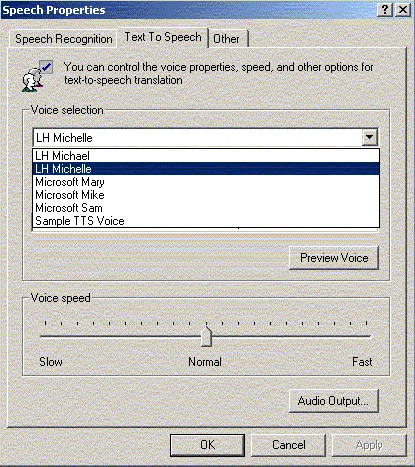
As shown in the above screen shot, there are various voice profiles to choose from. The voices are either masculine or feminine. The preview voice button will allow you to preview the voice.
The SpVoice class has a property called AudioOutputStream which could be used to store the voice file if required.
Summary
This article gives an introduction to text to speech conversion using the Speech SDK 5.1.
KarthikPosted Dec 27, 2015, 1:45 AM
..
KarthikPosted Dec 27, 2015, 1:45 AM
I am Karthik,I am an IT Student..nw I am doing Final year project in speech to text conversion and then text to speech conversion...so please guide me
sateesh vPosted Feb 5, 2013, 5:58 AM
thank u sir its very usefull for me but i want female voice how to get it sir .this is very urgent please reply as early as possible.
purvil ruperaPosted Mar 7, 2011, 6:53 AM
hey can you get the code for text to speech in c#
Matthew LiederPosted Jan 19, 2011, 7:33 PM
There's a better way to do it in .NET 3: http://www.studentguru.gr/blogs/jupiter/archive/2009/09/17/text-to-speech-using-c.aspx
shankarPosted Oct 30, 2010, 11:11 AM
hi srinivas is ter any possibility to change the voice through code
Karzan AbdullahPosted Oct 4, 2010, 5:25 PM
Hi dear Suhil, I am a senior IT student in Iraq, and for my final project i have chosen to build an application to convert speech to text. can you please guide me how to start oe any other help. thanks in advance, Karzan
sourabh aggarwalPosted Sep 2, 2010, 10:05 AM
abe ulke pathe project to de de..
Andrew HagelPosted Apr 15, 2010, 5:02 PM
I've been looking into this recently, and have seen this example or something like it, posted on various web sites. While this will work if you test it locally, it is somewhat deceptive in that if you deploy it to a server or attempt to run your test from another machine, the voice output will occur on the server -- *not* the client. I think the Speech Application SDK is what is needed for this to work; however, as far as I can tell, that hasn't been updated since it's release for Visual Studio 2003 (and after starting that up -- I now use VS2005 or VS2008 -- it seems problematic, since it blew up VS2003 on me when I was in the middle of attempting to use the toolbox with the client side controls), so I'm not all that optimistic that it will be feasible to continue pursuing until I go to Silverlight (which has been alluded to having native speech capabilities).
Luis Javier Freyre AlcantarPosted Mar 7, 2010, 8:44 PM
Hello, I'm working in a project that involves TTS.... The main task is to allow the interaction between a robot and people in the University...When the user select one option (in a touchscreen) the robot speaks according to the option selected. Some related websites will be really helpful...especially in how to program using Cepstral library or a similar one and to read text files and convert the text in to speech. Kind regards
Piyushdeep TalujaeditedPosted Apr 22, 2009, 8:14 PMEdited Apr 22, 2009, 8:25 PM
hello sir , i m working undera a project of speech recognition in this we have to include 3 aspects ie 1) voice to text conversion 2) text to voice conversion 3) operation over command i actually needed u r help , plz provide me information regarding codes in c#. thanks & regards piyushdeep singh email id is [email protected]
pazhani velPosted Feb 28, 2009, 11:12 PM
Hi, I am developing an application in a Pocket PC using .NET Compact Framework 3.5 with C# to manage mobiles call using USB or Bluetooth connection.. Can anyone tell me what are the toolkit i need to install to run my application in Pocket PC to convert my voice based commands into text..? And ihow do i implement those things. And also let me know what are the classes and libraries i need to use to do the above.. Thanks in advance..
meharban bhandariPosted Feb 14, 2009, 1:50 PM
Firstly i want to give thanks to you , So you have created this wonderfull Webside its realy helfull to us. sir i want only the concept behind HOW TO CREATE SpeechLib Please sir
lakshmi narayanaPosted Jan 31, 2009, 9:37 AM
sir, i lakshminarayan persuing b-tech 4-2 semester in hyderabad,india.In the final sem we select a project to do on "speech comparison using Neural networks".so i request u to send some material regarding this topic. here we came to know there may be the concepts about FAST FOURIER TRANSFORM FOR SPEECH COMPARISON AND POWER SPECTRAL DENSITY. thanking u sir
Chaitanya ElluruPosted Jan 6, 2009, 5:14 AM
I am using speeh dll of dotnetframework 3.0,but on my system i am able to see only one voice'ié MicrosoftSam inorder to get the other voices what should i do?
abhinav singhPosted Oct 17, 2008, 3:14 AM
hello suhil, i m working on project voice chat mesanger in c#.net so that i want to know something abt connectivity for speech and thier coding ..plzz help me for that and send me as soon as possible ..thanks
savitaPosted Feb 26, 2008, 1:32 AM
Dear Suhil, I tried the code as given in your website but it ended with an error msg spvoice namespace not registered. Please help me to solve this problem. How can i register this namespace so that other methods of this namespace are available to me..... Please reply as early as possibe...thanks a lot in anticipation.
mohammed armanPosted Feb 18, 2008, 6:52 AM
dear sir, do you have any TTS c# code for more than a language , i need to integrate them in my project, its really urgent, please if u can help me i'll be greatefull thanx in advance yours mohammed arman [email protected]
mohammed armanPosted Feb 18, 2008, 6:52 AM
dear sir, do you have any TTS c# code for more than a language , i need to integrate them in my project, its really urgent, please if u can help me i'll be greatefull thanx in advance yours mohammed arman [email protected]
Reinier PupoPosted Nov 13, 2007, 6:04 PM
I would like to know how I create my own voice, for instance, a voice like Sam Microsoft Windows, but with the specific peculiarities of my region.
Ronald AlbaPosted Nov 24, 2006, 3:40 AM
Hi Suhil, I have some questions regarding Microsoft Speech SDK 5.1, have you already developed a voice enabled website using that said engine in C#/ASP.NET 2.0? If yes, please help me on how to implement this, I really need this ASAP. Thanks! Ron
Ronald AlbaPosted Nov 24, 2006, 3:39 AM
Hi Suhil, I have some questions regarding Microsoft Speech SDK 5.1, have you already develop a voice enabled website using that said engine in C#/ASP.NET 2.0? If yes, please help me on how to implement this, I really need this ASAP. Thanks! Ron
Venkat NaiduPosted Aug 17, 2006, 9:14 AM
Hi srinivas , Im venkat working as software engineer on.Net. Recently i got task that is to convert the text to speech in asp.net web application.For this i followed your steps as it is. i downloaded the speech sdk 5.1 software and installed on my system,then i got all users like you shown the screen shot for speech in control pannel. after thst i included sapi dll also. But now im getting an error like class not registered :exception Interopable services. SpVoice objSpeech = new SpVoice(); objSpeech.Speak(TextBox1.Text,SpeechVoiceSpeakFlags.SVSFlagsAsync); objSpeech.WaitUntilDone(Timeout.Infinite); In the second line im getting exception like class not registered : Exception Interop services. im waiting for u r reply, Thanks& regards Venkat.K