

Introduction
In this article, we are going to learn about task scheduling through QUARTZ Scheduler in C#. Here, we are going to make a simple Windows.Forms application and schedule a job in it.
What is QUARTZ?
Quartz.Net is a .NET port of the popular Java job scheduling framework. It's an open source job scheduling system that can be used from the smallest apps to the large-scale enterprise systems. The official website of Quartz.Net states: "Quartz.Net is a full-featured, open source job scheduling system that can be used from smallest apps to large scale enterprise systems."
Things to do (Setting things up)
- Go to "Manage NuGet Package".
- Search for Quartz.NET.
- Install it in your desired project.
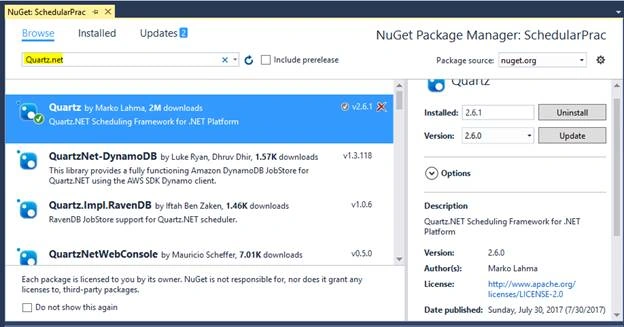
Now, you are ready to schedule the task through Quartz Scheduler.
Example Program
Let’s make a simple program to understand it through apractical example. Here, we are going to make a simple Windows.Forms application in C#. I assume that your project is ready for development.
Scenario
Here, we are building a Windows.Forms application in which the first form contains a DateTime picker and a Schedule button. When a user clicks on the button, a job is scheduled at the time he/she sets in DateTime picker. And, this scheduled job starts doing its work at the given time and date.
Make Form1 like this.
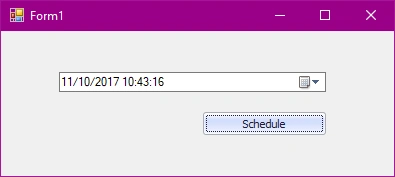
And, handle the ClickEvent of the button just like this.
We made two classes to achieve this scheduling task. One is of JOB and the other class is of the scheduler.
Class Schedular.cs
- using Quartz;
- using Quartz.Impl;
- using System;
- namespace SchedularPrac
- {
- public class Scheduler
- {
- public void Start(DateTime date)
- {
- IScheduler scheduler = StdSchedulerFactory.GetDefaultScheduler();
- scheduler.Start();
- IJobDetail job = JobBuilder.Create<Job>().Build();
- ITrigger trigger = TriggerBuilder.Create()
- .WithIdentity("IDGJob", "IDG")
- .StartAt(date)
- .WithPriority(1)
- .Build();
- scheduler.ScheduleJob(job, trigger);
- }
- }
- }
Explanation of class
This class will schedule the job written in the job.cs class at the given time and the job will start executing with high priority. When the given time comes, the scheduler will trigger the given job and start working on it.
Class Job.cs
- using Quartz;
- namespace SchedularPrac
- {
- public class Job : IJob
- {
- public void Execute(IJobExecutionContext context)
- {
- Form2 fm = new Form2();
- fm.ShowDialog();
- }
- }
- }
Explanation
This is the job which we want to execute at given time. Here, just a new form is opened when the job starts.
Code of Form1
- public Form1()
- {
- InitializeComponent();
- dateTimePicker1.Format = DateTimePickerFormat.Custom;
- dateTimePicker1.CustomFormat = "MM/dd/yyyy hh:mm:ss";
- }
- private void simpleButton1_Click(object sender, EventArgs e)
- {
- DateTime date = dateTimePicker1.Value;
- Scheduler sc = new Scheduler();
- sc.Start(date);
- }
Explanation
When the form is initialized, the date time picker format is changed and contains hours, minutes, and second along with the date so the user will start the scheduler at a more precise time. And, in click handler of a button, the Scheduler class is started with the given date.
Output
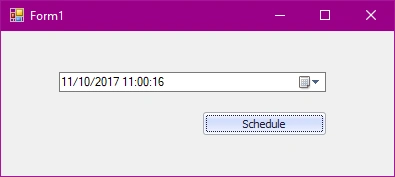
Here, I have scheduled a job for 10 November 2017 11:00:16 and clicked on the Schedule button. After this job is scheduled, it starts waiting for time to start its execution. At the scheduled time, a new form is opened which contains current date-time and a status.
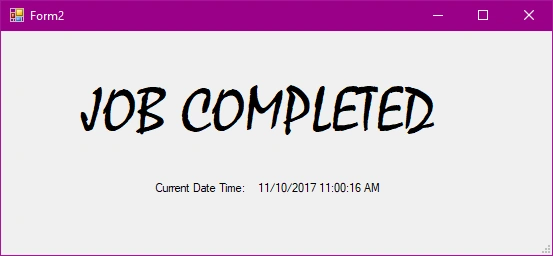
Form2 Code
- public Form2()
- {
- InitializeComponent();
- &nbFsp; label2.Text = DateTime.Now.ToString();
- }
Label2 contains the current date and time.
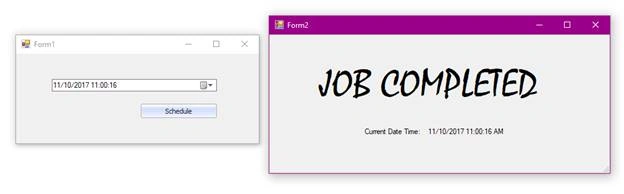
So, the reliable results come out at the end. And, you can see that this scheduler works nicely and executes its job perfectly at any given time.
Akter HossainPosted Oct 16, 2022, 7:41 AM
Short and Simple, to quickly get the concept.
Hamid KhanPosted Oct 25, 2019, 6:26 AM
Great explanation...……………...
swatiPosted Jul 19, 2019, 7:31 AM
I have used simple scheduler for a job and it's working fine on local server but on remote server it stops everytime Application_End event is fired. How could i make it work there?
Shabareesh rPosted Jul 19, 2019, 2:12 AM
If i have a for loop which is time intensive and runs for 30000 times, I have a quartz scheduler which executes this loop every 1 minute. How does the threading happen. My thread pool size is 10. What will happen when when the Quartz scheduler runs every minute?
Moon GriffPosted Jan 22, 2019, 8:28 AM
Needs modifying for version 3 but works well once a few tweaks were made. A*
Viswanathan LPosted Jan 7, 2019, 12:24 PM
How to do this for particular time on daily basis without having schedule button?
YvesPosted Apr 24, 2018, 12:51 PM
Files is corrupted . Could you ,share it again ?
Tridip BhattacharjeePosted Nov 13, 2017, 4:55 AM
It would be better if you post sample project so people can download and check the coding flow. any way small good write up.