

Note: this article is published on 02/21/2022.
This article was initially written in 2021, we try to make it done now. The content is mainly based on the MS article Table-Valued Parameters with some understanding and explanation, and with some examples to demo the results.
I put this article into the series of articles about SQL Tables:
- Table(s): Temp Table, Table Variable, and CTE (Common Table Expression)
- Performance: Temp Table vs. Table Variable vs. CTE
- Table As Input Parameters For Stored Procedure --- This article
Introduction
Table-valued parameters were introduced to SQL Server in 2008. Table-valued parameters provide an easy way to marshal multiple rows of data from a client application to SQL Server without requiring multiple round trips or special server-side logic for processing the data.
This is the structure of this article,
- Introduction
- A - Passing Multiple Rows in Previous Versions of SQL Server
- B - What Table-Parameters is
- C - Passing a user-defined table type to a Stored Procedure in SQL Server
- D - Passing a user-defined table type to a Stored Procedure from C# Code
A - Passing Multiple Rows in Previous Versions of SQL Server
Before table-valued parameters were introduced to SQL Server 2008, the options for passing multiple rows of data to a stored procedure or a parameterized SQL command were limited. A developer could choose from the following options for passing multiple rows to the server:
- Use a series of individual parameters to represent the values in multiple columns and rows of data.
- Bundle multiple data values into delimited strings or XML documents and then pass those text values to a procedure or statement.
- Create a series of individual SQL statements for data modifications that affect multiple rows, such as those created by calling the
Updatemethod of a SqlDataAdapter. - Use the
bcputility program or the SqlBulkCopy object to load many rows of data into a table.
The disadvantages of all methods above at least include one that the server side processing is necessary for them.
B - What Table-Parameters is
Table-valued parameters provide an easy way to marshal multiple rows of data from a client application to SQL Server without requiring multiple round trips or special server-side logic for processing the data. You can use table-valued parameters to encapsulate rows of data in a client application and send the data to the server in a single parameterized command. The incoming data rows are stored in a table variable that can then be operated on by using Transact-SQL.
Column values in table-valued parameters can be accessed using standard Transact-SQL SELECT statements. Table-valued parameters are strongly typed and their structure is automatically validated. The size of table-valued parameters is limited only by server memory.

There are several limitations to table-valued parameters:
- You cannot pass table-valued parameters to CLR user-defined functions.
- Table-valued parameters can only be indexed to support UNIQUE or PRIMARY KEY constraints. SQL Server does not maintain statistics on table-valued parameters.
- Table-valued parameters are read-only in Transact-SQL code.
- You cannot use ALTER TABLE statements to modify the design of table-valued parameters.
C - Passing a user-defined table type to a Stored Procedure in SQL Server
1. Creating Table-Valued Parameter Types
Table-valued parameters are based on strongly typed table structures that are defined by using Transact-SQL CREATE TYPE statements. You have to create a table type and define the structure in SQL Server before you can use table-valued parameters in your client applications. We use database Northwind.
Use Northwind

CREATE TYPE dbo.CategoryTableType AS TABLE
    ( CategoryID int, CategoryName nvarchar(50) )
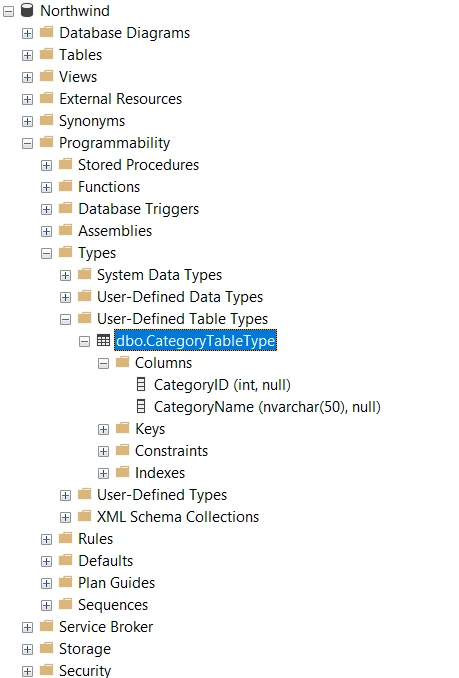
In the Microsoft SQL Server Management Studio, we can see the created type:
Database->Programmability->Types->User Define Table Types:
2. Creating Stored Procedures in SQL Server using the Table-valued Parameters Type
Table-valued parameters can be used in set-based data modifications that affect multiple rows by executing a single statement.
Update
CREATE PROCEDURE usp_UpdateCategories
    (@tvpEditedCategories dbo.CategoryTableType READONLY)
AS
BEGIN
	SET NOCOUNT ON
	UPDATE dbo.Categories
    SET Categories.CategoryName = ec.CategoryName
    FROM dbo.Categories INNER JOIN @tvpEditedCategories AS ec
    ON dbo.Categories.CategoryID = ec.CategoryID;
END
Note: that the READONLY keyword is required for declaring a table-valued parameter.
3. Run the Stored Procedure with Table-Valued Parameters (Transact-SQL)
Table-valued parameters can be used in set-based data modifications that affect multiple rows by executing a single statement.
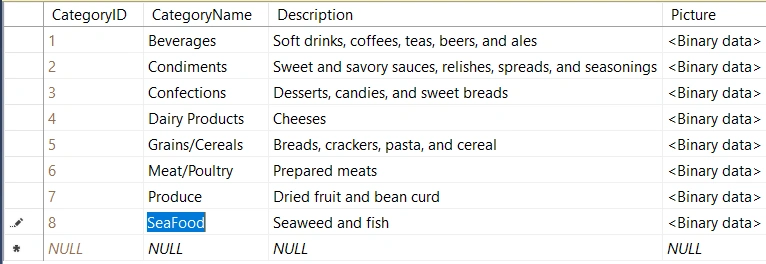
Table Categories --- Before:
Run the Stored Procedure with Table-Valued Parameters:
DECLARE @tvpUpdateCategories AS dbo.CategoryTableType
INSERT INTO @tvpUpdateCategories([CategoryID], [CategoryName]) VALUES(8,'SeaFood1')
EXEC  dbo.usp_UpdateCategories @tvpUpdateCategories
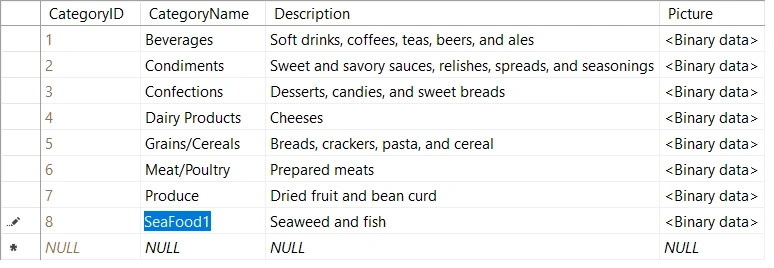
Table Categories --- After
D - Passing a Table-Valued Parameter to a Stored Procedure from C# Code
We will skip this part, you may see the detailed implementation from the bottom on Table-Valued Parameters.
Note [ref]:
Normally we provide DbType of SqlParameter for a normal parameter like varchar, nvarchar, int, and so on as in the following code.
SqlParameter sqlParam= new SqlParameter();
sqlParam.ParameterName = "@StudentName";
sqlParam.DbType = DbType.String;
sqlParam.Value = StudentName;
But in the case of a Table parameter, we do not need to provide a DbType as the parameter data type. We need to provide SqlType rather than DbType, such as
SqlParameter Parameter = new SqlParameter;
Parameter.ParameterName = "@PhoneBook";
Parameter.SqlDbType = SqlDbType.Structured;
Parameter.Value = PhoneTable;
Reference
- Table-Valued Parameters --- MS
- Passing DataTable to StoredProcedure as Parameter in C# --- C# Corner
- Sending a DataTable to a Stored Procedure --- codeproject.com
- Passing Data table as Parameter to Stored Procedures --- codingsight.com
- Passing Table to a Store Procedure Parameter in SQL Server 2012 --- C# Corner
- Can you pass table as parameter in stored procedure --- askingthelot.com
Sagar ChavanPosted Feb 22, 2022, 12:58 PM
This article has everything related to table value parameters to the stored procedures.