

Interchanging the elements of the first and last rows in a matrix is a straightforward operation that can be accomplished using various techniques in Java. This article will cover different methods to achieve this, complete with code examples, explanations, and expected outputs.
Problem Statement
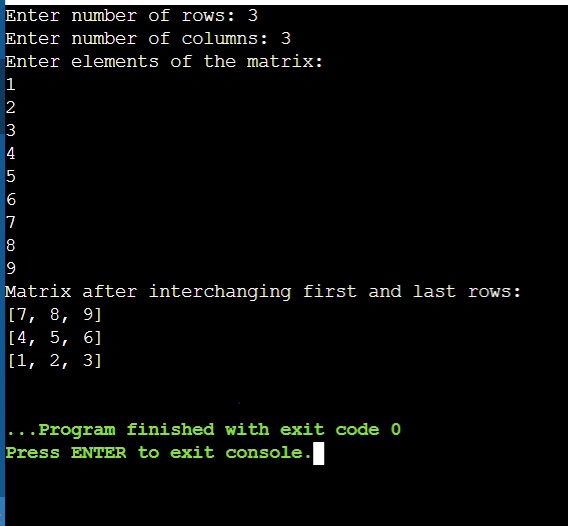
Given a matrix, we want to swap the elements of the first row with those of the last row. For example, if we have the following matrix:
1 2 3
4 5 6
7 8 9
After interchanging the first and last rows, the matrix should look like this:
7 8 9
4 5 6
1 2 3
Method 1. Using a Simple Loop
The most straightforward method involves using a loop to swap the elements of the first and last rows.
Code example
import java.util.Arrays;
import java.util.Scanner;

public class MatrixRowInterchange {
    public static void main(String[] args) {
        Scanner scanner = new Scanner(System.in);

        // Input matrix dimensions
        System.out.print("Enter number of rows: ");
        int rows = scanner.nextInt();
        System.out.print("Enter number of columns: ");
        int cols = scanner.nextInt();

        // Initialize the matrix
        int[][] matrix = new int[rows][cols];

        // Input matrix elements
        System.out.println("Enter elements of the matrix:");
        for (int i = 0; i < rows; i++) {
            for (int j = 0; j < cols; j++) {
                matrix[i][j] = scanner.nextInt();
            }
        }

        // Interchange first and last rows
        for (int j = 0; j < cols; j++) {
            int temp = matrix[0][j];
            matrix[0][j] = matrix[rows - 1][j];
            matrix[rows - 1][j] = temp;
        }

        // Output the modified matrix
        System.out.println("Matrix after interchanging first and last rows:");
        for (int i = 0; i < rows; i++) {
            System.out.println(Arrays.toString(matrix[i]));
        }

        scanner.close();
    }
}
Explanation
- Input Dimensions: The program starts by taking input for the number of rows and columns.
- Matrix Initialization: It initializes a two-dimensional array to store the matrix elements.
- Input Elements: The user is prompted to enter the elements of the matrix.
- Row Interchange: A loop iterates through each column to swap elements between the first row (matrix[j]) and the last row (matrix[rows - 1][j]).
- Output: Finally, it prints the modified matrix.
Output Example
Method 2. Using Array Copy
Another approach is to use System.arraycopy() to perform the swap more efficiently.
Code Example
import java.util.Arrays;
import java.util.Scanner;

public class MatrixRowInterchange {
    public static void main(String[] args) {
        Scanner scanner = new Scanner(System.in);

        // Input matrix dimensions
        System.out.print("Enter number of rows: ");
        int rows = scanner.nextInt();
        System.out.print("Enter number of columns: ");
        int cols = scanner.nextInt();

        // Initialize the matrix
        int[][] matrix = new int[rows][cols];

        // Input matrix elements
        System.out.println("Enter elements of the matrix:");
        for (int i = 0; i < rows; i++) {
            for (int j = 0; j < cols; j++) {
                matrix[i][j] = scanner.nextInt();
            }
        }

        // Create temporary array for swapping
        int[] tempRow = new int[cols];

        // Copy first row to temporary array
        System.arraycopy(matrix[0], 0, tempRow, 0, cols);

        // Copy last row to first row
        System.arraycopy(matrix[rows - 1], 0, matrix[0], 0, cols);

        // Copy temporary array back to last row
        System.arraycopy(tempRow, 0, matrix[rows - 1], 0, cols);

        // Output the modified matrix
        System.out.println("Matrix after interchanging first and last rows:");
        for (int i = 0; i < rows; i++) {
            System.out.println(Arrays.toString(matrix[i]));
        }

        scanner.close();
    }
}
Explanation
- Temporary Array: A temporary array tempRow is created to hold the values of the first row.
- Array Copying: The System.arraycopy() method is used to copy:
The first row into tempRow.
The last row into the first row.
The values from tempRow back into the last row. - Output: It prints the modified matrix.
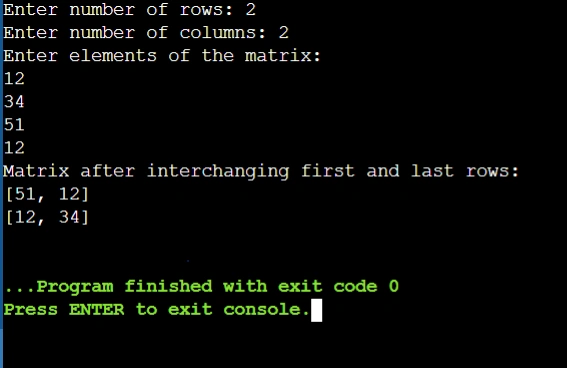
Output
Conclusion
In this article, we explored two methods for interchanging the first and last rows in a matrix using Java. The first method utilized a simple loop for swapping values directly, while the second method leveraged System.arraycopy() for potentially better performance and cleaner code. Both methods effectively achieve the desired result. You can choose either method based on your preference or the specific requirements of your applications!
Join the conversation! Your thoughts help the community grow.