

SVG Animate with Transform in HTML5
The SVG animateTransform element animates a transformation attribute on an element. In this article, transformation refers to the attributes of SVG elements that may be transformed, for example, its size, position, rotation and so on.
AnimateTransform is the element that works in combination with the transformation processes. These transformations can be animated, where an initial starting value, an ending value and a duration for the transformation effect are supplied.
To animate a transformation you use the animateTransform element that adds a "type" attribute so that you can specify what type of transformation you are animating.
For example, the two shapes are rotated 45 degrees. This is done using the rotate(45 50 50) "function" call inside the transform attribute. The first number, 45, is the number of degrees to rotate the shape. The second and third numbers are x,y of the point you want to rotate around. In this article, the shapes are both rotated around point 50,50.
Note: You still need to specify the "attributeName" attribute with this element or no animation occurs.
The Types of Transform that can be performed are:
- Translate: moves the structure along either the x-axis or y-axis depending on how you define the action.
- Rotate: takes a structure and turns it at a center point. Visualize a wheel turning on a car. Rotation transformations use a similar process to turn a shape. You set the center point coordinates and establish rules for the transformation.
- Scale: changes the size of the element.
- SkewX: slides the shape along the x-axis to change the angle. Just like rotate, skew relies on a center point to anchor the shape.
- SkewY: works the same way as its counterpart "skewX" except the angle change moves in an up or down direction.
The attributes of an Animating Transformation are:
- attributeName: The name of the attribute to animate.
- from: The initial value of the attribute.
- to: The final value.
- dur: The duration of the animation.
Difference between Animation and Transformation
Transformation
Transformation allows you to take a form that you have already drawn and modified it in some way. For example, you could use a rectangle and rotate it in one direction so that it sits at an angle. You could take that same rectangle and make it smaller, or larger to suit the needs of the page you are designing. In a pure transformation, there is no movement. The images are static. This approach enables you to change the structure as you need to without redesigning it.
Animation
Animation creates a moving picture. The shape may change upon loading, or when a viewer clicks on the image. Flash is a form of animation that uses a storyboard design to make the move.
SVG is unable to do animation without help. That is the main difference between transformation and animation. To create movement in an SVG image, you want to integrate either SMIL or JavaScript to make it work.
The important points to note are:
- The <animateTransform> element is a child of the <rect> element.
- The type is "rotate" (could also be "translate", "scale", "skewX" or "skewY").
- The from and to are in the form "n1 n2 n3".
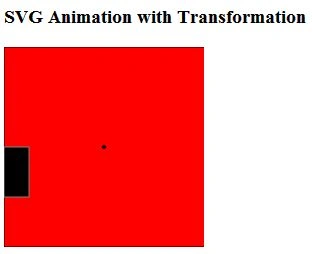
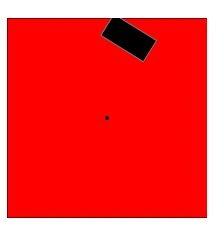
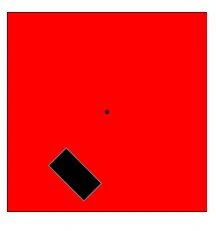
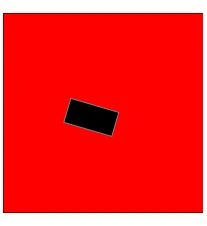
- The rotation starts from 0 degrees to 360 degrees (the n1 values).
- The center of rotation is at (n2, n3).
- The dur is "20s", meaning a full rotation takes 20 seconds.
- The repeatCount is "indefinite", but can be a number, even a decimal.
- There are also begin and end attributes to determine when to start and stop the animation.
Example
- <!DOCTYPE html>
- <html lang="en" xmlns="http://www.w3.org/1999/xhtml">
- <head>
- <meta charset="utf-8" />
- <title>SVG Animate with transform</title>
- </head>
- <body>
- <h3>SVG Animation with Transformation</h3>
- <svg width="200px" height="200px" xmlns="http://www.w3.org/2000/svg">
- <rect x="0" y="0" width="300" height="200" fill="red" stroke="black" stroke-width="1" />
- <circle cx="100" cy="100" r="2" fill="black"/>
- <rect x="0" y="100" width="25" height="50" fill="black" stroke="gray" stroke-width="1" transform="rotation">
- <desc> Rectangle will Rotate from 0 to 360 degree
- </desc>
- <animateTransform
- attributeName="transform"
- begin="2s"
- dur="5s"
- type="rotate"
- from="0 100 100"
- to="360 100 100"
- repeatCount="indefinite"
- />
- <animate attributeName="x" attributeType="XML"
- begin="2s" dur="20s" from="0" to="95" fill="freeze"/>
- <animate attributeName="y" attributeType="XML"
- begin="2s" dur="20s" from="100" to="85" fill="freeze"/>
- </rect>
- </svg>
- </body>
- </html>
Output
In the following figure the rectangle will rotate:
Join the conversation! Your thoughts help the community grow.