

Introduction
Strategic design pattern is a behavioral design pattern in which the behavior of the object is encapsulated with a common function name.
Where to use Strategic design pattern?
When different customers have a common strategy (common operation name) but a different action to perform, then we can use strategic design pattern.
Why use Strategic design pattern?
As we discussed previously, customers have a common operation name to perform, so that we can share a common interface to all customers to perform their actions as per their need.
Players in this pattern,
- Strategy: It defines contract with common operation.
- ConcreteStrategy : It implements contact defined by Strategy.
- Product: It fullfils customer requirements using ConcreteStrategy objects by referring Strategy contract.
We will see strategic design pattern with an example.
Problem definition
Define a common operation for students to access different actions like addition, subtraction, multiplication, division.
Players in this case,
- Strategy : IOperator
- ConcreteStrategy: AddOperator, SubtractOperator, MultiplyOperator, DivisionOperator.
- Product : Calculator
Below is the IOperator contract which defined common operation called ExecuteOperation
- namespace Strategy.Design.Pattern.Contract
- {
- public interface IOperator
- {
- void ExecuteOperation(int a, int b);
- }
- }
Below are the concrete operators which implement contract defined by IOperator
- using Strategy.Design.Pattern.Contract;
- using static System.Console;
- namespace Strategy.Design.Pattern.Business
- {
- public class AddOperator : IOperator
- {
- public void ExecuteOperation(int a, int b)
- {
- WriteLine($"{nameof(AddOperator)} result: {a + b}");
- }
- }
- }
- using Strategy.Design.Pattern.Contract;
- using static System.Console;
- namespace Strategy.Design.Pattern.Business
- {
- public class SubtractOperator : IOperator
- {
- public void ExecuteOperation(int a, int b)
- {
- WriteLine($"{nameof(SubtractOperator)} result: {a - b}");
- }
- }
- }
- using Strategy.Design.Pattern.Contract;
- using static System.Console;
- namespace Strategy.Design.Pattern.Business
- {
- public class MultiplyOperator : IOperator
- {
- public void ExecuteOperation(int a, int b)
- {
- WriteLine($"{nameof(MultiplyOperator)} result: {a * b}");
- }
- }
- }
- using Strategy.Design.Pattern.Contract;
- using static System.Console;
- namespace Strategy.Design.Pattern.Business
- {
- public class DivisionOperator : IOperator
- {
- public void ExecuteOperation(int a, int b)
- {
- WriteLine($"{nameof(DivisionOperator)} result: {a / b}");
- }
- }
- }
Below is the our product calculator which is going to be used by customers with the help of IOperator contract
- using Strategy.Design.Pattern.Contract;
- namespace Strategy.Design.Pattern.Business
- {
- public class Calculator
- {
- private IOperator _operator;
- public Calculator(IOperator ioperator)
- {
- _operator = ioperator;
- }
- public void Calculate(int a, int b)
- {
- _operator.ExecuteOperation(a, b);
- }
- }
- }
Below is the Student class in which Student uses a calculator to fullfil his/her requirement.
- using Strategy.Design.Pattern.Business;
- using static System.Console;
- namespace Strategy.Design.Pattern
- {
- class Student
- {
- static void Main(string[] args)
- {
- Calculator oprt = new Calculator(new AddOperator());
- oprt.Calculate(20, 10);
- oprt = new Calculator(new SubtractOperator());
- oprt.Calculate(20, 10);
- oprt = new Calculator(new MultiplyOperator());
- oprt.Calculate(20, 10);
- oprt = new Calculator(new DivisionOperator());
- oprt.Calculate(20, 10);
- ReadLine();
- }
- }
- }
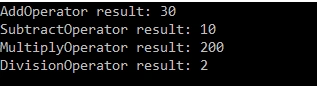
Below is the snap of the output window of the above code:
Summary
In this article we understood about what strategic design pattern is and how to use it.
Sanjit Kumar SinghPosted Jan 13, 2020, 11:51 PM
Short and Sweet. Keep it up :)