

Introduction
In this article, I give a short description of Stored Procedures. In this article I describe how to create a Stored Procedure, use of Stored Procedures, the benefits of Stored Procedures and Stored Procedures for insert, update, delete and join.
Stored Procedure
Stored Procedures are a precompiled set of one or more statements that are stored together in the database. They reduce the network load because of the precompilation. We can create a Stored Procedure using the "Create proc" statement.
Why we use Stored Procedure
There are several reasons to use a Stored Procedure. They are a network load reducer and decrease execution time because they are precompiled. The most important use of a Stored Procedure is for security purposes. They can restrict SQL Injection. We can avoid SQL injection by use of a Stored Procedure.
Difference Between Stored Procedure and Function
- A Stored Procedure may or may not return a value but a function always returns a value.
- We can use a function in a Stored Procedure but we can't use a Stored Procedure in a Function
Here we create two tables named emp and emp1 on which we apply a Stored Procedure.
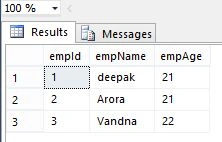
Creation of emp table
Creation of emp table
- create table emp(empId int, empName varchar(15), empAge int )
- insert into emp
- select 1,'deepak',21 union all
- select 2,'Arora',21 union all
- select 3,'Vandna',22
- select * from emp
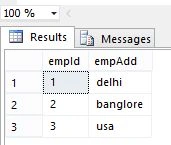
Creation of emp1 table
- create table emp1(empId int,empAdd varchar(35))
- insert into emp1
- select 1,'delhi'union all
- select 2,'banglore'union all
- select 3,'usa'
Output
- select * from emp1
Type of Stored Procedure
-
System Stored Procedure
-
User Defined Stored Procedure
Here I describe only User Defined Stored Procedure
Types of User Defined Store Procedure
-
Non-parameterized Stored Procedure
-
Parameterized Stored Procedure
Non-parameterized Stored Procedure
This type of Stored Procedure does not accept parameters.
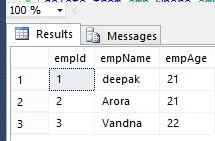
Non-parameterized Stored Procedure for Showing All Records
- create proc usp_select
- as
- select * from emp
- exec usp_select
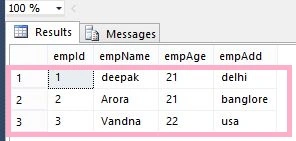
Non-parameterized Stored Procedure for Join
- create proc usp_join
- as
- select e.empId,e.empName,e.empAge,e1.empAdd from emp e inner join emp1 e1 on e.empId=e1.empId
- exec usp_join
Parameterized Stored Procedure
These accept one or more Parameters. It is important that the data type of the parameters be the same as the data type in the tables.
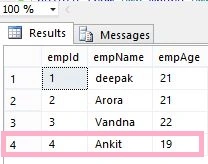
Parameterized Stored Procedure for Insert
- create proc usp_insert(@id int,@name varchar(15),@age int)
- as
- insert into emp values(@id,@name,@age)
- exec usp_insert 4,'Ankit',19
- exec usp_select
Parameterized Stored Procedure for Update
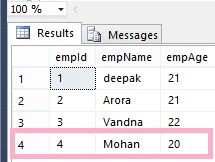
- create proc usp_update(@id int,@name varchar(15),@age int)
- as
- update emp set empName=@name,empAge=@age where empId=@id
- exec usp_update 4,'Mohan',20
- exec usp_select
Parameterized Store Procedure for delete
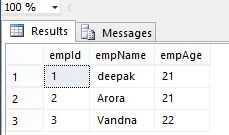
- create proc usp_delete(@id int)
- as
- delete from emp where empId=@id
- exec usp_delete 4
- exec usp_select
Summary
In this article, I described Store Procedures in SQL Server. I hope this article has helped you to understand this topic. Please share if you know more about this. Your feedback and constructive contributions are welcome.
Suresh MolabantiPosted Jun 23, 2016, 1:04 AM
it's very helpful to meee.
Suresh MolabantiPosted Jun 23, 2016, 1:03 AM
thanks..
Deepak MiddhaPosted Nov 27, 2012, 5:13 AM
Thanks Georige..
Georgie WebberPosted Nov 27, 2012, 2:27 AM
very nice article Deepak
Vithal WadjePosted Oct 31, 2012, 1:51 AM
their is no diffrence between creating a stored procedure old as wel as in new version