

What is Power Platform Solutions?
Solutions transport apps and components between different environments or apply a set of customizations to existing apps. A solution can comprise one or more apps and various other components, including site maps, tables, processes, web resources, choices, flows, and more. In Power automate and other Power Platform products, such as Power Apps, solutions represent the mechanism for implementing application lifecycle management (ALM) which refers to the management of an application's lifecycle, encompassing various stages from requirements gathering to deployment, which is divided into three key areas: Governance, Development, and Maintenance.
Governance includes managing requirements, resources, data security, user access, change tracking, review, audit, deployment control, and rollback. Development involves identifying and resolving issues and planning, designing, building, and testing the application. Maintenance encompasses the deployment of the app and maintaining optional and dependent technologies. The process of managing a solution's lifecycle, including its creation, updates, upgrades, and patches. To access solutions, you need an environment with a database. These solutions can be located within the Power Apps Maker site.
Power Platform Solutions Types
There are two types of solutions:
- Unmanaged Solutions.
- Managed Solutions.
| # | Unmanaged Solutions | Managed Solutions |
| 1 | During the development process of the applications, unmanaged solutions have to be used to make any necessary changes. | They are used to deploy to various environments, such as test, UAT, SIT, and production environments. |
| 2 | Can be exported either as unmanaged or managed | It can't be exported. |
| 3 | All the components can be edited. | Most of the components can't be edited. |
| 4 | By deleting it, only the solution container containing any customizations included in it will be deleted. | All the customizations and extensions included with it will be removed by deleting it. |
Steps to Create Power Platform Solutions
These are the steps that you can follow to create Power Platform solutions:
- Go to the following link.
- Log in with your credential.
- The power automates window will be opened.
- Select an environment with a database. Here is the detailed article for creating an environment.
- Select the "Solutions" option from the left navigation bar, as shown in figure 1. The solution explorer window of that environment will open, where you can find your already deployed solutions.
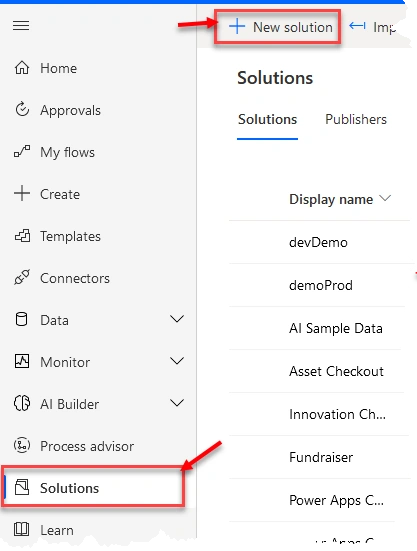
Figure 1: Microsoft Power Automate Platform
- Now click on the "New Solution" button from the top, as shown in figure 1. A popup window will open on the right side of the window, as shown in figure 2.
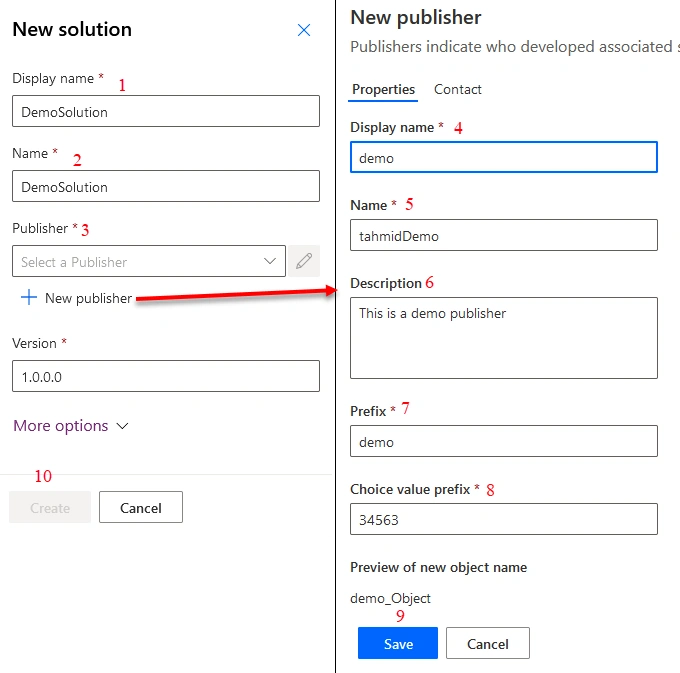
Figure 2: Creating Microsoft Power Platform Solutions
- Input the display name in position 1, as shown in figure 2, which will appear in the solutions list and can be modified later.
- In position 2, the field Name is also mandatory, which will be autogenerated as you put the "Display Name". But you can change this value as you want before saving.
- In position 3, you have to select a publisher for this solution which is selected as the default one, or create a new one. Creating a new publisher for each solution would be better as the responsibility of creating, managing, and distributing solutions lies with the solution publisher, who can be an individual or an organization. The owner of a component has control over the changes that other solution publishers, including the component, can or cannot make. While it is possible to transfer ownership of a component from one solution to another within the same publisher, it cannot be done across publishers. Once a component is introduced in a managed solution, its publisher cannot be changed. Therefore, it is advisable to have a single publisher to enable easier modification of the layering model across solutions. A publisher prefix is included in the solution publisher to avoid naming conflicts. This mechanism helps install solutions from different publishers in an environment with minimal conflicts.
- To create a new publisher, Click the "New publisher" button under the publisher field. The New Publisher window will be opened, as shown in figure 2.
- Enter a name in the display name field in position 4, as this will be visible everywhere.
- Put a unique name in the Name field in position 5.
- In potion 6, the Description field is not mandatory. You can put a description value that is suited for you.
- In the Prefix field, enter a value that will be the prefix of all the components of this solution. So, try to put some value that is meaningful and unique here.
- In position 8, the "Choice value prefix" field will be auto-generated. This value would generate a number based on the publisher prefix. When adding options to choices, this number indicates which solution was used to add the option.
- Other than the publisher's property values, you can put the publisher's contact info in the contact pane by selecting the contact pane from the top. But putting contact information is not mandatory.
- However, after selecting save, as shown in position 9, the publisher tab will be closed, and we will return to the "New Solution" tab again.
- Now select the newly create publisher from the dropdown in position 3.
- Then click the "Create" button in position 10. Your solution will be created now, and you can start to add components to your solutions.
Conclusion
The absence of solutions in the Power Platform can result in scattered components that are difficult to migrate across different environments. Therefore, Power Platform solutions serve as a container that consolidates all the components of a specific project into one place, making management easier and the importing-exporting process more seamless.
Join the conversation! Your thoughts help the community grow.