

Introduction
Lazy loading is a powerful technique in Angular that defers the loading of certain parts of your application (usually modules and their associated components) until they are actual. Imagine it like a well-organized pantry where you only take out the ingredients you need for your recipe.
In this article, you will learn the step-by-step guide to implementing Lazy Loading in an Angular Project.
Lazy Loading in Angular
Please follow the below steps.
Step 1. Create a new Angular project
ng new angular-lazy-loading
Step 2. Create a module and separate routing
Create a module and separate routing file named lazy-loading. Independent routing aims to handle all the components associated with the angular lazy-loading module.
ng g m lazy-loading –routing

Step 3. Create a component
Create a component named lazy-demo within the lazy-loading module,
ng g c lazy-demo

Step 4. Add a link in the header
Adding a link in the header on whose route we will implement lazy loading.
app.component.html
<li class="nav-item">
   <a class="nav-link" [routerLink]="['/lazy-loading]">
      Lazy Loading
   </a>
</li>
Step 5. Lazy load component
Lazy load the component displayed on the route – /lazy-loading Make necessary changes in app-routing.module.ts. Here, we will load the module lazily using loadChildren.
app-routing.module.ts
{
   path: 'lazy-'oading',
 ' loadChildren: () => import('./lazy-loading/lazy-loading.module')
   .then(m => m.LazyLoadingModule)
},
Step 6. Setup route
Set up the route in lazy-loading-routing.module.ts.
lazy-loading-routing.module.ts
import { NgModule } from '@angular/core';
import { RouterModule, Routes } from '@angular/router';
import { LazyDemoComponent } from './lazy-demo/lazy-demo.component';
const routes: Routes = [
 { path: '', component: LazyDemoComponent }
];
 @NgModule({
    imports: [RouterModule.forChild(routes)],
    exports: [RouterModule]
})
export class LazyLoadingRoutingModule { }
If the above import option gives an error, try this.
import { LazyDemoComponent } from"E:/Pranam/Git Repository Projects/Angular-Lazy-Loading-Example/src/app/lazy-demo/lazy-demo.component";
It’s it's runs our application.
Go to the terminal and execute the “ng se" ve” comm" nd.
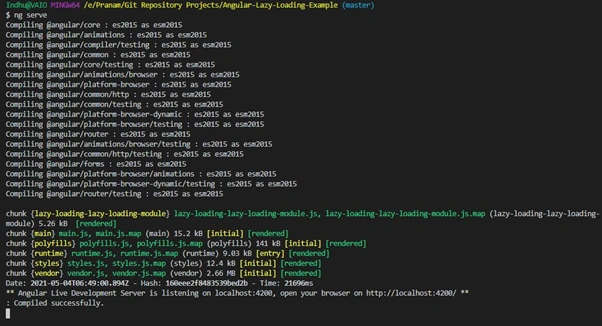
Now go to the browser https://localhost:4200
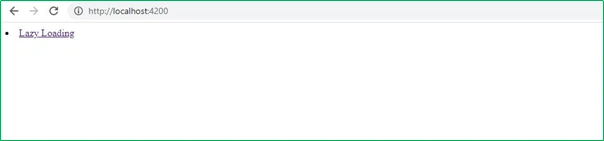
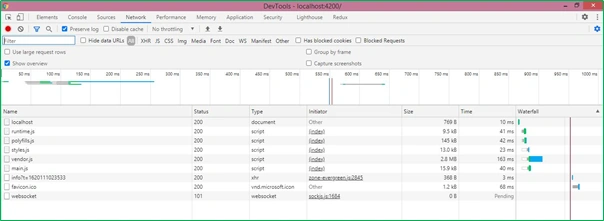
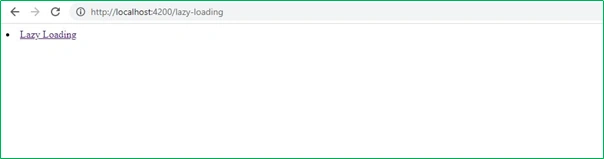
You will observe that main.js is being served on refreshing the browser. The Lazy Loading module is loaded only on hitting the route /lazy-loading.
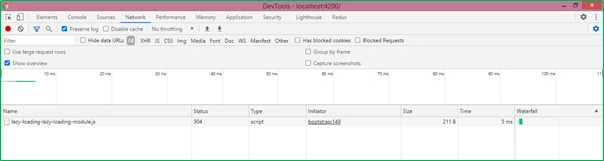
How do you verify Lazy loading in Angular?
Verify lazy loading in Angular
Run the following command to generate a build,
npm run build
And you do something like this.
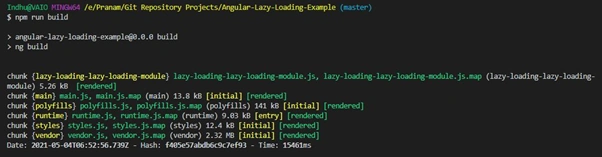
The above image verifies that a separate chunk is generated for the lazy loading module.
Another way to verify is to open the dist folder of your project. You will notice a separate file for the module that uses Lazy Loading.
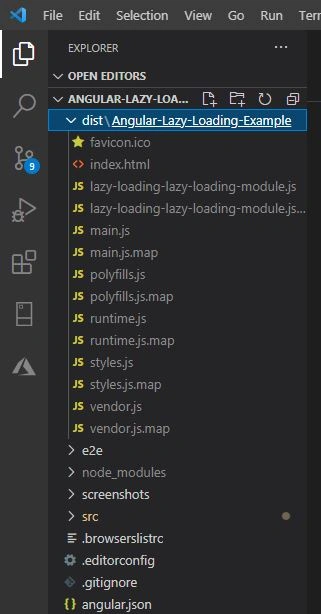
Benefits of Lazy Loading
Faster initial load times: By loading only essential modules upfront, you significantly reduce the initial payload for the browser to download, leading to a quicker and smoother user experience. Think of it like skipping the appetizer course and diving straight into the main dish!
- Reduced bundle size: Lazy loading keeps your initial bundle size smaller, translating to faster page loads and less data consumption, especially for users on mobile networks. It has a compact backpack that can be carried around.
- Improved performance: With less code loaded initially, your application has fewer resources to manage, leading to smoother rendering and better overall performance. Imagine a race car with a streamlined design for optimal speed.
- Enhanced modularity: Lazy loading encourages a modular architecture, where your code is well-organized and divided into clear, independent modules. This makes your application easier to maintain and develop in the long run. Think of it like having separate drawers for different kitchen utensils, keeping everything organized and accessible.
Lazy loading relies on code splitting, a feature of modern JavaScript bundlers that allows splitting code into multiple bundles.
Disadvantages of lazy loading
- Firstly, the extra lines of code, to be added to the existing ones to implement lazy load, make the code a bit complicated.
- Additional code when integrating with JavaScript
- User experience may be affected. For example, backtracking may not be possible if the page structure is not optimal.
Also note
- Consider preloading or prefetching lazy-loaded modules for a smoother user experience, especially for critical features.
- Implement loading indicators to provide feedback to the user while modules are being loaded.
- Lazy loading can be used with Server-Side Rendering (SSR) but requires additional configuration.
- By incorporating lazy loading into your Angular development workflow, you can create faster, more responsive, and more efficient applications, delivering a delightful experience for your users. So, unleash the power of lazy loading to optimize your Angular applications!
Tips
- If possible, do not lazy load routes your users frequently visit.
- Keep your chunk sizes as small as possible (Only import what you need and keep shared modules as compact as possible).
- Use router states to show a loader or animation when a lazy loaded route is being fetched so they do not think your application lags. You can even handle cases when the lazy-loaded route fails, e.g., Show a toast notification and redirect to a previously loaded route.
Code Repository
Hamid KhanPosted Jul 14, 2022, 8:16 PM
Good Explain.....................Pranam Bhat