

Introduction
In this article, I explain most SQL Server functions for manipulating text.
The list of functions described in this article is.
| Sr. No | Function | Sr. No | Function |
| 1. | CHARINDEX | 10. | REVERSE |
| 2. | PATINDEX | 11. | REPLACE |
| 3. | LEFT | 12. | STUFF |
| 4. | RIGHT | 13. | REPLICATE |
| 5. | LEN | 14. | QUOTENAME |
| 6. | LTRIM | 15. | STR |
| 7. | RTRIM | 16. | SUBSTRING |
| 8. | LOWER | 17. | SPACE |
| 9. | UPPER |
Explanation of Functions
Here I am explaining each function mentioned in the above table.
CHARINDEX
We can use the CHARINDEX function to search text in a string expression. It returns the first occurrence of text searched for in another text expression or returned 0 if there is no match. It takes three arguments.
Syntax
CHARINDEX(searchExperision, textExpresion, startIndex)
The following explains each argument.
Example

Output
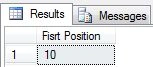
- textExpresion. It is the whole text data being searched for a text part. It is a character expression. It is a required parameter, and we need to pass it to the function because if we don't pass it, we get 0 from the function as output. But in textExpresion, we cannot use more than 8000 characters.
- searchExperision. It is part of the text we want to search for in textExpresion. It is a character expression. It is a required argument, and we need to pass it to the function because if we don't pass it, we get 0 from the function as output.
- startIndex. It is an int or bigint value used to define the start index, in other words, an index value in textExpresion where the search will start for searchExperision. It is optional; in other words, if we do not pass an argument start index to the CHARINDEX function, then the index starts from 0. But whether we do or do not pass a start index value to the CHARINDEX function, it always returns a zero-based index value.
PATINDEX
We can use the PATINDEX function to search text in a string expression. It takes two arguments. It returns the first occurrence of a text pattern searched for in another text expression or returned 0 if there is no match. We use a wild card to search for a character expression in this function.
Syntax
PATINDEX(searchExperision, textExpresion)
The following explains each parameter.
Example

Output
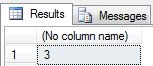
- textExpresion. It is the whole text data to be searched for a text pattern. It is a character expression. It is a required parameter, and we need to pass it to the function because if we do not pass it, the expression will give an error instead of 0.
- searchExperision. it is a part of the text we want to search for in textExpresion. It is a character expression. It is a required parameter, and we need to pass it to the function because if we don't pass it, we get an error from the function instead of 0. This contains a wild card character.
LEFT
It returns the text from the left portion of the character string with a fixed number of characters. It takes two parameters.
Syntax
LEFT(textExpression, noOfChar)
The following explains each argument.
Example

Output
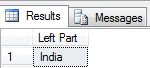
- textExpression. It is the whole text data where we can get a text part. It is a character expression. It is a required parameter, and we must pass it to the function.
- noOfChar. It's an integer value which is the length of the character string. That will be calculated from the left side.
RIGHT
It returns the text from the right portion of the character string with a fixed number of characters. It takes two arguments.
Syntax
RIGHT(textExpression, noOfChar)
The following explains each argument.
Example

Output
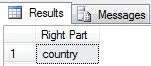
- textExpression. It is the whole text data where we can get a text part. It is a character expression. It is a required argument, and we must pass it to the function.
- noOfChar. It's an integer value that is the length of the character string returned from the right side of textExpression.
LEN
It returns the number of characters of the character expression. It excludes the right side (trailing) blanks but does not exclude the left side (leading) blanks when counting the length. It takes one argument.
Syntax
LEN(textExpression)
The following explains the argument.
Example

Output
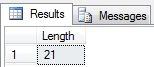
- textExpression. It is the whole text data where we can get the total number of characters. It can be a character expression, constant, or column. It can also be an int data type. It is a required parameter, and we must pass it to the function.
LTRIM
It returns a character expression after removing left-side (trailing) blanks. It takes one argument and returns a character expression.
Syntax
LTRIM(textExpression)
The following explains the argument.
Example

Output

- textExpression. It is the whole text data by which we can get a character expression. It can be a character expression, constant, or column. It is a required parameter, and we must pass it to the function.
RTRIM
It returns a character expression after removing right-side (trailing) blanks. It takes one argument and returns a character expression.
Syntax
RTRIM(textExpression)
The following explains the argument.
Example

Output
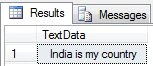
- textExpression. It is the whole text data by which we can get character expressions. It can be a character expression, constant, or column. It is a required parameter, and we must pass it to the function.
LOWER
It returns a character expression. It converts all upper-case characters to lower-case ones. It takes one argument as a character expression which will be converted to lower-case characters.
Syntax
LOWER(textExpression)
The following explains the argument.
Example

Output
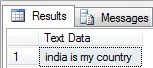
- textExpression. It is the whole text data to be converted to lowercase. It can be a character expression, constant, or column. It is a required argument, and we must pass it to the function.
UPPER
It returns a character expression. It converts all lower-case characters to upper-case. It takes one argument as a character expression which will be converted to upper-case characters.
Syntax
UPPER(textExpression)
The following explains the argument.
Example

Output
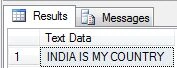
- textExpression. It is the whole text data to be converted to upper-case. It can be a character expression, constant, or column. It is a required argument, and we must pass it to the function.
REVERSE
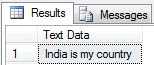
It returns a character expression. This function reverses a character expression; in other words, it reverses the whole statement with each word. It not only reverses the character expression but also can reverse integer values. It takes one argument.
Syntax
REVERSE(textExpression)
The following explains the argument.
Example

Output
- textExpression. It is the whole text data by which we can get the character expression in reverse. It can be a character expression, constant, or column. It is a required argument, and we must pass it to the function.
REPLACE
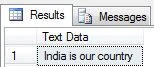
It replaces a string value in another value for all occurrences with a string value. It returns the string value after replacing it, and it takes three arguments.
Syntax
REPLACE(textExpresion, findExpresion, replaceExpresion)
The following explains each argument.
Example

Output
- textExpresion. It is the whole text data where we replace a string value. It is a character expression. It is a required argument, and we need to pass it to the function because if we don't pass it, we get an error.
- findExpresion. it is a part of the text we want to replace in textExpresion. It is a character expression. It is a required argument, and we need to pass it to the function because if we don't pass it, we get an error.
- replaceExpresion. It is a string value that replaces a string value in textExpresion where findExpresion occurs. t is a required argument, and we need to pass it to the function because if we don't pass it, we get an error.
STUFF
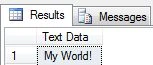
The STUFF function inserts a string into another string. It deletes a specified length of characters in the first string at the start position and then inserts the second string into the first string at the start. A NULL string is returned if the start position or the length is negative. It takes four arguments.
Syntax
STUFF(textExpression, startPosition, length, insertExpression)
Now explains each argument.
Example

Output
- textExpression. This argument is used in the STUFF function to pass the actual string expression on which the new string will replace a specific length string.
- startPosition. It is the int value where the new string will be inserted, and the existing string will be deleted (of a specific length) as defined in the STUFF function.
- length. It is an int value that specifies how many characters will be deleted after the start position.
- insertExpression. It is a string value that will be inserted in textExpression.
REPLICATE
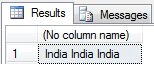
This function repeats a character expression a number of times; in other words, we want to repeat a string value several times in a character expression. It takes two arguments and returns a character expression.
Syntax
REPLICATE(textExpresion, integerExpression)
The following explains each argument.
Example

Output
- textExpresion. It is the whole text data that we can repeat. It is a character expression. It is a required parameter, and we need to pass it to the function because if we don't pass it, we get an error. But it should not be varchar(max) or nvarchar(max). It can be a column name, constant, string, or integer value.
- integerExpression. This parameter specifies how many times to repeat the character expression. It is a bigint or int value.
QUOTENAME
The QUOTENAME function appends square brackets to the beginning and end of the string expression and thereby makes a string expression a valid SQL Server identifier. It takes one argument. But when we have a closing square bracket in the string expression, QUOTENAME appends an extra closing square bracket. The QUOTENAME function is useful when working with database object names that contain spaces and reserved words. Generally, using reserved words, special characters, and spaces inside your object names is a bad idea.
Syntax
QUOTENAME(textExpression)
Now explain the argument
Example

Output
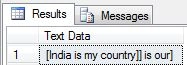
- textExpression. It is a string expression to which square brackets are appended. If it contains a square bracket or closing square brackets, then in the return string expression closing square brackets will be appended after the square brackets.
STR
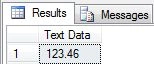
The str function converts numbers (int, bigint, float, etc.) to characters. It takes three arguments for the number expression, the length of the number, and the number of places after the decimal point.
Syntax
STR(numberExpression, length, decimalNumber)
Now explains each argument.
Example

In the above example, the length is 6, and the total numeric expression length is 7, so the digits after the decimal point will be rounded off.
Output
Example

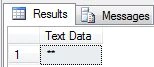
In the above example, the length is 2, and the total numeric expression length before the decimal point is 3, so the return value will be filled with "*" (asterisk).
Output
- numberExpression. It is a numeric expression that contains the int, bigint, or float type values. It is a required argument. It will be converted to a string using the STR function.
- length. It is an optional argument. It defines the entire length of the returned string expression and should be long enough to accommodate the decimal point and the number's sign. The decimal portion of the result is rounded to fit within the specified length. If the integer portion of the number does not fit within the length, the str returns a row of "*" asterisks of the specified length.
- decimalNumber. It is an integer value and an optional argument that defines the number of digits after the decimal point.
SUBSTRING
It returns the portion of the character expression from a string value. It takes three arguments.
Syntax
SUBSTRING(textExpression. startIndex, length)
Now explain each argument.
Example

Output
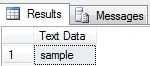
- textExpression. It can be a character, binary, text, or image data type. It is a required argument. The SUBSTRING function returns a value from this expression.
- startIndex. It is an int or bigint type. It is the value specifying where the returned character expression starts. If startIndex is less than 0, an error is generated, and the statement is terminated. A zero-length expression is returned if startIndex is greater than the number of characters in the value expression.
- length. It is a positive integer or bigint type value. It defines how many characters will be returned from the start index. If it is negative, then the statement will return an error.
SPACE
It repeats the space character in a string. It takes one argument that represents how many spaces will be returned.
Syntax
SPACE(numericExpression)
Now explain the argument.
Example

Output
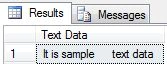
- numericExpression. It is an int or bigint type numeric value representing how many spaces will be added to the string value.
Summary
This article taught us about SQL Server Text Data Manipulation with different functions and example programs.
Sandeep Singh ShekhawatPosted Dec 9, 2012, 6:23 AM
Thanks Gaurav !
Sandeep Singh ShekhawatPosted Dec 9, 2012, 6:22 AM
Welcome Nishant Roy
Gaurav ChauhanPosted Nov 4, 2012, 11:47 PM
Nice article, thanks for sharing.
Nishant RoyPosted Nov 4, 2012, 11:46 PM
Thanks for sharing this article