
Using DataSets
This application connects to a running SQL Server 2000 and displays all the available databases in it.
On selecting the database it shows all the User Tables in that database in a ComboBox. After selecting the table it shows the Table in DataGrid.If there are any relations present between tables it shows them in the DataGrid. Here I have shown relations for only Order,OrderDetails and Customers Table in Northwind Database.
By modifying the code it can be used to show relation in all the tables.
Application requires
.NET Framework version Beta2 or final
SQLServer2000
How to run
In SQLServer2000 select the NorthwindDatabase choose Order Details table and rename it to OrderDetails(Remove the space between Order and Details ).
Copy this file and save as DataBaseExplorer.cs
Compile it on Command prompt as
csc /r:System.dll;System.data.dll;System.drawing.dll DataBaseExplorer.cs
Then run as DataBaseExplorer
To see the relation between the tables you have to select the tables Orders,OrederDetails and Customers. Only after selecting these tables u can see Customers table showing the relationship as shown in the following figure.
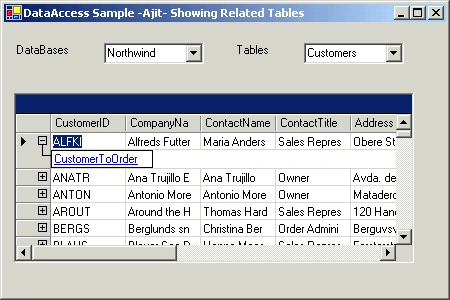
You can explore and view any table in the connected SQLServer. What you learn
- Using DataSets
- Event Handling
- Building WinForms Application
How it works
variables used for explanation
- lblDatabases- Label
- cmbDatabases-ComboBox to display database names
- lblTables-Label
- myDataGrid -DataGrid to display selected Table
The WinForm contains one label,two CombBoxes and a DataGrid to show the tables.In the constructor add all these components to Form using
this
.Controls.AddRange( new Control [] {lblDatabases,cmbDatabases,lblTables,cmbTables,myDataGrid }); When application runs we bind the DataGrid to a default table in default database usingcmbDatabases.DataSource = ajitDB.DBWin.getDataSet(null,null,null);
cmbDatabases.DisplayMember = "sysdatabases.name";
Based on the selection of either a database or a table the SQL query is generated dynamically.Based on this query DataGrid is populated.
Enhancements
This application can be modified to update the Tables. By making it more generic we can use this application to connect to any SQLServer. Here name of the SQLServer is hard coded.
utsav rathourPosted May 16, 2009, 6:34 AM
Thanks this seems like exactly what i was looking for. Will let you know if it works for me or not.