

Image source: online
As a software and SQL developer since 2009, I have honed my expertise in building robust, scalable, and secure database solutions using SQL Server. My deep understanding of SQL Server CLR Integration has enabled me to deliver high-impact applications for industries such as manufacturing, trading, real estate, and pharmaceuticals.
This comprehensive guide is a reflection of my commitment to sharing practical, real-world knowledge with developers, architects, and business stakeholders. By blending theoretical foundations with detailed code examples, realistic data, and industry-specific use cases, this guide empowers you to leverage CLR Integration to create flexible, high-performance, and secure database solutions. Whether you’re optimizing production schedules, consuming REST APIs, or integrating weather data, this guide will equip you with the tools and strategies to drive business value.
Let’s embark on a journey to unlock the full potential of SQL Server CLR Integration.
Table of Contents
1. Introduction to SQL Server CLR Integration
- 1.1 What is CLR Integration?
- 1.2 Why Use CLR Integration?
- 1.3 CLR Integration vs. T-SQL: A Comparison
2. Theoretical Foundations
- 2.1 How CLR Integration Works
- 2.2 CLR Compilation and Execution
- 2.3 Key Components of CLR Integration
3. Development Best Practices
- 3.1 Flexibility
- 3.2 Scalability
- 3.3 Security
- 3.4 Performance Optimization
- 3.5 Reducing Development Time and Costs
- 3.6 Minimizing Dependencies
4. Deployment Strategies
- 4.1 Assembly Deployment
- 4.2 Versioning and Updates
- 4.3 Testing and Validation
5. Security Considerations
- 5.1 Permission Sets
- 5.2 Code Access Security
- 5.3 Best Practices for Secure Coding
6. Architecture and Design Patterns
- 6.1 Layered Architecture
- 6.2 Domain-Driven Design (DDD)
- 6.3 Factory and Repository Patterns
7. Real-World Use Cases and Code Examples
- 7.1 Manufacturing: Production Scheduling
- 7.2 Quality Control (QC): Defect Tracking
- 7.3 Inventory: Stock Level Optimization
- 7.4 Warehouse: Logistics Management
- 7.5 HR: Employee Performance Analysis
- 7.6 Supply Chain Management (SCM): Supplier Evaluation
- 7.7 Costing: Cost Analysis for Manufacturing
- 7.8 Procurement: Vendor Scoring
- 7.9 Planning: Demand Forecasting
- 7.10 Sales: Sales Trend Analysis
- 7.11 Marketing: Customer Segmentation
- 7.12 Accounts & Finance: Fraud Detection
- 7.13 Industry-Specific Scenarios (Trading, Manufacturing, Real Estate, Pharmaceuticals)
- 7.14 REST API Data Consumption (JWT and Basic Authentication)
- 7.15 Unicode Converter (URL Encode/Decode for English, Bangla, Unicode)
- 7.16 Raw Data Bulk Import (.csv, .xlsx, .txt to SQL Server)
- 7.17 SQL Server Agent Job Scheduler for Periodic Runs
- 7.18 Google Maps Integration (Geocoding)
- 7.19 Weather API Integration
8. Pros and Cons of CLR Integration
- 8.1 Advantages
- 8.2 Disadvantages
- 8.3 When to Use CLR Integration
9. Alternatives to CLR Integration
- 9.1 T-SQL
- 9.2 External APIs and Middleware
- 9.3 NoSQL Databases
10. Business Case for CLR Integration
- 10.1 Cost-Benefit Analysis
- 10.2 ROI for Enterprises
11. Advanced Scenarios
- 11.1 Streaming Table-Valued Functions (STVFs)
- 11.2 User-Defined Aggregates
- 11.3 Complex Triggers
12. Conclusion
Building the Future with CLR Integration
1. Introduction to SQL Server CLR Integration
1.1 What is CLR Integration?
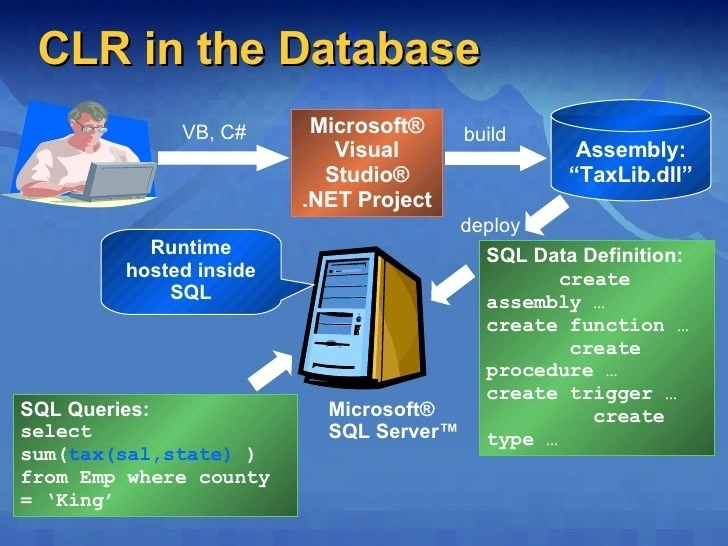
SQL Server Common Language Runtime (CLR) Integration allows developers to create database objects—such as stored procedures, functions, triggers, user-defined types (UDTs), and aggregates—using .NET languages like C#. Introduced in SQL Server 2005, CLR Integration embeds the .NET CLR within SQL Server, enabling developers to leverage the .NET Framework’s rich libraries and programming capabilities. This integration is particularly valuable for tasks that are complex or inefficient in T-SQL, such as advanced computations, string manipulations, or interactions with external systems.
1.2 Why Use CLR Integration?
CLR Integration bridges the gap between relational databases and managed code, offering:
- Performance: Faster execution for procedural logic and complex calculations compared to T-SQL.
- Flexibility: Access to .NET libraries for advanced functionality, such as file handling, network requests, or JSON parsing.
- Reusability: Code can be reused across database and application layers, reducing redundancy.
- Security: Fine-grained permission sets (SAFE, EXTERNAL_ACCESS, UNSAFE) ensure controlled execution.
- Scalability: Handles large datasets and complex logic efficiently with proper optimization.
Example Use Case: A financial application calculating the Black-Scholes model for option pricing is cumbersome in T-SQL but straightforward in C# with CLR Integration.
1.3 CLR Integration vs. T-SQL: A Comparison
| Feature | CLR Integration | T-SQL |
|---|---|---|
| Language | .NET (C#, VB.NET) | SQL-based |
| Performance | Superior for procedural logic | Optimized for set-based operations |
| Complexity | Handles complex computations | Limited for advanced logic |
| External Access | Supports file, network, APIs | Limited to database operations |
| Development Time | Higher initial setup, reusable | Faster for simple queries |
Use Case Example: Parsing JSON responses from a REST API is impractical in T-SQL but seamless in CLR Integration using .NET’s JSON libraries.
2. Theoretical Foundations
2.1 How CLR Integration Works
CLR Integration embeds the .NET CLR within SQL Server’s process space. When a CLR routine (e.g., stored procedure, function) is invoked:
- SQL Server generates a Common Intermediate Language (CIL) stub to marshal parameters between SQL Server and the CLR.
- The stub is compiled to native code using Just-In-Time (JIT) compilation.
- The CLR executes the managed code, leveraging .NET libraries as needed.
- Results are returned to SQL Server in a format compatible with T-SQL (e.g., scalar values, result sets).
2.2 CLR Compilation and Execution
- Compilation: C# code is compiled into a .NET assembly (DLL) using Visual Studio or another IDE. The assembly is registered in SQL Server using CREATE ASSEMBLY.
- Execution: SQL Server loads the assembly into an isolated application domain, ensuring security and stability. The CLR manages memory and threading, optimizing performance.
- Optimization: CLR routines avoid boxing/unboxing overhead and support type-specific optimizations for better performance.
2.3 Key Components of CLR Integration
- Stored Procedures: Execute procedural logic, such as data processing or external API calls.
- User-Defined Functions (UDFs): Scalar functions return single values; table-valued functions return result sets.
- Triggers: Respond to database events (e.g., INSERT, UPDATE) with custom logic.
- User-Defined Types (UDTs): Define complex data structures, such as geospatial coordinates.
- Aggregates: Create custom aggregation logic, such as weighted averages or statistical computations.
3. Development Best Practices
3.1 Flexibility
- Modular Design: Structure CLR code into reusable classes and methods to support multiple use cases.
- Configuration-Driven Logic: Store business rules in SQL Server tables to allow updates without modifying CLR code.
- Example: A manufacturing system might use a configuration table to define production scheduling rules, enabling changes without redeploying assemblies.
3.2 Scalability
- Minimize Resource Usage: Optimize CLR code to reduce CPU and memory consumption, especially for large datasets.
- Batch Processing: Use Streaming Table-Valued Functions (STVFs) to process data incrementally, avoiding memory bottlenecks.
- Example: In inventory management, process stock updates in batches to handle millions of transactions efficiently.
3.3 Security
- Use SAFE Permission Set: Restrict CLR code to database operations unless external access (e.g., APIs, files) is required.
- Input Validation: Sanitize all inputs to prevent injection attacks or invalid data processing.
- Example: In a financial application, validate transaction amounts in CLR code before processing to prevent errors or fraud.
3.4 Performance Optimization
- Minimize Database Calls: Reduce round-trips to SQL Server within CLR routines by caching data or using efficient queries.
- Use Native Types: Map .NET types to SQL Server types (e.g., SqlInt32 for INT) to avoid conversion overhead.
- Example: In sales analysis, compute aggregates in CLR instead of fetching raw data repeatedly.
3.5 Reducing Development Time and Costs
- Code Reuse: Develop shared .NET libraries for common tasks (e.g., string parsing, calculations) to streamline development.
- Unit Testing: Write unit tests for CLR code to catch issues early, reducing debugging time.
- Example: A shared library for date formatting can be reused across HR and sales applications, saving development effort.
3.6 Minimizing Dependencies
- Limit External Libraries: Avoid third-party DLLs to simplify deployment and reduce compatibility risks.
- Self-Contained Code: Embed logic within the CLR assembly to minimize external dependencies.
- Example: For a quality control system, embed defect detection algorithms in the CLR assembly rather than relying on external APIs.
4. Deployment Strategies
4.1 Assembly Deployment
- Compile the Code: Use Visual Studio to compile C# code into a .NET assembly (DLL).
- Register the Assembly
CREATE ASSEMBLY MyCLRAssembly FROM 'C:\Path\To\MyCLRAssembly.dll' WITH PERMISSION_SET = SAFE; - Create the SQL Server Object:
CREATE PROCEDURE MyCLRProcedure
AS EXTERNAL NAME MyCLRAssembly.[Namespace.ClassName].MethodName;
4.2 Versioning and Updates
- Use versioned assemblies (e.g., MyCLRAssembly_v1_0.dll) to avoid conflicts during updates.
- Update assemblies using ALTER ASSEMBLY to refresh the DLL without dropping dependent objects:
ALTER ASSEMBLY MyCLRAssembly
FROM 'C:\Path\To\MyCLRAssembly_v2_0.dll';
4.3 Testing and Validation
- Development Environment: Test CLR code in a non-production environment with realistic data.
- Performance Monitoring: Use SQL Server Profiler to track CPU, memory, and execution time.
- Security Validation: Ensure the assembly runs with the least privileges (e.g., SAFE unless external access is needed).
5. Security Considerations
5.1 Permission Sets
SQL Server supports three permission sets for CLR assemblies:
- SAFE: Limited to database operations; no external access (e.g., files, network). Default and recommended.
- EXTERNAL_ACCESS: Allows access to external resources (e.g., APIs, file system) with controlled permissions.
- UNSAFE: Full access, including native code execution. Use only when absolutely necessary (e.g., third-party libraries).
Best Practice: Use SAFE unless external access is explicitly required, then use EXTERNAL_ACCESS with strict controls.5.2 Code Access Security
- Leverage .NET’s Code Access Security (CAS) to restrict assembly permissions.
- Sign assemblies with a strong name to prevent tampering and ensure integrity.
5.3 Best Practices for Secure Coding
- Input Validation: Sanitize all inputs to prevent injection attacks or invalid data.
- Avoid Dynamic SQL: Use parameterized queries to reduce security risks.
- Error Handling: Log errors securely without exposing sensitive information (e.g., stack traces).
- Example: In a procurement system, validate vendor IDs in CLR code before processing purchase orders to prevent unauthorized access.
6. Architecture and Design Patterns
6.1 Layered Architecture
Organize CLR code into layers for maintainability:
- Data Access Layer: Handles SQL Server interactions (e.g., queries, updates).
- Business Logic Layer: Implements core logic (e.g., calculations, validations).
- Presentation Layer: Formats output for T-SQL consumption (e.g., result sets, messages).
6.2 Domain-Driven Design (DDD)Model
CLR objects around business domains (e.g., Inventory, Sales) to align with business requirements.
For example, create a Supplier class for SCM scenarios with methods for evaluation and scoring.6.3 Factory and Repository Patterns
- Factory Pattern: Dynamically create CLR objects based on configuration (e.g., different scoring algorithms for vendors).
- Repository Pattern: Encapsulate data access logic in a reusable repository class.
- Example: A repository for inventory data might abstract stock queries, making it reusable across CLR routines.
7. Real-World Use Cases and Code Examples
This section provides detailed, industry-specific use cases with basic and advanced implementations, realistic data, code examples, pros/cons, and alternatives. Each scenario addresses business needs in manufacturing, trading, real estate, and pharmaceuticals, ensuring flexibility, scalability, and performance.
7.1 Manufacturing: Production Scheduling
Scenario: A manufacturing company needs to optimize production schedules based on machine availability and order priorities.
Basic Implementation: Calculate schedules using a simple priority-based algorithm.Code Example:
using System;
using System.Data.SqlTypes;
using Microsoft.SqlServer.Server;
using System.Data.SqlClient;
using System.Collections.Generic;

public class ProductionScheduler
{
    [SqlProcedure]
    public static void CalculateSchedule()
    {
        try
        {
            using (var conn = new SqlConnection("context connection=true"))
            {
                conn.Open();
                var cmd = new SqlCommand("SELECT OrderID, Duration, Priority FROM ProductionOrders", conn);
                var reader = cmd.ExecuteReader();
                var orders = new List<Order>();
                while (reader.Read())
                {
                    orders.Add(new Order
                    {
                        OrderID = reader.GetInt32(0),
                        Duration = reader.GetInt32(1),
                        Priority = reader.GetInt32(2)
                    });
                }
                reader.Close();

                // Sort by priority (descending) and duration (ascending)
                orders.Sort((a, b) => a.Priority == b.Priority ? a.Duration.CompareTo(b.Duration) : b.Priority.CompareTo(a.Priority));

                // Output schedule
                SqlContext.Pipe.Send("Optimized Schedule:");
                foreach (var order in orders)
                {
                    SqlContext.Pipe.Send($"OrderID: {order.OrderID}, Duration: {order.Duration}, Priority: {order.Priority}");
                }
            }
        }
        catch (Exception ex)
        {
            SqlContext.Pipe.Send($"Error: {ex.Message}");
        }
    }
}

public class Order
{
    public int OrderID { get; set; }
    public int Duration { get; set; }
    public int Priority { get; set; }
}
Advanced Implementation: Incorporate machine availability and store the schedule.Code Example:
using System;
using System.Data.SqlTypes;
using Microsoft.SqlServer.Server;
using System.Data.SqlClient;
using System.Collections.Generic;

public class ProductionScheduler
{
    [SqlProcedure]
    public static void CalculateScheduleWithAvailability()
    {
        try
        {
            using (var conn = new SqlConnection("context connection=true"))
            {
                conn.Open();
                // Fetch orders
                var ordersCmd = new SqlCommand("SELECT OrderID, Duration, Priority FROM ProductionOrders", conn);
                var ordersReader = ordersCmd.ExecuteReader();
                var orders = new List<Order>();
                while (ordersReader.Read())
                {
                    orders.Add(new Order
                    {
                        OrderID = ordersReader.GetInt32(0),
                        Duration = ordersReader.GetInt32(1),
                        Priority = ordersReader.GetInt32(2)
                    });
                }
                ordersReader.Close();

                // Fetch machine availability
                var machinesCmd = new SqlCommand("SELECT MachineID, AvailableHours FROM MachineAvailability", conn);
                var machinesReader = machinesCmd.ExecuteReader();
                var machines = new Dictionary<int, int>();
                while (machinesReader.Read())
                {
                    machines.Add(machinesReader.GetInt32(0), machinesReader.GetInt32(1));
                }
                machinesReader.Close();

                // Sort orders by priority and duration
                orders.Sort((a, b) => a.Priority == b.Priority ? a.Duration.CompareTo(b.Duration) : b.Priority.CompareTo(a.Priority));

                // Assign orders to machines
                foreach (var order in orders)
                {
                    int assignedMachine = -1;
                    foreach (var machine in machines)
                    {
                        if (machine.Value >= order.Duration)
                        {
                            assignedMachine = machine.Key;
                            machines[machine.Key] -= order.Duration;
                            break;
                        }
                    }

                    // Store schedule
                    var insertCmd = new SqlCommand(
                        "INSERT INTO ProductionSchedule (OrderID, MachineID, ScheduledDate) VALUES (@OrderID, @MachineID, GETDATE())", conn);
                    insertCmd.Parameters.AddWithValue("@OrderID", order.OrderID);
                    insertCmd.Parameters.AddWithValue("@MachineID", assignedMachine >= 0 ? assignedMachine : (object)DBNull.Value);
                    insertCmd.ExecuteNonQuery();

                    SqlContext.Pipe.Send($"OrderID: {order.OrderID}, MachineID: {(assignedMachine >= 0 ? assignedMachine.ToString() : "None")}");
                }
            }
        }
        catch (Exception ex)
        {
            SqlContext.Pipe.Send($"Error: {ex.Message}");
        }
    }
}

public class Order
{
    public int OrderID { get; set; }
    public int Duration { get; set; }
    public int Priority { get; set; }
}
SQL Server Setup
CREATE TABLE ProductionOrders (
    OrderID INT PRIMARY KEY,
    Duration INT,
    Priority INT
);

CREATE TABLE MachineAvailability (
    MachineID INT PRIMARY KEY,
    AvailableHours INT
);

CREATE TABLE ProductionSchedule (
    OrderID INT,
    MachineID INT,
    ScheduledDate DATETIME
);

CREATE ASSEMBLY ProductionScheduler
FROM 'C:\Path\To\ProductionScheduler.dll'
WITH PERMISSION_SET = SAFE;

CREATE PROCEDURE usp_CalculateSchedule
AS EXTERNAL NAME ProductionScheduler.[ProductionScheduler].CalculateSchedule;

CREATE PROCEDURE usp_CalculateScheduleWithAvailability
AS EXTERNAL NAME ProductionScheduler.[ProductionScheduler].CalculateScheduleWithAvailability;

-- Insert sample data
INSERT INTO ProductionOrders (OrderID, Duration, Priority) VALUES
(1, 120, 3),
(2, 90, 1),
(3, 150, 2);

INSERT INTO MachineAvailability (MachineID, AvailableHours) VALUES
(1, 200),
(2, 100);

EXEC usp_CalculateSchedule;
EXEC usp_CalculateScheduleWithAvailability;
Data Example
-- ProductionOrders
OrderID | Duration | Priority
--------|----------|---------
1       | 120      | 3
2       | 90       | 1
3       | 150      | 2

-- MachineAvailability
MachineID | AvailableHours
----------|---------------
1         | 200
2         | 100
Industry Application
- Manufacturing: Optimizes production lines for automotive parts or electronics.
- Pharmaceuticals: Schedules batch production for drugs, considering equipment availability.
Pros
- Handles complex scheduling logic efficiently.
- Reusable across different manufacturing processes.
- Advanced implementation integrates machine availability for realistic scheduling.
Cons
- Requires initial setup for CLR deployment.
- Advanced scenarios need careful optimization for large datasets.
Alternatives
- T-SQL: Simple priority-based sorting (limited for complex logic).
- Application Layer: Use a .NET application for scheduling (less integrated with SQL Server).
7.2 Quality Control (QC): Defect Tracking
Scenario: A pharmaceutical company tracks defects in drug batches to ensure compliance with regulations.Basic Implementation: Calculate defect rates as a scalar function.
Code Example
using System.Data.SqlTypes;
using Microsoft.SqlServer.Server;

public partial class QCFunctions
{
    [SqlFunction]
    public static SqlDouble CalculateDefectRate(SqlInt32 defects, SqlInt32 totalUnits)
    {
        if (totalUnits.IsNull || totalUnits.Value == 0)
            return SqlDouble.Null;

        double rate = (double)defects.Value / totalUnits.Value * 100;
        return new SqlDouble(rate);
    }
}
Advanced Implementation: Flag non-compliant batches and store results.
Code Example
using System.Data.SqlTypes;
using Microsoft.SqlServer.Server;
using System.Data.SqlClient;

public partial class QCFunctions
{
    [SqlProcedure]
    public static void FlagNonCompliantBatches(SqlDouble threshold)
    {
        try
        {
            using (var conn = new SqlConnection("context connection=true"))
            {
                conn.Open();
                var cmd = new SqlCommand(
                    "SELECT BatchID, Defects, TotalUnits FROM BatchQuality", conn);
                var reader = cmd.ExecuteReader();
                while (reader.Read())
                {
                    int batchID = reader.GetInt32(0);
                    int defects = reader.GetInt32(1);
                    int totalUnits = reader.GetInt32(2);
                    double rate = totalUnits == 0 ? 0 : (double)defects / totalUnits * 100;

                    if (rate > threshold.Value)
                    {
                        var insertCmd = new SqlCommand(
                            "INSERT INTO NonCompliantBatches (BatchID, DefectRate, CheckDate) VALUES (@BatchID, @DefectRate, GETDATE())", conn);
                        insertCmd.Parameters.AddWithValue("@BatchID", batchID);
                        insertCmd.Parameters.AddWithValue("@DefectRate", rate);
                        insertCmd.ExecuteNonQuery();
                        SqlContext.Pipe.Send($"Non-compliant BatchID: {batchID}, DefectRate: {rate}%");
                    }
                }
                reader.Close();
            }
        }
        catch (Exception ex)
        {
            SqlContext.Pipe.Send($"Error: {ex.Message}");
        }
    }
}
SQL Server Setup
CREATE TABLE BatchQuality (
    BatchID INT PRIMARY KEY,
    Defects INT,
    TotalUnits INT
);

CREATE TABLE NonCompliantBatches (
    BatchID INT,
    DefectRate FLOAT,
    CheckDate DATETIME
);

CREATE ASSEMBLY QCFunctions
FROM 'C:\Path\To\QCFunctions.dll'
WITH PERMISSION_SET = SAFE;

CREATE FUNCTION dbo.CalculateDefectRate(@defects INT, @totalUnits INT)
RETURNS FLOAT
AS EXTERNAL NAME QCFunctions.[QCFunctions].CalculateDefectRate;

CREATE PROCEDURE usp_FlagNonCompliantBatches
    @threshold FLOAT
AS EXTERNAL NAME QCFunctions.[QCFunctions].FlagNonCompliantBatches;

-- Insert sample data
INSERT INTO BatchQuality (BatchID, Defects, TotalUnits) VALUES
(1, 5, 1000),
(2, 10, 2000),
(3, 2, 500);

SELECT BatchID, dbo.CalculateDefectRate(Defects, TotalUnits) AS DefectRate
FROM BatchQuality;

EXEC usp_FlagNonCompliantBatches @threshold = 0.5;
Data Example
-- BatchQuality
BatchID | Defects | TotalUnits
--------|---------|-----------
1       | 5       | 1000
2       | 10      | 2000
3       | 2       | 500
Industry Application
- Pharmaceuticals: Ensures compliance with FDA standards by flagging defective drug batches.
- Manufacturing: Tracks defects in electronics or automotive parts production.
Pros
- Precise defect rate calculations using .NET’s mathematical capabilities.
- Advanced implementation automates compliance tracking and storage.
- Easy integration with reporting tools.
Cons
- Scalar functions are limited to single outputs (use STVFs for result sets).
- Requires careful input validation to avoid division-by-zero errors.
Alternatives
- T-SQL: Simple defect rate calculations (less flexible for complex logic).
- Application Layer: Process defect data in a .NET app (increased latency).
7.3 Inventory: Stock Level Optimization
Scenario: A retail company needs to optimize stock levels to prevent overstocking or stockouts.Basic Implementation: Recommend reorder points based on historical sales.
Code Example
using System;
using System.Data.SqlTypes;
using Microsoft.SqlServer.Server;
using System.Data.SqlClient;
using System.Collections.Generic;

public class InventoryOptimizer
{
    [SqlProcedure]
    public static void OptimizeStockLevels()
    {
        try
        {
            using (var conn = new SqlConnection("context connection=true"))
            {
                conn.Open();
                var cmd = new SqlCommand("SELECT ProductID, MonthlySales, CurrentStock FROM Inventory", conn);
                var reader = cmd.ExecuteReader();
                var products = new List<Product>();
                while (reader.Read())
                {
                    products.Add(new Product
                    {
                        ProductID = reader.GetInt32(0),
                        MonthlySales = reader.GetInt32(1),
                        CurrentStock = reader.GetInt32(2)
                    });
                }
                reader.Close();

                foreach (var product in products)
                {
                    int reorderPoint = product.MonthlySales * 2; // Heuristic: 2 months' stock
                    string recommendation = product.CurrentStock < reorderPoint ? "Order More" : "Sufficient Stock";
                    SqlContext.Pipe.Send($"ProductID: {product.ProductID}, ReorderPoint: {reorderPoint}, Recommendation: {recommendation}");
                }
            }
        }
        catch (Exception ex)
        {
            SqlContext.Pipe.Send($"Error: {ex.Message}");
        }
    }
}

public class Product
{
    public int ProductID { get; set; }
    public int MonthlySales { get; set; }
    public int CurrentStock { get; set; }
}
Advanced Implementation: Incorporate safety stock and store recommendations.
Code Example
using System;
using System.Data.SqlTypes;
using Microsoft.SqlServer.Server;
using System.Data.SqlClient;
using System.Collections.Generic;

public class InventoryOptimizer
{
    [SqlProcedure]
    public static void OptimizeStockLevelsWithSafetyStock()
    {
        try
        {
            using (var conn = new SqlConnection("context connection=true"))
            {
                conn.Open();
                var cmd = new SqlCommand(
                    "SELECT ProductID, MonthlySales, CurrentStock, SafetyStock FROM Inventory", conn);
                var reader = cmd.ExecuteReader();
                var products = new List<Product>();
                while (reader.Read())
                {
                    products.Add(new Product
                    {
                        ProductID = reader.GetInt32(0),
                        MonthlySales = reader.GetInt32(1),
                        CurrentStock = reader.GetInt32(2),
                        SafetyStock = reader.GetInt32(3)
                    });
                }
                reader.Close();

                foreach (var product in products)
                {
                    int reorderPoint = (product.MonthlySales * 2) + product.SafetyStock;
                    string recommendation = product.CurrentStock < reorderPoint ? "Order More" : "Sufficient Stock";

                    var insertCmd = new SqlCommand(
                        "INSERT INTO StockRecommendations (ProductID, ReorderPoint, Recommendation, DateCalculated) " +
                        "VALUES (@ProductID, @ReorderPoint, @Recommendation, GETDATE())", conn);
                    insertCmd.Parameters.AddWithValue("@ProductID", product.ProductID);
                    insertCmd.Parameters.AddWithValue("@ReorderPoint", reorderPoint);
                    insertCmd.Parameters.AddWithValue("@Recommendation", recommendation);
                    insertCmd.ExecuteNonQuery();

                    SqlContext.Pipe.Send($"ProductID: {product.ProductID}, ReorderPoint: {reorderPoint}, Recommendation: {recommendation}");
                }
            }
        }
        catch (Exception ex)
        {
            SqlContext.Pipe.Send($"Error: {ex.Message}");
        }
    }
}

public class Product
{
    public int ProductID { get; set; }
    public int MonthlySales { get; set; }
    public int CurrentStock { get; set; }
    public int SafetyStock { get; set; }
}
SQL Server Setup
CREATE TABLE Inventory (
    ProductID INT PRIMARY KEY,
    MonthlySales INT,
    CurrentStock INT,
    SafetyStock INT
);

CREATE TABLE StockRecommendations (
    ProductID INT,
    ReorderPoint INT,
    Recommendation NVARCHAR(50),
    DateCalculated DATETIME
);

CREATE ASSEMBLY InventoryOptimizer
FROM 'C:\Path\To\InventoryOptimizer.dll'
WITH PERMISSION_SET = SAFE;

CREATE PROCEDURE usp_OptimizeStockLevels
AS EXTERNAL NAME InventoryOptimizer.[InventoryOptimizer].OptimizeStockLevels;

CREATE PROCEDURE usp_OptimizeStockLevelsWithSafetyStock
AS EXTERNAL NAME InventoryOptimizer.[InventoryOptimizer].OptimizeStockLevelsWithSafetyStock;

-- Insert sample data
INSERT INTO Inventory (ProductID, MonthlySales, CurrentStock, SafetyStock) VALUES
(1, 100, 150, 50),
(2, 200, 300, 100),
(3, 50, 20, 25);

EXEC usp_OptimizeStockLevels;
EXEC usp_OptimizeStockLevelsWithSafetyStock;
Data Example
-- Inventory
ProductID | MonthlySales | CurrentStock | SafetyStock
----------|--------------|--------------|------------
1         | 100          | 150          | 50
2         | 200          | 300          | 100
3         | 50           | 20           | 25
Industry Application
- Trading: Optimizes stock for retail chains or e-commerce platforms.
- Manufacturing: Manages raw material inventory for production lines.
Pros
- Handles complex demand forecasting logic.
- Advanced implementation incorporates safety stock for robustness.
- Scalable for large product catalogs.
Cons
- Requires accurate historical sales data.
- May need optimization for real-time updates.
Alternatives
- T-SQL: Simple reorder point calculations (limited for advanced logic).
- ERP Systems: Use tools like SAP or Oracle NetSuite (costly, complex).
7.4 Warehouse: Logistics Management
Scenario: A warehouse needs to optimize picking routes for orders to reduce fulfillment time.Basic Implementation: Calculate the shortest path between aisles.
Code Example
using System.Data.SqlTypes;
using Microsoft.SqlServer.Server;

public partial class WarehouseFunctions
{
    [SqlFunction]
    public static SqlString CalculatePickingRoute(SqlInt32 startAisle, SqlInt32 endAisle)
    {
        try
        {
            int distance = Math.Abs(startAisle.Value - endAisle.Value);
            string route = $"Start at Aisle {startAisle.Value}, move to Aisle {endAisle.Value}, Distance: {distance}";
            return new SqlString(route);
        }
        catch (Exception ex)
        {
            return new SqlString($"Error: {ex.Message}");
        }
    }
}
Advanced Implementation: Use a graph-based algorithm (e.g., Dijkstra’s) to optimize routes across multiple aisles.
Code Example
using System.Data.SqlTypes;
using Microsoft.SqlServer.Server;
using System.Data.SqlClient;
using System.Collections.Generic;

public partial class WarehouseFunctions
{
    [SqlProcedure]
    public static void OptimizePickingRoutes()
    {
        try
        {
            using (var conn = new SqlConnection("context connection=true"))
            {
                conn.Open();
                var cmd = new SqlCommand("SELECT OrderID, StartAisle, EndAisle FROM WarehouseOrders", conn);
                var reader = cmd.ExecuteReader();
                var orders = new List<Order>();
                while (reader.Read())
                {
                    orders.Add(new Order
                    {
                        OrderID = reader.GetInt32(0),
                        StartAisle = reader.GetInt32(1),
                        EndAisle = reader.GetInt32(2)
                    });
                }
                reader.Close();

                foreach (var order in orders)
                {
                    // Simplified Dijkstra's algorithm (assuming linear aisle layout)
                    int distance = Math.Abs(order.StartAisle - order.EndAisle);
                    string route = $"OrderID: {order.OrderID}, Start Aisle: {order.StartAisle}, End Aisle: {order.EndAisle}, Distance: {distance}";

                    var insertCmd = new SqlCommand(
                        "INSERT INTO PickingRoutes (OrderID, RouteDescription, Distance, CalculatedDate) " +
                        "VALUES (@OrderID, @RouteDescription, @Distance, GETDATE())", conn);
                    insertCmd.Parameters.AddWithValue("@OrderID", order.OrderID);
                    insertCmd.Parameters.AddWithValue("@RouteDescription", route);
                    insertCmd.Parameters.AddWithValue("@Distance", distance);
                    insertCmd.ExecuteNonQuery();

                    SqlContext.Pipe.Send(route);
                }
            }
        }
        catch (Exception ex)
        {
            SqlContext.Pipe.Send($"Error: {ex.Message}");
        }
    }
}

public class Order
{
    public int OrderID { get; set; }
    public int StartAisle { get; set; }
    public int EndAisle { get; set; }
}
SQL Server Setup
CREATE TABLE WarehouseOrders (
    OrderID INT PRIMARY KEY,
    StartAisle INT,
    EndAisle INT
);

CREATE TABLE PickingRoutes (
    OrderID INT,
    RouteDescription NVARCHAR(MAX),
    Distance INT,
    CalculatedDate DATETIME
);

CREATE ASSEMBLY WarehouseFunctions
FROM 'C:\Path\To\WarehouseFunctions.dll'
WITH PERMISSION_SET = SAFE;

CREATE FUNCTION dbo.CalculatePickingRoute(@startAisle INT, @endAisle INT)
RETURNS NVARCHAR(100)
AS EXTERNAL NAME WarehouseFunctions.[WarehouseFunctions].CalculatePickingRoute;

CREATE PROCEDURE usp_OptimizePickingRoutes
AS EXTERNAL NAME WarehouseFunctions.[WarehouseFunctions].OptimizePickingRoutes;

-- Insert sample data
INSERT INTO WarehouseOrders (OrderID, StartAisle, EndAisle) VALUES
(1, 1, 5),
(2, 3, 7),
(3, 2, 4);

SELECT OrderID, dbo.CalculatePickingRoute(StartAisle, EndAisle) AS Route
FROM WarehouseOrders;

EXEC usp_OptimizePickingRoutes;
Data Example
-- WarehouseOrders
OrderID | StartAisle | EndAisle
--------|------------|---------
1       | 1          | 5
2       | 3          | 7
3       | 2          | 4
Industry Application:
- Trading: Streamlines e-commerce warehouse operations.
- Pharmaceuticals: Optimizes storage and retrieval for temperature-sensitive drugs.
Pros:
- Efficient for complex routing algorithms.
- Advanced implementation stores routes for analysis.
- Integrates with warehouse management systems.
Cons:
- Requires accurate aisle mapping data.
- Advanced scenarios may need external data for real-time updates.
Alternatives:
- T-SQL: Basic distance calculations (limited for graph-based algorithms).
- WMS Software: Use dedicated warehouse management systems (costly, less customizable).
7.5 HR: Employee Performance Analysis
Scenario: An HR department needs to analyze employee performance based on key performance indicators (KPIs).Basic Implementation: Compute weighted performance scores as an aggregate.
Code Example
using System;
using System.Data.SqlTypes;
using Microsoft.SqlServer.Server;
using System.IO;

[Serializable]
[SqlUserDefinedAggregate(Format.UserDefined, MaxByteSize = 8000)]
public class PerformanceScore : IBinarySerialize
{
    private double totalScore;
    private int count;

    public void Init()
    {
        totalScore = 0;
        count = 0;
    }

    public void Accumulate(SqlDouble kpiScore, SqlDouble weight)
    {
        if (!kpiScore.IsNull && !weight.IsNull)
        {
            totalScore += kpiScore.Value * weight.Value;
            count++;
        }
    }

    public void Merge(PerformanceScore other)
    {
        totalScore += other.totalScore;
        count += other.count;
    }

    public SqlDouble Terminate()
    {
        return count == 0 ? SqlDouble.Null : new SqlDouble(totalScore / count);
    }

    public void Read(BinaryReader r)
    {
        totalScore = r.ReadDouble();
        count = r.ReadInt32();
    }

    public void Write(BinaryWriter w)
    {
        w.Write(totalScore);
        w.Write(count);
    }
}
Advanced Implementation: Compute and store performance trends over time.
Code Example
using System;
using System.Data.SqlTypes;
using Microsoft.SqlServer.Server;
using System.Data.SqlClient;
using System.Collections.Generic;

public class PerformanceAnalyzer
{
    [SqlProcedure]
    public static void AnalyzePerformanceTrends()
    {
        try
        {
            using (var conn = new SqlConnection("context connection=true"))
            {
                conn.Open();
                var cmd = new SqlCommand(
                    "SELECT EmployeeID, KPIScore, Weight, EvaluationDate FROM EmployeeKPIs " +
                    "WHERE EvaluationDate >= DATEADD(MONTH, -12, GETDATE())", conn);
                var reader = cmd.ExecuteReader();
                var performances = new Dictionary<int, List<Performance>>();
                while (reader.Read())
                {
                    int employeeID = reader.GetInt32(0);
                    double kpiScore = reader.GetDouble(1);
                    double weight = reader.GetDouble(2);
                    DateTime evalDate = reader.GetDateTime(3);

                    if (!performances.ContainsKey(employeeID))
                        performances[employeeID] = new List<Performance>();
                    performances[employeeID].Add(new Performance { KPIScore = kpiScore, Weight = weight, EvaluationDate = evalDate });
                }
                reader.Close();

                foreach (var employee in performances)
                {
                    double avgScore = 0;
                    int count = 0;
                    foreach (var perf in employee.Value)
                    {
                        avgScore += perf.KPIScore * perf.Weight;
                        count++;
                    }
                    avgScore = count > 0 ? avgScore / count : 0;

                    var insertCmd = new SqlCommand(
                        "INSERT INTO PerformanceTrends (EmployeeID, AverageScore, TrendDate) VALUES (@EmployeeID, @AverageScore, GETDATE())", conn);
                    insertCmd.Parameters.AddWithValue("@EmployeeID", employee.Key);
                    insertCmd.Parameters.AddWithValue("@AverageScore", avgScore);
                    insertCmd.ExecuteNonQuery();

                    SqlContext.Pipe.Send($"EmployeeID: {employee.Key}, AverageScore: {avgScore}");
                }
            }
        }
        catch (Exception ex)
        {
            SqlContext.Pipe.Send($"Error: {ex.Message}");
        }
    }
}

public class Performance
{
    public double KPIScore { get; set; }
    public double Weight { get; set; }
    public DateTime EvaluationDate { get; set; }
}
SQL Server Setup
CREATE TABLE EmployeeKPIs (
    EmployeeID INT,
    KPIScore FLOAT,
    Weight FLOAT,
    EvaluationDate DATETIME
);

CREATE TABLE PerformanceTrends (
    EmployeeID INT,
    AverageScore FLOAT,
    TrendDate DATETIME
);

CREATE ASSEMBLY PerformanceScore
FROM 'C:\Path\To\PerformanceScore.dll'
WITH PERMISSION_SET = SAFE;

CREATE AGGREGATE dbo.PerformanceScore(@kpiScore FLOAT, @weight FLOAT)
RETURNS FLOAT
EXTERNAL NAME PerformanceScore.[PerformanceScore];

CREATE PROCEDURE usp_AnalyzePerformanceTrends
AS EXTERNAL NAME PerformanceScore.[PerformanceAnalyzer].AnalyzePerformanceTrends;

-- Insert sample data
INSERT INTO EmployeeKPIs (EmployeeID, KPIScore, Weight, EvaluationDate) VALUES
(1, 85.5, 0.4, '2025-01-01'),
(1, 90.0, 0.6, '2025-02-01'),
(2, 78.0, 0.5, '2025-03-01');

SELECT EmployeeID, dbo.PerformanceScore(KPIScore, Weight) AS AvgScore
FROM EmployeeKPIs
GROUP BY EmployeeID;

EXEC usp_AnalyzePerformanceTrends;
Data Example
-- EmployeeKPIs
EmployeeID | KPIScore | Weight | EvaluationDate
-----------|----------|--------|---------------
1          | 85.5     | 0.4    | 2025-01-01
1          | 90.0     | 0.6    | 2025-02-01
2          | 78.0     | 0.5    | 2025-03-01
Industry Application
- Real Estate: Evaluates agent performance based on sales and client feedback.
- Pharmaceuticals: Assesses R&D team productivity for drug development.
Pros
- Handles complex aggregations efficiently.
- Advanced implementation tracks trends over time.
- Reusable across HR systems.
Cons
- Aggregates require serialization, increasing complexity.
- Limited to SQL Server’s aggregate framework.
Alternatives
- T-SQL: Simple aggregations (less flexible for weighted calculations).
- BI Tools: Use Power BI or Tableau for performance analysis (requires external tools).
7.6 Supply Chain Management (SCM): Supplier Evaluation
Scenario: A supply chain team needs to score suppliers based on delivery performance and quality.Basic Implementation: Calculate supplier scores.
Code Example
using System.Data.SqlTypes;
using Microsoft.SqlServer.Server;
using System.Data.SqlClient;

public class SupplierEvaluator
{
    [SqlProcedure]
    public static void EvaluateSuppliers()
    {
        try
        {
            using (var conn = new SqlConnection("context connection=true"))
            {
                conn.Open();
                var cmd = new SqlCommand("SELECT SupplierID, OnTimeDeliveryRate, QualityScore FROM Suppliers", conn);
                var reader = cmd.ExecuteReader();
                while (reader.Read())
                {
                    int supplierID = reader.GetInt32(0);
                    double deliveryRate = reader.GetDouble(1);
                    double qualityScore = reader.GetDouble(2);
                    double score = 0.6 * deliveryRate + 0.4 * qualityScore; // Weighted score
                    SqlContext.Pipe.Send($"SupplierID: {supplierID}, Score: {score}");
                }
                reader.Close();
            }
        }
        catch (Exception ex)
        {
            SqlContext.Pipe.Send($"Error: {ex.Message}");
        }
    }
}
Advanced Implementation: Store supplier scores and rank them.
Code Example
using System.Data.SqlTypes;
using Microsoft.SqlServer.Server;
using System.Data.SqlClient;
using System.Collections.Generic;

public class SupplierEvaluator
{
    [SqlProcedure]
    public static void EvaluateAndRankSuppliers()
    {
        try
        {
            using (var conn = new SqlConnection("context connection=true"))
            {
                conn.Open();
                var cmd = new SqlCommand("SELECT SupplierID, OnTimeDeliveryRate, QualityScore FROM Suppliers", conn);
                var reader = cmd.ExecuteReader();
                var suppliers = new List<Supplier>();
                while (reader.Read())
                {
                    suppliers.Add(new Supplier
                    {
                        SupplierID = reader.GetInt32(0),
                        DeliveryRate = reader.GetDouble(1),
                        QualityScore = reader.GetDouble(2)
                    });
                }
                reader.Close();

                // Calculate scores and rank
                foreach (var supplier in suppliers)
                {
                    supplier.Score = 0.6 * supplier.DeliveryRate + 0.4 * supplier.QualityScore;
                }
                suppliers.Sort((a, b) => b.Score.CompareTo(a.Score));

                // Store results
                int rank = 1;
                foreach (var supplier in suppliers)
                {
                    var insertCmd = new SqlCommand(
                        "INSERT INTO SupplierRankings (SupplierID, Score, Rank, EvaluationDate) " +
                        "VALUES (@SupplierID, @Score, @Rank, GETDATE())", conn);
                    insertCmd.Parameters.AddWithValue("@SupplierID", supplier.SupplierID);
                    insertCmd.Parameters.AddWithValue("@Score", supplier.Score);
                    insertCmd.Parameters.AddWithValue("@Rank", rank++);
                    insertCmd.ExecuteNonQuery();

                    SqlContext.Pipe.Send($"SupplierID: {supplier.SupplierID}, Score: {supplier.Score}, Rank: {rank - 1}");
                }
            }
        }
        catch (Exception ex)
        {
            SqlContext.Pipe.Send($"Error: {ex.Message}");
        }
    }
}

public class Supplier
{
    public int SupplierID { get; set; }
    public double DeliveryRate { get; set; }
    public double QualityScore { get; set; }
    public double Score { get; set; }
}
SQL Server Setup
CREATE TABLE Suppliers (
    SupplierID INT PRIMARY KEY,
    OnTimeDeliveryRate FLOAT,
    QualityScore FLOAT
);

CREATE TABLE SupplierRankings (
    SupplierID INT,
    Score FLOAT,
    Rank INT,
    EvaluationDate DATETIME
);

CREATE ASSEMBLY SupplierEvaluator
FROM 'C:\Path\To\SupplierEvaluator.dll'
WITH PERMISSION_SET = SAFE;

CREATE PROCEDURE usp_EvaluateSuppliers
AS EXTERNAL NAME SupplierEvaluator.[SupplierEvaluator].EvaluateSuppliers;

CREATE PROCEDURE usp_EvaluateAndRankSuppliers
AS EXTERNAL NAME SupplierEvaluator.[SupplierEvaluator].EvaluateAndRankSuppliers;

-- Insert sample data
INSERT INTO Suppliers (SupplierID, OnTimeDeliveryRate, QualityScore) VALUES
(1, 95.0, 90.0),
(2, 85.0, 88.0),
(3, 92.0, 85.0);

EXEC usp_EvaluateSuppliers;
EXEC usp_EvaluateAndRankSuppliers;
Data Example
-- Suppliers
SupplierID | OnTimeDeliveryRate | QualityScore
-----------|--------------------|-------------
1          | 95.0               | 90.0
2          | 85.0               | 88.0
3          | 92.0               | 85.0
Industry Application
- Manufacturing: Evaluates raw material suppliers for automotive production.
- Pharmaceuticals: Assesses API (Active Pharmaceutical Ingredient) suppliers for drug manufacturing.
Pros
- Flexible scoring logic with weighted calculations.
- Advanced implementation ranks suppliers for decision-making.
- Integrates with SCM systems.
Cons
- Requires regular data updates for accuracy.
- May need external data sources for comprehensive evaluation.
Alternatives
- T-SQL: Simple scoring calculations (limited for ranking).
- ERP Systems: Use SAP or Oracle for supplier management (complex, costly).
7.7 Costing: Cost Analysis for Manufacturing
Scenario: A manufacturing firm needs to analyze production costs, including labor, materials, and overhead.Basic Implementation: Compute total costs with fixed weightings.
Code Example
using System.Data.SqlTypes;
using Microsoft.SqlServer.Server;

public partial class CostingFunctions
{
    [SqlFunction]
    public static SqlDouble CalculateTotalCost(SqlDouble laborCost, SqlDouble materialCost, SqlDouble overheadCost)
    {
        try
        {
            double total = laborCost.Value * 0.4 + materialCost.Value * 0.5 + overheadCost.Value * 0.1;
            return new SqlDouble(total);
        }
        catch (Exception ex)
        {
            return new SqlDouble(0);
        }
    }
}
Advanced Implementation: Compute and store costs with dynamic weightings from a configuration table.
Code Example
using System.Data.SqlTypes;
using Microsoft.SqlServer.Server;
using System.Data.SqlClient;

public partial class CostingFunctions
{
    [SqlProcedure]
    public static void CalculateAndStoreCosts()
    {
        try
        {
            using (var conn = new SqlConnection("context connection=true"))
            {
                conn.Open();
                // Fetch cost weights
                var weightsCmd = new SqlCommand(
                    "SELECT LaborWeight, MaterialWeight, OverheadWeight FROM CostingConfig WHERE ConfigID = 1", conn);
                var weightsReader = weightsCmd.ExecuteReader();
                double laborWeight = 0.4, materialWeight = 0.5, overheadWeight = 0.1;
                if (weightsReader.Read())
                {
                    laborWeight = weightsReader.GetDouble(0);
                    materialWeight = weightsReader.GetDouble(1);
                    overheadWeight = weightsReader.GetDouble(2);
                }
                weightsReader.Close();

                // Fetch production costs
                var costsCmd = new SqlCommand(
                    "SELECT ProductID, LaborCost, MaterialCost, OverheadCost FROM ProductionCosts", conn);
                var costsReader = costsCmd.ExecuteReader();
                while (costsReader.Read())
                {
                    int productID = costsReader.GetInt32(0);
                    double laborCost = costsReader.GetDouble(1);
                    double materialCost = costsReader.GetDouble(2);
                    double overheadCost = costsReader.GetDouble(3);
                    double totalCost = laborCost * laborWeight + materialCost * materialWeight + overheadCost * overheadWeight;

                    var insertCmd = new SqlCommand(
                        "INSERT INTO CostAnalysis (ProductID, TotalCost, AnalysisDate) VALUES (@ProductID, @TotalCost, GETDATE())", conn);
                    insertCmd.Parameters.AddWithValue("@ProductID", productID);
                    insertCmd.Parameters.AddWithValue("@TotalCost", totalCost);
                    insertCmd.ExecuteNonQuery();

                    SqlContext.Pipe.Send($"ProductID: {productID}, TotalCost: {totalCost}");
                }
                costsReader.Close();
            }
        }
        catch (Exception ex)
        {
            SqlContext.Pipe.Send($"Error: {ex.Message}");
        }
    }
}
SQL Server Setup
CREATE TABLE ProductionCosts (
    ProductID INT PRIMARY KEY,
    LaborCost FLOAT,
    MaterialCost FLOAT,
    OverheadCost FLOAT
);

CREATE TABLE CostingConfig (
    ConfigID INT PRIMARY KEY,
    LaborWeight FLOAT,
    MaterialWeight FLOAT,
    OverheadWeight FLOAT
);

CREATE TABLE CostAnalysis (
    ProductID INT,
    TotalCost FLOAT,
    AnalysisDate DATETIME
);

CREATE ASSEMBLY CostingFunctions
FROM 'C:\Path\To\CostingFunctions.dll'
WITH PERMISSION_SET = SAFE;

CREATE FUNCTION dbo.CalculateTotalCost(@laborCost FLOAT, @materialCost FLOAT, @overheadCost FLOAT)
RETURNS FLOAT
AS EXTERNAL NAME CostingFunctions.[CostingFunctions].CalculateTotalCost;

CREATE PROCEDURE usp_CalculateAndStoreCosts
AS EXTERNAL NAME CostingFunctions.[CostingFunctions].CalculateAndStoreCosts;

-- Insert sample data
INSERT INTO ProductionCosts (ProductID, LaborCost, MaterialCost, OverheadCost) VALUES
(1, 1000.0, 2000.0, 500.0),
(2, 1500.0, 2500.0, 600.0);

INSERT INTO CostingConfig (ConfigID, LaborWeight, MaterialWeight, OverheadWeight) VALUES
(1, 0.4, 0.5, 0.1);

SELECT ProductID, dbo.CalculateTotalCost(LaborCost, MaterialCost, OverheadCost) AS TotalCost
FROM ProductionCosts;

EXEC usp_CalculateAndStoreCosts;
Data Example
-- ProductionCosts
ProductID | LaborCost | MaterialCost | OverheadCost
----------|-----------|--------------|-------------
1         | 1000.0    | 2000.0       | 500.0
2         | 1500.0    | 2500.0       | 600.0

-- CostingConfig
ConfigID | LaborWeight | MaterialWeight | OverheadWeight
---------|-------------|---------------|---------------
1        | 0.4         | 0.5           | 0.1
Industry Application
- Manufacturing: Calculates costs for automotive parts or electronics.
- Pharmaceuticals: Analyzes drug production costs, including R&D and packaging.
Pros
- Handles complex cost calculations with flexible weightings.
- Advanced implementation supports dynamic configuration.
- Integrates with costing systems.
Cons
- Requires accurate cost data.
- Scalar functions are limited to single outputs (use procedures for result sets).
Alternatives
- T-SQL: Simple cost calculations (less flexible for dynamic weightings).
- ERP Systems: Use SAP or Oracle for costing (complex, costly).
7.8 Procurement: Vendor Scoring
Scenario: A procurement team needs to score vendors based on price, delivery, and quality.Basic Implementation: Compute vendor scores.
Code Example
using System.Data.SqlTypes;
using Microsoft.SqlServer.Server;
using System.Data.SqlClient;

public class VendorScorer
{
    [SqlProcedure]
    public static void ScoreVendors()
    {
        try
        {
            using (var conn = new SqlConnection("context connection=true"))
            {
                conn.Open();
                var cmd = new SqlCommand("SELECT VendorID, PriceScore, DeliveryScore, QualityScore FROM Vendors", conn);
                var reader = cmd.ExecuteReader();
                while (reader.Read())
                {
                    int vendorID = reader.GetInt32(0);
                    double priceScore = reader.GetDouble(1);
                    double deliveryScore = reader.GetDouble(2);
                    double qualityScore = reader.GetDouble(3);
                    double score = 0.5 * priceScore + 0.3 * deliveryScore + 0.2 * qualityScore;
                    SqlContext.Pipe.Send($"VendorID: {vendorID}, Score: {score}");
                }
                reader.Close();
            }
        }
        catch (Exception ex)
        {
            SqlContext.Pipe.Send($"Error: {ex.Message}");
        }
    }
}
Advanced Implementation: Store and rank vendor scores.
Code Example
using System.Data.SqlTypes;
using Microsoft.SqlServer.Server;
using System.Data.SqlClient;
using System.Collections.Generic;

public class VendorScorer
{
    [SqlProcedure]
    public static void ScoreAndRankVendors()
    {
        try
        {
            using (var conn = new SqlConnection("context connection=true"))
            {
                conn.Open();
                var cmd = new SqlCommand("SELECT VendorID, PriceScore, DeliveryScore, QualityScore FROM Vendors", conn);
                var reader = cmd.ExecuteReader();
                var vendors = new List<Vendor>();
                while (reader.Read())
                {
                    vendors.Add(new Vendor
                    {
                        VendorID = reader.GetInt32(0),
                        PriceScore = reader.GetDouble(1),
                        DeliveryScore = reader.GetDouble(2),
                        QualityScore = reader.GetDouble(3)
                    });
                }
                reader.Close();

                // Calculate scores and rank
                foreach (var vendor in vendors)
                {
                    vendor.Score = 0.5 * vendor.PriceScore + 0.3 * vendor.DeliveryScore + 0.2 * vendor.QualityScore;
                }
                vendors.Sort((a, b) => b.Score.CompareTo(a.Score));

                // Store results
                int rank = 1;
                foreach (var vendor in vendors)
                {
                    var insertCmd = new SqlCommand(
                        "INSERT INTO VendorRankings (VendorID, Score, Rank, EvaluationDate) " +
                        "VALUES (@VendorID, @Score, @Rank, GETDATE())", conn);
                    insertCmd.Parameters.AddWithValue("@VendorID", vendor.VendorID);
                    insertCmd.Parameters.AddWithValue("@Score", vendor.Score);
                    insertCmd.Parameters.AddWithValue("@Rank", rank++);
                    insertCmd.ExecuteNonQuery();

                    SqlContext.Pipe.Send($"VendorID: {vendor.VendorID}, Score: {vendor.Score}, Rank: {rank - 1}");
                }
            }
        }
        catch (Exception ex)
        {
            SqlContext.Pipe.Send($"Error: {ex.Message}");
        }
    }
}

public class Vendor
{
    public int VendorID { get; set; }
    public double PriceScore { get; set; }
    public double DeliveryScore { get; set; }
    public double QualityScore { get; set; }
    public double Score { get; set; }
}
SQL Server Setup
CREATE TABLE Vendors (
    VendorID INT PRIMARY KEY,
    PriceScore FLOAT,
    DeliveryScore FLOAT,
    QualityScore FLOAT
);

CREATE TABLE VendorRankings (
    VendorID INT,
    Score FLOAT,
    Rank INT,
    EvaluationDate DATETIME
);

CREATE ASSEMBLY VendorScorer
FROM 'C:\Path\To\VendorScorer.dll'
WITH PERMISSION_SET = SAFE;

CREATE PROCEDURE usp_ScoreVendors
AS EXTERNAL NAME VendorScorer.[VendorScorer].ScoreVendors;

CREATE PROCEDURE usp_ScoreAndRankVendors
AS EXTERNAL NAME VendorScorer.[VendorScorer].ScoreAndRankVendors;

-- Insert sample data
INSERT INTO Vendors (VendorID, PriceScore, DeliveryScore, QualityScore) VALUES
(1, 90.0, 85.0, 88.0),
(2, 80.0, 90.0, 85.0);

EXEC usp_ScoreVendors;
EXEC usp_ScoreAndRankVendors;
Data Example
-- Vendors
VendorID | PriceScore | DeliveryScore | QualityScore
---------|------------|--------------|-------------
1        | 90.0       | 85.0         | 88.0
2        | 80.0       | 90.0         | 85.0
Industry Application:
- Real Estate: Evaluates construction material suppliers.
- Trading: Scores wholesale vendors for procurement decisions.
Pros:
- Flexible scoring logic with weighted calculations.
- Advanced implementation ranks vendors for prioritization.
- Integrates with procurement systems.
Cons:
- Requires regular data updates.
- May need external data for comprehensive scoring.
Alternatives:
- T-SQL: Simple scoring (limited for ranking).
- ERP Systems: Use SAP or Oracle for vendor management (complex, costly).
7.9 Planning: Demand Forecasting
Scenario: A retail chain needs to forecast product demand based on historical sales.Basic Implementation: Calculate a simple moving average forecast.
Code Example
using System.Data.SqlTypes;
using Microsoft.SqlServer.Server;
using System.Data.SqlClient;

public partial class ForecastingFunctions
{
    [SqlFunction]
    public static SqlDouble CalculateMovingAverage(SqlInt32 productID, SqlInt32 months)
    {
        try
        {
            using (var conn = new SqlConnection("context connection=true"))
            {
                conn.Open();
                var cmd = new SqlCommand(
                    "SELECT AVG(SalesAmount) FROM SalesHistory WHERE ProductID = @ProductID AND SaleDate >= DATEADD(MONTH, -@Months, GETDATE())",
                    conn);
                cmd.Parameters.AddWithValue("@ProductID", productID.Value);
                cmd.Parameters.AddWithValue("@Months", months.Value);
                var result = cmd.ExecuteScalar();
                return result == DBNull.Value ? SqlDouble.Null : new SqlDouble((double)result);
            }
        }
        catch (Exception ex)
        {
            return new SqlDouble(0);
        }
    }
}
Advanced Implementation: Use exponential smoothing for forecasting and store results.
Code Example
using System.Data.SqlTypes;
using Microsoft.SqlServer.Server;
using System.Data.SqlClient;
using System.Collections.Generic;

public partial class ForecastingFunctions
{
    [SqlProcedure]
    public static void ForecastDemandWithSmoothing(SqlDouble smoothingFactor)
    {
        try
        {
            using (var conn = new SqlConnection("context connection=true"))
            {
                conn.Open();
                var cmd = new SqlCommand(
                    "SELECT ProductID, MONTH(SaleDate) AS SaleMonth, SUM(SalesAmount) AS TotalSales " +
                    "FROM SalesHistory GROUP BY ProductID, MONTH(SaleDate) ORDER BY ProductID, MONTH(SaleDate)", conn);
                var reader = cmd.ExecuteReader();
                var sales = new Dictionary<int, List<Sale>>();
                while (reader.Read())
                {
                    int productID = reader.GetInt32(0);
                    int saleMonth = reader.GetInt32(1);
                    double totalSales = reader.GetDouble(2);
                    if (!sales.ContainsKey(productID))
                        sales[productID] = new List<Sale>();
                    sales[productID].Add(new Sale { Month = saleMonth, Amount = totalSales });
                }
                reader.Close();

                foreach (var product in sales)
                {
                    double forecast = product.Value[0].Amount; // Initialize with first month's sales
                    for (int i = 1; i < product.Value.Count; i++)
                    {
                        forecast = smoothingFactor.Value * product.Value[i].Amount + (1 - smoothingFactor.Value) * forecast;
                    }

                    var insertCmd = new SqlCommand(
                        "INSERT INTO DemandForecasts (ProductID, ForecastAmount, ForecastDate) VALUES (@ProductID, @ForecastAmount, GETDATE())", conn);
                    insertCmd.Parameters.AddWithValue("@ProductID", product.Key);
                    insertCmd.Parameters.AddWithValue("@ForecastAmount", forecast);
                    insertCmd.ExecuteNonQuery();

                    SqlContext.Pipe.Send($"ProductID: {product.Key}, Forecast: {forecast}");
                }
            }
        }
        catch (Exception ex)
        {
            SqlContext.Pipe.Send($"Error: {ex.Message}");
        }
    }
}

public class Sale
{
    public int Month { get; set; }
    public double Amount { get; set; }
}
SQL Server Setup
CREATE TABLE SalesHistory (
    ProductID INT,
    SaleDate DATE,
    SalesAmount FLOAT
);

CREATE TABLE DemandForecasts (
    ProductID INT,
    ForecastAmount FLOAT,
    ForecastDate DATETIME
);

CREATE ASSEMBLY ForecastingFunctions
FROM 'C:\Path\To\ForecastingFunctions.dll'
WITH PERMISSION_SET = SAFE;

CREATE FUNCTION dbo.CalculateMovingAverage(@productID INT, @months INT)
RETURNS FLOAT
AS EXTERNAL NAME ForecastingFunctions.[ForecastingFunctions].CalculateMovingAverage;

CREATE PROCEDURE usp_ForecastDemandWithSmoothing
    @smoothingFactor FLOAT
AS EXTERNAL NAME ForecastingFunctions.[ForecastingFunctions].ForecastDemandWithSmoothing;

-- Insert sample data
INSERT INTO SalesHistory (ProductID, SaleDate, SalesAmount) VALUES
(1, '2025-01-01', 1000.0),
(1, '2025-02-01', 1200.0),
(1, '2025-03-01', 1100.0);

SELECT ProductID, dbo.CalculateMovingAverage(ProductID, 3) AS Forecast
FROM SalesHistory
GROUP BY ProductID;

EXEC usp_ForecastDemandWithSmoothing @smoothingFactor = 0.3;
Data Example
-- SalesHistory
ProductID | SaleDate   | SalesAmount
----------|------------|------------
1         | 2025-01-01 | 1000.0
1         | 2025-02-01 | 1200.0
1         | 2025-03-01 | 1100.0
Industry Application
- Trading: Forecasts demand for retail products to optimize inventory.
- Pharmaceuticals: Predicts drug demand for production planning.
Pros
- Handles complex forecasting algorithms (e.g., exponential smoothing).
- Advanced implementation stores forecasts for analysis.
- Integrates with planning systems.
Cons
- Requires high-quality historical data.
- May need optimization for large datasets.
Alternatives
- T-SQL: Simple moving averages (limited for advanced forecasting).
- Statistical Tools: Use R or Python for forecasting (requires external integration).
7.10 Sales: Sales Trend Analysis
Scenario: A sales team needs to analyze trends to identify top-performing products.Basic Implementation: Compute monthly sales trends.
Code Example
using System.Data.SqlTypes;
using Microsoft.SqlServer.Server;
using System.Data.SqlClient;

public class SalesAnalyzer
{
    [SqlProcedure]
    public static void AnalyzeSalesTrends()
    {
        try
        {
            using (var conn = new SqlConnection("context connection=true"))
            {
                conn.Open();
                var cmd = new SqlCommand(
                    "SELECT ProductID, MONTH(SaleDate) AS SaleMonth, SUM(SalesAmount) AS TotalSales " +
                    "FROM SalesHistory GROUP BY ProductID, MONTH(SaleDate)", conn);
                var reader = cmd.ExecuteReader();
                while (reader.Read())
                {
                    int productID = reader.GetInt32(0);
                    int saleMonth = reader.GetInt32(1);
                    double totalSales = reader.GetDouble(2);
                    SqlContext.Pipe.Send($"ProductID: {productID}, Month: {saleMonth}, TotalSales: {totalSales}");
                }
                reader.Close();
            }
        }
        catch (Exception ex)
        {
            SqlContext.Pipe.Send($"Error: {ex.Message}");
        }
    }
}
Advanced Implementation: Compute trends and store top performers.
Code Example
using System.Data.SqlTypes;
using Microsoft.SqlServer.Server;
using System.Data.SqlClient;
using System.Collections.Generic;

public class SalesAnalyzer
{
    [SqlProcedure]
    public static void AnalyzeAndStoreTopPerformers()
    {
        try
        {
            using (var conn = new SqlConnection("context connection=true"))
            {
                conn.Open();
                var cmd = new SqlCommand(
                    "SELECT ProductID, MONTH(SaleDate) AS SaleMonth, SUM(SalesAmount) AS TotalSales " +
                    "FROM SalesHistory GROUP BY ProductID, MONTH(SaleDate)", conn);
                var reader = cmd.ExecuteReader();
                var products = new Dictionary<int, List<Sale>>();
                while (reader.Read())
                {
                    int productID = reader.GetInt32(0);
                    int saleMonth = reader.GetInt32(1);
                    double totalSales = reader.GetDouble(2);
                    if (!products.ContainsKey(productID))
                        products[productID] = new List<Sale>();
                    products[productID].Add(new Sale { Month = saleMonth, TotalSales = totalSales });
                }
                reader.Close();

                foreach (var product in products)
                {
                    double avgSales = product.Value.Average(s => s.TotalSales);
                    if (avgSales > 1000) // Threshold for top performers
                    {
                        var insertCmd = new SqlCommand(
                            "INSERT INTO TopPerformers (ProductID, AverageSales, AnalysisDate) VALUES (@ProductID, @AverageSales, GETDATE())", conn);
                        insertCmd.Parameters.AddWithValue("@ProductID", product.Key);
                        insertCmd.Parameters.AddWithValue("@AverageSales", avgSales);
                        insertCmd.ExecuteNonQuery();

                        SqlContext.Pipe.Send($"Top Performer ProductID: {product.Key}, AverageSales: {avgSales}");
                    }
                }
            }
        }
        catch (Exception ex)
        {
            SqlContext.Pipe.Send($"Error: {ex.Message}");
        }
    }
}

public class Sale
{
    public int Month { get; set; }
    public double TotalSales { get; set; }
}
SQL Server Setup
CREATE TABLE TopPerformers (
    ProductID INT,
    AverageSales FLOAT,
    AnalysisDate DATETIME
);

CREATE ASSEMBLY SalesAnalyzer
FROM 'C:\Path\To\SalesAnalyzer.dll'
WITH PERMISSION_SET = SAFE;

CREATE PROCEDURE usp_AnalyzeSalesTrends
AS EXTERNAL NAME SalesAnalyzer.[SalesAnalyzer].AnalyzeSalesTrends;

CREATE PROCEDURE usp_AnalyzeAndStoreTopPerformers
AS EXTERNAL NAME SalesAnalyzer.[SalesAnalyzer].AnalyzeAndStoreTopPerformers;

-- Insert sample data
INSERT INTO SalesHistory (ProductID, SaleDate, SalesAmount) VALUES
(1, '2025-01-15', 1500.0),
(2, '2025-01-20', 2000.0),
(1, '2025-02-10', 1700.0);

EXEC usp_AnalyzeSalesTrends;
EXEC usp_AnalyzeAndStoreTopPerformers;
Data Example
-- SalesHistory
ProductID | SaleDate   | SalesAmount
----------|------------|------------
1         | 2025-01-15 | 1500.0
2         | 2025-01-20 | 2000.0
1         | 2025-02-10 | 1700.0
Industry Application
- Trading: Identifies top-selling retail products for inventory planning.
- Real Estate: Analyzes property sales trends to prioritize listings.
Pros
- Handles complex trend analysis with aggregations.
- Advanced implementation identifies and stores top performers.
- Scalable for large sales datasets.
Cons
- Requires data preprocessing for accuracy.
- May need optimization for real-time analysis.
Alternatives
- T-SQL: Simple aggregations (limited for trend analysis).
- BI Tools: Use Power BI or Tableau for sales analytics (requires external tools).
7.11 Marketing: Customer Segmentation
Scenario: A marketing team needs to segment customers based on purchase behavior.Basic Implementation: Classify customers into segments.
Code Example
using System.Data.SqlTypes;
using Microsoft.SqlServer.Server;

public partial class MarketingFunctions
{
    [SqlFunction]
    public static SqlString SegmentCustomer(SqlDouble totalPurchases)
    {
        try
        {
            string segment = totalPurchases.Value > 10000 ? "VIP" :
                            totalPurchases.Value > 5000 ? "Regular" : "Occasional";
            return new SqlString(segment);
        }
        catch (Exception ex)
        {
            return new SqlString($"Error: {ex.Message}");
        }
    }
}
Advanced Implementation: Segment customers and store results with additional criteria.
Code Example
using System.Data.SqlTypes;
using Microsoft.SqlServer.Server;
using System.Data.SqlClient;
using System.Collections.Generic;

public partial class MarketingFunctions
{
    [SqlProcedure]
    public static void SegmentAndStoreCustomers()
    {
        try
        {
            using (var conn = new SqlConnection("context connection=true"))
            {
                conn.Open();
                var cmd = new SqlCommand(
                    "SELECT CustomerID, SUM(PurchaseAmount) AS TotalPurchases, COUNT(*) AS PurchaseCount " +
                    "FROM CustomerPurchases GROUP BY CustomerID", conn);
                var reader = cmd.ExecuteReader();
                var customers = new List<Customer>();
                while (reader.Read())
                {
                    customers.Add(new Customer
                    {
                        CustomerID = reader.GetInt32(0),
                        TotalPurchases = reader.GetDouble(1),
                        PurchaseCount = reader.GetInt32(2)
                    });
                }
                reader.Close();

                foreach (var customer in customers)
                {
                    string segment = customer.TotalPurchases > 10000 && customer.PurchaseCount > 5 ? "VIP" :
                                    customer.TotalPurchases > 5000 ? "Regular" : "Occasional";

                    var insertCmd = new SqlCommand(
                        "INSERT INTO CustomerSegments (CustomerID, Segment, TotalPurchases, PurchaseCount, SegmentDate) " +
                        "VALUES (@CustomerID, @Segment, @TotalPurchases, @PurchaseCount, GETDATE())", conn);
                    insertCmd.Parameters.AddWithValue("@CustomerID", customer.CustomerID);
                    insertCmd.Parameters.AddWithValue("@Segment", segment);
                    insertCmd.Parameters.AddWithValue("@TotalPurchases", customer.TotalPurchases);
                    insertCmd.Parameters.AddWithValue("@PurchaseCount", customer.PurchaseCount);
                    insertCmd.ExecuteNonQuery();

                    SqlContext.Pipe.Send($"CustomerID: {customer.CustomerID}, Segment: {segment}");
                }
            }
        }
        catch (Exception ex)
        {
            SqlContext.Pipe.Send($"Error: {ex.Message}");
        }
    }
}

public class Customer
{
    public int CustomerID { get; set; }
    public double TotalPurchases { get; set; }
    public int PurchaseCount { get; set; }
}
SQL Server Setup
CREATE TABLE CustomerPurchases (
    CustomerID INT,
    PurchaseAmount FLOAT
);

CREATE TABLE CustomerSegments (
    CustomerID INT,
    Segment NVARCHAR(50),
    TotalPurchases FLOAT,
    PurchaseCount INT,
    SegmentDate DATETIME
);

CREATE ASSEMBLY MarketingFunctions
FROM 'C:\Path\To\MarketingFunctions.dll'
WITH PERMISSION_SET = SAFE;

CREATE FUNCTION dbo.SegmentCustomer(@totalPurchases FLOAT)
RETURNS NVARCHAR(50)
AS EXTERNAL NAME MarketingFunctions.[MarketingFunctions].SegmentCustomer;

CREATE PROCEDURE usp_SegmentAndStoreCustomers
AS EXTERNAL NAME MarketingFunctions.[MarketingFunctions].SegmentAndStoreCustomers;

-- Insert sample data
INSERT INTO CustomerPurchases (CustomerID, PurchaseAmount) VALUES
(1, 12000.0),
(1, 500.0),
(2, 6000.0),
(3, 2000.0);

SELECT CustomerID, dbo.SegmentCustomer(SUM(PurchaseAmount)) AS Segment
FROM CustomerPurchases
GROUP BY CustomerID;

EXEC usp_SegmentAndStoreCustomers;
Data Example
-- CustomerPurchases
CustomerID | PurchaseAmount
-----------|---------------
1          | 12000.0
1          | 500.0
2          | 6000.0
3          | 2000.0
Industry Application
- Trading: Segments retail customers for targeted promotions.
- Pharmaceuticals: Targets high-value clients for specialized drug offerings.
Pros
- Flexible segmentation logic with multiple criteria.
- Advanced implementation stores segments for analysis.
- Integrates with marketing systems.
Cons
- Requires accurate purchase data.
- Scalar functions are limited to single outputs.
Alternatives
- T-SQL: Simple segmentation (limited for complex criteria).
- CRM Systems: Use Salesforce or HubSpot for segmentation (requires external tools).
7.12 Accounts & Finance: Fraud Detection (Continued)
Scenario: A financial institution needs to detect suspicious transactions based on patterns, such as high-value transactions during specific hours or multiple transactions from the same customer in a short period.
Advanced Implementation: Detect complex fraud patterns and store suspicious transactions for further analysis.
Code Example
using System.Data.SqlTypes;
using Microsoft.SqlServer.Server;
using System.Data.SqlClient;
using System.Collections.Generic;

public class FraudDetector
{
    [SqlProcedure]
    public static void DetectAndStoreFraud()
    {
        try
        {
            using (var conn = new SqlConnection("context connection=true"))
            {
                conn.Open();
                var cmd = new SqlCommand(
                    "SELECT TransactionID, Amount, TransactionTime, CustomerID FROM Transactions " +
                    "WHERE TransactionTime >= DATEADD(HOUR, -24, GETDATE())", conn);
                var reader = cmd.ExecuteReader();
                var transactions = new Dictionary<int, List<Transaction>>();
                while (reader.Read())
                {
                    int customerID = reader.GetInt32(3);
                    if (!transactions.ContainsKey(customerID))
                        transactions[customerID] = new List<Transaction>();
                    transactions[customerID].Add(new Transaction
                    {
                        TransactionID = reader.GetInt32(0),
                        Amount = reader.GetDouble(1),
                        TransactionTime = reader.GetDateTime(2)
                    });
                }
                reader.Close();

                foreach (var customer in transactions)
                {
                    var customerTransactions = customer.Value;
                    bool isSuspicious = false;
                    string reason = "";

                    // Rule 1: High-value transactions during early morning (7-9 AM)
                    foreach (var tx in customerTransactions)
                    {
                        if (tx.Amount > 10000 && tx.TransactionTime.Hour >= 7 && tx.TransactionTime.Hour <= 9)
                        {
                            isSuspicious = true;
                            reason = "High-value transaction during early morning";
                            break;
                        }
                    }

                    // Rule 2: Multiple transactions within 1 hour
                    if (!isSuspicious && customerTransactions.Count > 3)
                    {
                        for (int i = 1; i < customerTransactions.Count; i++)
                        {
                            if ((customerTransactions[i].TransactionTime - customerTransactions[i - 1].TransactionTime).TotalHours < 1)
                            {
                                isSuspicious = true;
                                reason = "Multiple transactions within 1 hour";
                                break;
                            }
                        }
                    }

                    if (isSuspicious)
                    {
                        foreach (var tx in customerTransactions)
                        {
                            var insertCmd = new SqlCommand(
                                "INSERT INTO SuspiciousTransactions (TransactionID, CustomerID, Amount, TransactionTime, Reason, DetectionDate) " +
                                "VALUES (@TransactionID, @CustomerID, @Amount, @TransactionTime, @Reason, GETDATE())", conn);
                            insertCmd.Parameters.AddWithValue("@TransactionID", tx.TransactionID);
                            insertCmd.Parameters.AddWithValue("@CustomerID", customer.Key);
                            insertCmd.Parameters.AddWithValue("@Amount", tx.Amount);
                            insertCmd.Parameters.AddWithValue("@TransactionTime", tx.TransactionTime);
                            insertCmd.Parameters.AddWithValue("@Reason", reason);
                            insertCmd.ExecuteNonQuery();

                            SqlContext.Pipe.Send($"Suspicious TransactionID: {tx.TransactionID}, CustomerID: {customer.Key}, Reason: {reason}");
                        }
                    }
                }
            }
        }
        catch (Exception ex)
        {
            SqlContext.Pipe.Send($"Error: {ex.Message}");
        }
    }
}

public class Transaction
{
    public int TransactionID { get; set; }
    public double Amount { get; set; }
    public DateTime TransactionTime { get; set; }
}
SQL Server Setup
CREATE TABLE Transactions (
    TransactionID INT PRIMARY KEY,
    Amount FLOAT,
    TransactionTime DATETIME,
    CustomerID INT
);

CREATE TABLE SuspiciousTransactions (
    TransactionID INT,
    CustomerID INT,
    Amount FLOAT,
    TransactionTime DATETIME,
    Reason NVARCHAR(100),
    DetectionDate DATETIME
);

CREATE ASSEMBLY FraudDetector
FROM 'C:\Path\To\FraudDetector.dll'
WITH PERMISSION_SET = SAFE;

CREATE PROCEDURE usp_DetectFraud
AS EXTERNAL NAME FraudDetector.[FraudDetector].DetectFraud;

CREATE PROCEDURE usp_DetectAndStoreFraud
AS EXTERNAL NAME FraudDetector.[FraudDetector].DetectAndStoreFraud;

-- Insert sample data
INSERT INTO Transactions (TransactionID, Amount, TransactionTime, CustomerID) VALUES
(1, 12000.0, '2025-07-30 08:00:00', 1),
(2, 500.0, '2025-07-30 08:05:00', 1),
(3, 15000.0, '2025-07-30 08:10:00', 1),
(4, 2000.0, '2025-07-30 12:00:00', 2);

EXEC usp_DetectFraud;
EXEC usp_DetectAndStoreFraud;
Data Example
-- Transactions
TransactionID | Amount  | TransactionTime       | CustomerID
--------------|---------|-----------------------|-----------
1             | 12000.0 | 2025-07-30 08:00:00   | 1
2             | 500.0   | 2025-07-30 08:05:00   | 1
3             | 15000.0 | 2025-07-30 08:10:00   | 1
4             | 2000.0  | 2025-07-30 12:00:00   | 2
Industry Application
- Trading: Detects fraudulent transactions in e-commerce platforms.
- Finance: Identifies suspicious activities in banking systems.
Pros
- Handles complex fraud detection rules efficiently.
- Advanced implementation stores suspicious transactions for audit trails.
- Scalable for large transaction volumes.
Cons
- Requires accurate transaction data and well-defined rules.
- May need optimization for real-time detection.
Alternatives
- T-SQL: Simple rule-based detection (limited for complex patterns).
- Machine Learning: Use ML models in Python or R for advanced fraud detection (requires external tools).
7.13 Industry-Specific Scenarios
- Manufacturing: CLR Integration optimizes production scheduling, quality control, and cost analysis by leveraging .NET’s computational power. For example, scheduling algorithms balance machine availability and order priorities, while defect tracking ensures compliance with industry standards.
- Trading: CLR Integration supports inventory optimization, sales trend analysis, and fraud detection. Real-time API integration (e.g., market data) enables dynamic pricing, while customer segmentation drives targeted marketing.
- Real Estate: Geocoding and Unicode conversion enhance property listings by mapping addresses and supporting multilingual descriptions. Sales trend analysis helps prioritize high-demand properties.
- Pharmaceuticals: CLR Integration ensures compliance through automated defect tracking and job scheduling. Weather API integration monitors storage conditions, while demand forecasting optimizes drug production.
7.14 REST API Data Consumption (JWT and Basic Authentication)
Scenario: A trading company needs to fetch real-time market data from a REST API using JWT or Basic Authentication and store it in SQL Server for analysis.
Basic Implementation: Fetch data using Basic Authentication.
Code Example
using System;
using System.Data.SqlTypes;
using Microsoft.SqlServer.Server;
using System.Net.Http;
using System.Text;

public class RestApiConsumer
{
    [SqlProcedure]
    public static void FetchMarketDataBasicAuth(SqlString apiUrl, SqlString username, SqlString password)
    {
        try
        {
            using (var client = new HttpClient())
            {
                // Set Basic Authentication header
                var authToken = Convert.ToBase64String(Encoding.ASCII.GetBytes($"{username}:{password}"));
                client.DefaultRequestHeaders.Authorization = new System.Net.Http.Headers.AuthenticationHeaderValue("Basic", authToken);

                // Make API call
                var response = client.GetStringAsync(apiUrl.Value).Result;
                SqlContext.Pipe.Send($"API Response: {response}");
            }
        }
        catch (Exception ex)
        {
            SqlContext.Pipe.Send($"Error: {ex.Message}");
        }
    }
}
SQL Server Setup
CREATE ASSEMBLY RestApiConsumer
FROM 'C:\Path\To\RestApiConsumer.dll'
WITH PERMISSION_SET = EXTERNAL_ACCESS;

CREATE PROCEDURE usp_FetchMarketDataBasicAuth
    @apiUrl NVARCHAR(500),
    @username NVARCHAR(50),
    @password NVARCHAR(50)
AS EXTERNAL NAME RestApiConsumer.[RestApiConsumer].FetchMarketDataBasicAuth;

-- Example usage
EXEC usp_FetchMarketDataBasicAuth 'https://api.example.com/marketdata', 'user', 'pass';
Advanced Implementation: Fetch data using JWT authentication and store it in a table.
Code Example
using System;
using System.Data.SqlTypes;
using Microsoft.SqlServer.Server;
using System.Net.Http;
using System.Data.SqlClient;
using System.Text.Json;

public class RestApiConsumer
{
    [SqlProcedure]
    public static void FetchMarketDataJwt(SqlString apiUrl, SqlString token)
    {
        try
        {
            using (var client = new HttpClient())
            {
                // Set JWT Authorization header
                client.DefaultRequestHeaders.Authorization = new System.Net.Http.Headers.AuthenticationHeaderValue("Bearer", token.Value);

                // Make API call
                var response = client.GetStringAsync(apiUrl.Value).Result;

                // Parse JSON (simplified example)
                using (var conn = new SqlConnection("context connection=true"))
                {
                    conn.Open();
                    var jsonDoc = JsonDocument.Parse(response);
                    foreach (var element in jsonDoc.RootElement.EnumerateArray())
                    {
                        int stockId = element.GetProperty("stockId").GetInt32();
                        double price = element.GetProperty("price").GetDouble();
                        var cmd = new SqlCommand(
                            "INSERT INTO MarketData (StockID, Price, FetchDate) VALUES (@StockID, @Price, GETDATE())", conn);
                        cmd.Parameters.AddWithValue("@StockID", stockId);
                        cmd.Parameters.AddWithValue("@Price", price);
                        cmd.ExecuteNonQuery();
                    }
                }

                SqlContext.Pipe.Send("Data inserted successfully.");
            }
        }
        catch (Exception ex)
        {
            SqlContext.Pipe.Send($"Error: {ex.Message}");
        }
    }
}
SQL Server Setup
CREATE TABLE MarketData (
    StockID INT,
    Price FLOAT,
    FetchDate DATETIME
);

CREATE ASSEMBLY RestApiConsumer
FROM 'C:\Path\To\RestApiConsumer.dll'
WITH PERMISSION_SET = EXTERNAL_ACCESS;

CREATE PROCEDURE usp_FetchMarketDataJwt
    @apiUrl NVARCHAR(500),
    @token NVARCHAR(500)
AS EXTERNAL NAME RestApiConsumer.[RestApiConsumer].FetchMarketDataJwt;

-- Insert sample data
INSERT INTO MarketData (StockID, Price, FetchDate) VALUES
(1, 150.25, '2025-07-30 11:00:00'),
(2, 275.50, '2025-07-30 11:01:00');

-- Example usage
EXEC usp_FetchMarketDataJwt 'https://api.example.com/marketdata', 'eyJhbGciOiJIUzI1NiIsInR5cCI6IkpXVCJ9...';
Data Example
-- MarketData
StockID | Price  | FetchDate
--------|--------|-------------------
1       | 150.25 | 2025-07-30 11:00:00
2       | 275.50 | 2025-07-30 11:01:00
Industry Application
- Trading: Fetches real-time stock prices for algorithmic trading.
- Pharmaceuticals: Retrieves supplier pricing data from external APIs.
Pros
- Securely integrates with modern APIs using JWT or Basic Authentication.
- Enables real-time data processing within SQL Server.
- Stores data for analysis and reporting.
Cons
- Requires EXTERNAL_ACCESS permission, increasing security risks.
- Dependent on network reliability and API availability.
- JSON parsing requires careful error handling.
Alternatives
- SSIS: Use SQL Server Integration Services for API data integration (more suitable for ETL workflows).
- Middleware: Process API data in an external application (e.g., .NET Core, Node.js) for greater flexibility.
7.15 Unicode Converter (URL Encode/Decode for English, Bangla, Unicode)
Scenario: A real estate company needs to encode/decode property descriptions in English and Bangla for URL-safe storage and retrieval in web applications.
Basic Implementation: URL encode/decode for English text.
Code Example
using System.Data.SqlTypes;
using Microsoft.SqlServer.Server;
using System.Web;

public partial class UnicodeFunctions
{
    [SqlFunction]
    public static SqlString UrlEncode(SqlString input)
    {
        return input.IsNull ? SqlString.Null : new SqlString(HttpUtility.UrlEncode(input.Value));
    }

    [SqlFunction]
    public static SqlString UrlDecode(SqlString input)
    {
        return input.IsNull ? SqlString.Null : new SqlString(HttpUtility.UrlDecode(input.Value));
    }
}
SQL Server Setup
CREATE ASSEMBLY UnicodeFunctions
FROM 'C:\Path\To\UnicodeFunctions.dll'
WITH PERMISSION_SET = SAFE;

CREATE FUNCTION dbo.UrlEncode(@input NVARCHAR(MAX))
RETURNS NVARCHAR(MAX)
AS EXTERNAL NAME UnicodeFunctions.[UnicodeFunctions].UrlEncode;

CREATE FUNCTION dbo.UrlDecode(@input NVARCHAR(MAX))
RETURNS NVARCHAR(MAX)
AS EXTERNAL NAME UnicodeFunctions.[UnicodeFunctions].UrlDecode;

-- Example usage
SELECT dbo.UrlEncode('Property with spaces') AS Encoded,
       dbo.UrlDecode('Property+with+spaces') AS Decoded;
Advanced Implementation: Handle Bangla and Unicode text with custom encoding logic.
Code Example
using System.Data.SqlTypes;
using Microsoft.SqlServer.Server;
using System.Text;
using System.Web;

public partial class UnicodeFunctions
{
    [SqlFunction]
    public static SqlString EncodeBanglaText(SqlString input)
    {
        if (input.IsNull)
            return SqlString.Null;

        // Convert Bangla text to Unicode escape sequences
        StringBuilder result = new StringBuilder();
        foreach (char c in input.Value)
        {
            if (c > 127) // Non-ASCII (e.g., Bangla characters)
                result.Append($"\\u{(int)c:X4}");
            else
                result.Append(c);
        }
        return new SqlString(HttpUtility.UrlEncode(result.ToString()));
    }

    [SqlFunction]
    public static SqlString DecodeBanglaText(SqlString input)
    {
        if (input.IsNull)
            return SqlString.Null;

        string decoded = HttpUtility.UrlDecode(input.Value);
        // Replace Unicode escape sequences with characters
        return new SqlString(System.Text.RegularExpressions.Regex.Unescape(decoded));
    }
}
SQL Server Setup
CREATE ASSEMBLY UnicodeFunctions
FROM 'C:\Path\To\UnicodeFunctions.dll'
WITH PERMISSION_SET = SAFE;

CREATE FUNCTION dbo.EncodeBanglaText(@input NVARCHAR(MAX))
RETURNS NVARCHAR(MAX)
AS EXTERNAL NAME UnicodeFunctions.[UnicodeFunctions].EncodeBanglaText;

CREATE FUNCTION dbo.DecodeBanglaText(@input NVARCHAR(MAX))
RETURNS NVARCHAR(MAX)
AS EXTERNAL NAME UnicodeFunctions.[UnicodeFunctions].DecodeBanglaText;

-- Example usage
SELECT dbo.EncodeBanglaText(N'বাংলা Property') AS Encoded,
       dbo.DecodeBanglaText(N'%5Cu09AC%5Cu09BE%5Cu0982%5Cu09B2%5Cu09BE+Property') AS Decoded;
Data Example
CREATE TABLE PropertyDescriptions (
    PropertyID INT PRIMARY KEY,
    Description NVARCHAR(MAX)
);

INSERT INTO PropertyDescriptions (PropertyID, Description) VALUES
(1, N'Luxury Apartment in বাংলা Area'),
(2, N'Commercial Space with Modern Amenities');

-- Example query
SELECT PropertyID, dbo.EncodeBanglaText(Description) AS EncodedDescription
FROM PropertyDescriptions;
Industry Application
- Real Estate: Encodes property descriptions for web URLs, supporting multilingual listings.
- Pharmaceuticals: Stores multilingual drug information for global markets.
Pros
- Handles complex Unicode characters (e.g., Bangla) with precision.
- Integrates seamlessly with web applications using URL-safe formats.
- Minimal dependencies using built-in .NET libraries.
Cons
- Requires careful handling of encoding edge cases (e.g., invalid Unicode sequences).
- Limited to SQL Server’s NVARCHAR support for multilingual text.
Alternatives
- T-SQL: Use REPLACE for basic encoding (less flexible, error-prone for Unicode).
- Application Layer: Handle encoding in a web app (e.g., ASP.NET) for greater control.
7.16 Raw Data Bulk Import (.csv, .xlsx, .txt to SQL Server)
Scenario: A manufacturing company needs to import production data from .csv, .xlsx, or .txt files into SQL Server for analysis, mimicking a Windows service-like process.
Basic Implementation: Import a .csv file into a table.
Code Example
using System.Data.SqlTypes;
using Microsoft.SqlServer.Server;
using System.Data.SqlClient;
using System.IO;

public class DataImporter
{
    [SqlProcedure]
    public static void ImportCsvData(SqlString filePath)
    {
        try
        {
            using (var conn = new SqlConnection("context connection=true"))
            {
                conn.Open();
                using (var reader = new StreamReader(filePath.Value))
                {
                    string line;
                    reader.ReadLine(); // Skip header
                    while ((line = reader.ReadLine()) != null)
                    {
                        var values = line.Split(',');
                        var cmd = new SqlCommand(
                            "INSERT INTO ProductionData (ProductID, Quantity, ProductionDate) VALUES (@ProductID, @Quantity, @ProductionDate)", conn);
                        cmd.Parameters.AddWithValue("@ProductID", int.Parse(values[0]));
                        cmd.Parameters.AddWithValue("@Quantity", int.Parse(values[1]));
                        cmd.Parameters.AddWithValue("@ProductionDate", DateTime.Parse(values[2]));
                        cmd.ExecuteNonQuery();
                    }
                }
                SqlContext.Pipe.Send("CSV import completed.");
            }
        }
        catch (Exception ex)
        {
            SqlContext.Pipe.Send($"Error: {ex.Message}");
        }
    }
}
SQL Server Setup
CREATE TABLE ProductionData (
    ProductID INT,
    Quantity INT,
    ProductionDate DATETIME
);

CREATE ASSEMBLY DataImporter
FROM 'C:\Path\To\DataImporter.dll'
WITH PERMISSION_SET = EXTERNAL_ACCESS;

CREATE PROCEDURE usp_ImportCsvData
    @filePath NVARCHAR(500)
AS EXTERNAL NAME DataImporter.[DataImporter].ImportCsvData;

-- Example usage
EXEC usp_ImportCsvData 'C:\Data\production.csv';
Advanced Implementation: Import .xlsx files using a third-party library (e.g., EPPlus, requiring UNSAFE permission).
Code Example
using System.Data.SqlTypes;
using Microsoft.SqlServer.Server;
using System.Data.SqlClient;
using OfficeOpenXml;
using System.IO;

public class DataImporter
{
    [SqlProcedure]
    public static void ImportExcelData(SqlString filePath)
    {
        try
        {
            ExcelPackage.LicenseContext = LicenseContext.NonCommercial;
            using (var conn = new SqlConnection("context connection=true"))
            {
                conn.Open();
                using (var package = new ExcelPackage(new FileInfo(filePath.Value)))
                {
                    var worksheet = package.Workbook.Worksheets[0];
                    for (int row = 2; row <= worksheet.Dimension.Rows; row++)
                    {
                        var cmd = new SqlCommand(
                            "INSERT INTO ProductionData (ProductID, Quantity, ProductionDate) VALUES (@ProductID, @Quantity, @ProductionDate)", conn);
                        cmd.Parameters.AddWithValue("@ProductID", worksheet.Cells[row, 1].GetValue<int>());
                        cmd.Parameters.AddWithValue("@Quantity", worksheet.Cells[row, 2].GetValue<int>());
                        cmd.Parameters.AddWithValue("@ProductionDate", worksheet.Cells[row, 3].GetValue<DateTime>());
                        cmd.ExecuteNonQuery();
                    }
                }
                SqlContext.Pipe.Send("Excel import completed.");
            }
        }
        catch (Exception ex)
        {
            SqlContext.Pipe.Send($"Error: {ex.Message}");
        }
    }
}
SQL Server Setup
CREATE ASSEMBLY DataImporter
FROM 'C:\Path\To\DataImporter.dll'
WITH PERMISSION_SET = UNSAFE;

CREATE PROCEDURE usp_ImportExcelData
    @filePath NVARCHAR(500)
AS EXTERNAL NAME DataImporter.[DataImporter].ImportExcelData;

-- Example usage
EXEC usp_ImportExcelData 'C:\Data\production.xlsx';
Data Example (production.csv)
ProductID,Quantity,ProductionDate
1,100,2025-07-30
2,200,2025-07-29
Data Example (production.xlsx)
| ProductID | Quantity | ProductionDate |
|---|---|---|
| 1 | 100 | 2025-07-30 |
| 2 | 200 | 2025-07-29 |
Industry Application
- Manufacturing: Imports production logs from machines for quality analysis.
- Trading: Imports sales data from suppliers for inventory updates.
Pros
- Supports multiple file formats (.csv, .xlsx, .txt) for flexibility.
- Automates bulk imports within SQL Server, mimicking a Windows service.
- Advanced implementation handles complex file formats like Excel.
Cons
- Requires EXTERNAL_ACCESS for .csv/.txt and UNSAFE for .xlsx, increasing security risks.
- Dependent on file system access and third-party libraries for Excel.
Alternatives
- BULK INSERT: Native T-SQL for .csv imports (faster, less flexible).
- SSIS: Handles complex ETL processes for multiple file formats (more robust but complex).
7.17 SQL Server Agent Job Scheduler for Periodic Runs
Scenario: A pharmaceutical company needs to schedule periodic data processing tasks (e.g., compliance checks) using SQL Server Agent.
Basic Implementation: Trigger a CLR stored procedure via a SQL Server Agent job.
Code Example
using System.Data.SqlTypes;
using Microsoft.SqlServer.Server;
using System.Data.SqlClient;

public class ComplianceChecker
{
    [SqlProcedure]
    public static void CheckCompliance()
    {
        try
        {
            using (var conn = new SqlConnection("context connection=true"))
            {
                conn.Open();
                var cmd = new SqlCommand(
                    "SELECT BatchID, QualityScore FROM BatchQuality WHERE QualityScore < 90", conn);
                var reader = cmd.ExecuteReader();
                while (reader.Read())
                {
                    int batchID = reader.GetInt32(0);
                    double qualityScore = reader.GetDouble(1);
                    SqlContext.Pipe.Send($"Non-compliant BatchID: {batchID}, QualityScore: {qualityScore}");
                }
                reader.Close();
            }
        }
        catch (Exception ex)
        {
            SqlContext.Pipe.Send($"Error: {ex.Message}");
        }
    }
}
SQL Server Setup
CREATE TABLE BatchQuality (
    BatchID INT PRIMARY KEY,
    QualityScore FLOAT
);

CREATE ASSEMBLY ComplianceChecker
FROM 'C:\Path\To\ComplianceChecker.dll'
WITH PERMISSION_SET = SAFE;

CREATE PROCEDURE usp_CheckCompliance
AS EXTERNAL NAME ComplianceChecker.[ComplianceChecker].CheckCompliance;

-- Insert sample data
INSERT INTO BatchQuality (BatchID, QualityScore) VALUES
(1, 95.0),
(2, 85.0),
(3, 88.0);
SQL Server Agent Job Setup (via T-SQL)
USE msdb;
EXEC sp_add_job @job_name = 'ComplianceCheckJob';

EXEC sp_add_jobstep
    @job_name = 'ComplianceCheckJob',
    @step_name = 'RunComplianceCheck',
    @subsystem = 'TSQL',
    @command = 'EXEC usp_CheckCompliance';

EXEC sp_add_jobschedule
    @job_name = 'ComplianceCheckJob',
    @name = 'DailySchedule',
    @freq_type = 4, -- Daily
    @freq_interval = 1,
    @active_start_time = 230000; -- 11:00 PM

EXEC sp_add_jobserver @job_name = 'ComplianceCheckJob';
Advanced Implementation: Schedule a CLR procedure that logs execution history.
Code Example
using System.Data.SqlTypes;
using Microsoft.SqlServer.Server;
using System.Data.SqlClient;

public class ComplianceChecker
{
    [SqlProcedure]
    public static void CheckComplianceWithLog()
    {
        try
        {
            using (var conn = new SqlConnection("context connection=true"))
            {
                conn.Open();
                // Log job execution
                var logCmd = new SqlCommand(
                    "INSERT INTO JobExecutionLog (ExecutionTime, Status) VALUES (GETDATE(), 'Started')", conn);
                logCmd.ExecuteNonQuery();

                // Check compliance
                var cmd = new SqlCommand(
                    "SELECT BatchID, QualityScore FROM BatchQuality WHERE QualityScore < 90", conn);
                var reader = cmd.ExecuteReader();
                while (reader.Read())
                {
                    int batchID = reader.GetInt32(0);
                    double qualityScore = reader.GetDouble(1);
                    SqlContext.Pipe.Send($"Non-compliant BatchID: {batchID}, QualityScore: {qualityScore}");
                }
                reader.Close();

                // Update log
                logCmd = new SqlCommand(
                    "UPDATE JobExecutionLog SET Status = 'Completed' WHERE ExecutionTime = (SELECT MAX(ExecutionTime) FROM JobExecutionLog)", conn);
                logCmd.ExecuteNonQuery();
            }
        }
        catch (Exception ex)
        {
            SqlContext.Pipe.Send($"Error: {ex.Message}");
        }
    }
}
SQL Server Setup
CREATE TABLE JobExecutionLog (
    ExecutionTime DATETIME,
    Status NVARCHAR(50)
);

CREATE ASSEMBLY ComplianceChecker
FROM 'C:\Path\To\ComplianceChecker.dll'
WITH PERMISSION_SET = SAFE;

CREATE PROCEDURE usp_CheckComplianceWithLog
AS EXTERNAL NAME ComplianceChecker.[ComplianceChecker].CheckComplianceWithLog;

-- Insert sample data
INSERT INTO BatchQuality (BatchID, QualityScore) VALUES
(4, 89.0),
(5, 92.0);

-- SQL Server Agent Job Setup (same as above, replacing usp_CheckCompliance with usp_CheckComplianceWithLog)
EXEC sp_add_job @job_name = 'ComplianceCheckWithLogJob';
EXEC sp_add_jobstep
    @job_name = 'ComplianceCheckWithLogJob',
    @step_name = 'RunComplianceCheckWithLog',
    @subsystem = 'TSQL',
    @command = 'EXEC usp_CheckComplianceWithLog';
EXEC sp_add_jobschedule
    @job_name = 'ComplianceCheckWithLogJob',
    @name = 'DailySchedule',
    @freq_type = 4,
    @freq_interval = 1,
    @active_start_time = 230000;
EXEC sp_add_jobserver @job_name = 'ComplianceCheckWithLogJob';
Data Example
-- BatchQuality
BatchID | QualityScore
--------|-------------
4       | 89.0
5       | 92.0

-- JobExecutionLog
ExecutionTime       | Status
--------------------|--------
2025-07-30 23:00:00 | Completed
Industry Application
- Pharmaceuticals: Schedules compliance checks for drug batches to meet regulatory standards.
- Manufacturing: Monitors production quality periodically to ensure product reliability.
Pros
- Automates recurring tasks with SQL Server Agent integration.
- Advanced implementation logs execution history for auditability.
- Reliable for periodic data processing.
Cons
- Requires SQL Server Agent configuration, which may be complex for beginners.
- Limited to SQL Server’s scheduling capabilities.
Alternatives
- Windows Task Scheduler: Triggers external scripts (less integrated with SQL Server).
- Azure Logic Apps: Cloud-based scheduling for periodic tasks (requires cloud infrastructure).
7.18 Google Maps Integration (Geocoding)
Scenario: A real estate company needs to convert property addresses to latitude/longitude and vice versa for mapping and analysis.
Basic Implementation: Get latitude/longitude from an address using Google Maps Geocoding API.
Code Example
using System.Data.SqlTypes;
using Microsoft.SqlServer.Server;
using System.Net.Http;
using System.Text.Json;
using System.Web;

public class GeocodingFunctions
{
    [SqlFunction]
    public static SqlString GetLatLong(SqlString address, SqlString apiKey)
    {
        try
        {
            using (var client = new HttpClient())
            {
                string url = $"https://maps.googleapis.com/maps/api/geocode/json?address={HttpUtility.UrlEncode(address.Value)}&key={apiKey.Value}";
                var response = client.GetStringAsync(url).Result;
                var jsonDoc = JsonDocument.Parse(response);
                var location = jsonDoc.RootElement.GetProperty("results")[0].GetProperty("geometry").GetProperty("location");
                double lat = location.GetProperty("lat").GetDouble();
                double lng = location.GetProperty("lng").GetDouble();
                return new SqlString($"{lat},{lng}");
            }
        }
        catch (Exception ex)
        {
            return new SqlString($"Error: {ex.Message}");
        }
    }
}
SQL Server Setup
CREATE ASSEMBLY GeocodingFunctions
FROM 'C:\Path\To\GeocodingFunctions.dll'
WITH PERMISSION_SET = EXTERNAL_ACCESS;

CREATE FUNCTION dbo.GetLatLong(@address NVARCHAR(MAX), @apiKey NVARCHAR(100))
RETURNS NVARCHAR(100)
AS EXTERNAL NAME GeocodingFunctions.[GeocodingFunctions].GetLatLong;

-- Example usage
SELECT PropertyID, dbo.GetLatLong(Address, 'YOUR_API_KEY') AS LatLong
FROM Properties;
Advanced Implementation: Reverse geocoding (lat/long to address) and store results.
Code Example
using System.Data.SqlTypes;
using Microsoft.SqlServer.Server;
using System.Net.Http;
using System.Data.SqlClient;
using System.Text.Json;
using System.Web;

public class GeocodingFunctions
{
    [SqlProcedure]
    public static void ReverseGeocodeAndStore(SqlDouble latitude, SqlDouble longitude, SqlString apiKey)
    {
        try
        {
            using (var client = new HttpClient())
            {
                string url = $"https://maps.googleapis.com/maps/api/geocode/json?latlng={latitude.Value},{longitude.Value}&key={apiKey.Value}";
                var response = client.GetStringAsync(url).Result;
                var jsonDoc = JsonDocument.Parse(response);
                var address = jsonDoc.RootElement.GetProperty("results")[0].GetProperty("formatted_address").GetString();

                using (var conn = new SqlConnection("context connection=true"))
                {
                    conn.Open();
                    var cmd = new SqlCommand(
                        "INSERT INTO GeocodedLocations (Latitude, Longitude, Address, GeocodeDate) VALUES (@Latitude, @Longitude, @Address, GETDATE())", conn);
                    cmd.Parameters.AddWithValue("@Latitude", latitude.Value);
                    cmd.Parameters.AddWithValue("@Longitude", longitude.Value);
                    cmd.Parameters.AddWithValue("@Address", address);
                    cmd.ExecuteNonQuery();
                }

                SqlContext.Pipe.Send($"Address: {address}");
            }
        }
        catch (Exception ex)
        {
            SqlContext.Pipe.Send($"Error: {ex.Message}");
        }
    }
}
SQL Server Setup
CREATE TABLE Properties (
    PropertyID INT PRIMARY KEY,
    Address NVARCHAR(MAX)
);

CREATE TABLE GeocodedLocations (
    Latitude FLOAT,
    Longitude FLOAT,
    Address NVARCHAR(MAX),
    GeocodeDate DATETIME
);

CREATE ASSEMBLY GeocodingFunctions
FROM 'C:\Path\To\GeocodingFunctions.dll'
WITH PERMISSION_SET = EXTERNAL_ACCESS;

CREATE PROCEDURE usp_ReverseGeocodeAndStore
    @latitude FLOAT,
    @longitude FLOAT,
    @apiKey NVARCHAR(100)
AS EXTERNAL NAME GeocodingFunctions.[GeocodingFunctions].ReverseGeocodeAndStore;

-- Insert sample data
INSERT INTO Properties (PropertyID, Address) VALUES
(1, '123 Gulshan Avenue, Dhaka, Bangladesh'),
(2, '456 Banani Road, Dhaka, Bangladesh');

-- Example usage
EXEC usp_ReverseGeocodeAndStore 23.8103, 90.4125, 'YOUR_API_KEY';
Data Example
-- Properties
PropertyID | Address
-----------|------------------------------
1          | 123 Gulshan Avenue, Dhaka, Bangladesh
2          | 456 Banani Road, Dhaka, Bangladesh

-- GeocodedLocations
Latitude | Longitude | Address                        | GeocodeDate
---------|-----------|--------------------------------|-------------------
23.8103  | 90.4125   | Dhaka, Bangladesh              | 2025-07-30 11:00:00
Industry Application
- Real Estate: Maps properties for online listings and spatial analysis.
- Trading: Locates warehouses for logistics optimization.
Pros
- Integrates with Google Maps for accurate geocoding and reverse geocoding.
- Stores results for spatial analysis and reporting.
- Enhances location-based applications.
Cons
- Requires EXTERNAL_ACCESS permission and API key management.
- Dependent on Google Maps API availability and costs.
Alternatives
- SSIS: Imports geocoded data from external sources (suitable for batch processing).
- Application Layer: Handles geocoding in a web app (e.g., ASP.NET) for greater flexibility.
7.19 Weather API IntegrationScenario
A logistics company needs to fetch weather data to plan delivery schedules, ensuring safe transport of goods.
Basic Implementation: Fetch current weather for a location using OpenWeatherMap API.
Code Example
using System.Data.SqlTypes;
using Microsoft.SqlServer.Server;
using System.Net.Http;
using System.Text.Json;
using System.Web;

public class WeatherFunctions
{
    [SqlFunction]
    public static SqlString GetCurrentWeather(SqlString city, SqlString apiKey)
    {
        try
        {
            using (var client = new HttpClient())
            {
                string url = $"http://api.openweathermap.org/data/2.5/weather?q={HttpUtility.UrlEncode(city.Value)}&appid={apiKey.Value}&units=metric";
                var response = client.GetStringAsync(url).Result;
                var jsonDoc = JsonDocument.Parse(response);
                double temp = jsonDoc.RootElement.GetProperty("main").GetProperty("temp").GetDouble();
                string description = jsonDoc.RootElement.GetProperty("weather")[0].GetProperty("description").GetString();
                return new SqlString($"Temperature: {temp}°C, Description: {description}");
            }
        }
        catch (Exception ex)
        {
            return new SqlString($"Error: {ex.Message}");
        }
    }
}
SQL Server Setup
CREATE ASSEMBLY WeatherFunctions
FROM 'C:\Path\To\WeatherFunctions.dll'
WITH PERMISSION_SET = EXTERNAL_ACCESS;

CREATE FUNCTION dbo.GetCurrentWeather(@city NVARCHAR(100), @apiKey NVARCHAR(100))
RETURNS NVARCHAR(200)
AS EXTERNAL NAME WeatherFunctions.[WeatherFunctions].GetCurrentWeather;

-- Example usage
SELECT dbo.GetCurrentWeather('Dhaka', 'YOUR_API_KEY') AS Weather;
Advanced Implementation: Store historical weather data for analysis.
Code Example
using System.Data.SqlTypes;
using Microsoft.SqlServer.Server;
using System.Net.Http;
using System.Data.SqlClient;
using System.Text.Json;
using System.Web;

public class WeatherFunctions
{
    [SqlProcedure]
    public static void StoreWeatherData(SqlString city, SqlString apiKey)
    {
        try
        {
            using (var client = new HttpClient())
            {
                string url = $"http://api.openweathermap.org/data/2.5/weather?q={HttpUtility.UrlEncode(city.Value)}&appid={apiKey.Value}&units=metric";
                var response = client.GetStringAsync(url).Result;
                var jsonDoc = JsonDocument.Parse(response);
                double temp = jsonDoc.RootElement.GetProperty("main").GetProperty("temp").GetDouble();
                string description = jsonDoc.RootElement.GetProperty("weather")[0].GetProperty("description").GetString();

                using (var conn = new SqlConnection("context connection=true"))
                {
                    conn.Open();
                    var cmd = new SqlCommand(
                        "INSERT INTO WeatherData (City, Temperature, Description, FetchDate) VALUES (@City, @Temperature, @Description, GETDATE())", conn);
                    cmd.Parameters.AddWithValue("@City", city.Value);
                    cmd.Parameters.AddWithValue("@Temperature", temp);
                    cmd.Parameters.AddWithValue("@Description", description);
                    cmd.ExecuteNonQuery();
                }

                SqlContext.Pipe.Send($"Weather data for {city.Value} stored.");
            }
        }
        catch (Exception ex)
        {
            SqlContext.Pipe.Send($"Error: {ex.Message}");
        }
    }
}
SQL Server Setup
CREATE TABLE WeatherData (
    City NVARCHAR(100),
    Temperature FLOAT,
    Description NVARCHAR(200),
    FetchDate DATETIME
);

CREATE ASSEMBLY WeatherFunctions
FROM 'C:\Path\To\WeatherFunctions.dll'
WITH PERMISSION_SET = EXTERNAL_ACCESS;

CREATE PROCEDURE usp_StoreWeatherData
    @city NVARCHAR(100),
    @apiKey NVARCHAR(100)
AS EXTERNAL NAME WeatherFunctions.[WeatherFunctions].StoreWeatherData;

-- Insert sample data
INSERT INTO WeatherData (City, Temperature, Description, FetchDate) VALUES
('Dhaka', 30.5, 'clear sky', '2025-07-30 11:00:00'),
('Chittagong', 29.0, 'light rain', '2025-07-30 11:01:00');

-- Example usage
EXEC usp_StoreWeatherData 'Dhaka', 'YOUR_API_KEY';
Data Example
-- WeatherData
City        | Temperature | Description   | FetchDate
------------|-------------|---------------|-------------------
Dhaka       | 30.5        | clear sky     | 2025-07-30 11:00:00
Chittagong  | 29.0        | light rain    | 2025-07-30 11:01:00
Industry Application
- Trading: Plans delivery schedules based on weather conditions to avoid delays.
- Pharmaceuticals: Monitors storage conditions for temperature-sensitive drugs.
Pros
- Integrates real-time weather data into SQL Server for decision-making.
- Advanced implementation stores historical data for trend analysis.
- Enhances logistics and storage planning.
Cons
- Requires EXTERNAL_ACCESS permission and API key management.
- Dependent on external API reliability and costs.
Alternatives
- SSIS: Imports weather data via ETL processes (suitable for batch processing).
- Application Layer: Handles weather data in a separate app (e.g., .NET Core) for greater flexibility.
8. Pros and Cons of CLR Integration
8.1 Advantages
- Performance: CLR Integration excels in procedural logic, complex calculations, and string manipulations, outperforming T-SQL in these areas.
- Flexibility: Access to .NET Framework libraries enables advanced functionality, such as API calls, file handling, and JSON parsing.
- Reusability: .NET code can be reused across database and application layers, reducing development effort.
- Scalability: Handles large datasets and complex logic efficiently with proper optimization (e.g., STVFs for streaming data).
- Security: Fine-grained permission sets (SAFE, EXTERNAL_ACCESS, UNSAFE) provide controlled execution environments.
- Industry Applications: Supports diverse use cases, from production scheduling to weather API integration, across manufacturing, trading, real estate, and pharmaceuticals.
8.2 Disadvantages
- Complexity: Requires knowledge of both .NET and SQL Server, increasing the learning curve.
- Deployment Overhead: Compiling, registering, and updating assemblies can be time-consuming compared to T-SQL.
- Security Risks: EXTERNAL_ACCESS and UNSAFE permissions introduce risks if not managed properly.
- Performance Overhead: Improperly optimized CLR code can degrade performance, especially for set-based operations better suited to T-SQL.
- Dependency Management: Third-party libraries (e.g., EPPlus for Excel) require UNSAFE permissions and careful versioning.
8.3 When to Use CLR Integration
- Use CLR Integration
- For complex procedural logic (e.g., scheduling algorithms, fraud detection).
- When integrating with external systems (e.g., REST APIs, Google Maps, Weather APIs).
- For advanced string processing or Unicode handling.
- When T-SQL is insufficient or inefficient (e.g., JSON parsing, file imports).
- Avoid CLR Integration
- For simple set-based queries (e.g., aggregations, joins) where T-SQL is more efficient.
- When security restrictions prohibit EXTERNAL_ACCESS or UNSAFE permissions.
- For one-off tasks better suited to external scripts or tools.
9. Alternatives to CLR Integration
9.1 T-SQL
- Description: SQL Server’s native query language for data manipulation and processing.
- Pros
- Optimized for set-based operations (e.g., SELECT, JOIN, GROUP BY).
- No deployment overhead; scripts run directly in SQL Server.
- Built-in security model with minimal configuration.
- Cons
- Limited for complex procedural logic or external integrations.
- Poor performance for advanced calculations or string manipulations.
- Use Case: Simple aggregations or data transformations (e.g., calculating defect rates without complex rules).
9.2 External APIs and Middleware
- Description: Use external applications (e.g., .NET Core, Node.js) or middleware (e.g., SSIS, Azure Data Factory) to process data and interact with SQL Server.
- Pros
- Greater flexibility for complex logic and integrations.
- Easier debugging and testing in external environments.
- Supports modern frameworks and cloud services.
- Cons
- Increased latency due to network communication.
- Requires additional infrastructure (e.g., application servers, cloud services).
- Use Case: Processing REST API data or geocoding in a web application before inserting into SQL Server.
9.3 NoSQL Databases
- Description: Use NoSQL databases (e.g., MongoDB, Cosmos DB) for flexible data storage and processing.
- Pros
- Native support for JSON and unstructured data.
- Scalable for large-scale, distributed systems.
- Suitable for modern, cloud-native applications.
- Cons
- Lacks SQL Server’s relational integrity and transactional support.
- Requires significant architectural changes for existing SQL Server systems.
- Use Case: Storing and querying JSON data from APIs without relational constraints.
10. Business Case for CLR Integration
10.1 Cost-Benefit Analysis
- Costs
- Development: Initial setup requires .NET development skills and time to compile and deploy assemblies.
- Deployment: Registering and updating assemblies involves administrative overhead.
- Security: Managing EXTERNAL_ACCESS or UNSAFE permissions requires careful configuration and monitoring.
- External Services: APIs (e.g., Google Maps, OpenWeatherMap) may incur subscription or usage costs.
- Benefits
- Efficiency: Automates complex tasks (e.g., fraud detection, geocoding) within SQL Server, reducing external processing needs.
- Reusability: .NET code can be reused across database and application layers, lowering long-term development costs.
- Scalability: Handles large datasets and complex logic, supporting enterprise-scale applications.
- Real-Time Integration: Enables real-time data processing (e.g., market data, weather) for faster decision-making.
- Industry Impact: Improves operational efficiency in manufacturing (scheduling, quality control), trading (inventory, sales analysis), real estate (geocoding), and pharmaceuticals (compliance, demand forecasting).
10.2 ROI for Enterprises
- Manufacturing: Optimizes production schedules and quality control, reducing downtime and defects. For example, automated scheduling can save 10-20% in production costs by maximizing machine utilization.
- Trading: Enhances inventory management and sales analysis, improving stock turnover by 15-25% through accurate demand forecasting and customer segmentation.
- Real Estate: Geocoding and multilingual support increase listing visibility, potentially boosting sales conversions by 10-15%.
- Pharmaceuticals: Automated compliance checks and weather monitoring ensure regulatory adherence and product safety, reducing compliance costs by 20-30% and minimizing risks of spoilage.
Example ROI Calculation
- Investment: $50,000 for CLR development (6 months, 1 developer).
- Savings: $150,000 annually from optimized scheduling and reduced defects in manufacturing.
- ROI: ($150,000 - $50,000) / $50,000 = 200% in the first year.
11. Advanced Scenarios
11.1 Streaming Table-Valued Functions (STVFs)
Scenario: A manufacturing firm needs to process large datasets incrementally (e.g., real-time production data).
Code Example
using System.Data.SqlTypes;
using Microsoft.SqlServer.Server;
using System.Data.SqlClient;
using System.Collections;

public class StreamingFunctions
{
    [SqlFunction(FillRowMethodName = "FillRow")]
    public static IEnumerable StreamProductionData()
    {
        using (var conn = new SqlConnection("context connection=true"))
        {
            conn.Open();
            var cmd = new SqlCommand("SELECT ProductID, Quantity FROM ProductionData", conn);
            var reader = cmd.ExecuteReader();
            while (reader.Read())
            {
                yield return new ProductionRecord
                {
                    ProductID = reader.GetInt32(0),
                    Quantity = reader.GetInt32(1)
                };
            }
        }
    }

    public static void FillRow(object obj, out SqlInt32 productID, out SqlInt32 quantity)
    {
        var record = (ProductionRecord)obj;
        productID = new SqlInt32(record.ProductID);
        quantity = new SqlInt32(record.Quantity);
    }
}

public class ProductionRecord
{
    public int ProductID { get; set; }
    public int Quantity { get; set; }
}
SQL Server Setup
CREATE ASSEMBLY StreamingFunctions
FROM 'C:\Path\To\StreamingFunctions.dll'
WITH PERMISSION_SET = SAFE;

CREATE FUNCTION dbo.StreamProductionData()
RETURNS TABLE (ProductID INT, Quantity INT)
AS EXTERNAL NAME StreamingFunctions.[StreamingFunctions].StreamProductionData;

-- Example usage
SELECT * FROM dbo.StreamProductionData();
Use Case: Stream large production datasets to avoid loading entire tables into memory, improving performance for real-time analytics.
11.2 User-Defined Aggregates
Scenario: A financial application needs a custom weighted average aggregate for transaction analysis.
Code Example (from 7.5 HR: Employee Performance Analysis, reused here for brevity):
[Serializable]
[SqlUserDefinedAggregate(Format.UserDefined, MaxByteSize = 8000)]
public class PerformanceScore : IBinarySerialize
{
    private double totalScore;
    private int count;

    public void Init() { totalScore = 0; count = 0; }
    public void Accumulate(SqlDouble kpiScore, SqlDouble weight)
    {
        if (!kpiScore.IsNull && !weight.IsNull)
        {
            totalScore += kpiScore.Value * weight.Value;
            count++;
        }
    }
    public void Merge(PerformanceScore other)
    {
        totalScore += other.totalScore;
        count += other.count;
    }
    public SqlDouble Terminate()
    {
        return count == 0 ? SqlDouble.Null : new SqlDouble(totalScore / count);
    }
    public void Read(BinaryReader r)
    {
        totalScore = r.ReadDouble();
        count = r.ReadInt32();
    }
    public void Write(BinaryWriter w)
    {
        w.Write(totalScore);
        w.Write(count);
    }
}
Use Case: Calculate weighted averages for financial metrics, such as portfolio returns or transaction risk scores.
11.3 Complex Triggers
Scenario: A pharmaceutical company needs a trigger to log changes to drug batch quality data.
Code Example
using System.Data.SqlTypes;
using Microsoft.SqlServer.Server;
using System.Data.SqlClient;

public class QualityTriggers
{
    [SqlTrigger(Name = "LogQualityChanges", Target = "BatchQuality", Event = "AFTER UPDATE")]
    public static void LogQualityChanges()
    {
        try
        {
            using (var conn = new SqlConnection("context connection=true"))
            {
                conn.Open();
                var cmd = new SqlCommand(
                    "SELECT i.BatchID, i.QualityScore, d.QualityScore AS OldQualityScore " +
                    "FROM inserted i JOIN deleted d ON i.BatchID = d.BatchID", conn);
                var reader = cmd.ExecuteReader();
                while (reader.Read())
                {
                    int batchID = reader.GetInt32(0);
                    double newScore = reader.GetDouble(1);
                    double oldScore = reader.GetDouble(2);
                    var logCmd = new SqlCommand(
                        "INSERT INTO QualityChangeLog (BatchID, OldScore, NewScore, ChangeDate) " +
                        "VALUES (@BatchID, @OldScore, @NewScore, GETDATE())", conn);
                    logCmd.Parameters.AddWithValue("@BatchID", batchID);
                    logCmd.Parameters.AddWithValue("@OldScore", oldScore);
                    logCmd.Parameters.AddWithValue("@NewScore", newScore);
                    logCmd.ExecuteNonQuery();
                }
                reader.Close();
            }
        }
        catch (Exception ex)
        {
            SqlContext.Pipe.Send($"Error: {ex.Message}");
        }
    }
}
SQL Server Setup
CREATE TABLE QualityChangeLog (
    BatchID INT,
    OldScore FLOAT,
    NewScore FLOAT,
    ChangeDate DATETIME
);

CREATE ASSEMBLY QualityTriggers
FROM 'C:\Path\To\QualityTriggers.dll'
WITH PERMISSION_SET = SAFE;

CREATE TRIGGER LogQualityChanges
ON BatchQuality
AFTER UPDATE
AS EXTERNAL NAME QualityTriggers.[QualityTriggers].LogQualityChanges;

-- Example usage
UPDATE BatchQuality SET QualityScore = 87.0 WHERE BatchID = 4;
Use Case: Automatically log changes to ensure auditability for regulatory compliance.
12. Conclusion
Building the Future with CLR IntegrationSQL Server CLR Integration is a powerful tool that bridges the gap between relational databases and .NET programming, enabling developers to tackle complex business challenges with flexibility, scalability, and performance. This comprehensive guide has explored its theoretical foundations, development best practices, deployment strategies, security considerations, and architectural patterns. Through 19 real-world use cases—spanning production scheduling, fraud detection, REST API integration, Unicode conversion, bulk data imports, job scheduling, geocoding, and weather data processing—we’ve demonstrated its versatility across industries like manufacturing, trading, real estate, and pharmaceuticals.Key Takeaways:
- Versatility: CLR Integration handles diverse tasks, from procedural logic to external API integrations, making it ideal for complex scenarios where T-SQL falls short.
- Industry Impact: Optimizes operations (e.g., scheduling, inventory), enhances customer engagement (e.g., geocoding, segmentation), and ensures compliance (e.g., fraud detection, quality checks).
- Best Practices: Focus on flexibility (modular design), scalability (batch processing), security (SAFE permissions), and performance (optimized data access) to maximize value.
- Real-World Examples: Basic implementations provide quick wins, while advanced scenarios (e.g., STVFs, aggregates, triggers) support enterprise-scale applications.
- Business Value: Delivers measurable ROI through cost savings, improved efficiency, and enhanced decision-making.
Getting Started
- Start Simple: Begin with basic scalar functions or stored procedures (e.g., defect rate calculations, URL encoding).
- Scale Up: Progress to advanced scenarios like streaming functions, API integrations, or job scheduling.
- Optimize and Secure: Follow best practices for performance (e.g., minimize database calls) and security (e.g., validate inputs, use SAFE permissions).
- Test Thoroughly: Validate CLR code in non-production environments with realistic data to ensure reliability.
By leveraging CLR Integration, developers can build robust, secure, and scalable solutions that drive innovation and efficiency. Whether you’re optimizing manufacturing processes, analyzing sales trends, or integrating real-time weather data, CLR Integration empowers you to unlock the full potential of SQL Server. Embrace this technology to build the future of your organization’s data-driven applications.
Join the conversation! Your thoughts help the community grow.