

In this article, you will learn how to implement SQL paging in ASP.Net. I have used an ASP.Net Repeater control but the same concept can be used for an ASP.Net GridView control too.
Required software's are:
- Visual Studio 2008/2010
- SQL Server 2005/2008
I am using Visual Studio 2010 and SQL Server 2008.
Implementation Steps
Step 1
Download the attached file to get more information about it. The images and CSS files are also in the attached file.
Step 2
Before creating a web site, run the database script. In the SQL query analyzer create a table and a stored procedure.
SET
ANSI_NULLS ON
GO
SET
QUOTED_IDENTIFIER
ON
GO
SET
ANSI_PADDING ON
GO
CREATE
TABLE [dbo].[Employee](
[EmployeeID] [int] IDENTITY(1,1)
NOT NULL,
[FirstName] [varchar](100)
NULL,
[MiddleName] [varchar](100)
NULL,
[LastName] [varchar](100)
NULL,
[Address1] [varchar](max)
NULL,
[City] [varchar](50)
NULL,
[Country] [varchar](50)
NULL,
[Age] [int] NULL,
[DOB] [datetime] NULL
)
ON [PRIMARY]
GO
SET
ANSI_PADDING OFF
GO
SET
ANSI_NULLS ON
GO
SET
QUOTED_IDENTIFIER
ON
GO
CREATE
PROCEDURE [dbo].[DisplayDataPaging]
(
@PageNumber INT,
@PageSize INT=''
)
AS
SET
NOCOUNT ON;
CREATE TABLE
#Employee
(
EmployeeID int
,FullName
Varchar(500)
,Address1 Varchar(max)
,City Varchar(50)
,Country Varchar(100)
,Age int
,DOB DateTime
,RowNumber Int
IDENTITY(1,1)
)
DECLARE @intTotal
INT
DECLARE @SQL
varchar(MAX)
SET @intTotal
= @PageSize * @PageNumber
Select
COUNT(EmployeeID)
As TotalRecord
FROM Employee
INSERT INTO
#Employee
SELECT EmployeeID
,(FirstName +
' ' +
LastName) As
FullName
,Address1
,City
,Country
,Age
,DOB
FROM Employee
Select
EmployeeID
,FullName
,Address1
,City
,Country
,Age
,DOB
,RowNumber
From #Employee
WHERE RowNumber
between ((@PageNumber
* @PageSize)-(@PageSize-
1)) AND
(@PageNumber
* @PageSize)
Declare @TotalRecords
Integer
Declare @TotalPage
Integer
SELECT @TotalRecords=MAX(RowNumber)
from #Employee
if(@TotalRecords
is not
NULL)
begin
if(@TotalRecords%@PageSize
= 0)
begin
SET @TotalPage =
@TotalRecords/@PageSize
end
else
begin
SET @TotalPage =
@TotalRecords/@PageSize
+ 1
end
end
else
begin
set @TotalPage =
1
end
Select @TotalPage [TotalPages],
@TotalRecords [TotalRecords]
DROP Table
#Employee
GO
Insert some records into Employee table.
Step 3
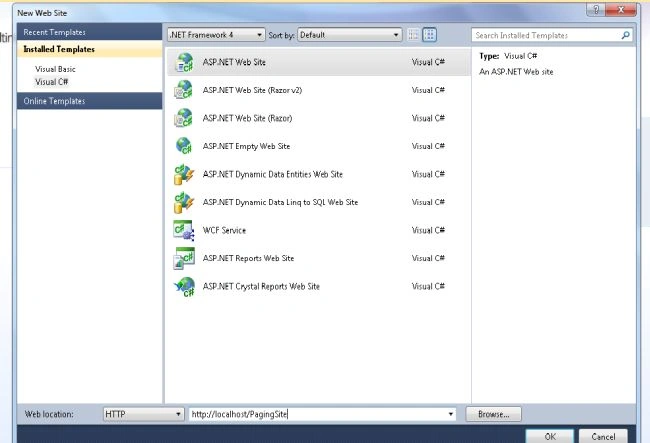
Create a new web site called <PagingSite> in Visual Studio 2010.
Step 4
Change the connection string in the web.config file according to your database server credentials.
<connectionStrings>
<add
name="connectionStringKey"
connectionString
="Data Source=server1;Initial Catalog=TestDatabase;uid=user1;pwd=password1"/>
</connectionStrings>
Step 5
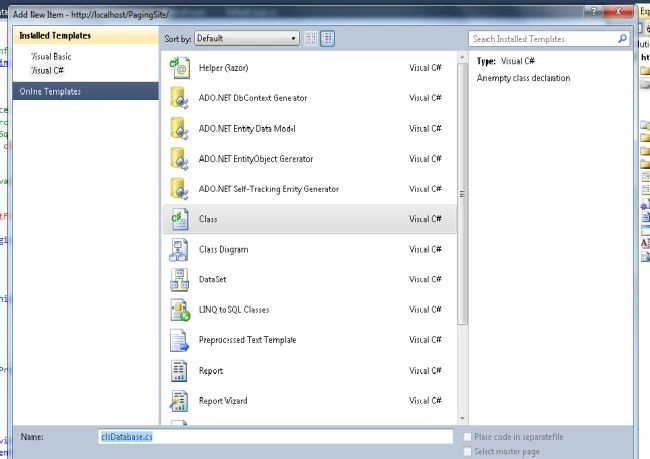
Create 2 classes called clsDatabase.cs and JobServices.cs as:
And write the following code
using System;
using
System.Collections.Generic;
using
System.Linq;
using
System.Web;
using
System.Data.SqlClient;
using
System.Data;
using
System.Configuration;
///
<summary>
/// Summary description
for clsDatabase
///
</summary>
public
class
clsDatabase
{
public clsDatabase()
{
//
// TODO: Add constructor logic
here
//
}
private
SqlConnection objConnection =
null;
private string
connectionString = string.Empty;
public
string ConnectionString
{
get {
return this.connectionString; }
set { this.ConnectionString
= value; }
}
///
<summary>
///
Open the connection.
///
</summary>
private
SqlConnection funOpenConnection()
{
try
{
string connStr =
"";
objConnection = new
SqlConnection();
this.connectionString =
ConfigurationManager.ConnectionStrings["connectionStringKey"].ToString();
//this.connectionString =
ConfigurationSettings.AppSettings["connectionStringKey"];
objConnection = new
SqlConnection(connectionString);
if (objConnection.State !=
ConnectionState.Open)
objConnection.Open();
}
catch (Exception
objException)
{
return
null;
}
return objConnection;
}
///
<summary>
///
Close the connection.
///
</summary>
public
void CloseConnection()
{
if (objConnection !=
null)
{
if (objConnection.State ==
ConnectionState.Open)
objConnection.Close();
}
}
///
<summary>
///
Close the connection.
///
</summary>
public
void funCloseConnection()
{
if (objConnection !=
null)
objConnection.Close();
}
///
<summary>
///
Release resources.
///
</summary>
public
void Dispose()
{
// make sure connection is closed
if (objConnection !=
null)
{
objConnection.Dispose();
objConnection = null;
}
}
public void
RunProcedure(string sProcName,
SqlParameter[] objaPrams,
out
DataSet objDataSet)
{
try
{
SqlDataAdapter
objDataAdapter = new
SqlDataAdapter();
SqlCommand objCommand
= funCreateCommand(funOpenConnection(), sProcName, objaPrams);
objDataAdapter.SelectCommand = objCommand;
objDataSet = new
DataSet();
objDataAdapter.Fill(objDataSet);
}
catch (Exception
ex) { objDataSet = null; }
finally {
this.CloseConnection(); }
}
private
SqlCommand funCreateCommand(SqlConnection
objConnection, string sProcName,
SqlParameter[] objaPrams)
{
SqlCommand objCommand =
new
SqlCommand(sProcName, objConnection);
objCommand.CommandType =
CommandType.StoredProcedure;
// add
proc parameters
if (objaPrams !=
null)
{
foreach (SqlParameter
objParameter in objaPrams)
objCommand.Parameters.Add(objParameter);
}
// return objaPrams
objCommand.Parameters.Add(
new
SqlParameter("ReturnValue",
SqlDbType.Int, 4,
ParameterDirection.ReturnValue,
false, 0, 0,
string.Empty,
DataRowVersion.Default,
null));
return
objCommand;
}
public
SqlParameter MakeInParameter(string
sParamName, SqlDbType objDbType,
int iSize, object
objValue)
{
return MakeParameter(sParamName,
objDbType, iSize, ParameterDirection.Input,
objValue);
}
///
<summary>
///
Make input param.
///
</summary>
///
<param name="sParamName">Name
of param.</param>
///
<param name="objDbType">Param
type.</param>
///
<param name="iSize">Param
size.</param>
///
<returns>New
parameter.</returns>
public
SqlParameter MakeOutParameter(string
sParamName, SqlDbType objDbType,
int iSize)
{
return MakeParameter(sParamName,
objDbType, iSize, ParameterDirection.Output,
null);
}
///
<summary>
///
Make stored procedure param.
///
</summary>
///
<param name="sParamName">Name
of param.</param>
///
<param name="objDbType">Param
type.</param>
///
<param name="iSize">Param
size.</param>
///
<param name="objDirection">Parm
direction.</param>
///
<param name="objValue">Param
value.</param>
///
<returns>New
parameter.</returns>
public
SqlParameter MakeParameter(string
sParamName, SqlDbType objDbType,
Int32 iSize,
ParameterDirection objDirection,
object objValue)
{
SqlParameter objParameter;
if (iSize > 0)
objParameter = new
SqlParameter(sParamName,
objDbType, iSize);
else
objParameter = new
SqlParameter(sParamName,
objDbType);
objParameter.Direction = objDirection;
if (!(objDirection ==
ParameterDirection.Output &&
objValue == null))
objParameter.Value = objValue;
return
objParameter;
}
}
Create another class called JobServices.cs
and write the following code:
using
System;
using
System.Collections.Generic;
using
System.Linq;
using
System.Web;
using
System.Data;
using
System.Data.SqlClient;
///
<summary>
/// Summary description
for JobServices
///
</summary>
public
class
JobServices
{
SqlParameter[] objParam;
clsDatabase objDatabase;
DataSet objDataSet;
public JobServices()
{
//
// TODO: Add constructor logic
here
//
}
public
DataSet GetAllJobs(int
PageNumber, int PageSize)
{
objDatabase = new
clsDatabase();
DataSet ds =
new
DataSet();
SqlParameter[]
objParameter = new
SqlParameter[2];
objParameter[0] = objDatabase.MakeInParameter("@PageNumber",
SqlDbType.Int, 4, PageNumber);
objParameter[1] = objDatabase.MakeInParameter("@PageSize",
SqlDbType.Int, 4, PageSize);
objDatabase.RunProcedure("DisplayDataPaging",
objParameter, out ds);
return ds;
}
}
Complete design of Default.aspx is
<%@
Page Title="Home
Page" Language="C#"
MasterPageFile="~/Site.master"
AutoEventWireup="true"
CodeFile="Default.aspx.cs"
Inherits="_Default"
%>
<asp:Content
ID="HeaderContent"
runat="server"
ContentPlaceHolderID="HeadContent">
<link
href="StyleSheet.css"
rel="stylesheet"
type="text/css"
/>
</asp:Content>
<asp:Content
ID="BodyContent"
runat="server"
ContentPlaceHolderID="MainContent">
<h2>
Implementation of SQL paging in ASP.Net using SQL Server, ASP.Net
and C#
</h2>
<asp:ScriptManager
ID="ScriptManagerID1"
runat="server">
</asp:ScriptManager>
<asp:UpdatePanel
ID="updatePanelDefaultPage"
runat="server"
ChildrenAsTriggers="true">
<ContentTemplate>
<div
class="questionDetail">
<div
class="noDataFound">
<asp:Label
ID="LabelMessage"
runat="server"
Visible="false"
Text="No Records
Found!"
ForeColor="Red"></asp:Label>
</div>
<ul>
<asp:Repeater
ID="repeaterLatestJobs"
runat="server"
OnItemDataBound="repeaterLatestJobs_ItemDataBound">
<ItemTemplate>
<li>
<div
style="width:
600px; float:
left;">
<a
class="LinkNormalGray"
href='<%#
DataBinder.Eval(Container.DataItem,"FullName")%>'>
<%#Server.HtmlDecode(DataBinder.Eval(Container.DataItem,"FullName").ToString())%></a>
| <span><a
class="LinkNormalBlue"
href='<%#
DataBinder.Eval(Container.DataItem,"Address1")%>'>
<%#
DataBinder.Eval(Container.DataItem,
"Address1")%>
</a></span>|
<span><a
href='<%#
DataBinder.Eval(Container.DataItem,"CITY")%>'
class="LinkRed">
<%#
DataBinder.Eval(Container.DataItem,
"CITY")%></a></span>
| <span><a
href='<%#
DataBinder.Eval(Container.DataItem,"Country")%>'
class="LinkNormalBlue">
<%#
DataBinder.Eval(Container.DataItem,
"Country")%></a>
</span>|
<span
class="LinkNormalGrayLight">
<%#DateTime.Parse(Eval("DOB").ToString()).ToString("MMM
dd, yyyy")%></span>
</div>
</li>
</ItemTemplate>
</asp:Repeater>
</ul>
</div>
<div
id="PagingRow"
runat="server">
<ul
class="paging">
<li>
<asp:LinkButton
ID="LinkButtonFirst"
runat="server"
Enabled="False"
Font-Bold="True"
CssClass="pagingSpritIcons
first" OnClick="LinkButtonFirst_Click"></asp:LinkButton>
</li>
<li>
<asp:LinkButton
ID="LinkButtonPrevious"
runat="server"
Enabled="False"
Font-Bold="True"
CssClass="pagingSpritIcons
previous" OnClick="LinkButtonPrevious_Click"></asp:LinkButton>
</li>
<li>
<asp:LinkButton
ID="LinkButtonNext"
runat="server"
Enabled="False"
Font-Bold="True"
CssClass="pagingSpritIcons
next" EnableViewState="true"
OnClick="LinkButtonNext_Click"></asp:LinkButton>
</li>
<li>
<asp:LinkButton
ID="LinkButtonLast"
runat="server"
Enabled="False"
Font-Bold="True"
CssClass="pagingSpritIcons
last" OnClick="LinkButtonLast_Click"></asp:LinkButton>
</li>
</ul>
</div>
</ContentTemplate>
</asp:UpdatePanel>
</asp:Content>
Step 6
The complete code of the Default.aspx.cs is:
using
System;
using
System.Collections.Generic;
using
System.Linq;
using
System.Web;
using
System.Web.UI;
using
System.Web.UI.WebControls;
using
System.Data;
using
System.Data.SqlClient;
using
System.Web.UI.HtmlControls;
using
System.Text;
using
System.Configuration;
public
partial class
_Default : System.Web.UI.Page
{
int PageSize =
int.Parse(ConfigurationManager.AppSettings["RecentJobsSize"].ToString());
protected
void Page_Load(object
sender, EventArgs e)
{
LabelMessage.Visible = false;
if (PagingRow.Visible ==
false)
{
PagingRow.Visible = true;
}
if (!IsPostBack)
{
funBindGrid();
}
}
public
int CurrentPage
{
get
{
// look for current page in ViewState
object current =
this.ViewState["CurrentPage"];
if (current ==
null)
return 1;
// default page index of 0
else
return (int)current;
}
set
{
this.ViewState["CurrentPage"]
= value;
}
}
protected
void LinkButtonPrevious_Click(object
sender, EventArgs e)
{
CurrentPage -= 1;
funBindGrid();
}
protected
void LinkButtonNext_Click(object
sender, EventArgs e)
{
CurrentPage += 1;
funBindGrid();
}
protected
void LinkButtonFirst_Click(object
sender, EventArgs e)
{
CurrentPage = 1;
funBindGrid();
}
protected
void LinkButtonLast_Click(object
sender, EventArgs e)
{
CurrentPage = int.Parse(ViewState["TotalPages"].ToString());
funBindGrid();
}
protected
void LinkButton1_Click(object
sender, EventArgs e)
{
LinkButton lnkbtn = (LinkButton)sender;
CurrentPage = (int.Parse(lnkbtn.Text));
funBindGrid();
}
private
void ShowPagingLinks()
{
if (CurrentPage ==
int.Parse(ViewState["TotalPages"].ToString()))
{
LinkButtonNext.Enabled =
false;
LinkButtonLast.Enabled = false;
}
else
{
LinkButtonNext.Enabled = true;
LinkButtonLast.Enabled = true;
}
if
(CurrentPage == 1)
{
LinkButtonPrevious.Enabled = false;
LinkButtonFirst.Enabled = false;
}
else
{
LinkButtonPrevious.Enabled =
true;
LinkButtonFirst.Enabled = true;
}
}
private
void funBindGrid()
{
try
{
JobServices
objAllJobs = new
JobServices();
DataSet objDataSet =
new
DataSet();
objDataSet = objAllJobs.GetAllJobs(CurrentPage, PageSize);
if
(objDataSet.Tables[1].Rows.Count > 0)
{
DataView jobs =
objDataSet.Tables[1].DefaultView;
repeaterLatestJobs.DataSource = jobs;
repeaterLatestJobs.DataBind();
int totalRecords =
int.Parse(objDataSet.Tables[2].Rows[0]["TotalRecords"].ToString());
if
(totalRecords % PageSize > 0)
{
PagingRow.Visible = true;
ViewState["TotalPages"]
= objDataSet.Tables[2].Rows[0]["TotalPages"].ToString();
ShowPagingLinks();
}
else
{
PagingRow.Visible = false;
ViewState["TotalPages"]
= (totalRecords % PageSize) - 1;
}
}
else
{
ShowError();
}
}
catch (Exception
objExecption)
{
}
}
private void
ShowError()
{
LabelMessage.Visible = true;
repeaterLatestJobs.DataSource = null;
repeaterLatestJobs.DataBind();
PagingRow.Visible = false;
}
protected
void ButtonSort_Click(object
sender, EventArgs e)
{
funBindGrid();
}
protected
void repeaterLatestJobs_ItemDataBound(object
sender, RepeaterItemEventArgs e)
{
}
}
Step 7
Compile and run the application. By
default, records from 1 to 10 are displayed and the result looks like this:
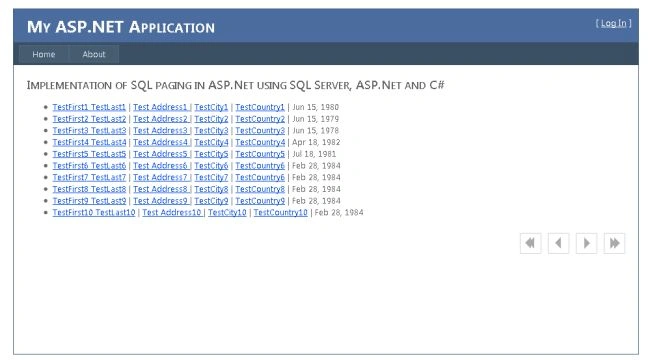
Now click on next, records from 11 to 20 are displayed and so on.
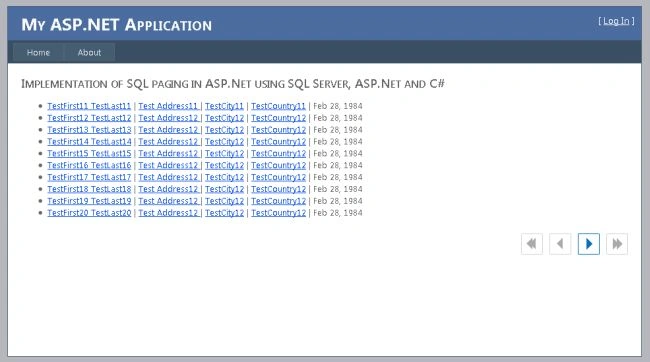
It means only 10 records comes from
the database as a result of the front end and so it is very quick in terms of
loading the page for the next set of records.
It is very useful and fast to access the data from the huge database records.
Happy coding.
Konemore StoryPosted Apr 20, 2018, 1:21 PM
What is RecentJobsSize
Pradip PandeyPosted Aug 6, 2012, 11:52 PM
Thanks Rohtash and yes we can display total no. of records with paging number, because if you see, the result returned by the stored procedure also contains total no. of records.
Rohatash KumarPosted Aug 6, 2012, 11:25 PM
Thanks so much Sir, I really appreciate your effort really I found this article useful. Can you display total number of records with paging number.