

Note. This is a series of articles related to Source Control. If you have read my other articles in this series, you may skip the top general part and jump to INTRODUCTION for the specific topic of this article.
This is a series of articles related to Source Control or Version Control issues, from a stand-alone app, such as MS SourceSafe, to a Server app, such as MS TFS (Team Foundation Server), to web services such as GitHub, AWS, and MS Azure DevOps. We have tried to categorize this series of articles as Source Control or Version Control, but this site does not have these categories. So, we put the articles in the DevOps category, as explained in the Wiki:
DevOps is a set of practices that combines software development (Dev) and IT operations (Ops). It aims to shorten the systems development life cycle and provide continuous delivery with high software quality.[1] DevOps is complementary to Agile software development; several DevOps aspects came from the Agile methodology.
The structure of this article series will cover:
- Stand Alone App:
- MS Source Safe
- Server App
- MS TFS (Team Foundation Server)
- Online (Cloud) Centralized Service:
- MS Azure: DevOps
- Boards
- Repos
- Pipelines
- Test Plans
- Artifacts
- GitHub
- AWS GitHub Enterprise
- MS Azure: DevOps
- Distributed App:
- Git
Because these are huge topics, I will not go step by step. Instead, each section will be relatively independent and will become a reading unit.
- Source Control (1), MS Source Safe --- Stand Alone App
- Source Control (2), MS TFS --- Centralized Server App
- Source Control (2-1), TFS --- Comparison
- Source Control (2-2), TFS --- Merge
- Source Control (2-3), TFS --- Shelving
- Source Control (3), MS Azure DevOps (GitHub, Jira) --- Centralized Service
- Source Control (4), Git --- Distributed App --- this article
- Source Control (4-1), Git --- Configuration
- Source Control (4-2), Git --- Configured to Connect to DevOps and GitHub
- Source Control (4-3), Git --- Cherry Pick in Visual Studio
- Source Control (4-4), Git --- Recover Git Tree: Reflog/Reset
- Source Control (4-5), Git --- Recover Deleted Branch
- Source Control (4-6), Git --- Revert
- Source Control (4.7), Git --- Get Specific Version or Commit
- Source Control (4.8), Git --- Get Specific Version or Commit in practice
- Source Control (4.9), Git --- Merge: Fetch, Pull, Push and Sync
- Source Control (5), GitHub access (setup connection)
- Source Control (6), DevOps access (setup connection)
- Source Control (7), GitLab access (setup connection and Clone to Local)
- Source Control (8), Git, Azure Repos, and Visual Studio (Interaction)
- Source Control (9), Push into Git Hub and DevOps
- Source Control (10), Git Hub, DevOps Publish
A - Introduction
In this article, we will give Git definition, history, and major features.
- A - Introduction
- B - Git Definition
- C - Git History
- D - Git Workflow
- E - Branch in Git
- F - Commands in Git
B - Git Definition
Git is an Free Open Source Distributed Version Control System.
- Control System: This basically means that Git is a content tracker. So Git can be used to store content — it is mostly used to store code due to the other features it provides.
- Version Control System: The code which is stored in Git keeps changing as more code is added. Also, many developers can add code in parallel. So Version Control System helps in handling this by maintaining a history of what changes have happened. Also, Git provides features like branches and merges, which I will be covering later.
- Distributed Version Control System: Git has a remote repository which is stored in a server and a local repository which is stored in the computer of each developer. This means that the code is not just stored in a central server, but the full copy of the code is present in all the developers’ computers. Git is a Distributed Version Control System since the code is present in every developer’s computer. I will explain the concept of remote and local repositories later in this article.
C - Git History
Git was originally authored by Linus Torvalds in 2005 for development of the Linux kernel, with other kernel developers contributing to its initial development. Since 2005, Junio Hamano has been the core maintainer. As with most other distributed version control systems, and unlike most client–server systems, every Git directory on every computer is a full-fledged repository with complete history and full version-tracking abilities, independent of network access or a central server.
Since its creation, Git has become the most popular distributed version control system, with nearly 95% of developers reporting it as their primary version control system as of 2022. There are many popular offerings of Git repository services, including DevOps, GitHub, SourceForge, Bitbucket and GitLab.
D - Git Workflow
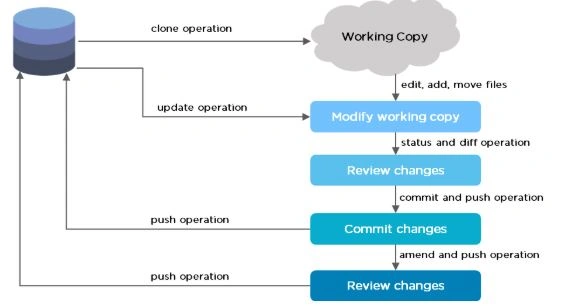
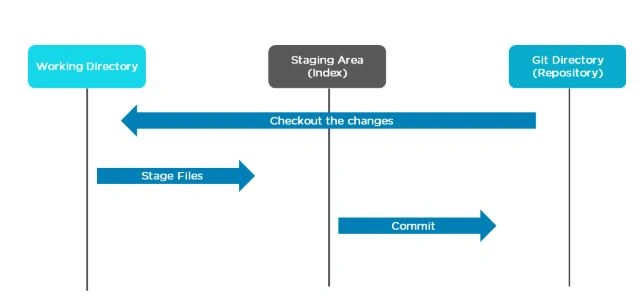
The Git workflow is divided into three states.
- Working directory - Modify files in your working directory
- Staging area (Index) - Stage the files and add snapshots of them to your staging area
- Git directory (Repository) - Perform a commit that stores the snapshots permanently to your Git directory. Checkout any existing version, make changes, stage them and commit.
E - Branch in Git
Branch in Git is used to keep your changes until they are ready. You can do your work on a branch while the main branch (master) remains stable. After you are done with your work, you can merge it with the main office.
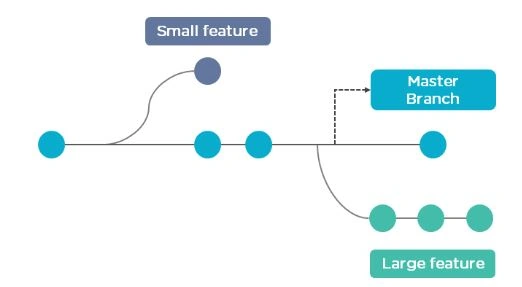
The above diagram shows there is a master branch. There are two separate branches called “small feature” and “large feature.” Once you are finished working with the two separate branches, you can merge them and create a master branch.
F - Commands in Git
- Create Repositories
git init - Make Changes
add
commit
status - Parallel Development
branch
merge
rebase - Sync Repositories
push
pull
add origin
References
Join the conversation! Your thoughts help the community grow.