
Introduction
In my previous article I described Sort Array in Ascending order and this article describes how to sort an array in descending order. It is very simple by just using math reverse. Here I have first sorted the array in ascending order and then reverse the array.
Use the following procedure to create it.
Step 1
First of all you must create a new Windows Store Application.
- Open Visual Studio 2012
- "File" -> "New" -> "Project..."
- Choose "Template" -> "Visual C#" -> "Window Store app"
- Choose "Blank App (XAML)" then rename the application
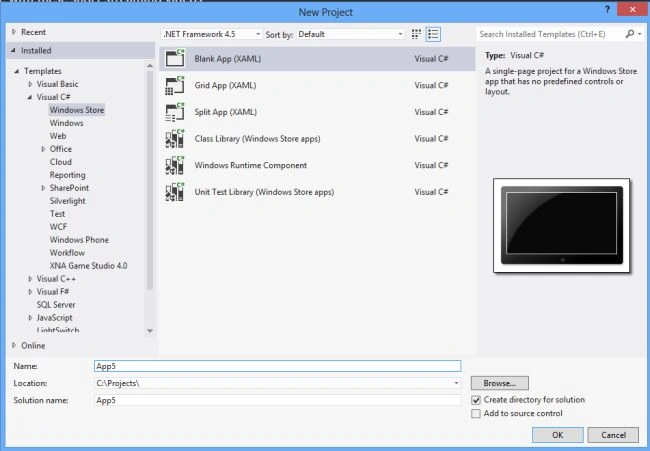
Step 2
Write the following XAML code in "Mainpage.Xaml" (that is available in Solution Explorer):
<Page
x:Class="array_sorting.MainPage"
xmlns="http://schemas.microsoft.com/winfx/2006/xaml/presentation"
xmlns:x="http://schemas.microsoft.com/winfx/2006/xaml"
xmlns:local="using:array_sorting"
xmlns:d="http://schemas.microsoft.com/expression/blend/2008"
xmlns:mc="http://schemas.openxmlformats.org/markup-compatibility/2006"
mc:Ignorable="d">
<Grid Background="Red">
<Grid.RowDefinitions>
<RowDefinition Height="76*"/>
<RowDefinition Height="46*"/>
<RowDefinition Height="45*"/>
<RowDefinition Height="42*"/>
<RowDefinition Height="45*"/>
<RowDefinition Height="514*"/>
</Grid.RowDefinitions>
<Grid.ColumnDefinitions>
<ColumnDefinition Width="149*"/>
<ColumnDefinition Width="287*"/>
<ColumnDefinition Width="242*"/>
<ColumnDefinition Width="688*"/>
</Grid.ColumnDefinitions>
<TextBlock Text="Enter the Array Element" FontFamily="Arial" FontSize="20" FontWeight="ExtraBold" Grid.Column="1" Grid.Row="1"></TextBlock>
<TextBox x:Name="textbox1" Grid.Column="2" Grid.Row="1" VerticalAlignment="Top" Height="32" Width="175" HorizontalAlignment="Left" />
<Button x:Name="button1" Grid.Column="2" Grid.Row="2" Background="Yellow" Foreground="Black" Width="150" VerticalAlignment="Top" Height="35" Content="Insert" Click="button1_Click" ></Button>
<TextBlock x:Name="text1" Grid.Column="3" Grid.Row="1" Foreground="White" FontSize="20" FontFamily="Arial" FontWeight="ExtraBold" ></TextBlock>
<Button x:Name="button2" Grid.Column="2" Grid.Row="3" Background="Yellow" Foreground="Black" Width="150" VerticalAlignment="Top" Height="35" Content="Show" Click="button2_Click" ></Button>
<TextBlock x:Name="text2" Grid.Column="3" Grid.Row="3" Foreground="White" FontSize="20" FontFamily="Arial" FontWeight="ExtraBold" ></TextBlock>
<Button x:Name="button3" Grid.Column="2" Grid.Row="4" Background="Yellow" Foreground="Black" Width="237" VerticalAlignment="Top" Height="35" Content="Show After descending sort" Click="button3_Click" ></Button>
<TextBlock x:Name="text3" Grid.Column="3" Grid.Row="4" Foreground="White" FontSize="20" FontFamily="Arial" FontWeight="ExtraBold" ></TextBlock>
</Grid>
</Page>
Step 3
Now write the following C# code for the button within "Mainpage.Xaml.cs".
using System;
using System.Collections.Generic;
using System.IO;
using System.Linq;
using Windows.Foundation;
using Windows.Foundation.Collections;
using Windows.UI.Xaml;
using Windows.UI.Xaml.Controls;
using Windows.UI.Xaml.Controls.Primitives;
using Windows.UI.Xaml.Data;
using Windows.UI.Xaml.Input;
using Windows.UI.Xaml.Media;
using Windows.UI.Xaml.Navigation;
namespace array_sorting
{
public sealed partial class MainPage : Page
{
public MainPage()
{
this.InitializeComponent();
}
protected override void OnNavigatedTo(NavigationEventArgs e)
{
}
int[] arr = new int[5];
int i = 0;
private void button1_Click(object sender, RoutedEventArgs e)
{
if (textbox1.Text.Length > 0)
{
if (i < arr.Length)
{
arr[i] = int.Parse(textbox1.Text);
i++;
textbox1.Text = " ";
}
else
{
text1.Text = "Sorry Array can contain only 5 element";
}
}
}
private void button2_Click(object sender, RoutedEventArgs e)
{
foreach (int a in arr)
{
text2.Text += a + " ";
}
}
private void button3_Click(object sender, RoutedEventArgs e)
{
Array.Sort(arr);
Array.Reverse(arr);
foreach (int a in arr)
{
text3.Text += a + " ";
}
}
}
}
Step 4
Now Run your app.

Join the conversation! Your thoughts help the community grow.