

Description
A few days before writing this article I was thinking that Microsoft built Windows 8 as a universal operating system for all devices, like Desktop, Smart Phone, Surface Tablet. But my assumption was wrong, because the Window Phone 8 OS is the second generation of mobile operating systems from Microsoft that runs under the mobile hardware but Windows RT and Windows 8 OS that are different versions of the Windows 8 OS runs on Desktops & Tablets respectively. Windows Store Apps are different from Windows Phone 8 Applications, they are totally different depending on their platforms, UI, API's and so on. Windows Phone 8 applications only run on Windows Phone 8 and Windows Store Applications only run on Windows RT and Windows 8. But this doesn't meant that they don't have any similarity. Windows Phone 8 and Windows 8 / Windows RT have the same Kernel.
Some differences between Windows Store App & Windows Phone 8 App
1. App Store
-
Windows Store App
The Windows Store is growing day by day; according to WinBeta, the Windows Store has nearly 109,939 total apps. Its apps are easily installed via the Windows Store app on your Windows 8 machine. You can install it only via Windows Store and can also upload your apps to the store that will go under the certification process. -
Windows Phone 8 Marketplace
Microsoft has announced in their blog post that Windows Phone 8 Marketplace has crossed the figure of 160,000+ apps and games. Also, the apps in the Windows Store currently drive more than 200 million monthly downloads, with a 2.5x increase in daily revenue since the launch of Windows Phone 8. Assuming the growth continues, it should be north of 3x by the holiday sales cycle.
2. Platform
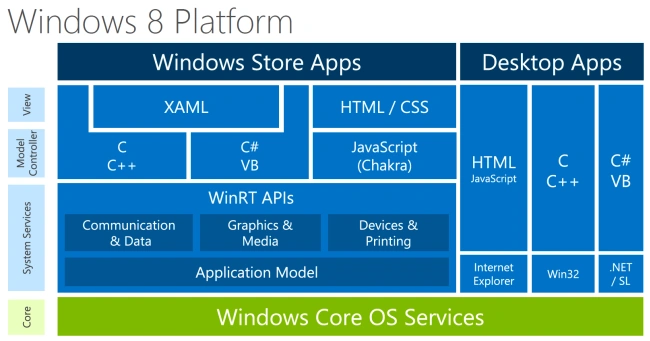
- Windows 8 Platform
You can develop Windows Store App using XAML with C#/VB.NET/C++, HTML/JavaScript/CSS , Embarcadero Prism and so on, designed mainly for Touch.
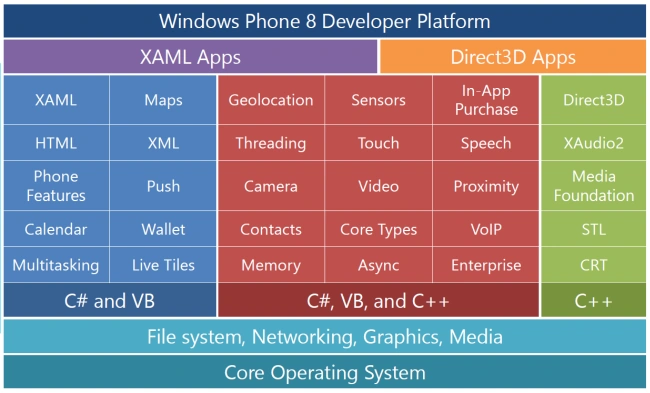
- Windows Phone 8 Developer Platform
You can develop Windows Phone 8 App using:
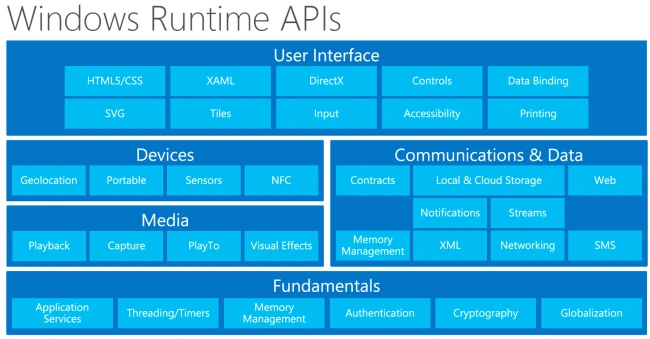
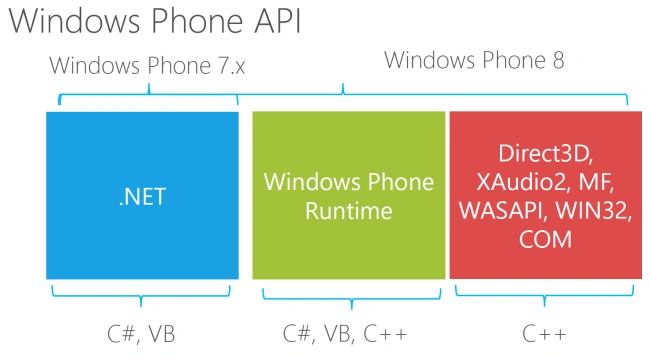
3. API
Both platforms support various API's.
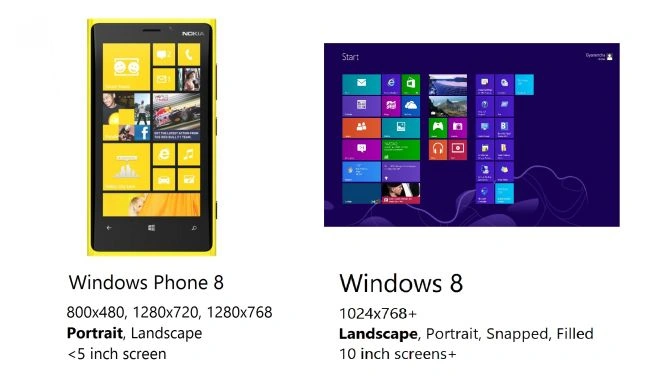
4. Screen Size
As we know, both store apps are used on various devices, like Desktop, Smartphone or Tablets so it means they have various screen sizes also. Here we can see the difference:
5. Controls
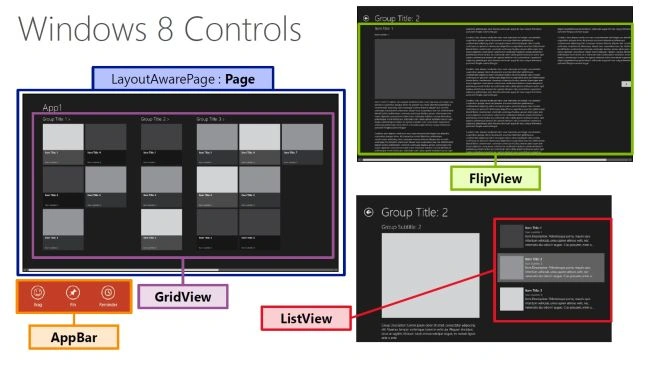
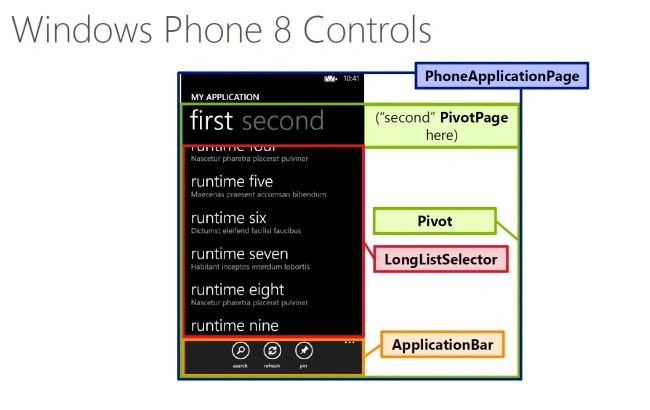
Each platform has its own set of XAML controls. Some controls are available in both platforms but they are located in different namespaces. We recommend you design your own user controls separately for each platform. It will help to maintain a consistent UX on each platform while reducing the bugs from porting the XAML. Check out some basic controls according to MSDN:
Windows 8 Controls
-
Page is the root page element
-
Use the ListView to show vertically scrolling content
-
Use the FlipView control for paging content horizontally
-
Use the AppBar control
-
Use GridView to group content in a grid
Windows 8 Controls
- PhoneApplicationPage control is the root page element
- Use the LongListSelector control to show vertically scrolling content
- Use the Pivot control for paging content horizontally
- Use the ApplicationBar control
Gyanender SharmaPosted Aug 1, 2013, 12:09 PM
Thanks Sir
Dinesh BeniwalPosted Aug 1, 2013, 11:15 AM
Good Start Gyanendar