

Introduction
This article explores a multi-flow design approach to resolving approval dependencies, where one flow initiates the approval process and another waits for and reacts to the approval result. By separating responsibilities and orchestrating communication between flows, this pattern enables better scalability, more apparent logic, and easier troubleshooting. Through this approach, you can build approval workflows that are more reusable and easier to extend as business requirements evolve.
Scenario Overview
An employee submits a leave request that requires manager approval. Based on the approval decision:
If approved, the employee's leave balance is updated, and the leave is confirmed.
If rejected: The request is marked as rejected, and the status gets updated accordingly.
At the same time, specific actions - such as logging the request and updating team calendars - need to happen immediately after submission.
Problem
In a traditional single-flow design, the workflow must wait for the manager's approval response before moving to the next step. This waiting behaviour creates a Blockage.
Solution: Multi-Flow Design
To address this, the process is divided into multiple flows with clear responsibilities:
Flow 1 (Submission & Parallel Tasks)
This flow is triggered when a leave request is submitted. It immediately:Logs the request for auditing
Generates a request ID
Updates calendars or schedules tentatively
It also initiates the approval process but does not wait for the outcome.
Flow 2 (Approval Handling)
This flow is dedicated to handling the manager's approval response. Once the decision is made:If approved, it updates the leave balance and finalizes the request.
If rejected, it marks the request as rejected .
By separating approval handling from other tasks, the system continues to operate efficiently without being blocked by approval delays. This multi-flow design results in better performance.
Prerequisites
Before implementing this , ensure the following:
One Data source like SharePoint or Dataverse for logging and one for employee requests.
Below are the steps for Multi-Flow Design:
Flow 1:
Triggered when a new item is added to the Employee Leave Requests list, starts the approval process, and logs the request in the Leave Request Logs list.
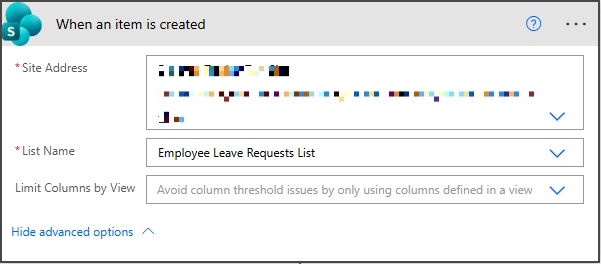
Step 1. Trigger: When an item is created in Employee Leave Requests list
[Note: Your flow can be triggered in different ways: when a user creates a request in the list, when Power Apps calls the flow with an Employee ID, or when Power Apps creates a list entry that triggers the flow.]
Site Address: Enter the site containing your list.
List Name: Choose your request list.
Step 2. Create an approval: Initiating the approval process
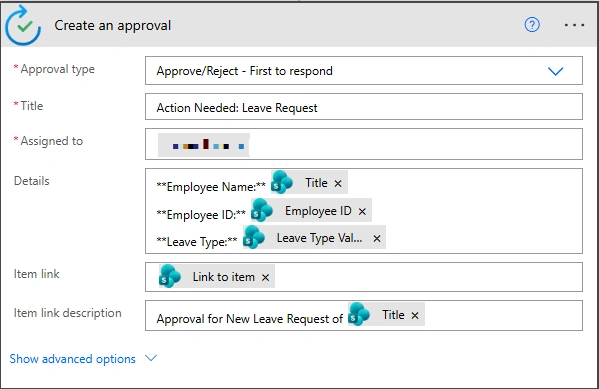
Approval type: Select the approval type according to your requirement. Here, I am choosing 'First to respond' because I want the flow to take action as soon as any one approver responds.
Title: Enter the email subject.
Assigned to: Add manager email(s), separated by commas if multiple.
Details: Include info about the leave request, like employee name, ID, and leave type.
Employee Name: Select Employee Name from the trigger's dynamic content.
triggerOutputs()?['body/Title']Employee ID: Select Employee ID from the trigger's dynamic content.
triggerOutputs()?['body/EmployeeID']Leave Type: Select Leave Type from the trigger's dynamic content.
triggerOutputs()?['body/LeaveType/Value']Item Link: Select Item link from the trigger's dynamic content.
triggerOutputs()?['body/{Link}']Item link Description: Add text describing the link.
Step 3. Create item: Create entry in the Leave Request Logs list
Site Address: Enter the site containing your list.
List Name: Choose your log list.
Employee Name: Select Employee Name from the trigger's dynamic content.
triggerOutputs()?['body/Title']Employee ID: Select Employee ID from the trigger's dynamic content.
triggerOutputs()?['body/EmployeeID']Leave Type: Select Leave Type from the trigger's dynamic content.
triggerOutputs()?['body/LeaveType/Value']Approval ID: Select Approval ID from the create an approval's dynamic content.
outputs('Create_an_approval')?['body/name']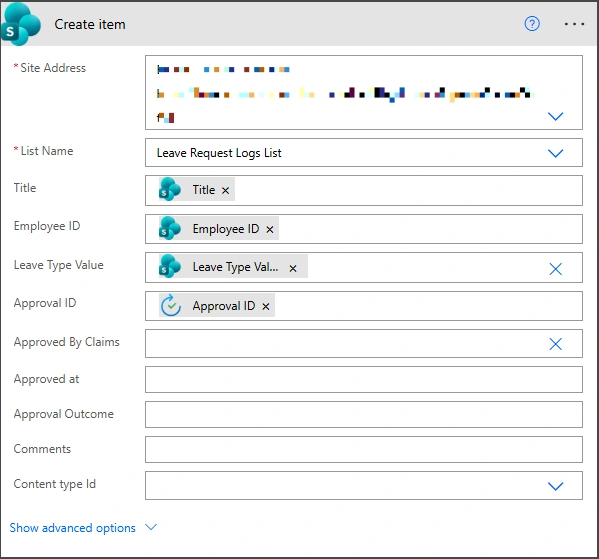
Flow 2:
When a new log is created, wait for approval, then update the request in both Leave Request Logs and Employee Leave Requests lists.
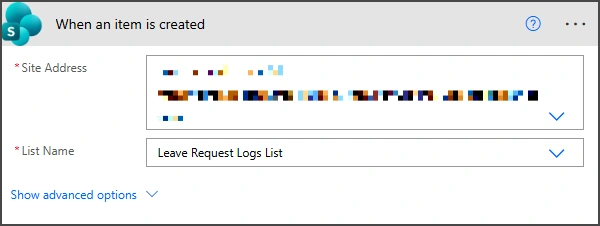
Step 1. Trigger: When an item is created in Leave Request Logs list
Site Address: Enter the site containing your list.
List Name: Choose your log list.
Step 2. Wait for an approval: Waits for the approval response
Approval ID: Select Approval ID from the trigger's dynamic content.
triggerBody()?['ApprovalID']
Step 3. Update item: Updates the Leave Request Logs list with approval details, such as who, when, what is outcome and comments of approval.
Site Address: Enter the site containing your list.
List Name: Choose your log list.
ID: Select ID from the trigger's dynamic content.
triggerOutputs()?['body/ID']Approved By Claims: Select the email of the approver from the first response and format it.
concat('i:0#.f|membership|',first(outputs('Wait_for_an_approval')?['body/responses'])?['responder/email'])Approved at: Capture the current date and time when approval is completed.
utcNow()Approval Outcome: Check if the outcome is 'Approve' or 'Reject' and label accordingly
if(equals(outputs('Wait_for_an_approval')?['body/outcome'],'Approve'),'Approved','Rejected')Comments: Get the comments from the first approver's response
first(outputs('Wait_for_an_approval')?['body/responses'])?['comments']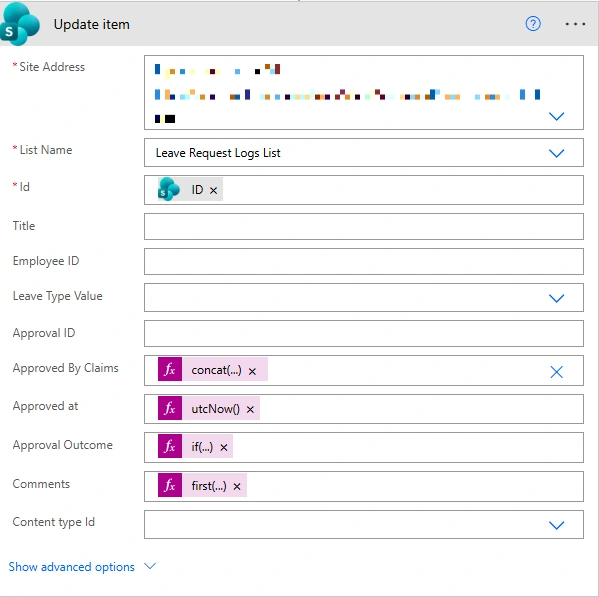
Step 4. Get item: Gets the requester's employee ID
Site Address: Enter the site containing your list.
List Name: Choose your request list.
Filter Query: Added a filter query for the requested employee's ID. Use the internal column name that stores the Employee ID.
EmployeeID eq '@{outputs('Update_item')?['body/EmployeeID']}'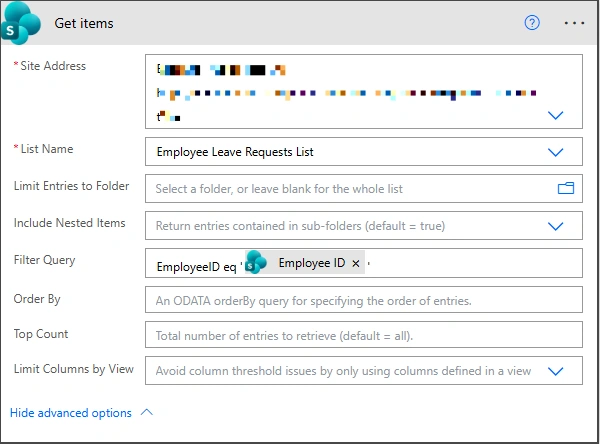
Step 5. Update item: Updates the Employee Leave Requests list with approval details, such as who, when, what is outcome and comments of approval.
Site Address: Enter the site containing your list.
List Name: Choose your request list.
ID: Gets the ID of the first item from the 'Get items' action.
first(outputs('Get_items')?['body/value'])?['ID']Manager Name Claims: Select the email of the approver from the first response and format it.
concat('i:0#.f|membership|',first(outputs('Wait_for_an_approval')?['body/responses'])?['responder/email'])Leave Balance Updated: Check if the outcome is 'Approve' or 'Reject' and labels accordingly.
if(equals(outputs('Wait_for_an_approval')?['body/outcome'],'Approve'),true,false)Approved at: Capture the current date and time when approval is completed.
utcNow()Approval Outcome: Check if the outcome is 'Approve' or 'Reject' and label accordingly
if(equals(outputs('Wait_for_an_approval')?['body/outcome'],'Approve'),'Approved','Rejected')Comments: Get the comments from the first approver's response
first(outputs('Wait_for_an_approval')?['body/responses'])?['comments']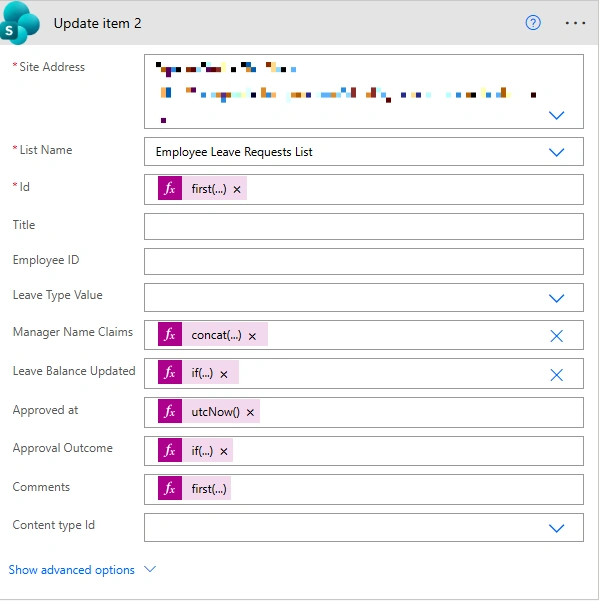
Conclusion
A multi-flow design processes leave requests efficiently, running parallel tasks immediately and handling approvals separately.
Join the conversation! Your thoughts help the community grow.