

The deployment of components from the lower environment to the higher environment is always an important aspect in any project implementation, and for products like Dynamics CRM wherein we have a solution containing all the required components, packing and unpacking is an important step for keeping track of changes that have been deployed over the target environments.
Solution packager plays an important role in unpacking/packing solutions that have been deployed for Dynamics CRM, and it’s part of the tool suite offered by Microsoft.
Sample Command for Solution Packager
SolutionPackager.exe /action:Pack: Extract /zip file: "Folder Path" /folder: "Folder Path" /map: "Mapping File Path"
To extract components from solutions exported out from Dynamics CRM, an individual has to pass a specific set of parameters
- Extract/ Pack: Information for action to be performed by Solution Packager
- /zip: Information of the folder containing the solution that needs to be extracted
- /folder: Information of the folder wherein we have extracted components from the solution
- /loc: Information on whether we want the language packs to be extracted from the solution or not
- /map: It's one of the important parameters, wherein the path of the Mapping File is passed to the Solution Packager, to share the information of the source and target file which needs to be referred to during the packaging of the solution.
Importance of Map.XML
- Map.XML plays an eminent role in the packing of solutions that will be deployed in the Target Environment.
Scenario
- Let's say we have a team of 4 developers, and the solution that needs to be deployed in the Target Environment has 4 Javascript files
- Individual developers will be uploading the changes to the environment of Dynamics CRM and will be committing the code to the Repository
- As an industry standard, source control is always the Single Source of Truth, so now while packing the solution for deployment we need to share the path of the original file in the source control folder in the local repository folder.
- Now let’s say we have 200 files that need to be mapped so to create all the mapping for all the files manually will be a tiresome job, and here the logic that has been shared will be assisting you to generate the solution.
Screenshot of Sample Map.XML file
- Source – Path of the file in the Web Resource folder of the extracted solution
- To – Path of the file in the local code repository, usually, the path is relative

Screenshot of Sample Project in Visual Studio
- Have created separate projects in Visual Studio for,
- Plugins
- Web Resouces – This will contain all JS: HTML
- Workflow – Code Activity
- Azure Plugins
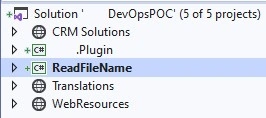
- In this Solution,
- CRM Solution Folder will contain the extracted solution which has been downloaded from the source environment
- It will have all the files and Web resources as shown in the screenshot
- During packing of the solution, we will need a mapping file that will pass the information to SolutionPackager about the source and target location of the file.
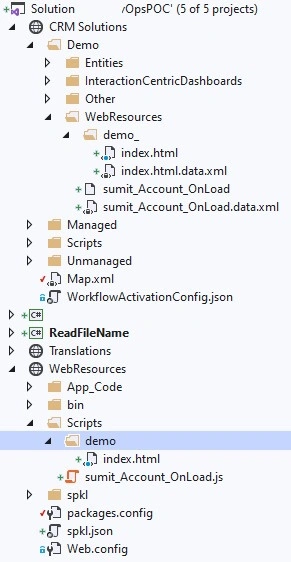
- Usually, the DevOps engineer creates the same manually for the first time, then moving ahead the developer needs to keep the file updated whenever a new file is introduced. If the developers are making changes to the existing file, no action needs to be undertaken
Steps for Programmatically Creating the Mapping File
- Create a project of type Console Application (.Net Framework) or you may load the attached project in Visual Studio 2017 or above.
Explanation to code
- It’s a console application performing the below steps
- Two variables have been declared
- Source Folder – Path for web resource folder of exported/extracted solution
- Target Folder – Path for repository code folder where the files exist
- Code reads the name of all files in the directory along with all subfolders
- Directory.GetFiles(solutionDirectoryPath, "*.*", SearchOption.AllDirectories).
- Post which search is undertaken for the matching file in the repository folder, and then creating a mapping of the same
- While creating the mapping file we used “String. Format” to format the output in the desired way
- Have used the Logger class, where we can update the path for the output file.
Screenshot for sample code
Program. cs -- Class
public static void Main(string[] args)
{
    string DirectoryPath = @"C:\Sumit\Work\WebResources\Scripts";
    string updatedPath = "..\\..";

    string finalPath = string.Empty;
    string mappingFilePath = string.Empty;

    string solutionDirectoryPath = @"C:\Sumit\Work\CRM Solutions\Demo\WebResources";
    string[] solutionFilePaths = Directory.GetFiles(solutionDirectoryPath, "*.*", SearchOption.AllDirectories);
    string solutionFinalPath = string.Empty;
    string mappingSolutionFilePath = string.Empty;
    string sourceFilePath = string.Empty;

    try
    {
        for (int i = 0; i < solutionFilePaths.Length; i++)
        {
            solutionFinalPath = solutionFilePaths[i];
            int filePathLength = solutionFinalPath.Length;

            if (!solutionFinalPath.Contains("data.xml"))
            {
                sourceFilePath = solutionFinalPath;
                int fileFormatPosition = 0;
                if (sourceFilePath.Contains('.'))
                {
                    fileFormatPosition = sourceFilePath.LastIndexOf(".");
                    sourceFilePath = sourceFilePath.Substring(0, ((fileFormatPosition)));
                }

                int startIndexWebResource = sourceFilePath.IndexOf("WebResources");
                sourceFilePath = sourceFilePath.Substring(((startIndexWebResource)));

                Logger.Write(string.Format("{0}{1}{2}", "<FileToFile map=\"", sourceFilePath, "\""));

                int charPosition = solutionFinalPath.LastIndexOf("\\");
                string fileName = solutionFinalPath.Substring(charPosition + 1, (filePathLength - (charPosition + 1)));

                string[] filePaths = Directory.GetFiles(DirectoryPath, string.Format("{0}.*", fileName), SearchOption.AllDirectories);
                for (int j = 0; j < filePaths.Length; j++)
                {
                    finalPath = filePaths[j].Replace(DirectoryPath, updatedPath);
                    mappingFilePath = String.Format("   to=\"{0}{1}", finalPath, "\" />");
                    Logger.WriteLine(mappingFilePath);
                }
            }
        }

        Logger.SaveLog(true);
    }
    catch (Exception ex)
    {
        Logger.WriteLine("Cannot open TextFile.txt for writing");
    }
}
Logger. cs Class
public static void SaveLog(bool Append = false, string Path = @"C:\Sumit\Work\C\Map.txt")
{
    if (LogString != null && LogString.Length > 0)
    {
        if (Append)
        {
            using (StreamWriter file = System.IO.File.AppendText(Path))
            {
                file.Write(LogString.ToString());
                file.Close();
                file.Dispose();
            }
        }
        else
        {
            using (System.IO.StreamWriter file = new System.IO.StreamWriter(Path))
            {
                file.Write(LogString.ToString());
                file.Close();
                file.Dispose();
            }
        }
    }
}
Screenshot for sample mapping file generated by an application.
<FileToFile map="WebResources\sumit_Account_OnLoad" to="..\..\sumit_Account_OnLoad.js" />
<FileToFile map="WebResources\demo_\index" to="..\..\demo\index.html" />
Join the conversation! Your thoughts help the community grow.