

Introduction
Smoke testing, often referred to as build verification testing, is a preliminary testing process used to evaluate the basic functionality of a software build. Its primary goal is to ensure that the core features of an application work correctly, acting as a gatekeeper before more extensive testing phases like functional or regression testing. By catching critical issues early, smoke testing saves time and resources, ensuring that only stable builds proceed further in the development cycle.
Smoke Testing vs. Sanity Testing
Smoke testing is often confused with sanity testing, but they serve distinct purposes:
-
Smoke Testing: Verifies the overall stability of a build by testing critical functionalities. It is performed early in the testing cycle and is broader in scope.
-
Sanity Testing: Focuses on specific changes or fixes, ensuring they work as expected without affecting other functionalities. It is narrower and typically performed after smoke testing.
For example, in a web application, a smoke test might check if users can log in and navigate to the homepage, while a sanity test might verify that a newly added "forgot password" feature works correctly.
Types of Smoke Testing
Smoke testing can be categorized into three main approaches, each suited to different project needs:
Manual Smoke Testing
Testers manually execute a small set of test cases to verify critical functionalities. This method is flexible and useful for projects with infrequent builds or when automation is not yet implemented. However, it can be time consuming and prone to human error.
Automated Smoke Testing
Automated scripts are used to run predefined test cases, making the process faster, repeatable, and consistent. This is ideal for continuous integration/continuous deployment (CI/CD) pipelines where frequent builds require rapid validation.
Hybrid Smoke Testing
Combines manual and automated approaches. Automation handles repetitive tasks, while manual testing verifies complex scenarios that require human judgment. This method balances speed and thoroughness, often used in agile environments.
Tools for Smoke Testing
Several tools streamline smoke testing, catering to different testing needs:
-
Selenium: An open-source framework for automating web application testing across browsers. It supports multiple programming languages like Java, Python, and C#.
-
Playwright: A modern automation tool for testing web applications, offering cross-browser support and faster execution than Selenium.
-
BrowserStack: Provides a cloud-based testing environment for manual and automated tests across various devices and browsers.
-
Cypress: A JavaScript-based tool for end-to-end testing, known for its fast execution and developer-friendly interface.
These tools enhance efficiency, especially in automated and hybrid smoke testing, by integrating with CI/CD pipelines and providing detailed test reports.
Example. Smoke Testing an e-Commerce Website
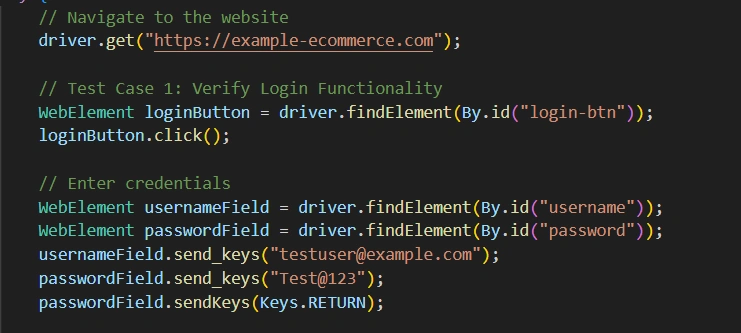
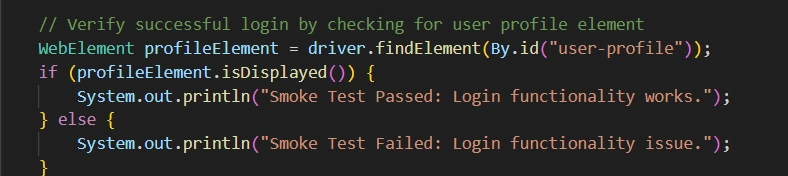
To illustrate smoke testing, consider an e-commerce website with core functionalities like user login, product browsing, cart management, and checkout. Below is an example of a smoke test suite, including test cases and a sample automated test script using Selenium with Java.
Smoke Test Cases
1. Login Functionality: Verify that users can log in with valid credentials. Sample Java code is as follows:
2. Homepage Navigation: Confirm that the homepage loads and navigation menus are functional. Sample Java code is as follows:
3. Add to Cart: Ensure users can add a product to their cart.
4. Checkout Initiation: Check that the checkout process starts without errors.
Conclusion
Smoke testing is an essential practice in software development, acting as a quick and effective way to validate the stability of a software build. By focusing on critical functionalities, it ensures that only reliable builds proceed to further testing, saving time and resources. With manual, automated, or hybrid approaches, and tools like Selenium, Playwright, and Testsigma, teams can implement smoke testing efficiently. An example of testing an e-commerce website demonstrates its practical application, highlighting its role in catching major defects early. By incorporating smoke testing into the development process, teams can enhance software quality, streamline workflows, and deliver robust applications with confidence.
Join the conversation! Your thoughts help the community grow.