
Introduction
Ajax (Asynchronous JavaScript and XML) is a new web development technique used for interactive websites. With AJAX help we can develop web applications and retrieve small amounts of data from a web server. AJAX consists of a different type of technology.
- JavaScript
- XML
- Asynchronous Call to the server
SliderShowExtender
SlideShow is an extender that targets image controls. You can provide it with buttons to hit previous, next and play. The Slideshow is to play automatically on rendering, allowing it to loop through the images in a round robin fashion and also set the interval for slide transitions. You can use a page method to supply images to the slide show or use a webservice.
Property
- TargetControlID
- NextButton
- PreviousButton
- ImageDescriptionLabelID
- SlideShowServiceMethod
- PlayButtonID
- AutoPlay
Step 1 : Open Visual Studio 2010
- Go to File->New->WebSite
- Select ASP.NET WebSite
Step 2 : Go to Solution Explorer and right-click.
- Select Add->New Item
- Select WebForm
- Default.aspx page open
Step 3 : Open Default.aspx page and click in [Design option].
- Drag and drop Label, Button, Image, ScriptManagerControl from ToolBox
Step 4 : Now go to the Solution Explorer and make image folder "Raj" and image.
- Right-click on folder and select Add Existing Item
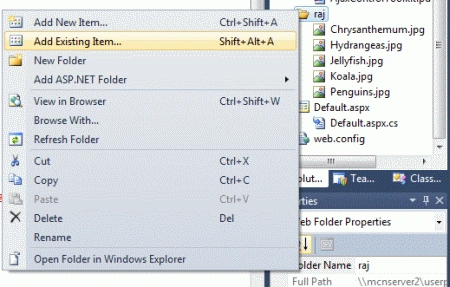
Step 5 : Now go to the Default.aspx [Design] option and drag the image control from the Toolbox.
Code
<asp:Image ID="Image1" runat="server" ImageUrl="~/raj/Chrysanthemum.jpg" Width="300px" />
Step 6 : Now drag SliderShowExtender control from the Toolbox.
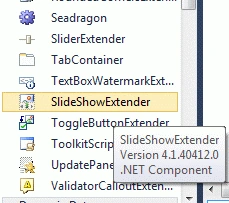
Step 7 : Now we define all properties for the sliderShowcontrol.
Code
<asp:SlideShowExtender ID="SlideShowExtender1" runat="server" TargetControlID="Image1" AutoPlay="true" NextButtonID="Button1" PreviousButtonID="Button2" ImageDescriptionLabelID="Label1" SlideShowServiceMethod="Slides" PlayButtonID="Button3" PlayButtonText="Play"
Loop="true">
</asp:SlideShowExtender>
Step 8 : Go to the Default.aspx[Source] option to write code.
Code
<title> my ajax application </title>
<style type="text/css">
body
{
margin:50px 0px; padding:0px;
text-align:center;
}
.Image
{
width:475px;
margin:0px auto;
text-align:center;
padding:20px;
border:1px dashed gray;
background-color:Silver;
}
</style>
</head>
<body>
<form id="form1" runat="server">
<asp:ScriptManager ID="ScriptManager1" runat="server">
</asp:ScriptManager>
<div class= "Image">
<asp:Image ID="Image1" runat="server" ImageUrl="~/raj/Chrysanthemum.jpg" Width="300px" />
</div>
<div>
<asp:Label ID="Label1" runat="server" Text="my image"></asp:Label>
<asp:Button ID="Button1" runat="server" Text="Next" />
<asp:Button ID="Button2" runat="server" Text="Prev" />
<asp:Button ID="Button3" runat="server" Text="Button" />
</div>
<asp:SlideShowExtender ID="SlideShowExtender1" runat="server" TargetControlID="Image1" AutoPlay="true" NextButtonID="Button1" PreviousButtonID="Button2" ImageDescriptionLabelID="Label1" SlideShowServiceMethod="Slides" PlayButtonID="Button3"
PlayButtonText="Play" Loop="true">
</asp:SlideShowExtender>
</form>
Step 9 : Go to the Default.aspx.cs file option to write code.
Code
using System;
using System.Collections.Generic;
using System.Linq;
using System.Web;
using System.Web.UI;
using System.Web.UI.WebControls;
using AjaxControlToolkit;
public partial class _Default : System.Web.UI.Page
{
protected void Page_Load(object sender, EventArgs e)
{
}
[System.Web.Services.WebMethod]
[System.Web.Script.Services.ScriptMethod]
public static AjaxControlToolkit.Slide[] Slides()
{
AjaxControlToolkit.Slide[] imgSlide = new AjaxControlToolkit.Slide[4];
imgSlide[0] = new AjaxControlToolkit.Slide("~/raj/Hydrangeas.jpg", "Hydrangeas ","Hydrangeas");
imgSlide[1] = new AjaxControlToolkit.Slide("~/raj/Jellyfish.jpg", "Jellyfish","Jellyfish " );
imgSlide[2] = new AjaxControlToolkit.Slide("~/raj/Koala.jpg", "Koala", "Koala");
imgSlide[3] = new AjaxControlToolkit.Slide("~/raj/Penguins.jpg", "Penguins","Penguins");
return (imgSlide);
}
}
Step 10 : Now we define the CSS.
Code
<style type="text/css">
body
{
margin:50px 0px; padding:0px;
text-align:center;
}
.Image
{
width:475px;
margin:0px auto;
text-align:center;
padding:20px;
border:1px dashed gray;
background-color:Silver;
}
</style>
Step 11 : Now run the application by pressing F5.
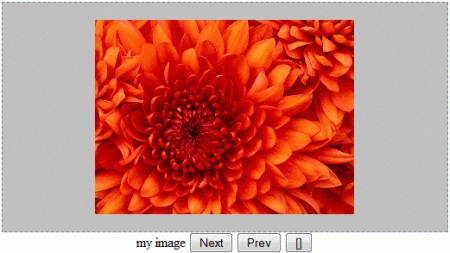
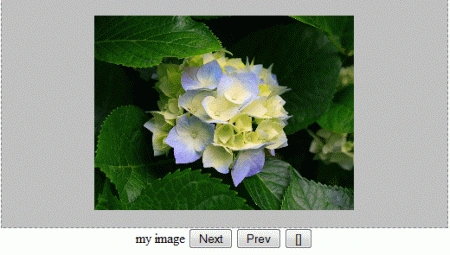
Step 12 : Now click on the next Button; the following output will be shown.
Resource
DropShadowExtender Control in AJAX Using ASP.NET
RangeValidator Control With AJAX Using ASP.NET
ConfirmButtonExtender Control With AJAX Using ASP.NET
Manav PandyaPosted Sep 19, 2016, 5:58 AM
Nice one sir ...
Rick WarnerPosted Feb 23, 2012, 10:42 AM
I'm not able to get Next, Previous and Play buttons to work. Only can see imsge1. What should I check? Also, what adjustments will I need to make if I add a master page?