

.slice( start, end[Optional] )
Description
This method selects a subset of the matched elements by giving a range of indices. In other words, it gives the set of DOM elements on the basis of its parameter (start, end).
Start
This is the first and mandatory parameter of the Slice method. This specifies from where to start to select the elements. The supplied index is zero-based. The Starting index can be a negative number; in other words, the elements are being selected from the end of the set, rather than the beginning.
End
This is an optional parameter. It specifies the range of the selection. This indicates where to stop the selection of elements, excluding end element. This also uses a 0-based position. If this parameter is not specified than all elements are selected from the starting index in the result.
Note
The Negative Indices is started from -1. This last element is denoted by index -1 and so on.
Let's see some small examples to understand it.
Here is my style,
- <style>
- .selected { color:red; }
- </style>
- <body>
- <div>
- <ul>
- <li>Item 1</li>
- <li>Item 2</li>
- <li>Item 3</li>
- <li>Item 4</li>
- <li>Item 5</li>
- </ul>
- </div>
- </body>
Now, here is the script,
- <script language="javascript" type="text/javascript">
- $(document).ready(function () {
- $("li").slice(0, 1).addClass("selected"); });
- <script>
If I want only the first element to be selected then I use the slice method.
Then, my query will be,
Result
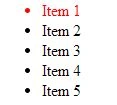
If I want to make the background Black for items 3, 4 and 5 then:
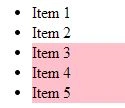
Result
Then, my query will be,
- $("li").slice(0, 1).addClass("selected");
If I want to make the background Black for items 3, 4 and 5 then:
- $('li').slice(2).css('background-color', 'pink');
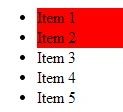
Now only items 1 and 2 are selected.
Result
The -1 index specifies the last element in the list of elements. Therefore when using a negative index position, the start index must be smaller than the end index.
Example
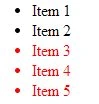
To select the bottom 3 elements,
Result
To select the top 2 elements,
Result
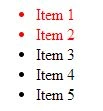
- $('li').slice(0,2).css('background-color', 'red');
Use of Negative Numbers
The -1 index specifies the last element in the list of elements. Therefore when using a negative index position, the start index must be smaller than the end index.
Example
To select the bottom 3 elements,
- $("li").slice(-3).addClass("selected");
To select the top 2 elements,
- $("li").slice(-5,-3).addClass("selected");
SubashPosted Sep 15, 2016, 1:17 AM
New one for me thanks