

Before reading this article, please read the previous articles so that you can understand Design Patterns in Flutter better. The list of previous articles is provided below.
- Introduction to Design Patterns in Flutter
- Factory Method Design Pattern In Flutter
- Abstract Factory Design Pattern In Flutter
The Singleton design pattern is one of the most popular design patterns in software development. It's a creational design pattern used when creating objects. If you're unsure what a design pattern is, look at my earlier articles on the design pattern series. In this article, we'll cover.
- What is the Singleton Design Pattern?
- When to use?
- How to implement in Dart?
- Pitfalls of Singleton
- An example of Singleton in Flutter
- Conclusion
Let's get started without any further delay.
What is the Single Design Pattern?
According to the book "Design Patterns, Elements of Reusable Object-Oriented Software," the Singleton design pattern ensures that a class has only one instance and provides a global point of access to it.
Let's put things in simpler terms. When we say "global point of access," we convey that this single instance of the class can be accessed from anywhere in the code without the need to create a new one.
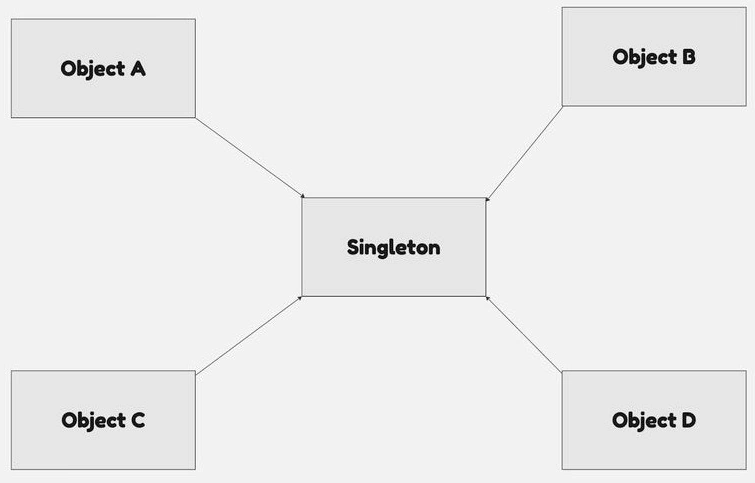
The Singleton Pattern is a design principle that limits a class to a single instance. It ensures that only one object of that class exists and guarantees that there will always be only one instance of the class in existence at any given time.
This pattern is especially useful when only one object is necessary to coordinate actions across the system. It provides a way to control access to shared resources, such as a database or a file.
When to Use?
It is useful to have singletons when you want to manage just one resource. As examples, here are a few.
- Configuration Management: The singleton pattern is useful for maintaining settings and configurations that apply universally throughout the application. It ensures that all application components point to a single source of configuration, ensuring consistency.
- Database Connection Pools: A singleton can be used to ensure that database connections are managed from a single point. This allows for more efficient use of database resources while minimizing any conflicts caused by multiple connection points.
- Logging: Implementing a logging service as a singleton enables a centralized, application-wide logging system that ensures all log entries are reliably sent to a single repository.
- State Management: Singletons can be used to handle global application states, such as user sessions, offering a consistent and centralized method for accessing and updating this data.
- Registry Settings: A singleton can be used to control access to registry settings. This guarantees that the settings are displayed consistently across the entire application.
- Load Balancers: Singletons can be used to create a load balancer that distributes network or application traffic across multiple servers. This ensures that only one instance of the load balancer manages traffic.
- File Manager: A singleton can be used to handle file operations in an application. This ensures that all file read/write activities are coordinated through a single point, avoiding potential conflicts.
How to implement in Dart?
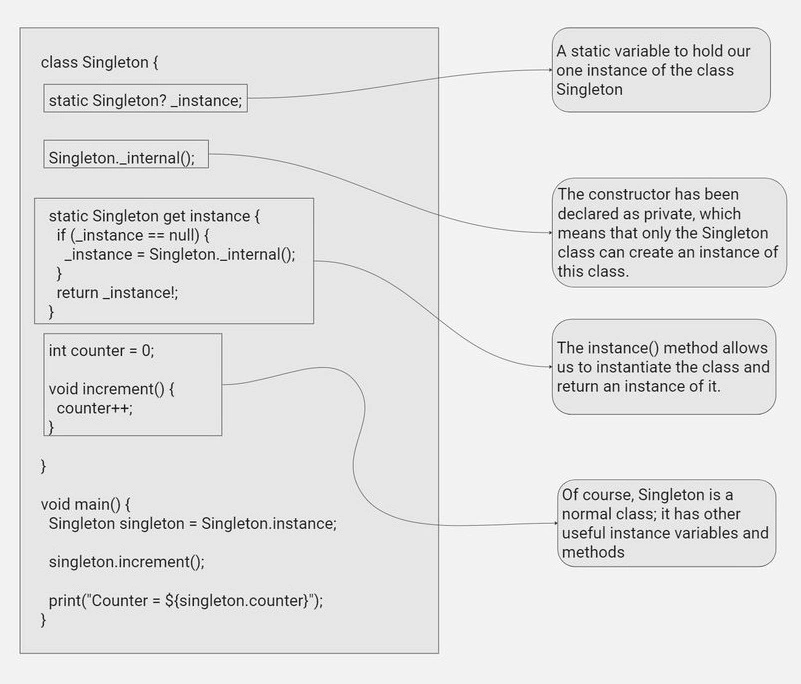
Now, let's try to create the singleton design pattern in Dart. I'm going to break down the code into a few sections so you can understand it better.
Step 1. Create a class
First, we define a class Singleton (you may call it anything, but I'm using Singleton to make things clear). It has a private constructor _internal(). This ensures that no additional Singleton instances are produced from outside the class.
class Singleton {
  static Singleton? _instance;
  Singleton._internal();
Step 2. Create the Singleton class instance
Next, we create a getter instance to see if _instance is null. If so, it generates a new Singleton instance and sets it to _instance. If _instance is not null, it returns the current Singleton instance.
static Singleton get instance {
    if (_instance == null) {
      _instance = Singleton._internal();
    }
    return _instance!;
  }
Step 3. Add the functionality to your singleton class
Now, we'll add some functionality to the Singleton class. In this scenario, we've added a counter variable and an increment() method. The increment() method simply increments the counter by one.
int counter = 0;

  void increment() {
    counter++;
  }
}
Step 4. Use the Singleton
Finally, we make use of the Singleton in our main() method. We get the Singleton instance, use its increment() method, and then print the counter value.
void main() {
  Singleton singleton = Singleton.instance;
  singleton.increment();
  print("Counter = ${singleton.counter}");
}
Each time you run this code, the counter will be increased by one. This shows that we are always working with the same Singleton instance, regardless of where we are in the code
Pitfalls of Singleton
- Global State: Singletons can create a global state in an application, making it difficult to understand and introducing difficult-to-detect dependencies across classes.
- Difficulty in Testing: Singletons can make unit testing difficult because they retain state throughout the application's lifecycle. Because of this common state, tests cannot be isolated and can interact with one another.
- Memory Usage: Once a Singleton class instance is generated, it remains in memory until the application is terminated. This may take more memory than is required, particularly if the instance is huge and will not be used for the whole of the application's lifespan.
- Inflexibility: Singletons can make programming inflexible and tightly connected, making it more difficult to expand and adjust the code.
- Misinterpretation: It's easy to unintentionally evolve a singleton into a factory design, especially when the getInstance method is modified to allow parameters.
An example Of Singleton in Flutter
Let's make a user preference class that will save data locally using the shared_preference package, so we'll make a UserPreference Singleton class. This class provides a centralized, efficient approach to managing user preferences in a Flutter application. it ensures that only one instance of the class exists and that user preferences persist across app launches. And we will try to get and set the username.
import 'package:shared_preferences/shared_preferences.dart';

// UserPreferences is a Singleton class that manages user preferences.
class UserPreferences {
  // _instance is a static instance of UserPreferences, initially null.
  static UserPreferences? _instance;

  // Private constructor.
  UserPreferences._internal();

  // Getter for the instance of UserPreferences.
  // If _instance is null, it initializes _instance before returning it.
  static UserPreferences get instance {
    if (_instance == null) {
      _instance = UserPreferences._internal();
    }
    return _instance!;
  }

  // _preferences is an instance of SharedPreferences to store and retrieve data.
  late SharedPreferences _preferences;

  // init is a method to initialize SharedPreferences.
  Future<void> init() async {
    _preferences = await SharedPreferences.getInstance();
  }

  // Getter for the username preference.
  // If the username is not set, it returns an empty string.
  String get username => _preferences.getString('username') ?? '';

  // Setter for the username preference.
  set username(String value) {
    _preferences.setString('username', value);
  }
}
main.dart
// The main function of the application.
void main() async {
  // Ensures that you have an instance of the WidgetsBinding.
  // This is required if you need to access the binary messenger before `runApp()`
  // has been called (for example, during plugin initialization).
  WidgetsFlutterBinding.ensureInitialized();

  // Initialize the UserPreferences singleton instance.
  // This is done before running the app to ensure that the preferences are
  // available to the application as soon as it starts.
  await UserPreferences.instance.init();

  // Run the app. The const keyword here means that the MyApp widget is
  // immutable and its configuration won't change over time.
  runApp(const MyApp());
}
Conclusion
The Singleton design pattern is a vital concept that software developers need to understand. It offers a unique and effective way to manage global access to resources. In this article, we discuss the Singleton pattern, its appropriate use cases, how to implement it in Dart, and its potential drawbacks. We also demonstrate its practical application in Flutter with the UserPreferences class, which efficiently handles user preferences by keeping a single instance of the class. Despite its benefits, it's crucial to consider the potential challenges associated with Singleton, such as global state management, testing difficulties, and potential inflexibility in code modification. If you like my articles, you can connect with me on LinkedIn and say hi.
Resources
Join the conversation! Your thoughts help the community grow.