

Introduction
- Simplify JavaScript Object Oriented Programming Model: Part 1
- Simplify JavaScript Object Oriented Programming Model: Part 2
Object is Mutable
- var Book = {
- Name: "Object Oriented JavaScript",
- Author : "John Raw"
- }
Now we create another object that is a replica of the preceding object as in following code snippet.
- var NewBook = {
- Name: "Object Oriented JavaScript",
- Author: "John Raw"
- }
- <script type="text/javascript">
- var Book = {
- Name: "Object Oriented JavaScript",
- Author: "John Raw"
- }
- var NewBook = {
- Name: "Object Oriented JavaScript",
- Author: "John Raw"
- }
- if(Book == NewBook)
- {
- console.log("Both objects are same");
- }
- else {
- console.log("Both objects are different");
- }
- </script>
When we assign an object to another object then it won't create a copy of the object. Now we again assign an object book to another object newBook and compare both as in the following code snippet.
- <script type="text/javascript">
- var book = {
- Name: "Object Oriented JavaScript",
- Author: "John Raw"
- }
- var newBook = book;
- if(book == newBook)
- {
- console.log("Both objects are same");
- }
- else {
- console.log("Both objects are different");
- }
- </script>
This time the preceding code output will be “Both objects are same” because the object newBook is not a copy of book. It is book. Both book and newBook point to the same object. Any changes to newBook will also change book, because book and newBook are the same object. Let's see another example where we first assign a book object to an object of newBook then change the Name property value of the newBook object.
- <script type="text/javascript">
- var book = {
- Name: "Object Oriented JavaScript",
- Author: "John Raw"
- }
- var newBook = book;
- newBook.Name = "JavaScript Progamming";
- console.log(newBook);
- console.log(book);
- </script>

Figure 1.1: Result shows the Objects are mutable
String is Immutable
Immutable means that once we instantiate the object, we can't change its properties. If we manipulate a String then that means we create a new string so we can't change a string once it has been created. To understand it we create an example. We create a string variable and assign a value to it and thereafter we manipulate it using predefined string methods as in the following code snippet.
- <script type="text/javascript">
- var name = "Object Oriented JavaScript Programming";
- var newName = name.slice(-22, 26);
- console.log(newName);
- var newSecondName = name.substring(16, 26);
- console.log(newSecondName);
- var newThirdName = name.substr(-22, 10);
- console.log(newThirdName);
- </script>

Figure 1.2: Result of string operations.
Slice() Method
The Slice() method has two parameters. The first parameter is the start index and the second is the end index for the obtained string. In the slice method we can use a negative index as in the following code snippet.
- <script type="text/javascript">
- var name = "JavaScript";
- var newName = name.slice(1, 5);
- console.log(newName);
- var secondName = name.slice(-9, -4);
- console.log(secondName);
- </script>

Figure1.3: Slice method result
Substring() Method
The Substring () method has two parameters. The first parameter is the start index and the second is the end index for the obtained string. In the Substring method we can use a negative index as in the following code snippet.
- <script type="text/javascript">
- var name = "JavaScript";
- var newName = name.substring(1, 5);
- console.log(newName);
- var secondName = name.substring(-4, 4);
- console.log(secondName);
- var thirdName = name.substring(3);
- console.log(thirdName);
- var fourthName = name.substring(3,-1);
- console.log(fourthName);
- </script>
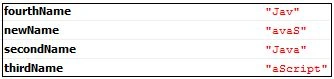
Figure1.4: Substring method result
Substr() Method
The Substr() method has two parameters. The first parameter is the start index and the second is the length of the obtained string. We can use a single argument and can use a negative index as in the following code snippet.
- <script type="text/javascript">
- var name = "JavaScript";
- var newName = name.substr(1, 5);
- console.log(newName);
- var secondName = name.substr(-4, 4);
- console.log(secondName);
- var thirdName = name.substr(3);
- console.log(thirdName);
- </script>

Figure1.5: Substr() method result
Ano MepaniPosted Jul 9, 2015, 12:30 AM
really nice article sandeep bhai
Debendra DashPosted Jul 6, 2015, 1:51 AM
Good one........
Gopi ChandPosted Jul 6, 2015, 1:19 AM
Good one :)
Neeraj KumarPosted Jul 5, 2015, 8:32 AM
Nice...
Santhakumar MunuswamyPosted Jul 5, 2015, 4:24 AM
Thanks for nice article:) keep it up