

Introduction
This is a simple shopping cart in SharePoint that helps users to pick items from a gallery and place the order with a simple and nice UI.
ObjectivePlace an order of picked items from a picture library in SharePoint using AngularJS.
Overview- Create a picture library in SharePoint with available products to checkout.
- Create a web page with nice UI for users to pick the items and shop.
- Create appropriate HTML and angular js script for shopping cart,
- Create a list for storing the placed orders by users.
- Create workflows on orders list to get notification on place new orders(Optional)
- Create a picture library in SharePoint with available items to checkout.
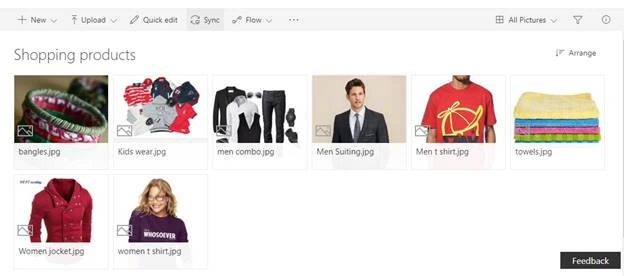
- Add the required columns for the product, like name, price, available sizes etc.
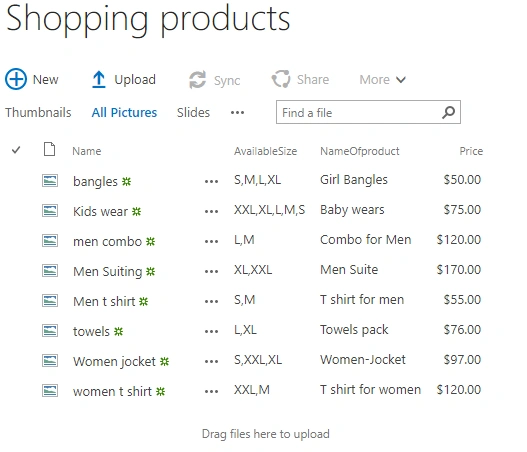
- Now, create a page with nice UI for shopping, as below, to represent the available products and their information like price, size, etc.

- where the product picture, price, available sizes are coming from a SharePoint list. Let’s have a look at the retrieval script.
- function GetListItems($scope){
- $.ajax({
- url: _spPageContextInfo.webAbsoluteUrl+"/_api/web/Lists(guid'86D80345-773F-4EC0-A5E0-C01765723BDF')/Items?$select=FileRef,NameOfproduct,Price,AvailableSize",/* url of picture library by guid to get the product info*/
- method: "GET",
- async: false,
- headers: { "Accept": "application/json;odata=verbose" },
- success: function(data){
- $scope.ItemsFromOrders= data.d.results;/*binding the retrieved products to a $scope variable*/
- },
- error: function(sender,args){
- console.log(args.get_message());
- }
- });
- }
HTML code to show up the product info from $scope.ItemsFromOrders
- <div class="row bigge-bucks-store">
- <div class="col-lg-6 col-md-12 col-sm-12 col-xs-12" ng-repeat="ItemsFromOrder in ItemsFromOrders"><!--from script-->
- <div class="products-img">
- <img src='{{ItemsFromOrder.FileRef}}'/><!--image-->
- </div>
- <p><strong>{{ItemsFromOrder.NameOfproduct}}</strong><br/>{{ItemsFromOrder.Price|currency}} Product Bucks<br/><label ng-show="ItemsFromOrder.AvailableSize!=null">Available Sizes:</label><br/>
- <ul ng-repeat="AvailSize in ItemsFromOrder.AvailableSize.results">
- <li>{{AvailSize}}</li>
- </ul>
- <br/>
- <input type="button" class="AddCartBtn" ng-click="AddToCart(ItemsFromOrder)" value="ADD TO CART"/>
- <hr>
- </p>
- </div>
- </div>
On click of "AddToCart" button, it is pushing the selected product info to an array and binding with custom properties as below
- $scope.AddToCart = function(CurrentItems) {
- $scope.SelectedItems.push({
- Title: CurrentItems.NameOfproduct,
- Price: CurrentItems.Price,
- AvailableSizesForCurItem: CurrentItems.AvailableSize.results,
- Quantity: 1,
- SelectedSize: ''
- });
- }
Code for CartItems button
On click of CartItems button,
- Check for array items greater than 0
- Hide product gallery and show up the selected products
- Provide the buttons like ‘Continue shopping’ and ‘Procceed to check out’ as below
- $scope.AllSelectedItems=function(ChosenItems){
- if($scope.SelectedItems.length>0){
- $scope.SelectedItemsForBilling=ChosenItems;
- $("#HideAfterCart").hide();
- $("#ShowAfterCart").show();
- }
- }
in the page, displays the below html on click of CartItems
- <div class="row" id="ShowAfterCart">
- <h2>My Shopping Cart</h2>
- <table>
- <tbody>
- <tr ng-repeat="SelectedItemForBilling in SelectedItemsForBilling track by $index">
- <td><strong>{{SelectedItemForBilling.Title}}</strong></td>
- <td>
- <strong>Select Size:</strong>
- <select ng-model="SelectedItemForBilling.SelectedSize">
- <option value="">--Select Size--</option>
- <option ng-repeat="AvlSize in SelectedItemForBilling.AvailableSizesForCurItem track by $index" value="{{AvlSize}}">{{AvlSize}}</option>
- </select>
- </td>
- <td><strong>Quantity:</strong> <input type="number" ng-model="SelectedItemForBilling.Quantity" /></td>
- <td><strong>Price:</strong>{{SelectedItemForBilling.Price|currency}}</td>
- <td><strong>Item Total Price:</strong>{{SelectedItemForBilling.Price*SelectedItemForBilling.Quantity|currency}}</td>
- <td><a ng-click="RemoveSelectedItem(SelectedItemForBilling)">Remove</a></td>
- </tr>
- <tr>
- <td colspan="4" class="ForSub"></td>
- <td>SubTotal: <input value="{{SubTotal()|currency}}" readonly/><input type="hidden" id="Sbtotal" value="{{SubTotal()}}" readonly/></td>
- </tr>
- </tbody>
- </table>
- <br>
- <div class="row"></div>
- <br/>
- <div class="row"><input type="button" class="AddCartBtn" ng-click="Continueshop()" value="Continue shopping..." style="float:left;font-size: large;"/><input type="button" class="AddCartBtn" ng-click="OrderTolist(SelectedItemForBilling)" value="PROCEED TO CHECKOUT" style="float:right;font-size: large;"/></div>
- </div>
See the result on screen as below
On click of cart items:
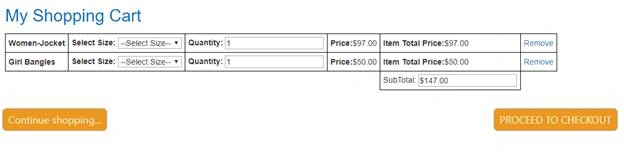
It will hide the selected cart items temporarily and show up the gallery of products with existing selected products.
Code for remove
- $scope.RemoveSelectedItem = function (CurItem) {
- if ($scope.SelectedItems.length > 1) {
- var index = $scope.SelectedItems.indexOf(CurItem);
- $scope.SelectedItems.splice(index, 1);
- }
- };
Click on PROCEED TO CHECKOUT
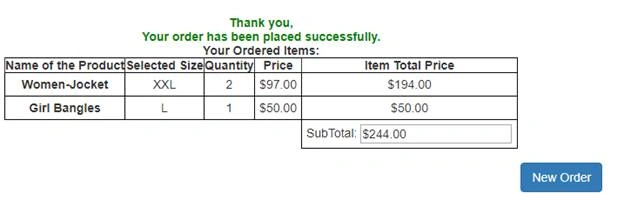
If we select the available size then, it will post the selected cart items to the SharePoint list which we have created to store the placed orders
And get as below,
Note
- When placing order button posting the data to the SharePoint list using bulk/batch post, please find the batch request code by downloading my code file
- You can use workflows on creating a record on SharePoint orders list to get notifications
- Please download all files and links properly for better understanding
This article may help to develop simple shopping cart using angular, also you can find several functions like dynamic calculations, dynamic remove record and bulk post/update to the SharePoint list.
abdiel perilloPosted Jun 28, 2022, 6:41 AM
It works like a charm! thanks for sharing my bahubali friend!
Heimo BischofterPosted Nov 18, 2020, 9:13 AM
Hi Mahipal, thanks for sharing your code. Great job - but I have one question. Which datatype is the availableSize in your picture library? Just a text field, separeted by commas? Because as far as I understood your code, in the HTML part it must be a array, that you can iterate over all the items and you are able to add to every product. Did you convert it anywhere, because I'm not able to get the size stuff running. I'm not able to select it in the result sreen on each item even I'm not able to show it on each item on the shopping screen. Thanks for your help
Benedict CardPosted Nov 6, 2019, 6:52 AM
Hi MahiPal. I am struggling to get the size select option to work. It doesn't show any values. Please can you explain how to get the values to populate in the dropdown. The batch update function is also not working for me.
Pramod PatilPosted Oct 12, 2018, 1:14 AM
I follow your steps , but i am not able to fetch data from list.