
Introduction
This is a simple login and register desktop application using Python 3.7 Tkinter and MySQL Database server. For MySQL, the database server XAMPP version 3.2.4 is used.
The latest version of XAMPP or MySQL Database server can be used.
Mysql.connector is used after downloading and installing it for connecting to the MySQL Database Server.
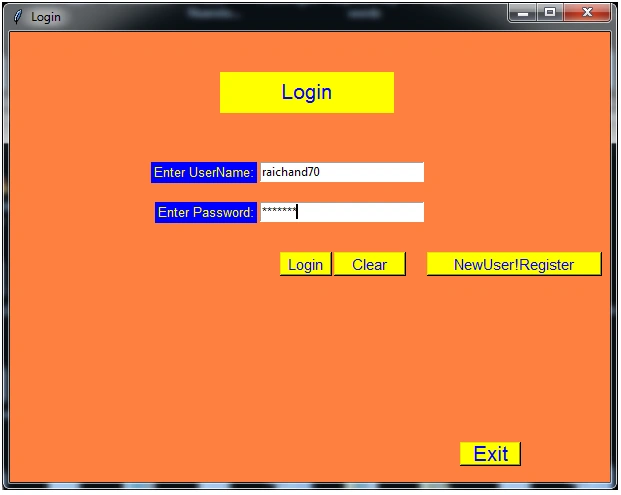
After running the application, the login window shown below opens up. This is where registered users can log in by entering username and password. A new user has to register to log in by clicking the NewUser!Register Button.
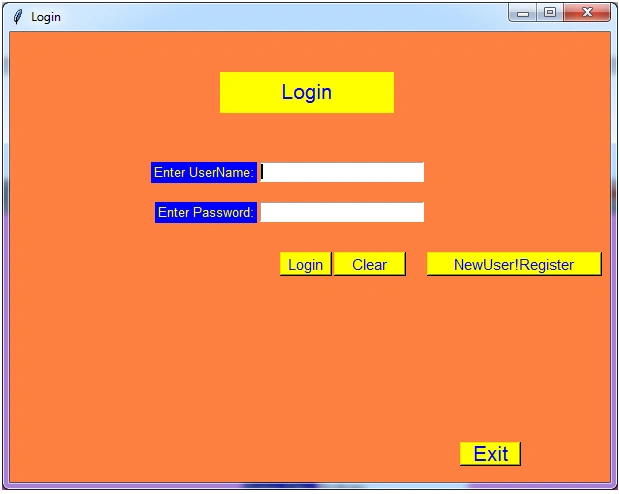
After clicking NewUser!Register Button Register window shown below opens where a new user can register himself. Then a Database named ‘User’ is created and a Table Named ‘User’ is created. Then a new User record is inserted in table ‘User’.
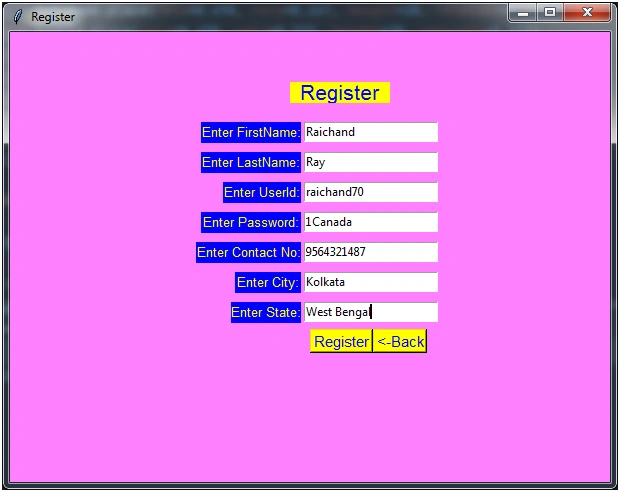
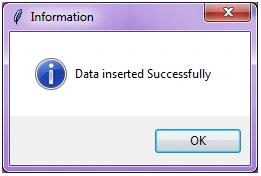
After clicking the ‘Register’ button below the message window shows up if registration is successful.
The registered user would come back to the ‘Login’ Window after clicking the ‘Back’ button. The login window opens, as shown below.
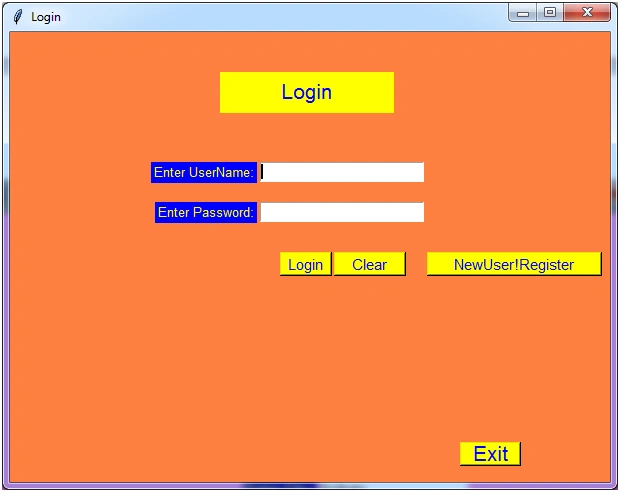
Then the registered user enters his registered username and password, as shown below.
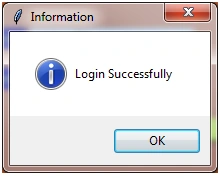
If the entered username and password match the username and password stored in the database, then the successful login message pops up, as shown below.
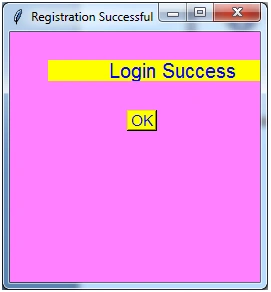
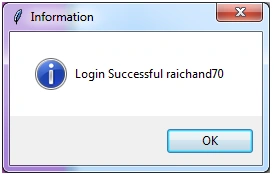
Also, the successful login window as shown below opens up. If the ok button is clicked, then another login successful message box pops up.
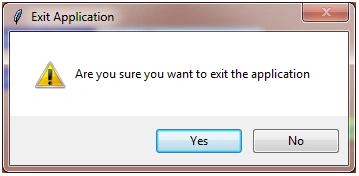
If Exit Button is clicked to close the application then a confirmation Message box pops up and on clicking ‘yes’ button the application closes.
There is one Python file named Login.py created. The code written in it is shown below.
- ##
- connecting to the database using 'connect()'
- method## it takes 3 required parameters 'host', 'user', 'password'
- db_connection = mysql.connector.connect(host = "localhost", user = "raichand70", password = "1America")
- In the above code snippet reader should change user and password to his username and password to connect to MySQL Database Server.
- -- -- -- -- -- -- -- -- -- -- -- -- -- -- -- -- -- -- -- -- -Login.py-- -- -- -- -- -- -- -- -- -- -- -- -- -- -- -- -- -- -- -- -- -- -- -- -- -- -- -- -- -- -- -- -- --
- import tkinter as tk
- import tkinter.messagebox as mb
- import random
- import tkinter.ttk## Connecting to the database## importing 'mysql.connector'
- for connection to mysql database
- import mysql.connector## connecting to the database using 'connect()'
- method## it takes 3 required parameters 'host', 'user', 'password'
- db_connection = mysql.connector.connect(host = "localhost", user = "raichand70", password = "1America")# creating database_cursor to perform SQL operation
- db_cursor = db_connection.cursor(buffered = True)# buffered = True would
- return actual number of records selected otherwise would
- return -1# Using Toplevel widget to create a new window named Register Successful Window
- class Login_Success_Window(tk.Toplevel): def __init__(self, parent): super().__init__(parent)
- self.original_frame = parent
- self.geometry("250x250")
- self.title("Registration Successful")
- self.configure(background = "#ff80ff")
- self.lbl_Login_success = tk.Label(self, text = "Login Success", font = ("Helvetica", 15), bg = "yellow", fg = "blue")
- self.lbl_Login_success.place(relx = 0.150, rely = 0.111, height = 21, width = 250)# create OK button
- self.btn_register = tk.Button(self, text = "OK", font = ("Helvetica", 11), bg = "yellow", fg = "blue", command = self.delete_login_success)# self.btn_register.pack(side = tk.BOTTOM)
- self.btn_register.place(relx = 0.467, rely = 0.311, height = 21, width = 30)
- def delete_login_success(self): mb.showinfo('Information', "Login Successful " + str(username))
- self.destroy()
- self.original_frame.show()# Using Toplevel widget to create a new window named RegisterWindow to register a new user
- class RegisterWindow(tk.Toplevel): def __init__(self, parent): super().__init__(parent)
- self.original_frame = parent
- self.geometry("600x450+485+162")
- self.title("Register")
- self.configure(background = "#ff80ff")
- self.lblRegister = tk.Label(self, text = "Register", font = ("Helvetica", 16), bg = "yellow", fg = "blue")
- self.lblFName = tk.Label(self, text = "Enter FirstName:", font = ("Helvetica", 10), bg = "blue", fg = "yellow")
- self.lblLName = tk.Label(self, text = "Enter LastName:", font = ("Helvetica", 10), bg = "blue", fg = "yellow")
- self.lblLName = tk.Label(self, text = "Enter LastName:", font = ("Helvetica", 10), bg = "blue", fg = "yellow")
- self.lblUId = tk.Label(self, text = "Enter UserId:", font = ("Helvetica", 10), bg = "blue", fg = "yellow")
- self.lblPwd = tk.Label(self, text = "Enter Password:", font = ("Helvetica", 10), bg = "blue", fg = "yellow")# self.lblPin = tk.Label(self, text = "Enter Pin:", font = ("Helvetica", 10), bg = "blue", fg = "yellow")
- self.lblContactNo = tk.Label(self, text = "Enter Contact No:", font = ("Helvetica", 10), bg = "blue", fg = "yellow")
- self.lblCity = tk.Label(self, text = "Enter City:", font = ("Helvetica", 10), bg = "blue", fg = "yellow")
- self.lblState = tk.Label(self, text = "Enter State:", font = ("Helvetica", 10), bg = "blue", fg = "yellow")
- self.txtFName = tk.Entry(self)
- self.txtLName = tk.Entry(self)
- self.txtUId = tk.Entry(self)
- self.txtPwd = tk.Entry(self)
- self.txtContact = tk.Entry(self)
- self.txtCity = tk.Entry(self)
- self.txtState = tk.Entry(self)
- self.btn_register = tk.Button(self, text = "Register", font = ("Helvetica", 11), bg = "yellow", fg = "blue", command = self.register)
- self.btn_cancel = tk.Button(self, text = "<-Back", font = ("Helvetica", 11), bg = "yellow", fg = "blue", command = self.onClose)
- self.lblRegister.place(relx = 0.467, rely = 0.111, height = 21, width = 100)
- self.lblFName.place(relx = 0.318, rely = 0.2, height = 21, width = 100)
- self.lblLName.place(relx = 0.319, rely = 0.267, height = 21, width = 100)
- self.lblUId.place(relx = 0.355, rely = 0.333, height = 21, width = 78)
- self.lblPwd.place(relx = 0.319, rely = 0.4, height = 21, width = 100)
- self.lblContactNo.place(relx = 0.310, rely = 0.467, height = 21, width = 105)
- self.lblCity.place(relx = 0.375, rely = 0.533, height = 21, width = 66)
- self.lblState.place(relx = 0.369, rely = 0.6, height = 21, width = 70)
- self.txtFName.place(relx = 0.490, rely = 0.2, height = 20, relwidth = 0.223)
- self.txtLName.place(relx = 0.490, rely = 0.267, height = 20, relwidth = 0.223)
- self.txtUId.place(relx = 0.490, rely = 0.333, height = 20, relwidth = 0.223)
- self.txtPwd.place(relx = 0.490, rely = 0.4, height = 20, relwidth = 0.223)
- self.txtContact.place(relx = 0.490, rely = 0.467, height = 20, relwidth = 0.223)
- self.txtCity.place(relx = 0.490, rely = 0.533, height = 20, relwidth = 0.223)
- self.txtState.place(relx = 0.490, rely = 0.6, height = 20, relwidth = 0.223)
- self.btn_register.place(relx = 0.500, rely = 0.660, height = 24, width = 63)
- self.btn_cancel.place(relx = 0.605, rely = 0.660, height = 24, width = 54)
- def register(self): if db_connection.is_connected() == False: db_connection.connect()# executing cursor with execute method and pass SQL query
- db_cursor.execute("CREATE DATABASE IF NOT EXISTS User")# Create a Database Named AradhanaBank
- db_cursor.execute("use User")# Interact with Bank Database# creating required tables
- db_cursor.execute("Create table if not exists USER(uid VARCHAR(30) NOT NULL PRIMARY KEY,password VARCHAR(30),fname VARCHAR(30),lname VARCHAR(30),city VARCHAR(20),state VARCHAR(30),mobileno VARCHAR(10))")
- db_connection.commit()
- fname = self.txtFName.get()# Retrieving entered first name
- lname = self.txtLName.get()# Retrieving entered last name
- uid = self.txtUId.get()# Retrieving entered user id
- pwd = self.txtPwd.get()# Retrieving entered password# pin = self.txtPin.get()# Retrieving entered ATM pin number
- contact_no = self.txtContact.get()# Retrieving entered contact number
- city = self.txtCity.get()# Retrieving entered city name
- state = self.txtState.get()# Retrieving entered state name# validating Entry Widgets
- if fname == "": mb.showinfo('Information', "Please Enter Firstname")
- self.txtFName.focus_set()
- return
- if lname == "": mb.showinfo('Information', "Please Enter Lastname")
- self.txtLName.focus_set()
- return
- if uid == "": mb.showinfo('Information', "Please Enter User Id")
- self.txtUId.focus_set()
- return
- if pwd == "": mb.showinfo('Information', "Please Enter Password")
- self.txtPwd.focus_set()
- return
- if contact_no == "": mb.showinfo('Information', "Please Enter Contact Number")
- self.txtContact.focus_set()
- return
- if city == "": mb.showinfo('Information', "Please Enter City Name")
- self.txtCity.focus_set()
- return
- if state == "": mb.showinfo('Information', "Please Enter State Name")
- self.txtState.focus_set()
- return# Inserting record into bank table of bank database
- db_cursor.execute("use User")# Interact with Bank Database
- query = "INSERT INTO User(uid,password,fname,lname,city,state,mobileno) VALUES ('%s','%s','%s','%s','%s','%s','%s')" % (uid, pwd, fname, lname, city, state, contact_no)
- try: #implement sql Sentence
- db_cursor.execute(query)
- mb.showinfo('Information', "Data inserted Successfully")# Submit to database
- for execution
- db_connection.commit()
- except: mb.showinfo('Information', "Data insertion failed!!!")# Rollback in
- case there is any error
- db_connection.rollback()# Close database connection
- db_connection.close()
- def onClose(self): ""
- ""
- ""
- self.destroy()
- self.original_frame.show()
- class LoginApp(tk.Tk): def __init__(self): super().__init__()
- self.title("Login")
- self.geometry("600x450+351+174")
- self.configure(bg = "#ff8040")
- self.lblHeading = tk.Label(self, text = "Login", font = ("Helvetica", 16), bg = "yellow", fg = "blue")
- self.lbluname = tk.Label(self, text = "Enter UserName:", font = ("Helvetica", 10), bg = "blue", fg = "yellow")
- self.lblpsswd = tk.Label(self, text = "Enter Password:", font = ("Helvetica", 10), bg = "blue", fg = "yellow")
- self.txtuname = tk.Entry(self, width = 60)
- self.txtpasswd = tk.Entry(self, width = 60, show = "*")
- self.btn_login = tk.Button(self, text = "Login", font = ("Helvetica", 11), bg = "yellow", fg = "blue", command = self.login)
- self.btn_clear = tk.Button(self, text = "Clear", font = ("Helvetica", 11), bg = "yellow", fg = "blue", command = self.clear_form)
- self.btn_register = tk.Button(self, text = "NewUser!Register", font = ("Helvetica", 11), bg = "yellow", fg = "blue", command = self.open_registration_window)
- self.btn_exit = tk.Button(self, text = "Exit", font = ("Helvetica", 16), bg = "yellow", fg = "blue", command = self.exit)
- self.lblHeading.place(relx = 0.35, rely = 0.089, height = 41, width = 174)
- self.lbluname.place(relx = 0.235, rely = 0.289, height = 21, width = 106)
- self.lblpsswd.place(relx = 0.242, rely = 0.378, height = 21, width = 102)
- self.txtuname.place(relx = 0.417, rely = 0.289, height = 20, relwidth = 0.273)
- self.txtpasswd.place(relx = 0.417, rely = 0.378, height = 20, relwidth = 0.273)
- self.btn_login.place(relx = 0.45, rely = 0.489, height = 24, width = 52)
- self.btn_clear.place(relx = 0.54, rely = 0.489, height = 24, width = 72)
- self.btn_register.place(relx = 0.695, rely = 0.489, height = 24, width = 175)
- self.btn_exit.place(relx = 0.75, rely = 0.911, height = 24, width = 61)
- def open_registration_window(self): self.withdraw()
- window = RegisterWindow(self)
- window.grab_set()
- def open_login_success_window(self): self.withdraw()
- window = Login_Success_Window(self)
- window.grab_set()
- def show(self): ""
- ""
- ""
- self.update()
- self.deiconify()
- def login(self): if db_connection.is_connected() == False: db_connection.connect()# executing cursor with execute method and pass SQL query
- db_cursor.execute("CREATE DATABASE IF NOT EXISTS User")# Create a Database Named Bank
- db_cursor.execute("use User")# Interact with Bank Database# creating required tables
- db_cursor.execute("create table if not exists USER(uid VARCHAR(30) NOT NULL PRIMARY KEY,password VARCHAR(30),fname VARCHAR(30),lname VARCHAR(30),city VARCHAR(20),state VARCHAR(30),mobileno VARCHAR(10))")
- db_connection.commit()
- try: global username
- username = str(self.txtuname.get())# Retrieving entered username
- passwd = str(self.txtpasswd.get())# Retrieving entered password
- if username == "": mb.showinfo('Information', "Please Enter Username")
- self.txtuname.focus_set()
- return
- if passwd == "": mb.showinfo('Information', "Please Enter Password")
- self.txtpasswd.focus_set()
- return
- print(username)
- print(passwd)
- query = "SELECT * FROM User WHERE uid = '" + username + "' AND password = '" + passwd + "'"
- print(query)# implement sql Sentence
- db_cursor.execute(query)
- rowcount = db_cursor.rowcount
- print(rowcount)
- if db_cursor.rowcount == 1: mb.showinfo('Information', "Login Successfully")
- self.open_login_success_window()
- else :mb.showinfo('Information', "Login failed,Invalid Username or Password.Try again!!!")
- except: #Closing Connection
- db_connection.disconnect()
- def clear_form(self): self.txtuname.delete(0, tk.END)
- self.txtpasswd.delete(0, tk.END)
- self.txtuname.focus_set()
- def exit(self): MsgBox = mb.askquestion('Exit Application', 'Are you sure you want to exit the application', icon = 'warning')
- if MsgBox == 'yes': self.destroy()
- if __name__ == "__main__": app = LoginApp()
- app.mainloop()
--------------------------------------------------------------------------------------------------------------------
References
1. Tkinter GUI application development cookbook by Alejandro Rodas de Paz of Packt Publications
2.Home and Learn website https://www.homeandlearn.uk/index.html for learning python language.
3.Stackoverflow.com
geluste bhaudePosted Apr 14, 2021, 10:34 AM
Useless code
Raichand RayPosted Mar 12, 2021, 2:47 AM
# creating database_cursor to perform SQL operation db_cursor = db_connection.cursor(buffered=True)# buffered=True would return actual number of records selected otherwise would return -1
Rahul PatilPosted Mar 8, 2021, 4:48 PM
I have problem with rowcount because my rowcount value is -1 . but I need that value 1 .plz tell me solution ------>line 171 , line 172 ---->rowcount = db_cursor.rowcount , print(rowcount)
Rudradev AryaPosted Jan 15, 2021, 2:42 PM
I need urgent help ...... i have a banking management project and for that i used this as my login page but when i press login and it pops up a tkinter message box login successful but then it breaks so i want it to continue through the project how can i do that.... please i need urgent help
Raichand RayPosted Aug 21, 2020, 3:17 AM
I have used relx = 0.54, rely = 0.489 to place the Labels,Entry Boxes and Buttons.Please use x and y and assign suitable values in place of relx and rely.Example Label1.place(x = 10,y = 10) .The grid manager can also be used. Like label1.grid(row = 0, column = 0, sticky = W, pady = 2)