

Introduction
- This article will help the beginners to perform CRUD operations on Cosmos DB database using C#.
- If you are new to Cosmos DB, then please refer Getting Started with Cosmos DB article.
Let’s start.
- Create Solution and add NuGet Package
- Create a new console app.
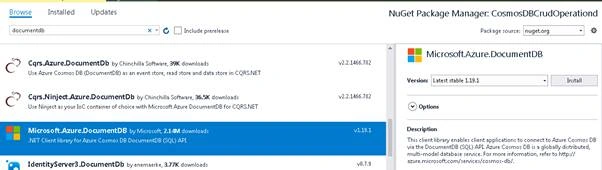
- Right-click on Project -> Manage NuGet Package.
- Search for ‘documentdb’ under the "Browse" tab.
- Select Microsoft.Azure.DocumentDB package and click on Install.
- Add Config Settings
Go to App Settings and add the following configuration.
- <appSettings>
- <!--Add Cosmos DB Endpoint URL-->
- <add key="DocDbEndpoint" value =""/>
- <!--Add Primary Key-->
- <add key="DocDbMasterKey" value =""/>
- </appSettings>
- How to get Endpoint URL and Master Key?
- Open the Azure portal.
- Go to the Cosmos DB account.
- Click on Keys.
- Copy the URI and Primary Key.
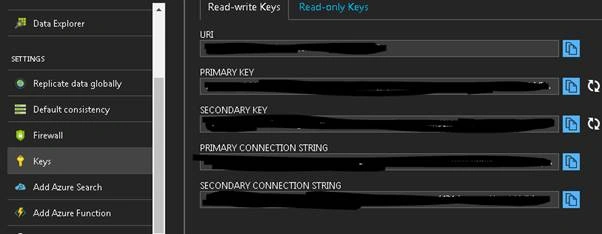
- URI = DocDbEndpoint
- Primary Key = DocDbMasterKey
- Initialize Document Client Instance
- Add a reference to Configuration;
- Add a reference to Microsoft.Azure.Documents.Client;
- Retrieve Endpoint URL and Primary Key
- using Microsoft.Azure.Documents;
- using Microsoft.Azure.Documents.Client;
- using System;
- using System.Configuration;
- using System.Linq;
- using System.Threading.Tasks;
- namespace CosmosDBCrudOperationd
- {
- class Program
- {
- static void Main(string[] args)
- {
- Task.Run(async () =>
- {
- var endpoint = ConfigurationManager.AppSettings["DocDbEndpoint"];
- var masterKey = ConfigurationManager.AppSettings["DocDbMasterKey"];
- using (var client = new DocumentClient(new Uri(endpoint), masterKey))
- {
- }
- }).Wait();
- }
- }
- }
- Create a New Cosmos DB Database
- Console.WriteLine("\r\n>>>>>>>>>>>>>>>> Creating Database <<<<<<<<<<<<<<<<<<<");
- // Create new database Object
- //Id defines name of the database
- var databaseDefinition = new Database { Id = "testDb" };
- var database = await client.CreateDatabaseIfNotExistsAsync(databaseDefinition);
- Console.WriteLine("Database testDb created successfully");
- Create a new database collection.
A database is a container that holds the number of collections.To create a new collection, you need to give the path of the database under which you want to create the collection.Database path can be given in following format,dbo/{databaseName}
- //Create new database collection
- Console.WriteLine("\r\n>>>>>>>>>>>>>>>> Creating Collection <<<<<<<<<<<<<<<<<<<");
- var collectionDefinition = new DocumentCollection { Id = "testDocumentCollection" };
- var collection = await client.CreateDocumentCollectionIfNotExistsAsync("dbo/testDb",
- collectionDefinition);
- Console.WriteLine("Collection testDocumentCollection created successfully");
You can see that CreateDocumentCollectionIfNotExistsAsync accepts two parameters.
- Database Link (path to database): dbo/testDb
- Document Collection Object
Alternatively, you can use UriFactory.CreateDatabaseUri(databaseName) method to create database URI for you.
- //Create new database collection
- Console.WriteLine("\r\n>>>>>>>>>>>>>>>> Creating Collection <<<<<<<<<<<<<<<<<<<");
- var collectionDefinition = new DocumentCollection { Id = "testDocumentCollection" };
- var collection = await client.CreateDocumentCollectionIfNotExistsAsync(UriFactory.CreateDatabaseUri("testDb"),
- collectionDefinition);
- Console.WriteLine("Collection testDocumentCollection created successfully");
- Insert New Document in Collection
To insert a new document, you need two things.
- Path to collection: dbo/{databaseName}/colls/{collectionName}
- Document Object
- //Insert new Document
- Console.WriteLine("\r\n>>>>>>>>>>>>>>>> Creating Document <<<<<<<<<<<<<<<<<<<");
- dynamic doc1Definition = new
- {
- title = "Star War IV ",
- rank = 600,
- category = "Sci-fi"
- };
- var document1 = await client.CreateDocumentAsync(
- UriFactory.CreateDocumentCollectionUri("testDb", "testDocumentCollection"),
- doc1Definition);
Here, doc1Definatin defines the document we want to insert in Cosmos DB.
UriFactory.CreateDocumentCollectionUri("testDb", "testDocumentCollection") method is used to create the collection URI “dbo/testDb/colls/testDocumentCollection”.
- Console.WriteLine("\r\n>>>>>>>>>>>> Querying Document <<<<<<<<<<<<<<<<<<<<");
- var response = client.CreateDocumentQuery
- (UriFactory.CreateDocumentCollectionUri("testDb", "testDocumentCollection"),
- "select * from c").ToList();
- var document = response.First();
- Console.WriteLine($"Id:{document.id}");
- Console.WriteLine($"Title:{document.title}");
- Console.WriteLine($"Rank:{document.rank}");
- Console.WriteLine($"category:{document.category}");
CreateDocumentQuery method requires two parametes,
- Collection URI
- Query string
- Console.WriteLine("\r\n>>>>>>>>>>>>>>>> Deleteing Collection <<<<<<<<<<<<<<<<<<<");
- await client.DeleteDocumentCollectionAsync(
- UriFactory.CreateDocumentCollectionUri("testDb", "testDocumentCollection"));
Overall Code
- using Microsoft.Azure.Documents;
- using Microsoft.Azure.Documents.Client;
- using System;
- using System.Configuration;
- using System.Linq;
- using System.Threading.Tasks;
- namespace CosmosDBCrudOperationd
- {
- class Program
- {
- static void Main(string[] args)
- {
- Task.Run(async () =>
- {
- var endpoint = ConfigurationManager.AppSettings["DocDbEndpoint"];
- var masterKey = ConfigurationManager.AppSettings["DocDbMasterKey"];
- using (var client = new DocumentClient(new Uri(endpoint), masterKey))
- {
- Console.WriteLine("\r\n>>>>>>>>>>>>>>>> Creating Database <<<<<<<<<<<<<<<<<<<");
- // Create new database Object
- //Id defines name of the database
- var databaseDefinition = new Database { Id = "testDb" };
- var database = await client.CreateDatabaseIfNotExistsAsync(databaseDefinition);
- Console.WriteLine("Database testDb created successfully");
- //Create new database collection
- Console.WriteLine("\r\n>>>>>>>>>>>>>>>> Creating Collection <<<<<<<<<<<<<<<<<<<");
- var collectionDefinition = new DocumentCollection { Id = "testDocumentCollection" };
- var collection = await client.CreateDocumentCollectionIfNotExistsAsync(UriFactory.CreateDatabaseUri("testDb"),
- collectionDefinition);
- Console.WriteLine("Collection testDocumentCollection created successfully");
- //Insert new Document
- Console.WriteLine("\r\n>>>>>>>>>>>>>>>> Creating Document <<<<<<<<<<<<<<<<<<<");
- dynamic doc1Definition = new
- {
- title = "Star War IV ",
- rank = 600,
- category = "Sci-fi"
- };
- var document1 = await client.CreateDocumentAsync(
- UriFactory.CreateDocumentCollectionUri("testDb", "testDocumentCollection"),
- doc1Definition);
- Console.WriteLine("\r\n>>>>>>>>>>>> Querying Document <<<<<<<<<<<<<<<<<<<<");
- var response = client.CreateDocumentQuery(UriFactory.CreateDocumentCollectionUri("testDb", "testDocumentCollection"),
- "select * from c").ToList();
- var document = response.First();
- Console.WriteLine($"Id:{document.id}");
- Console.WriteLine($"Title:{document.title}");
- Console.WriteLine($"Rank:{document.rank}");
- Console.WriteLine($"category:{document.category}");
- Console.WriteLine("\r\n>>>>>>>>>>>>>>>> Deleteing Collection <<<<<<<<<<<<<<<<<<<");
- await client.DeleteDocumentCollectionAsync(UriFactory.CreateDocumentCollectionUri("testDb", "testDocumentCollection"));
- Console.ReadKey();
- }
- }).Wait();
- }
- }
- }
Abhishek ShrivastavaPosted Jun 23, 2023, 12:06 PM
Hi, how can we Edit or Delete a single record using C#.
ashish fPosted Oct 15, 2020, 4:43 AM
What if i want to continuously insert data into cosmos every 1 second , how to form a static client and use it in right way please guide?
Hoang TuanPosted Apr 16, 2019, 1:49 AM
Lacking Update action. Please Update
Chandan KaviPosted Oct 11, 2018, 12:30 AM
Hi..i am new to cosmos db..i was trying to update the record in cosmos passed from the forms collection i used ReplaceDocumentAsync but it is not working
Sagar Pandurang KapPosted Jan 8, 2018, 11:39 PM
Very nice article.Great going.I think i=this article should be under azure section.