

Introduction
In this article, we will learn about handling the nested async request and async ajax request inside for loop.
Description
If you have worked with Web API and consuming Web API or any REST API in Javascript or Angular or React then you definitely faced an issue with Asynchronous request.
Consider a scenario in which for a specific city you are requesting Google maps API to find a hospital or ATM and with a pincode which may return multiple results and now you also want to get an area or address based on that pincode value.
So, for such a situation, you might have faced an inconsistency in result due to the async request.
Let's understand this situation with an example to get a better idea about what we are talking about.
For this demo, I will be using native fetch API which is responsible for making ajax request.
Example 1
Async request inside for loop without function,
- for(var i=1;i<10;i++){
- var reqUrl='https://jsonplaceholder.typicode.com/todos/'+i;
- fetch(reqUrl)
- .then(response => response.json())
- .then(json => console.log(json,i))
- }
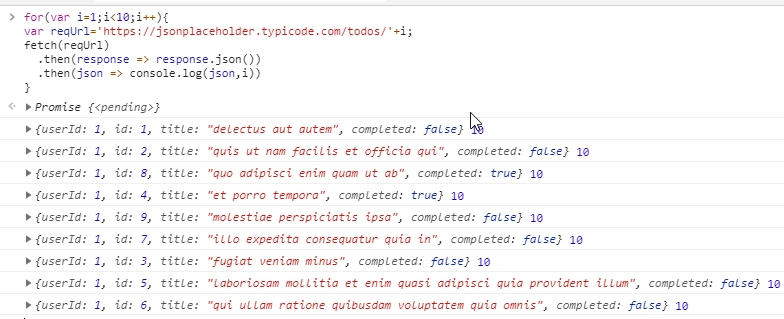
You might expected the value of index along with return result.
One more point you need to notice is that we have made async requested in sequence but in the result you can see id value which is not in order.
So here we have two issues.
- The index value is not synced with the response, meaning value of i and id should be same
- As order of execution is not in order, how will we know twhether it is completed or not?
Example 2
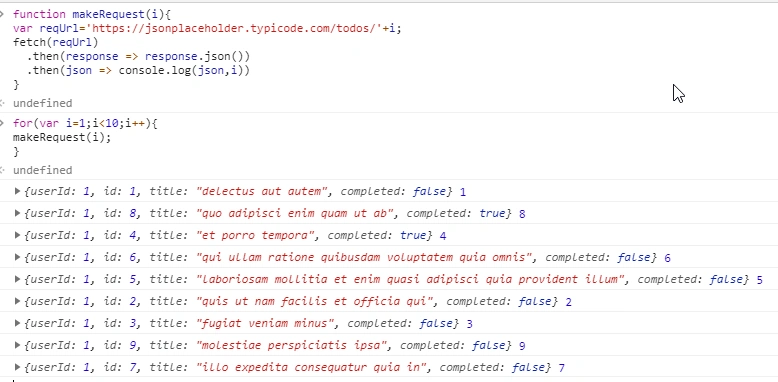
Async request inside for loop but inside the function scope:
- // wrapped async fetch request inside function
- function makeRequest(i){
- var reqUrl='https://jsonplaceholder.typicode.com/todos/'+i;
- fetch(reqUrl)
- .then(response => response.json())
- .then(json => console.log(json,i))
- }
- // Call async request inside for loop.
- for(var i=1;i<10;i++){
- makeRequest(i);
- }
Example 3
Async request is inside for loop, but inside the function scope verifying the total request and successfully executed request.
Using this method you can solve the second problem, to detect or know whether all request are completed or not. You can also extend logic if any error occurs while requesting.
- var tatalRequestCount=10;
- var tatalRequestCount=0;
- //
- function makeRequest(i){
- var reqUrl='https://jsonplaceholder.typicode.com/todos/'+i;
- fetch(reqUrl)
- .then(response => response.json())
- .then(json => {
- console.log(json,i);
- //Ensure successful request execution
- executedRequest++;
- if(tatalRequestCount===executedRequest){
- //TODO when you need to perform action once all request are executed update list or insert something
- console.log("All Request are executed");
- }
- });
- }
- // Start async call inside loops
- for(var i=1;i<=tatalRequestCount;i++){
- //Make sure before making request set counter to 0 if you are running this multiple times
- executedRequest=0;
- makeRequest(i);
- }
Conclusion
In this article we got a basic idea about some known issue with async call inside loops and to solve problems.
Join the conversation! Your thoughts help the community grow.