

A simple Animation Technique using Windows Presentation Foundation.
Description
This is my code that I learned from (Windows Presentation Foundation) WPF's Animation Techniques.
About Classes used
There are two important aspects to Animation Classes used in WPF:
- By varying the "Value of a Dependency Property", it allows animation by varying a value of a dependency property of an object, for a specific time period. Dependency properties can be Double, Int32, Int64, Thickness, Color, Matrix etc.
- They enable animations that are "Time Resolution Independent". Similar in spirit to the resolution independence of WPF's graphics, animations using the WPF animation classes do not speed up as hardware gets faster; they simply get smoother! WPF can vary the frame rate based on a variety of conditions and you, as the animation developer, don't need to care.
#1: Here I use the DoubleAnimation class, allowing the animation between two targeted values of the type System.Double. The DoubleAnimation instance contains an initial & end values for a double property.
Namespace Required: System.Windows.Media.Animation
Controls Used
- Button Control (btnAnimate)
- Label Control (lblAnimate)
- TextBox Controls (txtFrom, txtTo, txtDuration)
- CheckBox Controls (chkRepeat, chkReverse)
Here I implemented code for a simple animation of the FontSize Property of the DoubleAnimation class. (Important Note: Here I only include the portion of the code that is required to understand the concept of the Animation Class.)
The Code
- XAML Code for Creating Controls for Animation.
<Grid Width="276" Height="217">
<Label Height="63" Width="92" Name="lblFontSize" Content="Font Size" />
<Label Margin="14,92,16,9" Name="lblAnimation" Content="Animation"/>
<Button Height="36" Width="75" Name="btnAnimate"
Click="AnimateOnClick" Content="Animate" />
<Label Height="25" Width="37" Name="lblFrom" Content="From" />
<TextBox Height="23" Width="37" Name="txtFrom" />
<Label Height="25" Width="25" Name="lblTo" Content="To"/>
<TextBox Height="23" Width="37" Name="txtTo" />
<Label Height="25" Width="52" Name="lblDuration" Content="Duration" />
<TextBox Height="23" Name="txtDuration" ToolTip="Format :- hh:mm:ss" />
<CheckBox Height="15" Name="chkRepeat" Content="Repeat Forever" />
<CheckBox Height="15" Name="chkReverse" Content="Auto Reverse" />
</Grid>
- C# Code to create a function to animate the dependency property of any control.
DoubleAnimation animate; // Declare an object for animation
void Animate(Control cnrt, double from, double to,string duration, bool repeat, bool reverse)
{
animate = new DoubleAnimation(from, to, TimeSpan.Parse(duration));
if (repeat == true)
animate.RepeatBehavior = RepeatBehavior.Forever;
if (reverse == true)
animate.AutoReverse = true;
// Apply Animation to Button Control
cnrt.BeginAnimation(FontSizeProperty, animate);
}
- Now execute the application and see the result (Figure 1).
Intended Result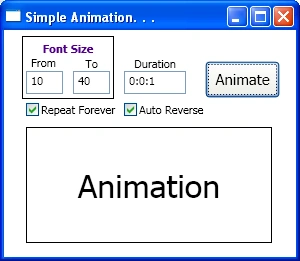
Figure 1: Output Window
Summary
In this writing, using C# & XAML, we have seen how to simply animate any dependency property of a control at runtime.
Join the conversation! Your thoughts help the community grow.