
Prism Framework provides a very good solution
for creating Modular applications in Silverlight.
First of we need to download Prism Framework from the Microsoft site
http://www.microsoft.com/download/en/details.aspx?id=4922.
The dlls would be downloaded as shown below: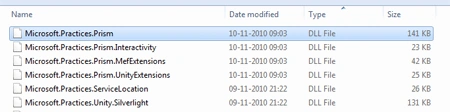
I guess it would help if one has bit of understanding of how MEF works . Since
that would make life easier.
Well lets start. Here I would demonstrate a simple working example of Prism
Implementation.
Create a new Silverlight Library Project and named it as FirstHello.
Just add a view First.xaml.
<Grid
x:Name="LayoutRoot"
Background="White">
<TextBlock
Text="HelloWorld"
FontSize="26"
HorizontalAlignment="Center"
VerticalAlignment="Center"
/>
</Grid>
Create a new Module.
public
class Module
: IModule
{
#region
IModule Members
private
IRegionManager regionManager;
IUnityContainer container;
public void
Initialize()
{
if (this.regionManager.Regions.ContainsRegionWithName("FirstHello"))
{
this.regionManager.Regions["FirstHello"].Add(this.container.Resolve<First>());
}
}
public Module(IRegionManager
regionManager, IUnityContainer container)
{
this.container = container;
this.regionManager = regionManager;
}
#endregion
}
The Module implements the Imodule Interface.
namespace
Microsoft.Practices.Prism.Modularity
{
// Summary:
// Defines the contract for the modules deployed in the
application.
public
interface
IModule
{
// Summary:
// Notifies the module that it has be initialized.
void
Initialize();
}
}
Similarly lets add a another Silverlight library project.
Second.xaml is the View.
<UserControl
x:Class="SecondHello.View.Second"
xmlns="http://schemas.microsoft.com/winfx/2006/xaml/presentation"
xmlns:x="http://schemas.microsoft.com/winfx/2006/xaml"
xmlns:d="http://schemas.microsoft.com/expression/blend/2008"
xmlns:mc="http://schemas.openxmlformats.org/markup-compatibility/2006"
mc:Ignorable="d"
d:DesignHeight="300"
d:DesignWidth="400">
<Grid
x:Name="LayoutRoot"
Background="White">
<TextBlock
Text="GreetingWorld"
FontSize="26"
HorizontalAlignment="Center"
VerticalAlignment="Center"
/>
</Grid>
</UserControl>
The next Module looks as:
public class
Module1 :
IModule
{
#region
IModule Members
private
IRegionManager regionManager;
IUnityContainer container;
public void
Initialize()
{
if (this.regionManager.Regions.ContainsRegionWithName("SecondHello"))
{
this.regionManager.Regions["SecondHello"].Add(this.container.Resolve<Second>());
}
}
public Module1(IRegionManager
regionManager, IUnityContainer container)
{
this.container = container;
this.regionManager = regionManager;
}
#endregion
}
Let us create a new
Silverlight Project SLPrismPart1.
Lets Create a Bootstrapper.
public class
Bootstrapper :
UnityBootstrapper
{
protected
override DependencyObject CreateShell()
{
Shell shell =
new Shell();
Application.Current.RootVisual =
shell;
return shell;
}
protected
override IModuleCatalog
CreateModuleCatalog()
{
ModuleCatalog modules =
new ModuleCatalog();
modules.AddModule(typeof(FirstHello.Module));
modules.AddModule(typeof(SecondHello.Module1));
return modules;
}
}
The Bootstrapper class extends the UnityBootstrapper class. The
UnityBootstrapper class looks as below: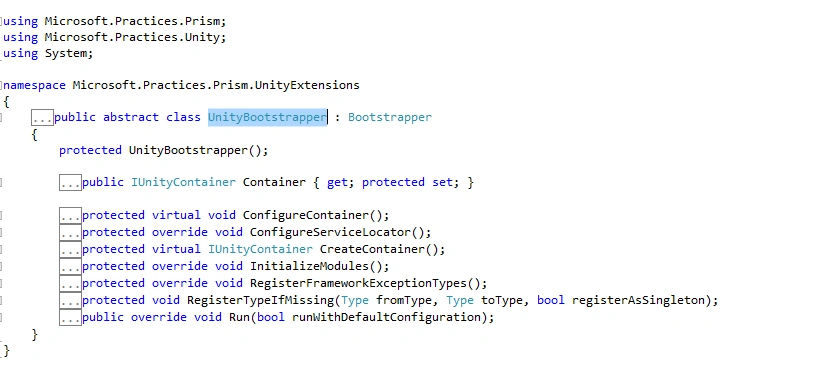
The Bootstrapper class looks as follows:
public class
Bootstrapper :
UnityBootstrapper
{
protected
override DependencyObject CreateShell()
{
Shell shell =
new Shell();
Application.Current.RootVisual =
shell;
return shell;
}
protected
override IModuleCatalog
CreateModuleCatalog()
{
ModuleCatalog modules =
new ModuleCatalog();
modules.AddModule(typeof(FirstHello.Module));
modules.AddModule(typeof(SecondHello.Module1));
return modules;
}
}
The xaml Shell which would
display both our Modules will look as follows:
<UserControl
xmlns:toolkit="http://schemas.microsoft.com/winfx/2006/xaml/presentation/toolkit"
x:Class="SLPrismPart1.Shell"
xmlns="http://schemas.microsoft.com/winfx/2006/xaml/presentation"
xmlns:x="http://schemas.microsoft.com/winfx/2006/xaml"
xmlns:d="http://schemas.microsoft.com/expression/blend/2008"
xmlns:mc="http://schemas.openxmlformats.org/markup-compatibility/2006"
xmlns:Regions="clr-namespace:Microsoft.Practices.Prism.Regions;assembly=Microsoft.Practices.Prism"
mc:Ignorable="d"
d:DesignHeight="300"
d:DesignWidth="400">
<Grid
x:Name="LayoutRoot"
ShowGridLines="True">
<Grid.ColumnDefinitions>
<ColumnDefinition/>
<ColumnDefinition/>
</Grid.ColumnDefinitions>
<Grid.RowDefinitions
>
<RowDefinition
Height="Auto"/>
<RowDefinition
Height="*"/>
</Grid.RowDefinitions>
<TextBlock
Text="Sample
MVVM Hello World Application"
FontSize="16"
HorizontalAlignment="Center"
Grid.Row="0"
Grid.ColumnSpan="2"/>
<ContentControl
Grid.Row="1"
Grid.Column="0"
x:Name="FirstHello"
Regions:RegionManager.RegionName="FirstHello"
HorizontalAlignment="Center"
VerticalAlignment="Center"/>
<ContentControl
Grid.Row="1"
Grid.Column="1"
x:Name="SecondHello"
Regions:RegionManager.RegionName="SecondHello"
HorizontalAlignment="Center"
VerticalAlignment="Center"/>
</Grid>
</UserControl>
The Application_Startup in
the App.xaml will look as follows :
private void
Application_Startup(object sender,
StartupEventArgs e)
{
Bootstrapper bootStrapper =
new Bootstrapper();
bootStrapper.Run();
}
We are done lets give it a run: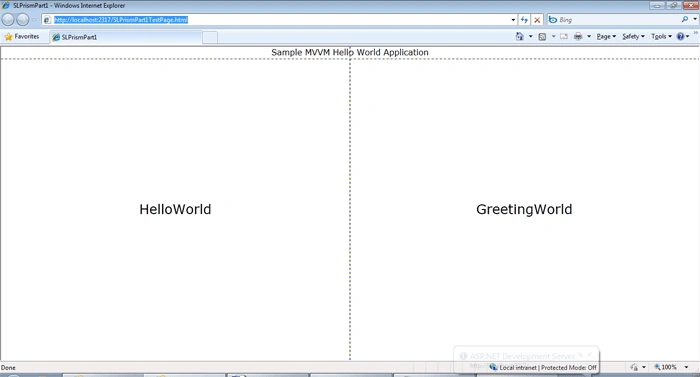
In my next post I would go more indepth into the Prism Framework. Thanks. Happy
coding.
Join the conversation! Your thoughts help the community grow.