

In this article, I am going to show how to shutdown, restart, Lock, Logoff, Sleep etc. through C# Code.
Suppose your app needs to perform operations such as Shutdown, Restart, Logoff, Lock, Hibernate or Sleep through code. Then you need to call a process that runs a specific executable file (already stored in our system) along with their required arguments. Here I made a Utility Application "PC Controller" that allows you to do these kinds of operations. A sample code is attached with this article.
After going through this article, we will get to know the following points:
- Adding items to a ListView Control and showing them as Small Icons
- Shutting Down, Restarting, Locking and Logging off operations through code
When we run this application, we get the following screen where each operation is showing as an icon in the ListView Control:
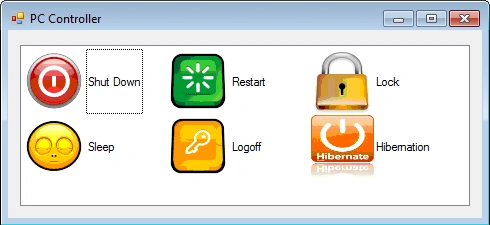
Figure 1
Let us see the application in more detail. In this GUI design, there is a ListView Control being used. Just use the following to design the GUI:
- To show an item as icons, click the arrow on the right side of the ListViewControl in designer mode and set the View to "SmallIcon". (See Figure-2)
- Then drop an ImageList Control and add all your icon images in the ImageList Control by setting the "Images" property to the folder path where we store all our icons.
- After associating images with an ImageList Control, we will see "imageList1" in the combo box of the "SmallImageList" property. Now set the Small image List property to "imageList1".
- Now attach an event handler for the "SelectedIndexChanged" event.
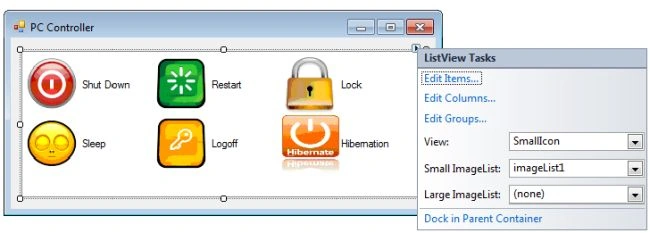
Figure 2
In the "SelectedIndex_Changed" event handler, add the following code in which we basically call a process by giving the executable file name and its command line arguments.
ProcessStartInfo startinfo = new ProcessStartInfo(filename, arguments);
Process.Start(startinfo);
Here is the full code
public partial class Form1 : Form
{
    public Form1()
    {
        InitializeComponent();
    }
    private void listView1_SelectedIndexChanged(object sender, EventArgs e)
    {
        DoOperation(listView1.SelectedItems[0].Text);
    }
    private void DoOperation(string oparation)
    {
        string filename = string.Empty;
        string arguments = string.Empty;
        switch (oparation)
        {
            case "Shut Down":
                filename = "shutdown.exe";
                arguments = "-s";
                break;
            case "Restart":
                filename = "shutdown.exe";
                arguments = "-r";
                break;
            case "Logoff":
                filename = "shutdown.exe";
                arguments = "-l";
                break;
            case "Lock":
                filename = "Rundll32.exe";
                arguments = "User32.dll, LockWorkStation";
                break;
            case "Hibernation":
                filename = @"%windir%\system32\rundll32.exe";
                arguments = "PowrProf.dll, SetSuspendState";
                break;
            case "Sleep":
                filename = "Rundll32.exe";
                arguments = "powrprof.dll, SetSuspendState 0,1,0";
                break;
        }
        ProcessStartInfo startinfo = new ProcessStartInfo(filename, arguments);
        Process.Start(startinfo);
        this.Close();
    }
}
Nayan KumarPosted Mar 3, 2016, 5:42 AM
Thanks Hemant Srivastava
Hemant SrivastavaPosted Nov 26, 2014, 5:42 PM
Thanks Niroshan!
Niroshan MadhurangaPosted Nov 25, 2014, 11:48 PM
Thxs
engdhaif jaberPosted Jun 9, 2014, 11:36 PM
thank's man this very amazing
Hemant SrivastavaPosted Jan 14, 2013, 7:34 AM
Thanks Arul
arul vPosted Jan 14, 2013, 6:30 AM
tq hemant
nguyen nguyenPosted Jan 11, 2013, 6:38 AM
Thank
Hemant SrivastavaPosted Jan 11, 2013, 12:38 AM
yeah Sam.., Thanks for sharing.
Sam HobbsPosted Jan 10, 2013, 9:49 PM
If you only need to do a shutdown, restart or logoff then I think you can use the WMI Win32_OperatingSystem class. There are other ways to do hibernate, lock and sleep; I do not know the details but it is possible.