

In this article, you will learn a solution to generate billcode which is based on MS SQLSERVER .
BackgroundMany of systems we use will generate plenty of billcodes everyday , and most of them include date(datetime) or a prefix to show their signification , such as specifying a billcode belongs to a special day or a special type .
Based on this scenario , I will share my idea and solution.
Let's start !
PreparationFirst of all , we need a universal rule of the billcode so that we can generate through the rule .
Here is the rule summary with my experiences
- [prefix][date](optional)[number]
At this Rule , the billcode combine with three parts . Following table explains all of them .
| Part of Rule | Required | Description |
| prefix | true | specify different types of the billcodes , such as MM , 1 , 1A . etc . |
| date | false | when using this part , the value must be the date , such as 20171015 , 20170909 . etc . |
| number | true | the serial number , such as 0001 , 8900 . etc . |
MM201710150001 and MM0000001 are sample billcodes which are based on above rule .
Storing the three parts into a table that we can make the settings more easier to maintain .
Creating a table named BillCodeSetting
- CREATE TABLE [dbo].[BillCodeSetting](
- [TableName] [varchar](255) NOT NULL,
- [Prefix] [varchar](20) NOT NULL,
- [NumberLength] [tinyint] NOT NULL CONSTRAINT [DF_BillCodeSetting_NumLen] DEFAULT ((4)),
- [HasDate] [tinyint] NOT NULL,
- CONSTRAINT [PK_BillCodeSetting] PRIMARY KEY CLUSTERED
- (
- [TableName] ASC
- )WITH (PAD_INDEX = OFF, STATISTICS_NORECOMPUTE = OFF, IGNORE_DUP_KEY = OFF, ALLOW_ROW_LOCKS = ON, ALLOW_PAGE_LOCKS = ON) ON [PRIMARY]
- ) ON [PRIMARY]
For the meaning of each field , you can follow the below table .
| Fileds | Description |
| TableName | name of table |
| Prefix | billcode's prefix |
| NumberLength | length of serial number |
| HasDate | whether billcode contains current data |
Note
There is one more field named TableName we don't mention , it specifies which table uses this setting . What I want to do is to prevent the following scenario .
A prefix is suitable for many types of billcodes , but we also expect each type of billcode can increase no gap !
Take a look on the below two sequences .
1,2,3,4,5.....
1,3,6,8,10....
The first sequence is what we need !
The next thing we need to do is to get the max serial number for each rule so that it can return a new billcode .
Create a table named BillCode to store the max serial number for each rule(table) .
- CREATE TABLE [dbo].[BillCode](
- [Id] [bigint] IDENTITY(1,1) NOT FOR REPLICATION NOT NULL,
- [TableName] [varchar](255) NOT NULL,
- [BillDate] [date] NULL,
- [BillNumber] [bigint] NOT NULL,
- CONSTRAINT [PK_XT_BillMaxNum] PRIMARY KEY CLUSTERED
- (
- [Id] ASC
- )WITH (PAD_INDEX = OFF, STATISTICS_NORECOMPUTE = OFF, IGNORE_DUP_KEY = OFF, ALLOW_ROW_LOCKS = ON, ALLOW_PAGE_LOCKS = ON) ON [PRIMARY]
- ) ON [PRIMARY]
For the meaning of each field , you can follow the below table .
| Fields | Description |
| Id | identification |
| TableName | name of table , the same as BillCodeSetting's TableName |
| BillDate | date of current date , everyday will add a record |
| BillNumber | max serial number of everyday |
Note
When billcode contains the date , this table will add a new record everyday if you use this.
OK , we have finished the previous works ! Turning to generate next time .
How To Generate ?We will create a storedprocedure to generate the billcode here !
- CREATE PROCEDURE [dbo].[USP_GetBillCode]
- @TableName VARCHAR(255),
- @BillDate DATE = NULL,
- @BillCode VARCHAR(20) OUT
- AS
- BEGIN
- DECLARE @Prefix AS VARCHAR(20)
- DECLARE @NumLen AS INT
- DECLARE @Number AS BIGINT
- DECLARE @HasDate AS TINYINT
- SET NOCOUNT ON
- -- 1. Getting the settings
- SELECT TOP 1 @Prefix = [Prefix] , @NumLen = [NumberLength], @HasDate=[HasDate]
- FROM [dbo].[BillCodeSetting] WHERE [TableName] = @TableName
- -- 2. Updating the max billcode number
- IF @HasDate=0
- UPDATE [dbo].[BillCode]
- SET [BillNumber]=[BillNumber]+1,@Number=[BillNumber]+1
- WHERE [TableName] = @TableName
- ELSE
- UPDATE [dbo].[BillCode]
- SET[BillNumber]=[BillNumber]+1,@Number=[BillNumber]+1
- WHERE [TableName] = @TableName And [BillDate] = @BillDate
- -- 3. Inserting a new record to BillCode if not exists before
- IF @@ROWCOUNT = 0
- BEGIN
- INSERT INTO [dbo].[BillCode]([TableName],[BillDate],[BillNumber])
- VALUES (@TableName,@BillDate,1)
- SET @Number=1
- END
- -- 4. Get a new number
- SET @Number = @Number + 1000000000000000000
- -- 5. Generate a new billcode
- IF @HasDate=0
- SELECT @BillCode=@Prefix + RIGHT(CAST((@Number) AS VARCHAR(20)),@NumLen)
- ELSE
- SELECT @BillCode=@Prefix + REPLACE(CONVERT(varchar(10),@BillDate,120),'-','') + RIGHT(CAST((@Number) AS VARCHAR(20)),@NumLen)
- SET NOCOUNT OFF
- END
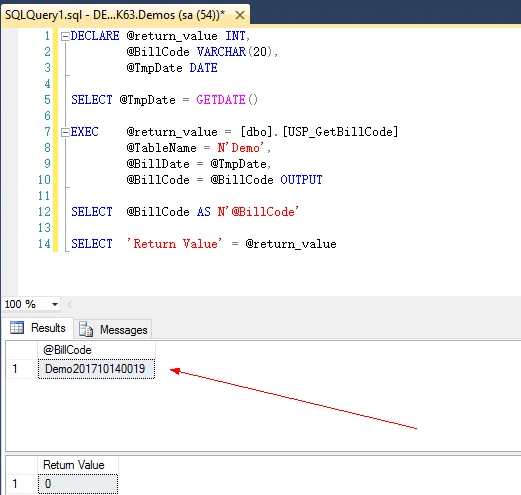
The following code demonstrates that how to execute this storedprocedure via T-SQL
- DECLARE @return_value INT,
- @BillCode VARCHAR(20),
- @TmpDate DATE
- SELECT @TmpDate = GETDATE()
- EXEC @return_value = [dbo].[USP_GetBillCode]
- @TableName = N'Demo',
- @BillDate = @TmpDate,
- @BillCode = @BillCode OUTPUT
- SELECT @BillCode AS N'@BillCode'
- SELECT 'Return Value' = @return_value
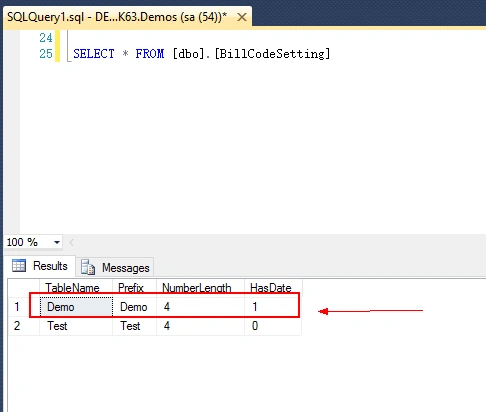
Before running this code , let's take a look on BillCodeSettings table , and we will use the first record(rule) to show the result .
After running this code in my compute , the result is Demo201710140019.
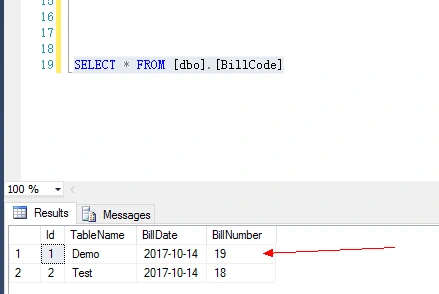
Turning to the BillCode table , you will find that the max serial number of Demo is 19.
By the way , using ADO.NET or ORM frameworks will be very easy when we call this procedure in our programs .
SummaryIn this article , I share a simple solution to generate billcode based on MS SQLSERVER . You can make some extensions to support your own systems . Hope this solution can help you !
Join the conversation! Your thoughts help the community grow.