

Overview
Custom scripting is a vital element of custom development in SharePoint Online. Scripting allows running custom scripts on SharePoint Online sites to achieve the desired result. It may be used to fetch the data from SharePoint or manipulate the DOM structure.
A few features of it are turned off by default. Scripting capability is also one of those features.
Custom Scripting Scenarios
The custom script by default is disabled on the below sites.
- SharePoint Online root site collection
- Classic SharePoint site collection
- SharePoint MySites
- Personal OneDrive sites
- SharePoint site collection created based on self-service site creation.
Mentioned below are a few scenarios that are impacted due to a disabled custom script.
- Uploading sandbox solutions
- Upload custom master pages and page layouts
If custom scripting is turned off, it does not allow you to upload the below file types.
- .master
- .aspx
- .ascx
- .asmx
- .htc
- .jar
- .swf
- .xap
- .xsf
The following site features are unavailable if the custom scripting is turned off.
- Save the Site as a Template
- Save the document library as a template
- Solution Gallery
- Theme Gallery
- Help Settings
- HTML Field Security
- Sandbox solutions
- SharePoint Designer
- Uploading files that potentially include script
Turn on custom scripting
Follow the below procedure to turn custom scripting on.
- Open SharePoint Online Admin Center (https://[tenant]-admin.sharepoint.com).
- From the left menu, click settings.
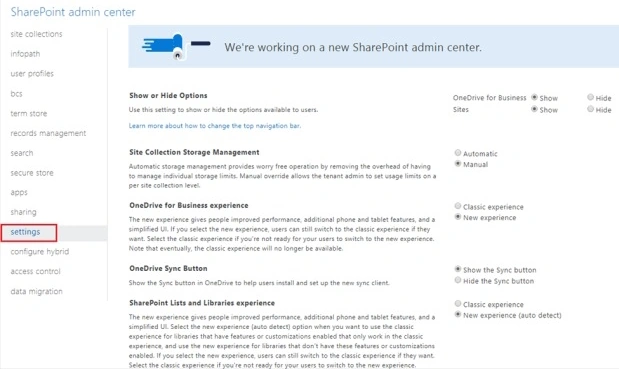
- Check "Allow users to run custom scripts on personal sites and self-service created sites".

Enable Custom Script with PowerShell
If it is not feasible to wait for 24 hours until the timer job runs to turn on the custom scripting, we can turn it on using PowerShell.
- Download and Install SharePoint Online Management Shell from https://www.microsoft.com/en-us/download/details.aspx?id=35588
- Open SharePoint Online Management Shell.
- Connect to your SharePoint online tenant.
Connect-SPOService -Url "https://[tenant]-admin.sharepoint.com" - Run the below command to enable custom scripting.
Set-SPOSite -Identity https://[tenant].sharepoint.com -DenyAddAndCustomizePages 0 - To disable scripting capabilities, run this command.
Set-SPOSite -Identity "https://[tenant].sharepoint.com" -DenyAddAndCustomizePages 1
Security Implications
Enabling the custom scripts on SharePoint tenant helps the developers in inserting the script to address different business scenarios. However, we can no longer enforce the governance around what custom scripts can do and where the scripts can be added to SharePoint.
Anyone who has "Add and Customize Pages" permission can insert the custom code. There are no boundaries for executing the script. This makes it very difficult to identify.
- Who has added the custom script?
- What code has been added as part of a custom script?
- Where the custom script has been added on the SharePoint site?
What can a custom script do?
The custom script runs in the context of the currently logged-in user. That means the script can access everything that a user has access to. The script can also access the content across Office 365 services.
Alternative to Custom Script (SharePoint Framework - SPFx)
To bring the governance, the recommended approach is to use SharePoint Framework (SPFx). Below are the features of SPFx.
- SPFx runs in the context of the current user.
- It does not use iFrame.
- Controls are responsive.
- SPFx has access to the Document Object Model (DOM).
- The developer can access the lifecycle.
- It can be developed using any JavaScript framework (React, Knockout, Angular, etc).
- The toolchain is open source (npm, TypeScript, Yeoman, Gulp).
- Office 365 admins have a governance tool to disable the SPFx solution.
- SPFx can work with classic and modern SharePoint.
Summary
Enabling custom scripts allows the developers to address business scenarios easily by inserting the scripts. However, it makes it very difficult to bring the governance. SharePoint Framework (SPFx) is a recommended way to implement the solutions that can work for both, classic and modern, SharePoint sites.
Prasham SabadraPosted Dec 4, 2018, 10:57 AM
Hi Nanddeep, do you know how to add url in HTML Field Security either through PowerShell or using CSOM
Ano MepaniPosted Sep 27, 2018, 9:27 PM
Informative and very well explained