

In this article, we will look for the PowerShell Scripts to export IIS Settings from the source SharePoint Farm. This information will be helpful to track all the “Application Pool” accounts used to configure Web Applications in the Farm.
There could be more properties that you can export but for this demo, I am considering the following important properties:
Site Name, Site Path, Application Pool, Bindings, Identity, Password
In Step 1, we will import module “WebAdministration” which gives us the methods to work with “IIS Manager” Objects.

In Step 2, we will retrieve items from IIS directory using wildcard path search “IIS:\Sites\*”.
In Step 3, we will enlist the header of the output Settings file by using the name of properties that we are pulling from IIS.
In Step 4, we will fetch properties “Site Name, Site Path, Application Pool, Bindings, Identity, Password” for each IIS Site.
In Step 5, we will append the properties to the output file for each of the IIS sites we have in the Farm.
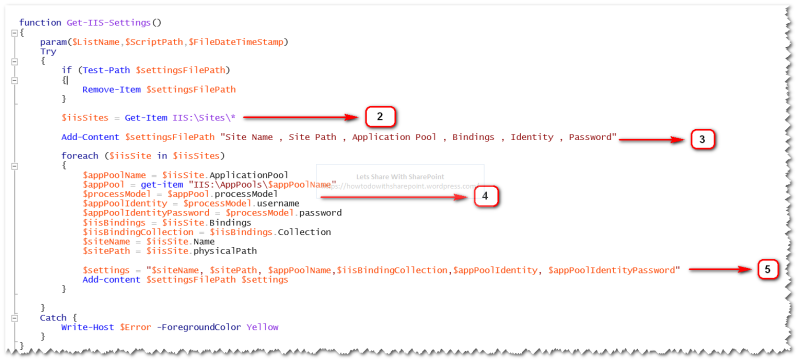
In Step 6, we are specifying the path for output file which would be in the form of CSV.
In Step 7, we are calling the function executing Steps 1-6.

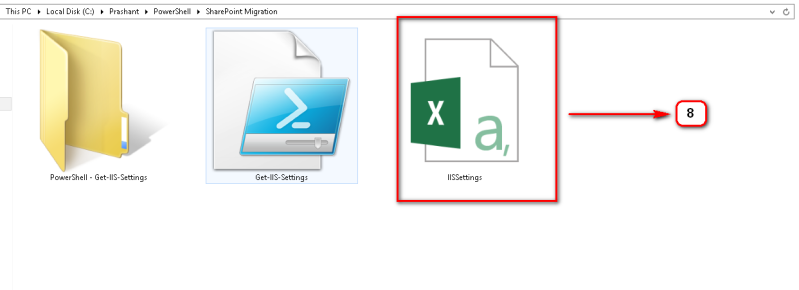
Once the script is executed successfully, it will generate the output file as shown below-
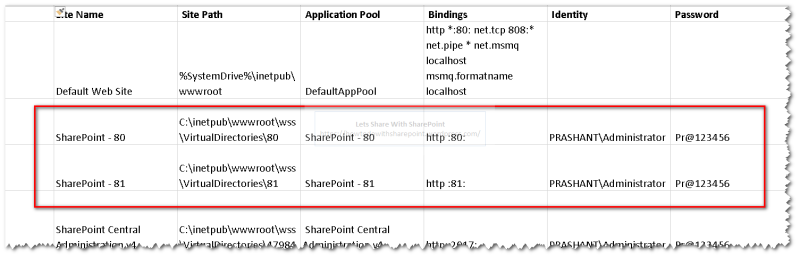
And, here is the data that was added to the output file during the execution of the above script.
We can see IIS details for each Site (Web Application) added to the SharePoint Farm and this information is really crucial to document during the Migration planning phase.
Code Reference
- Import - Module WebAdministration
- function Get - IIS - Settings() {
- param($ListName, $ScriptPath, $FileDateTimeStamp)
- Try {
- if (Test - Path $settingsFilePath) {
- Remove - Item $settingsFilePath
- }
- $iisSites = Get - Item IIS: \Sites\ * Add - Content $settingsFilePath "Site Name , Site Path , Application Pool , Bindings , Identity , Password"
- foreach($iisSite in $iisSites) {
- $appPoolName = $iisSite.ApplicationPool
- $appPool = get - item "IIS:\AppPools\$appPoolName"
- $processModel = $appPool.processModel
- $appPoolIdentity = $processModel.username
- $appPoolIdentityPassword = $processModel.password
- $iisBindings = $iisSite.Bindings
- $iisBindingCollection = $iisBindings.Collection
- $siteName = $iisSite.Name
- $sitePath = $iisSite.physicalPath
- $settings = "$siteName, $sitePath, $appPoolName,$iisBindingCollection,$appPoolIdentity, $appPoolIdentityPassword"
- Add - content $settingsFilePath $settings
- }
- }
- Catch {
- Write - Host $Error - ForegroundColor Yellow
- }
- }
- Clear - Host $settingsFilePath = "C:\Prashant\PowerShell\SharePoint Migration\IISSettings.csv"
- Get - IIS - Settings
Hope you find it helpful.
Join the conversation! Your thoughts help the community grow.