

Overview
SharePoint Framework client web parts are targeted to develop business scenarios. Office 365 UI Fabric component offers seamless integration with Office 365 and offers a wide range of UI components. However, it does not offer Organization chart kind of controls yet. In these scenarios, we can make use of open source npm packages offerings.
In this article, we will explore organization chart control. We will use React JS to develop the example.
Create SPFx Solution
Open the command prompt. Create a directory for SPFx solution.
- md spfx-react-orgchart
Navigate to the above-created directory.
- cd spfx-react-orgchart
Run Yeoman SharePoint Generator to create the solution.
- yo @microsoft/sharepoint
Yeoman generator will present you with the wizard by asking questions about the solution to be created.
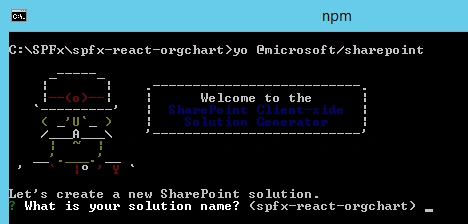
Solution Name: Hit Enter to have the default name (spfx-react-orgchart in this case) or type in any other name for your solution.
Selected choice: Hit Enter
Target for the component: Here, we can select the target environment where we are planning to deploy the client webpart, i.e., SharePoint Online or SharePoint OnPremise (SharePoint 2016 onwards).
Selected choice: SharePoint Online only (latest)
Place of files: We may choose to use the same folder or create a subfolder for our solution.
Selected choice: Same folder
Deployment option: Selecting Y will allow the app to deployed instantly to all sites and will be accessible everywhere.
Selected choice: N (install on each site explicitly)
Type of client-side component to create: We can choose to create a client-side webpart or an extension. Choose the webpart option.
Selected choice: WebPart
Web part name: Hit Enter to select the default name or type in any other name.
Selected choice: OrgChartViewer
Web part description: Hit Enter to select the default description or type in any other value.
Selected choice: Organization chart with React
Framework to use: Select any JavaScript framework to develop the component. Available choices are (No JavaScript Framework, React, and Knockout)
Selected choice: React
Yeoman generator will perform scaffolding process to generate the solution. The scaffolding process will take a significant amount of time.
Once the scaffolding process is completed, lock down the version of project dependencies by running below command
- npm shrinkwrap
In the command prompt type the below command to open the solution in code editor of your choice.
- code .
In this article, we will make use of SharePoint to store the hierarchical information for the chart and render it on SPFx web part.
A SharePoint list (named OrgChart) is used to store the hierarchical data. The schema of the list is as below.
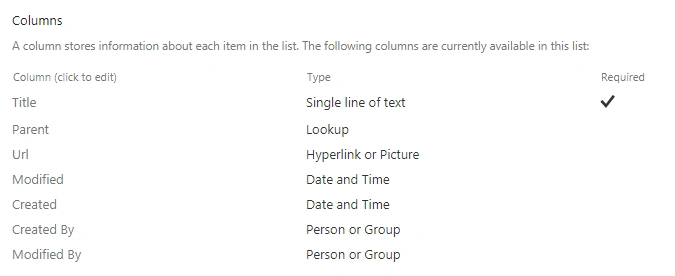
The Parent column is a lookup on same OrgChart list’s Title column.
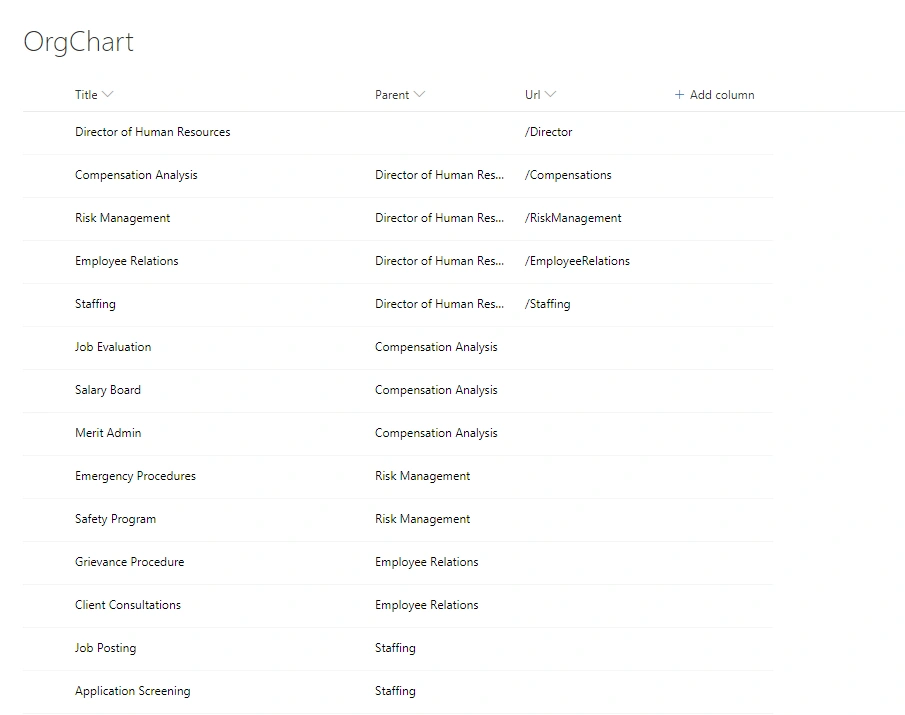
Let’s add some test data to our list.
NPM Packages
Organization Chart Control
At the time of writing this article, organization chart control is not available in Office 365 UI Fabric controls. We will explore the org chart control called react-orgchart (https://www.npmjs.com/package/react-orgchart)
Use the below command to install the org chart control
- npm install react-orgchart --save
The --save option enables NPM to include the packages to dependencies section of the package.json file.
Array to Tree
The array-to-tree npm package helps to convert a plain array of nodes (with pointers to parent nodes) to a nested data structure. (https://www.npmjs.com/package/array-to-tree)
Use the below command to install the array-to-tree npm package.
- npm install array-to-tree --save
Code the webpart
Open OrgChartViewer.tsx file under “\src\webparts\orgChartViewer\components\” folder to import the org chart control
Implement method to read items from SharePoint list - OrgChart.
Implement method to process the items and convert to OrgChart.
- import OrgChart from 'react-orgchart';
Open OrgChartViewer.module.scss file under “\src\webparts\orgChartViewer\components\” folder to import the CSS
- @import '~react-orgchart/index.css';
Modify the render method to render the tree view
- public render(): React.ReactElement<IOrgChartViewerProps> {
- return (
- <div className={ styles.orgChartViewer }>
- <div className={ styles.container }>
- <div className={ styles.row }>
- <div className={ styles.column }>
- <OrgChart tree={this.state.orgChartItems} NodeComponent={this.MyNodeComponent} />
- </div>
- </div>
- </div>
- </div>
- );
- }
- private MyNodeComponent = ({ node }) => {
- if (node.url) {
- return (
- <div className="initechNode">
- <a href={ node.url.Url } className={styles.link} >{ node.title }</a>
- </div>
- );
- }
- else {
- return (
- <div className="initechNode">{ node.title }</div>
- );
- }
- }
- private readOrgChartItems(): Promise<IOrgChartItem[]> {
- return new Promise<IOrgChartItem[]>((resolve: (itemId: IOrgChartItem[]) => void, reject: (error: any) => void): void => {
- this.props.spHttpClient.get(`${this.props.siteUrl}/_api/web/lists/getbytitle('${this.props.listName}')/items?$select=Title,Id,Url,Parent/Id,Parent/Title&$expand=Parent/Id&$orderby=Parent/Id asc`,
- SPHttpClient.configurations.v1,
- {
- headers: {
- 'Accept': 'application/json;odata=nometadata',
- 'odata-version': ''
- }
- })
- .then((response: SPHttpClientResponse): Promise<{ value: IOrgChartItem[] }> => {
- return response.json();
- })
- .then((response: { value: IOrgChartItem[] }): void => {
- resolve(response.value);
- }, (error: any): void => {
- reject(error);
- });
- });
- }
- private processOrgChartItems(): void {
- this.readOrgChartItems()
- .then((orgChartItems: IOrgChartItem[]): void => {
- let orgChartNodes: Array<ChartItem> = [];
- var count: number;
- for (count = 0; count < orgChartItems.length; count++) {
- orgChartNodes.push(new ChartItem(orgChartItems[count].Id, orgChartItems[count].Title, orgChartItems[count].Url, orgChartItems[count].Parent ? orgChartItems[count].Parent.Id : undefined));
- }
- var arrayToTree: any = require('array-to-tree');
- var orgChartHierarchyNodes: any = arrayToTree(orgChartNodes);
- var output: any = JSON.stringify(orgChartHierarchyNodes[0]);
- this.setState({
- orgChartItems: JSON.parse(output)
- });
- });
- }
Test the WebPart
- On the command prompt, type “gulp serve”.
- Open SharePoint site.
- Navigate to /_layouts/15/workbench.aspx.
- Add the webpart to page.
- Edit the webpart and add list name (i.e. OrgChart) to web part property.

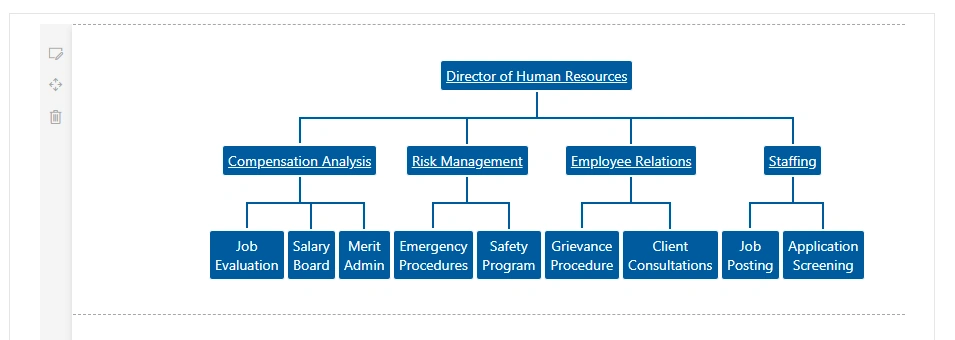
- The web part should display the data from the SharePoint list in an organization chart.
Troubleshooting
In some cases, SharePoint workbench (https://[tenant].sharepoint.com/_layouts/15/workbench.aspx) shows the below error although “gulp serve” is running.

Open the below URL in the next tab of the browser. Accept the warning message.
Open the below URL in the next tab of the browser. Accept the warning message.
https://localhost:4321/temp/manifests.js
We can utilize the open source npm packages in SharePoint framework to easily develop complex controls like organization chart control.
Chain HackPosted Apr 25, 2022, 9:56 PM
Great article. Can I change the HTML and some CSS of this chart as well? Which file i should be targeting to edit? (Sorry i am new to react and SPFX)
Varsha DhawalePosted Aug 31, 2020, 2:21 AM
Hi I am getting internal/util/inspect.js:31const types = internalBinding('types'); ^ ReferenceError: internalBinding is not defined error when running your source code. I did npm install, even repeated step as mentioned by you Please try by removing OrgChart entry from package.json and rerun npm install react-orgchart --save but still facing error. Please help to run your source code
Tanmay JainPosted Jun 9, 2020, 3:21 PM
I am facing issues after tenant deployment, please help me to get it resolved. Can't load the application on this page. Use the browser Back button to retry. If the problem persists, contact the administrator of the site and give them the information in Technical Details. Although, it works when gulp serve command is in running mode, however after deployment, issues were coming like this. Thanks
Sravan AmbalaPosted Nov 7, 2019, 4:25 AM
How to import IOrgChart and ChartItem?
Abenet BeyenePosted Sep 21, 2019, 10:55 PM
Can you make one using userprofile services?
Bruno KoteskyPosted Aug 27, 2019, 10:41 AM
Do you know if there's a way to make each node's collapsable? If possible
Bruno KoteskyPosted Aug 26, 2019, 6:10 PM
How do i implement the Url?
Elavarasu IyyanarappanPosted Aug 12, 2019, 1:22 PM
Nice... Thanks for sharing
prachi kulkarniPosted Jul 15, 2019, 7:09 PM
Error Details: 'OrgChart' is declared but its value is never read.tsCould not find a declaration file for module 'react-orgchart'. '/spfx-react-orgchart/node_modules/react-orgchart/index.js' implicitly has an 'any' type.
prachi kulkarniPosted Jul 15, 2019, 7:09 PM
I am getting an error while importing orgchart in orgchartviewer.tsx. Can you please help?
jyothsna gPosted Mar 1, 2019, 2:52 AM
Thanks for explaining in detail
Md Tahmidul AbedinPosted Oct 15, 2018, 5:35 AM
Nice Writing.
Rushi MehtaPosted Oct 15, 2018, 4:54 AM
Thanks for sharing