

Introduction
SharePoint has an object model known as the Client-side object model (CSOM), which is available for the .net framework. It wasn't available for the .NET standard, but now Microsoft has provided a much-awaited CSOM for the .NET standard.
With the release of this, we can easily connect to SharePoint using an Azure AD OAuth-based approach from .net core applications.
So to understand how CSOM for .NET standard works, let's create a .NET Core console application connect to SharePoint, and fetch all the items from the list.
Create Azure AD application
Step 1. Navigate to here.
Step 2. Click on Azure Active Directory and click on App registration.
Step 3. Click on + New registration to register the Azure AD application
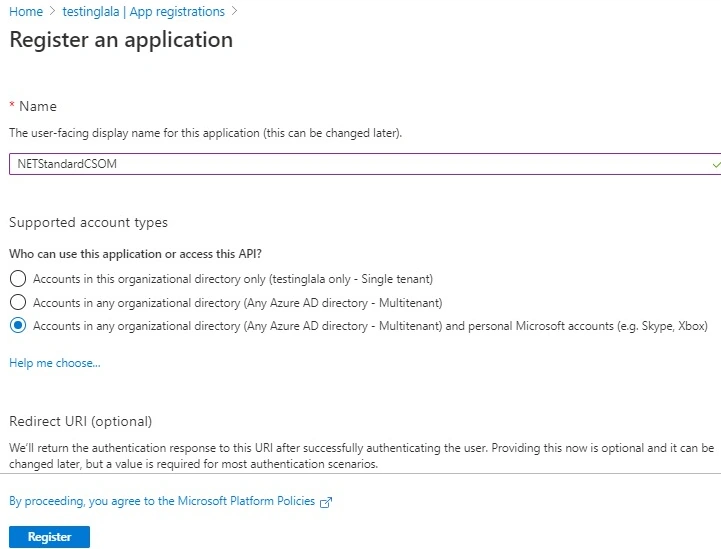
Step 4. Provide an appropriate name for the application -- we will use NETStandardCSOM.
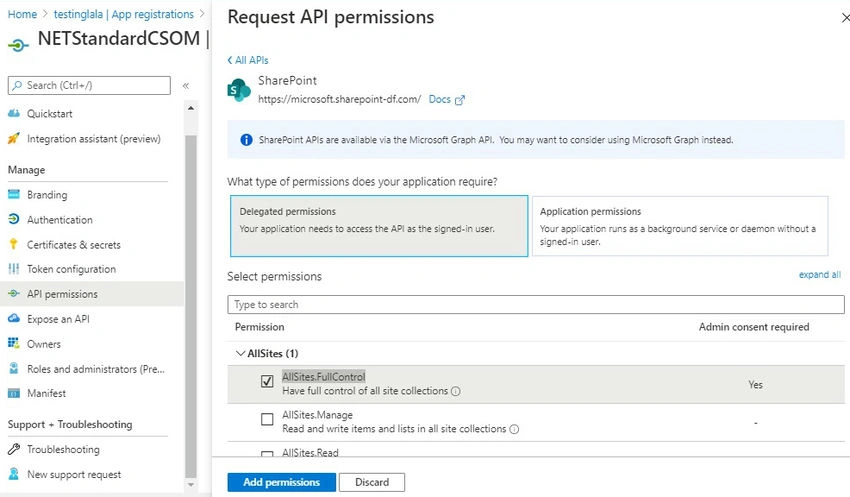
Step 5. Navigate to API Permission and select SharePoint to provide appropriate permission. Select delegated permission and check all the required permissions. For our demo, we will select AllSites.FullControl.
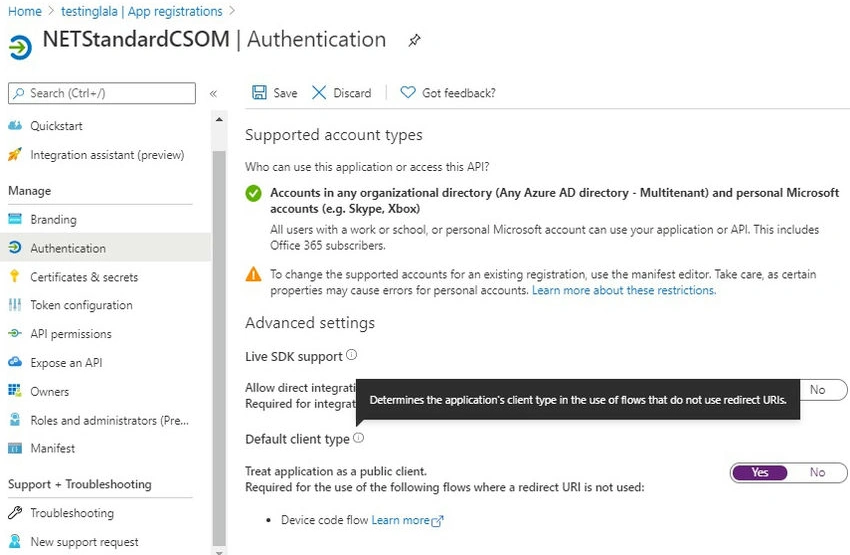
Step 6. Navigate to the authentication section and Under Default Client type select "Yes".
Step 7. Copy the client ID which got generated after creating the Azure AD application
Create a .Net Core console application
Step 1. Navigate to Visual Studio and create a new project with the template as .net core console application and name the project NetStandardCSOM.
Step 2. Add all the below NuGet packages.
- Microsoft.SharePoint online.CSOM - This library is CSOM for .NET Standard.
- Newtonsoft.Json
- System.Text.Json
- System.IdentityModel.Token.Jwt
Step 3. Add a class file named AuthenticationManager and add the below code.
This is the actual file where all the magic happens to fetch the token stored in the cache, so we are using OAuth 2.0 Resource Owner Password Credentials to fetch the token.
Please replace the client ID that we created in Step 1 in the string name defaultAADAppId.
using Microsoft.SharePoint.Client;
using System;
using System.Collections.Concurrent;
using System.Net.Http;
using System.Security;
using System.Text;
using System.Text.Json;
using System.Threading;
using System.Threading.Tasks;
using System.Web;
namespace NetStandardCSOM
{
    public class AuthenticationManager : IDisposable
    {
        private static readonly HttpClient httpClient = new HttpClient();
        private const string tokenEndpoint = "https://login.microsoftonline.com/common/oauth2/token";
        private const string defaultAADAppId = "3de78f25-cbf5-4ec4-b9af-349c91904dc5";
        private static readonly SemaphoreSlim semaphoreSlimTokens = new SemaphoreSlim(1);
        private AutoResetEvent tokenResetEvent = null;
        private readonly ConcurrentDictionary<string, string> tokenCache = new ConcurrentDictionary<string, string>();
        private bool disposedValue;

        internal class TokenWaitInfo
        {
            public RegisteredWaitHandle Handle = null;
        }
        public ClientContext GetContext(Uri web, string userPrincipalName, SecureString userPassword)
        {
            var context = new ClientContext(web);

            context.ExecutingWebRequest += (sender, e) =>
            {
                string accessToken = EnsureAccessTokenAsync(new Uri($"{web.Scheme}://{web.DnsSafeHost}"), userPrincipalName, new System.Net.NetworkCredential(string.Empty, userPassword).Password).GetAwaiter().GetResult();
                e.WebRequestExecutor.RequestHeaders["Authorization"] = "Bearer " + accessToken;
            };

            return context;
        }
        public async Task<string> EnsureAccessTokenAsync(Uri resourceUri, string userPrincipalName, string userPassword)
        {
            string accessTokenFromCache = TokenFromCache(resourceUri, tokenCache);
            if (accessTokenFromCache == null)
            {
                await semaphoreSlimTokens.WaitAsync().ConfigureAwait(false);
                try
                {
                    string accessToken = await AcquireTokenAsync(resourceUri, userPrincipalName, userPassword).ConfigureAwait(false);
                    Console.WriteLine($"Successfully requested new access token resource {resourceUri.DnsSafeHost} for user {userPrincipalName}");
                    AddTokenToCache(resourceUri, tokenCache, accessToken);
                    tokenResetEvent = new AutoResetEvent(false);
                    TokenWaitInfo wi = new TokenWaitInfo();
                    wi.Handle = ThreadPool.RegisterWaitForSingleObject(
                        tokenResetEvent,
                        async (state, timedOut) =>
                        {
                            if (!timedOut)
                            {
                                TokenWaitInfo wi1 = (TokenWaitInfo)state;
                                if (wi1.Handle != null)
                                {
                                    wi1.Handle.Unregister(null);
                                }
                            }
                            else
                            {
                                try
                                {
                                    await semaphoreSlimTokens.WaitAsync().ConfigureAwait(false);
                                    RemoveTokenFromCache(resourceUri, tokenCache);
                                    Console.WriteLine($"Cached token for resource {resourceUri.DnsSafeHost} and user {userPrincipalName} expired");
                                }
                                catch (Exception ex)
                                {
                                    Console.WriteLine($"Something went wrong during cache token invalidation: {ex.Message}");
                                    RemoveTokenFromCache(resourceUri, tokenCache);
                                }
                                finally
                                {
                                    semaphoreSlimTokens.Release();
                                }
                            }
                        },
                        wi,
                        (uint)CalculateThreadSleep(accessToken).TotalMilliseconds,
                        true
                    );

                    return accessToken;

                }
                finally
                {
                    semaphoreSlimTokens.Release();
                }
            }
            else
            {
                Console.WriteLine($"Returning token from cache for resource {resourceUri.DnsSafeHost} and user {userPrincipalName}");
                return accessTokenFromCache;
            }
        }
        private async Task<string> AcquireTokenAsync(Uri resourceUri, string username, string password)
        {
            string resource = $"{resourceUri.Scheme}://{resourceUri.DnsSafeHost}";

            var clientId = defaultAADAppId;
            var body = $"resource={resource}&client_id={clientId}&grant_type=password&username={HttpUtility.UrlEncode(username)}&password={HttpUtility.UrlEncode(password)}";
            using (var stringContent = new StringContent(body, Encoding.UTF8, "application/x-www-form-urlencoded"))
            {
                var result = await httpClient.PostAsync(tokenEndpoint, stringContent).ContinueWith((response) =>
                {
                    return response.Result.Content.ReadAsStringAsync().Result;
                }).ConfigureAwait(false);

                var tokenResult = JsonSerializer.Deserialize<JsonElement>(result);
                var token = tokenResult.GetProperty("access_token").GetString();
                return token;
            }
        }
        private static string TokenFromCache(Uri web, ConcurrentDictionary<string, string> tokenCache)
        {
            if (tokenCache.TryGetValue(web.DnsSafeHost, out string accessToken))
            {
                return accessToken;
            }

            return null;
        }
        private static void AddTokenToCache(Uri web, ConcurrentDictionary<string, string> tokenCache, string newAccessToken)
        {
            if (tokenCache.TryGetValue(web.DnsSafeHost, out string currentAccessToken))
            {
                tokenCache.TryUpdate(web.DnsSafeHost, newAccessToken, currentAccessToken);
            }
            else
            {
                tokenCache.TryAdd(web.DnsSafeHost, newAccessToken);
            }
        }
        private static void RemoveTokenFromCache(Uri web, ConcurrentDictionary<string, string> tokenCache)
        {
            tokenCache.TryRemove(web.DnsSafeHost, out string currentAccessToken);
        }
        private static TimeSpan CalculateThreadSleep(string accessToken)
        {
            var token = new System.IdentityModel.Tokens.Jwt.JwtSecurityToken(accessToken);
            var lease = GetAccessTokenLease(token.ValidTo);
            lease = TimeSpan.FromSeconds(lease.TotalSeconds - TimeSpan.FromMinutes(5).TotalSeconds > 0 ? lease.TotalSeconds - TimeSpan.FromMinutes(5).TotalSeconds : lease.TotalSeconds);
            return lease;
        }
        private static TimeSpan GetAccessTokenLease(DateTime expiresOn)
        {
            DateTime now = DateTime.UtcNow;
            DateTime expires = expiresOn.Kind == DateTimeKind.Utc ? expiresOn : TimeZoneInfo.ConvertTimeToUtc(expiresOn);
            TimeSpan lease = expires - now;
            return lease;
        }
        protected virtual void Dispose(bool disposing)
        {
            if (!disposedValue)
            {
                if (disposing)
                {
                    if (tokenResetEvent != null)
                    {
                        tokenResetEvent.Set();
                        tokenResetEvent.Dispose();
                    }
                }

                disposedValue = true;
            }
        }

        public void Dispose()
        {
            Dispose(disposing: true);
            GC.SuppressFinalize(this);
        }
    }
}

Step 4. Now let us use this context and fetch the title of the site collection.
Replace the below code in the Program.cs file.
Update the URI with the site collection URL for which we require a title.
Update the Username and Password of the User
using System;
using System.Net;
using System.Security;
using System.Threading.Tasks;
namespace NetStandardCSOM
{
    class Program
    {
        public static async Task Main(string[] args)
        {
            Uri site = new Uri("https://testinglala.sharepoint.com/");
            string user = "<<userName>>";
            string rawPassword = "<<password>>";
            SecureString password = new SecureString();
            foreach (char c in rawPassword) password.AppendChar(c);

            // Note: The PnP Sites Core AuthenticationManager class also supports this
            using (var authenticationManager = new AuthenticationManager())
            using (var context = authenticationManager.GetContext(site, user, password))
            {
                context.Load(context.Web, p => p.Title);
                await context.ExecuteQueryAsync();
                Console.WriteLine($"Title: {context.Web.Title}");
            }
        }
    }
}
Outcome
Conclusion
Now with the release of CSOM for .NET Standard, we can use this in Azure Function v2 which is based on .NET core, and connect to SharePoint. We can even use it in all other applications which are based on .NET Standard so we can connect to SharePoint from any platform.
Kalpana PatchigollaPosted Apr 10, 2023, 3:09 PM
Hi Kunj, I tried the same steps and it all worked fine for me. However, I tried retrieving the lists in a particular site. This only is returning the "User Information List" and nothing else. Could you please share any thoughts on this?
kinunga kinungaPosted Oct 22, 2021, 7:56 PM
HI Kunj, thanks for sharing this. I used this code with ASP.net Core 3.1 to upload file on OnlineSharePoint. It's work well on my dev. Environment but when i deploy my app on a linux server (ubuntu), i get this error message : Server relative urls must start with SPWeb.ServerRelativeUrl. Do you have an Idea on why am i getting this error ?
Firdouz HussainPosted Sep 17, 2021, 2:36 PM
Hi kunj, Have you tried this by enabling the multi factor authentication?
Chaithra V SPosted Jun 3, 2021, 5:27 AM
Hi Kunj, Instead of deleegated permisison, where its required to pass username and password, is it posisble to go with appication permisison.. As in our production, we cannot pass individual username and password. Please let me know
mcuprykPosted Mar 21, 2021, 7:15 PM
Hi Kunj, I am getting the following erro: "The given key was not present in the dictionary." "{\"error\":\"invalid_request\",\"error_description\":\"AADSTS50059: No tenant-identifying information found in either the request or implied by any provided credentials.
Siddharth SinghPosted Mar 8, 2021, 2:06 PM
Getting user properties is working fine. But, this is not suitable for updating any user profile in SharePoint.
Rafael DíazPosted Nov 12, 2020, 11:10 AM
System.Collections.Generic.KeyNotFoundException: 'The given key was not present in the dictionary.'I am receiving thie error when I run the example code: string accessToken = EnsureAccessTokenAsync(new Uri($"{web.Scheme}://{web.DnsSafeHost}"), userPrincipalName, new System.Net.NetworkCredential(string.Empty, userPassword).Password).GetAwaiter().GetResult();
Mikhail LazutkinPosted Oct 23, 2020, 2:19 PM
Kunj Sangani, many thank you for your article. I'm absolutely beginner and this article helps me to configure authentication part in my application that connects to Share Point Online. Great job!
Swapni SawanPosted Sep 30, 2020, 5:38 AM
I tried above code, every step has been followed.. but every time it does not authenticate user. It says "Invalid user id or password" even though credentials are correct.
Senthil Kumar ParthasarathyPosted Jul 18, 2020, 7:11 AM
Ano Mepani: I think Kunj has reiterated the code from Microsoft community docs. For more explanation, please refer this link. https://docs.microsoft.com/en-us/sharepoint/dev/sp-add-ins/using-csom-for-dotnet-standard
Ano MepaniPosted Jul 1, 2020, 8:04 AM
Thanks for sharing this. The article is not for the beginner, Advance Concept is used. Where did you get the reference for the Authentication Manager? Does it also works with CSOM for Dotnet as well without App Registration?