

Introduction
In this article, we will learn about creating SharePoint Online Batch API Request for INSERT, UPDATE, and DELETE operations using $batch REST API.
Description
In the previous article, we have learned how to use and make SharePoint $batch Rest API calls easily with a few lines of code using BatchUtils. You can reference Batchutils from previous article or you can directly reference from BatchUtils.
Once you have added BatchUtils reference, add code as below for Bulk Insert in SharePoint Online List.
Note
BatchUtils is in development feedback and suggestions are welcome
BatchUtils is in development feedback and suggestions are welcome
BULK INSERT using SharePoint Online $batch REST API with BatchUtils
Step 1
Prepare a Request URL with Payload and action as array for multiple requests.
- // Prepare collection of request with requestUrl and payload data.
- var arr=[
- {
- reqUrl:"https://brgrp.sharepoint.com/_api/Lists/Getbytitle('PlaceHolderList')/items"
- ,action:"ADD",
- data:{__metadata:{type:"SP.Data.PlaceHolderListListItem"},Title:"Add Article_Using_Batch_1"}},
- {
- reqUrl:"https://brgrp.sharepoint.com/_api/Lists/Getbytitle('PlaceHolderList')/items"
- ,action:"ADD",
- data:{__metadata:{type:"SP.Data.PlaceHolderListListItem"},Title:"Add Article_Using_Batch_2"}}
- ];
As per the above example reqUrl, the action and data are required field.
Supported action values are "ADD", "UPDATE", and "DELETE".
Step 2
Pass the rootUrl and an array of requestUrl with payload.
- BatchUtils.PostBatchAll({rootUrl:"https://brgrp.sharepoint.com",
- batchUrls:arr}).then(r=>console.log(r));
As per the above code, the rootUrl and batchUrl fields are required in BatchUtils.PostBatchAll. rootUrl is used internally to create the Request Digest for $batch API REST Call.
You can see the response of batch request as per the below screenshot.
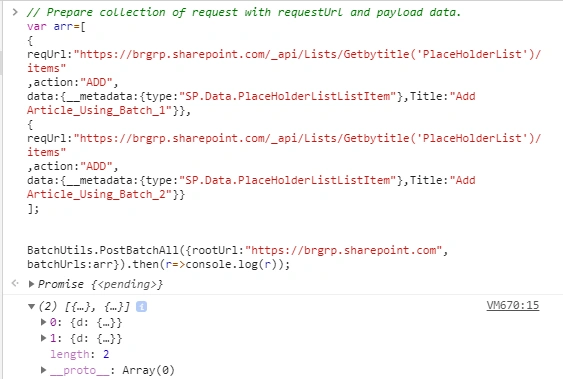
See the created items in SharePoint List.
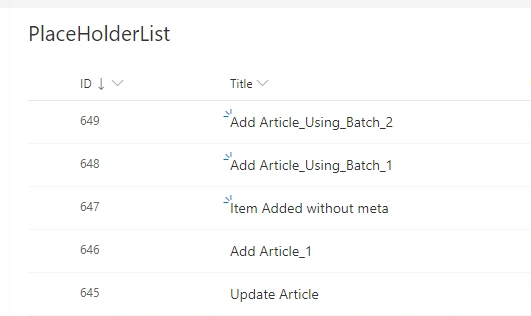
As per the above request, we have added two items in a SharePoint list and the response is returned for both items.
BULK UPDATE or DELETE Using SharePoint Online $batch REST API pasting with BatchUtils
Prepare a collection of requests with requestUrl and payload data and set the action field as below.
- var arr=[
- {
- reqUrl:"https://brgrp.sharepoint.com/_api/Lists/Getbytitle('PlaceHolderList')/items(649)"
- ,action:"UPDATE",
- data:{__metadata:{type:"SP.Data.PlaceHolderListListItem"},Title:"Update Article_Using_Batch_2"}},
- {
- reqUrl:"https://brgrp.sharepoint.com/_api/Lists/Getbytitle('PlaceHolderList')/items(648)"
- ,action:"UPDATE",
- data:{__metadata:{type:"SP.Data.PlaceHolderListListItem"},Title:"Update Article_Using_Batch_1"}}
- ];
- BatchUtils.PostBatchAll({rootUrl:"https://brgrp.sharepoint.com",
- batchUrls:arr}).then(r=>console.log(r));
The output of the above batch request on SharePoint can be seen as below.
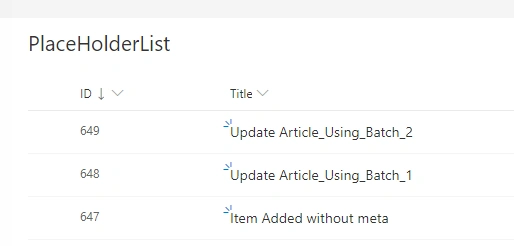
You can find similar code for Bulk Update operations with only the"action" field changed. Yes, you are right. In BatchUtils, I have managed generation of Request Payload and Request Header based on "action" value.
The above same code can also work with the Bulk Delete operation by just changing the "action" to "DELETE".
SharePoint $batch REST API also supports multiple different operations with a single Batch Request.
See the sample request example which contains ADD/UPDATE/DELETE operations with single batch request.
- // Prepare collection of request with requestUrl and payload data.
- var arr=[{
- reqUrl:"https://brgrp.sharepoint.com/_api/Lists/Getbytitle('PlaceHolderList')/items(212)"
- ,action:"UPDATE",
- data:{__metadata:{type:"SP.Data.PlaceHolderListListItem"},Title:"Update Article_1"}},
- {
- reqUrl:"https://brgrp.sharepoint.com/_api/Lists/Getbytitle('PlaceHolderList')/items(213)"
- ,action:"UPDATE",
- data:{__metadata:{type:"SP.Data.PlaceHolderListListItem"},Title:"Update Article_2"}},
- {
- reqUrl:"https://brgrp.sharepoint.com/_api/Lists/Getbytitle('PlaceHolderList')/items(214)"
- ,action:"UPDATE",
- data:{__metadata:{type:"SP.Data.PlaceHolderListListItem"},Title:"Update Article_3"}},
- {
- reqUrl:"https://brgrp.sharepoint.com/_api/Lists/Getbytitle('PlaceHolderList')/items"
- ,action:"ADD",
- data:{__metadata:{type:"SP.Data.PlaceHolderListListItem"},Title:"Add Article_1"}}
- ,{
- reqUrl:"https://brgrp.sharepoint.com/_api/Lists/Getbytitle('PlaceHolderList')/items(215)"
- ,action:"DELETE"}];
- BatchUtils.PostBatchAll({rootUrl:"https://brgrp.sharepoint.com",
- batchUrls:arr}).then(r=>console.log(r))
Reference Links,
- https://docs.microsoft.com/en-us/sharepoint/dev/sp-add-ins/make-batch-requests-with-the-rest-apis
- http://anomepani.github.io
- https://social.technet.microsoft.com/wiki/contents/articles/30044.sharepoint-online-performing-batch-operations-using-rest-api.aspx
- https://www.vrdmn.com/2016/08/batch-rest-requests-in-spfx-using.html
Conclusion
In this article, we have learned about the usage of SharePoint $batch API with a minimal line of code using BatchUtils for INSERT, UPDATE, and DELETE Operations.
Bibhash JhaPosted Mar 25, 2023, 2:43 PM
Hi Ano Mepani, this article is very helpful. I have created items using batch requests but I can't update the items. code for update is var arr=[ { reqUrl:"https://pacificpile.sharepoint.com/sites/employeeportal/_api/Lists/Getbytitle('ActiveDirectoryUsers')/items(3)" ,action:"UPDATE", data:{__metadata:{type:"SP.Data.ActiveDirectoryUsersListItem"},Title:"Update Article_Using_Batch_21"}}, { reqUrl:"https://pacificpile.sharepoint.com/sites/employeeportal/_api/Lists/Getbytitle('ActiveDirectoryUsers')/items(4)" ,action:"UPDATE", data:{__metadata:{type:"SP.Data.ActiveDirectoryUsersListItem"},Title:"Update Article_Using_Batch_12"}} ]; BatchUtils.PostBatchAll({rootUrl:"https://pacificpile.sharepoint.com/sites/employeeportal", batchUrls:arr}).then(r=>console.log(r)); My console is Promise?{<pending>}BatchUtils.js:224 ========================================================== BatchUtils.js:225 --changeset_vrd_jk0cui4b7 Content-Type: application/http Content-Transfer-Encoding: binary POST https://pacificpile.sharepoint.com/sites/employeeportal/_api/Lists/Getbytitle('ActiveDirectoryUsers')/items(3) HTTP/1.1 Accept: application/json;odata=verbose Content-Type: application/json;odata=verbose {"__metadata":{"type":"SP.Data.ActiveDirectoryUsersListItem"},"Title":"Update Article_Using_Batch_21"} --changeset_vrd_jk0cui4b7 Content-Type: application/http Content-Transfer-Encoding: binary POST https://pacificpile.sharepoint.com/sites/employeeportal/_api/Lists/Getbytitle('ActiveDirectoryUsers')/items(4) HTTP/1.1 Accept: application/json;odata=verbose Content-Type: application/json;odata=verbose {"__metadata":{"type":"SP.Data.ActiveDirectoryUsersListItem"},"Title":"Update Article_Using_Batch_12"} --changeset_vrd_jk0cui4b7-- BatchUtils.js:226 ========================================================== BatchUtils.js:227 --batch_vrd_7nxmog49w Content-Type: multipart/mixed; boundary="changeset_vrd_jk0cui4b7" Content-Length: 859 Content-Transfer-Encoding: binary --changeset_vrd_jk0cui4b7 Content-Type: application/http Content-Transfer-Encoding: binary POST https://pacificpile.sharepoint.com/sites/employeeportal/_api/Lists/Getbytitle('ActiveDirectoryUsers')/items(3) HTTP/1.1 Accept: application/json;odata=verbose Content-Type: application/json;odata=verbose {"__metadata":{"type":"SP.Data.ActiveDirectoryUsersListItem"},"Title":"Update Article_Using_Batch_21"} --changeset_vrd_jk0cui4b7 Content-Type: application/http Content-Transfer-Encoding: binary POST https://pacificpile.sharepoint.com/sites/employeeportal/_api/Lists/Getbytitle('ActiveDirectoryUsers')/items(4) HTTP/1.1 Accept: application/json;odata=verbose Content-Type: application/json;odata=verbose {"__metadata":{"type":"SP.Data.ActiveDirectoryUsersListItem"},"Title":"Update Article_Using_Batch_12"} --changeset_vrd_jk0cui4b7-- --batch_vrd_7nxmog49w-- BatchUtils.js:228 ========================================================== VM2680:1 [] ///////////////////// Please suggest how to update. thanks in advance
Bibhash JhaPosted Sep 28, 2022, 9:57 AM
How to do bulk crud operation using SharePoint online list
Ano MepaniPosted Feb 17, 2020, 9:44 PM
Are you saving item to List folder or list?
RishiKumar KPosted Feb 14, 2020, 8:01 AM
Hi, I have a requirement to add items to list folder using batch processing, can you please suggest