

In this article I would like to take you through deploying an HTTP module in SharePoint 2013.
Scenario
Redirect users from accessing the Site Contents page (viewlsts.aspx).
Procedure
Open Visual Studio and create a Class Library project.
Add a reference to the System.Web library.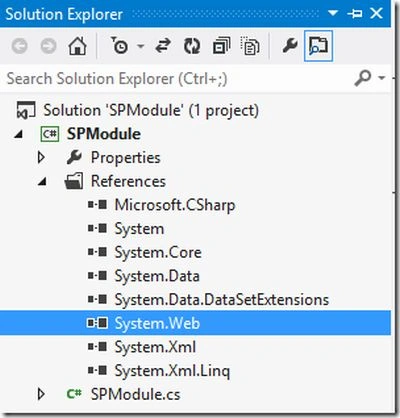
Replace the class file with the following code where:
- Class implements the IHttpModule interface
- Redirection when URL contains viewlsts.aspx
- using System;
- using System.Collections.Generic;
- using System.Linq;
- using System.Text;
- using System.Threading.Tasks;
- using System.Web;
- using System.Web.UI;
- namespace SPModule
- {
- public class SPModule : IHttpModule
- {
- public void Dispose() { }
- public void Init(HttpApplication context) { context.PreRequestHandlerExecute += context_PreRequestHandlerExecute; }
- void context_PreRequestHandlerExecute(object sender, EventArgs e)
- {
- HttpApplication app = sender as HttpApplication;
- if (app != null)
- {
- Page page = app.Context.CurrentHandler as Page;
- if (page != null) { if (HttpContext.Current.Request.Url.AbsoluteUri.Contains("_layouts/15/viewlsts.aspx")) { HttpContext.Current.Response.Redirect("http://www.bing.com"); } }
- }
- }
- }
- }

Now, open the web.config and find the modules section. (Please note that there is another httpModules section that is not for our purpose.)
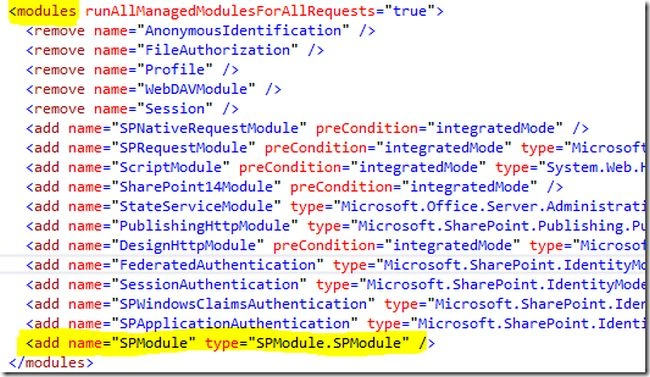
Add your class name in the format Assembly.ClassName. Save the changes.
Refresh your SharePoint site and try accessing the viewlsts.aspx page using the URL given below:
http://server/_layouts/15/viewlsts.aspx
You should see the page is redirected to www.bing.com.

References
HTTP Module
Summary
In this article we saw how to use an HTTP Module within SharePoint. The source code is attached with the article.
Jean PaulPosted Oct 31, 2014, 12:00 PM
Thank You Vithal!
Vithal WadjePosted Oct 31, 2014, 10:45 AM
good one