

Introduction
SharePoint 2013 adds the ability for you to remotely interact with SharePoint sites by using REST. Now, you can interact directly with SharePoint objects by using any technology that supports standard REST capabilities.
To access SharePoint resources using REST, construct a RESTful HTTP request, using the Open Data Protocol (OData) standard, which corresponds to the desired client object model API. For example:
Below are some client object model methods.
http://server17:1001/sales/_api/web
The above method will get the SPWeb details of the Sales site.
http://server17:1001/sales/_api/web/lists/?$select=title
The above method will displays all the list titles present in Sales web site.
http://server17:1001/sales/_api/web/lists/getbytitle('EmployeeList')/items/?$select=EmployeeName
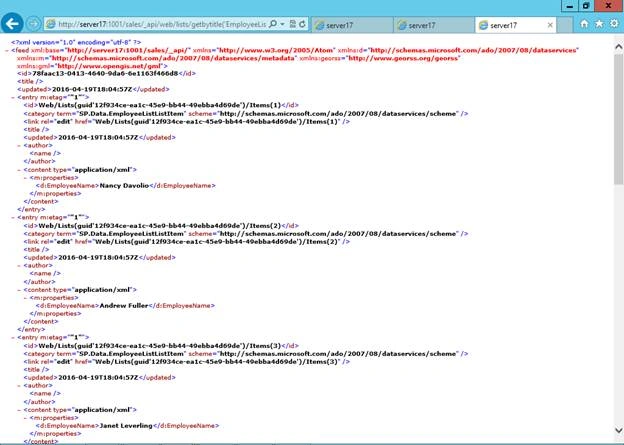
The above url method displays employees' names from EmployeeList in Sales web site.
Getting the list data from SharePoint List using REST Services.
We can access the SharePoint content using both Server Side and Client Side code, in this example we are going to get the SharePoint List data using Client REST Calls.
REST calls mainly depending on the Service url, client.svc service will provide data based on the URL.
Below is the structure to generate the REST URL.

Steps to create REST Service
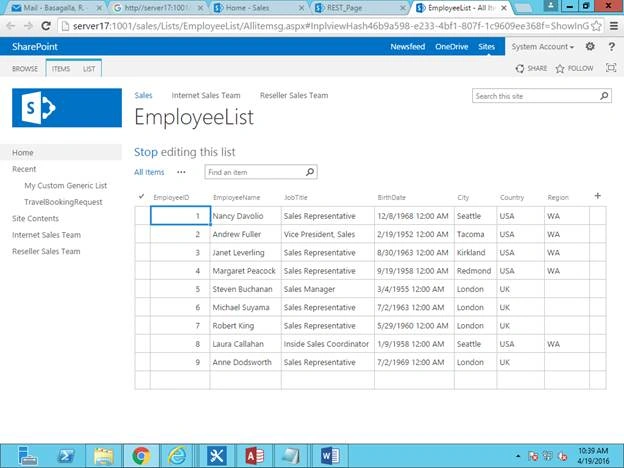
- Create Employee list and input some test data.
- Try to access the above URL to verify the service URL is returning proper data.
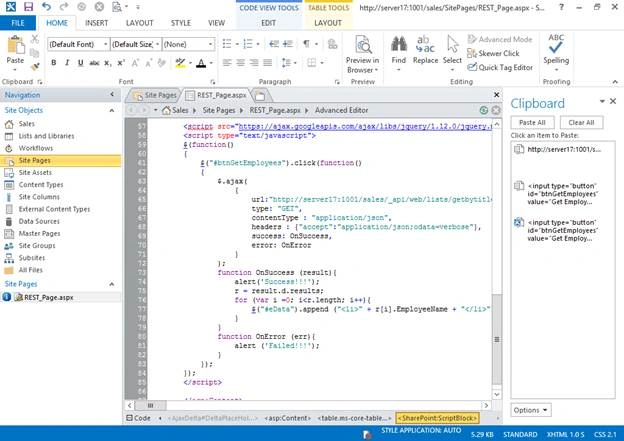
- Create site page and add below code to get the employee details.
Add below code in main content section, we are trying to bind the employee information to eData ul on click of button.Here we are making AJAX call to get the Employee details using Service URL.- <input type="button" id="btnGetEmployees" value="Get Employees" />
- <ul id="eData"></ul>
- <script type="text/javascript">
- $(function()
- {
- $("#btnGetEmployees").click(function()
- {
- $.ajax(
- {
- url:"http://server17:1001/sales/_api/web/lists/getbytitle('EmployeeList')/items",
- type: "GET",
- contentType : "application/json",
- headers : {"accept":"application/json;odata=verbose"},
- success: OnSuccess,
- error: OnError
- }
- );
- // On success we are binding the result to UL
- function OnSuccess (result){
- alert('Success!!!');
- r = result.d.results;
- for (var i =0; i<r.length; i++){
- $("#eData").append ("<li>" + r[i].EmployeeName + "</li>");
- }
- }
- // Alert the error message when error occurs
- function OnError (err){
- alert ('Failed!!!');
- }
- });
- });
- </script>
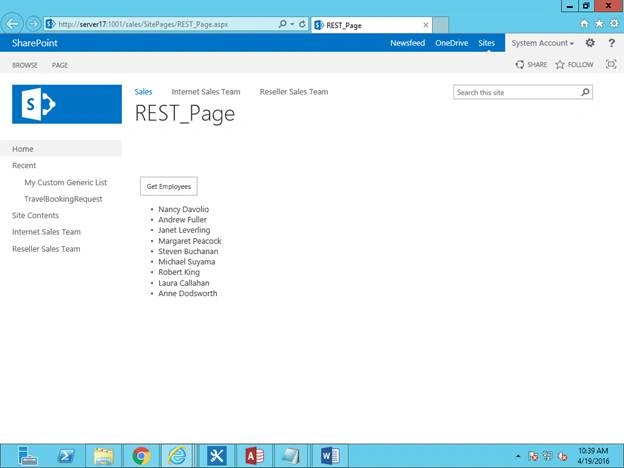
- Browse the created page and click on the Get Employees button, this will make REST call and bind the result to Unordered list.
Read more articles on SharePoint:
Ramakrishna BasagallaPosted Apr 25, 2016, 11:56 AM
Thank you very much for all your comments
Humayun Kabir MamunPosted Apr 24, 2016, 12:45 AM
Nice...
Kuppurasu NagarajPosted Apr 22, 2016, 12:04 PM
Nice Sharing..
Vijay SPosted Apr 22, 2016, 3:41 AM
Good one
Vipin TyagiPosted Apr 22, 2016, 12:44 AM
informative article.Where to start with REST API.Give some tips to write effective rest applications.Thanks!
Debasis SahaPosted Apr 21, 2016, 1:28 PM
Nice One..
Rahul Kumar SaxenaPosted Apr 21, 2016, 9:05 AM
Good one
Gk NPosted Apr 21, 2016, 8:48 AM
Thank You for the detailed explanation. Please do more.
Vignesh ManiPosted Apr 21, 2016, 8:23 AM
Nice
Vinodh NarayananPosted Apr 21, 2016, 6:57 AM
nice one
Gowtham RajamanickamPosted Apr 21, 2016, 6:38 AM
very good