

Introduction
- SharedPreferences pref = getSharedPreferences("MyPref", 0);
- Editor editor = pref.edit();
Finally we call the commit method with the editor, as in:
- editor.commit ();
- editor.putBoolean("key_name", true); // Storing boolean - true/false
- editor.putString("key_name", "string value"); // Storing string
- editor.putInt("key_name", "int value"); // Storing integer
- editor.putFloat("key_name", "float value"); // Storing float
- editor.putLong("key_name", "long value"); // Storing long
- editor.commit();
Step 1
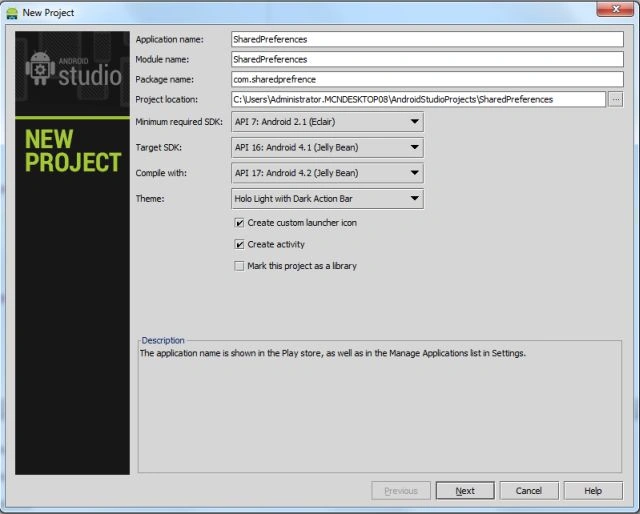
Create a new project as "File" -> "New" -> "Android Application project" as shown below.
- <RelativeLayout xmlns:android="http://schemas.android.com/apk/res/android"
- xmlns:tools="http://schemas.android.com/tools"
- android:layout_width="match_parent"
- android:layout_height="match_parent"
- android:paddingLeft="@dimen/activity_horizontal_margin"
- android:paddingRight="@dimen/activity_horizontal_margin"
- android:paddingTop="@dimen/activity_vertical_margin"
- android:paddingBottom="@dimen/activity_vertical_margin"
- tools:context=".MainActivity">
- <LinearLayout
- android:layout_width="fill_parent"
- android:layout_height="wrap_content"
- android:id="@+id/linearlayout1"
- android:orientation="horizontal">
- <TextView
- android:layout_width="wrap_content"
- android:layout_height="wrap_content"
- android:text="Store value"
- android:id="@+id/textViewNaame"/>
- <EditText
- android:layout_width="fill_parent"
- android:layout_height="wrap_content"
- android:id="@+id/name"
- android:layout_marginLeft="50dp"/>
- </LinearLayout>
- <Button
- android:layout_width="100dp"
- android:layout_height="wrap_content"
- android:text="stored"
- android:id="@+id/button" android:layout_below="@+id/textViewretrive" android:layout_centerHorizontal="true"
- android:layout_marginTop="39dp"/>
- <TextView
- android:layout_width="wrap_content"
- android:layout_height="wrap_content"
- android:text="retrievedata"
- android:id="@+id/textViewretrive"
- android:layout_marginTop="26dp" android:layout_below="@+id/linearlayout1"
- android:layout_alignLeft="@+id/linearlayout1"/>
- <Button
- android:layout_width="100dp"
- android:layout_height="wrap_content"
- android:text="retrieve"
- android:id="@+id/button2" android:layout_below="@+id/button" android:layout_alignLeft="@+id/button"
- android:layout_marginTop="42dp"/>
- </RelativeLayout>
- package com.sharedprefrence;
- import android.content.SharedPreferences;
- import android.os.Bundle;
- import android.app.Activity;
- import android.view.Menu;
- import android.view.View;
- import android.widget.EditText;
- import android.widget.TextView;
- import android.widget.Button;
- import android.widget.Toast;
- public class MainActivity extends Activity {
- EditText edttextname,edttextword;
- TextView txtviewname,txtviewword,txtviewretrieve;
- SharedPreferences settings;
- Button btnstore,btnretrieve;
- public static final String PREF="any_pref";
- @Override
- protected void onCreate(Bundle savedInstanceState) {
- super.onCreate(savedInstanceState);
- setContentView(R.layout.activity_main);
- edttextname=(EditText)findViewById(R.id.name);
- txtviewname=(TextView)findViewById(R.id.textViewNaame);
- btnstore=(Button)findViewById(R.id.button);
- txtviewretrieve=(TextView)findViewById(R.id.textViewretrive);
- btnretrieve=(Button)findViewById(R.id.button2);
- btnstore.setOnClickListener(new View.OnClickListener() {
- @Override
- public void onClick(View view) {
- String name=edttextname.getText().toString();
- SharedPreferences store = getSharedPreferences(PREF, MODE_PRIVATE);
- SharedPreferences.Editor editor = store.edit();
- editor.putString("any_pref",name);
- editor.commit();
- Toast.makeText(getApplicationContext(),
- "Store", Toast.LENGTH_LONG).show();
- }
- });
- btnretrieve.setOnClickListener(new View.OnClickListener() {
- @Override
- public void onClick(View view) {
- SharedPreferences store = getSharedPreferences(PREF, MODE_PRIVATE);
- String retrievestring = (store.getString("any_pref", ""));
- txtviewretrieve.setText(retrievestring);
- Toast.makeText(getApplicationContext(),
- "Retrive", Toast.LENGTH_LONG).show();
- }
- });
- }
- }
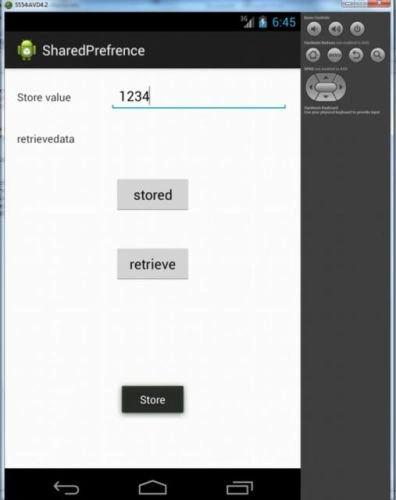
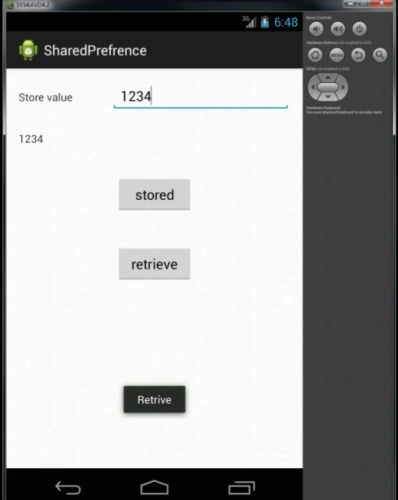
Wendell RamosPosted Jun 7, 2018, 4:35 AM
Very helpful tutorial on android java, in C# corner. Thank you very much :')
Sr KarthigaPosted May 6, 2016, 3:46 AM
good one
Ashish TiwariPosted May 5, 2016, 11:59 PM
Well Explained
Kuppurasu NagarajPosted May 5, 2016, 1:09 PM
Nice Sharing..