

Introduction
When starting development using the SharePoint Framework (SPFx), we need to set up our development machine, such as Windows 10/11, with some open-source tools.
Before setting up the development machine with the required tools, let us first understand the SPFx tool chain.
Please note that SPFx solutions are primarily client-side applications and are rendered on the client side. There is no traditional server-side rendering involved in the SPFx component itself.
This article focuses on Windows 10/11 machines using Node Version Manager (NVM). The advantages of using NVM are explained in the article about installing NVM, which is mentioned in the References section. Similar steps can be followed to install the required tools on macOS and Linux, as mentioned in the References section.
SPFx Tool Chain
The SPFx development environment uses several open-source tools. Each tool has a specific role in creating, building, and testing SPFx solutions.
Yeoman
Yeoman is a scaffolding tool that can be run using the yo command. It generates the initial project structure based on the type of component you want to develop using SPFx.
It can be compared to creating a new console application, class, or empty ASP.NET project using Visual Studio.
Gulp
Gulp is a task runner used in SPFx development to build, serve, bundle, and test projects.
It can be compared to the build and task-related functionality provided by Visual Studio for .NET applications.
Node.js
Node.js provides the JavaScript runtime required by the SPFx development tool chain.
It is used by the development tools and build process to execute JavaScript-based tooling on the development machine.
NPM
NPM stands for Node Package Manager. It is used to install and manage the dependencies required by an application.
Instead of manually downloading and managing individual scripts and dependencies, NPM allows developers to install packages through the command line.
It can be compared to using NuGet Package Manager in a .NET project.
Webpack
Webpack is a module bundler used by the SPFx tool chain to process and bundle JavaScript and other project resources.
It helps organize application modules and generates the bundles required by the SPFx solution.
The following screenshot depicts a comparison between traditional development tools (top) and modern open-source tools (bottom).
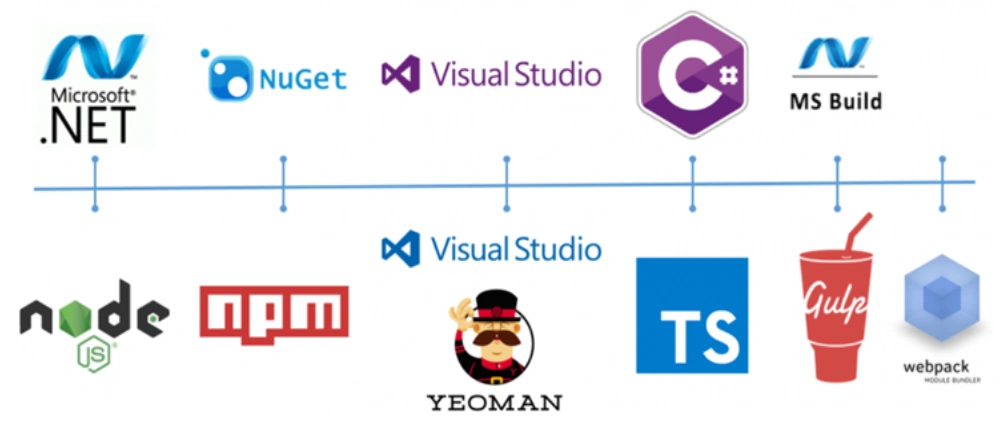
Setting up your development machine
To start developing SPFx components, it is required to have below tools set up and configured properly in order.
NVM (Node Version Manager)
This is used to provide the different versions of node run time for the SPFx development. The steps are detailed in the article ‘Installing node version manager‘ in the references section.
Node.js
After setting up NVM, you can install the Node.js version required for your SPFx development environment.
You can follow the same "Installing Node Version Manager" article mentioned in the References section.
SPFx versions have specific supported Node.js versions, so you should always verify the Node.js version requirements for the SPFx version you are using.
If your installed NVM implementation supports the lts alias, you can use the following command to install the latest Node.js LTS version:
nvm install ltsHowever, for an SPFx project, use the Node.js version supported by that specific SPFx release rather than automatically choosing the latest LTS version.
Install Gulp
To install the Gulp command-line interface globally, open Command Prompt or PowerShell with the required permissions and run the following command:
npm install gulp-cli --globalAfter the installation completes, you can verify the installation using:
gulp --version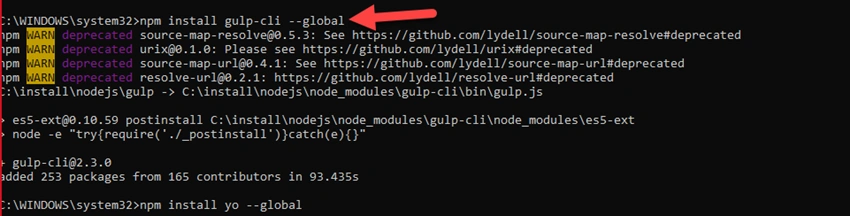
Install Yeoman
To install Yeoman globally, open Command Prompt or PowerShell with the required permissions and run the following command:
npm install yo --globalAfter installation, you can verify that Yeoman is available by running:
yo --version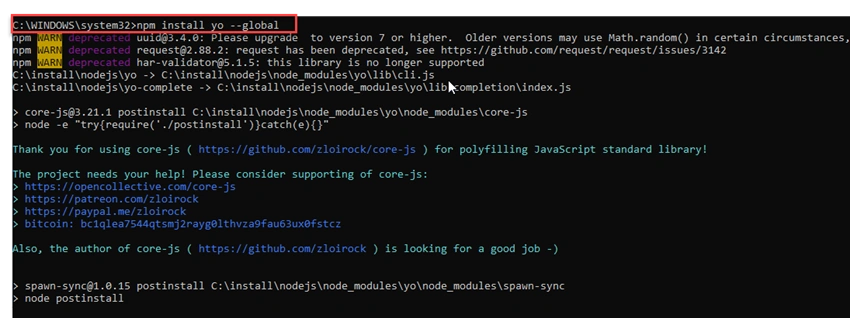
Install Yeoman SharePoint Generator
The Yeoman SharePoint generator is used to scaffold SharePoint Framework projects.
Install it globally using the following command:
npm install @microsoft/generator-sharepoint --globalAfter the installation, you can use the yo command with the SharePoint generator to create an SPFx project.
For example:
yo @microsoft/sharepointThe generator will guide you through the project configuration, including the solution name, component type, and other SPFx project settings.
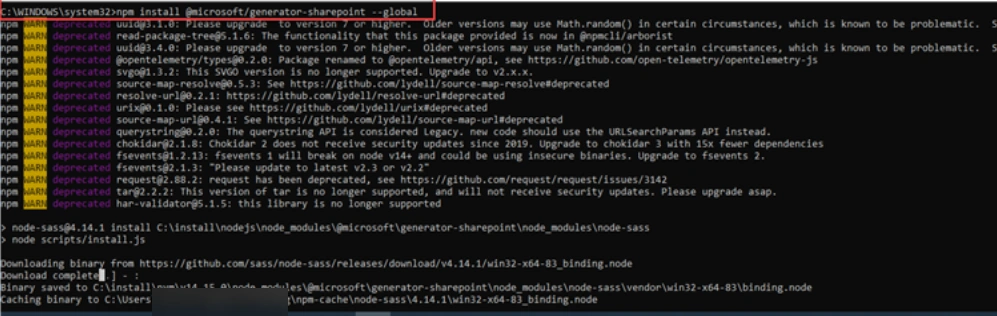
Install Teams Generator
If you are doing Microsoft Teams development using SPFx, you may also need the Teams generator depending on the development approach and project requirements.
You can install it globally using:
npm install generator-teams --global
SPFx Development Environment Overview
After completing the setup, the development environment contains the major tools required for creating and building SPFx solutions.
The overall tool chain can be summarized as follows:
NVM
 |
 +-- Node.js
      |
      +-- NPM
      |
      +-- Gulp
      |
      +-- Yeoman
             |
             +-- SharePoint Generator
             |
             +-- SPFx Project
NVM helps manage Node.js versions, while NPM manages project dependencies. Yeoman and the SharePoint generator provide project scaffolding, and Gulp supports common development tasks such as building and serving the project.
Conclusion
In this article, we understood the SPFx development environment and the major tools involved in the SPFx tool chain.
We also covered how to set up NVM, install Node.js, install Gulp and Yeoman, install the Yeoman SharePoint generator, and install the Teams generator when required.
Having the correct Node.js version and development tools configured is an important first step before creating and working with SharePoint Framework solutions.
Sajith G HPosted Jul 28, 2022, 1:10 PM
We cannot rum command prompt run as administrator for nvm use 14.15.0exit status 1: You do not have sufficient privilege to perform this operation. Any Option run without having admin righs ?
Sajith G HPosted May 17, 2022, 7:58 AM
Please check the below links. The issue is still there
Sajith G HPosted May 17, 2022, 7:57 AM
Https://github.com/yeoman/yo/issues/746
Sajith G HPosted May 17, 2022, 7:56 AM
The issue is in detail in the below links - https://github.com/SharePoint/sp-dev-docs/issues/7939
Sajith G HPosted May 17, 2022, 7:56 AM
Https://github.com/SharePoint/sp-dev-docs/issues/7939https://github.com/yeoman/yo/issues/746
Sajith G HPosted May 13, 2022, 1:56 PM
For the Node Version v10.24.1, Yo is throwing error while using NVM.
Vinay AyinapurapuPosted May 9, 2022, 9:22 PM
Thank you Swesh. Glad you found it helpful.
Swesh SPosted Apr 22, 2022, 11:38 AM
What is more important is the NodeJS version and yes you have provided a detailed article link and that is useful as well.