

Introduction
Do you feel it annoying to enter First Name and Last Name in lead even when Existing Contact is selected already?? If yes, then this post will help you to auto populate these fields as soon as Existing Contact is selected. Lead entity contains fullname as primary field (key attribute), which is a combination for First and Last name. These field is used to create contact record if Existing Contact lookup is not selected under lead, so based on the default process when lead is qualified it will create a contact record with the value of these fields (We can write a plug-in to stop creating contact record if required)
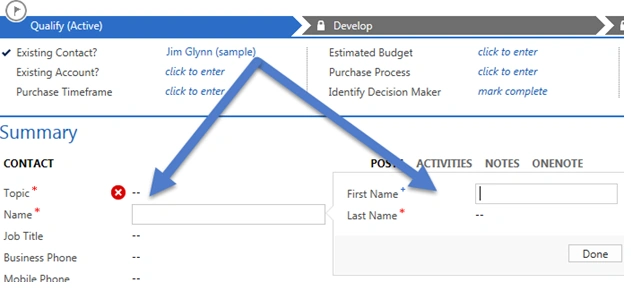
Figure 1: Qualify
Requirement: We need to fill First Name and Last Name based on the Existing Contact lookup.
- Create custom solution or open default solution by navigating Settings, Customizations, then Customize the system,
- Add a new script web resource and upload SDK.REST.js library like the following. This library comes with CRM SDK, you can find it under:
\SampleCode\JS\RESTEndpoint\JavaScriptRESTDataOperations\JavaScriptRESTDataOperations\Scripts
Note: If you have not downloaded CRM SDK, then first download it from here and then extract it.
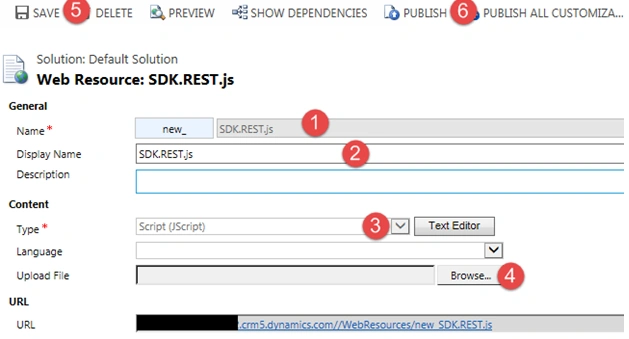
Figure 2: CRM
- Create another Java Script web resource and let’s name it Lead.js, we need to place the following code under Text Editor:
- function ParentContactId_OnChange()
- {
- if (Xrm.Page.getAttribute("parentcontactid") != null)
- {
- var ContactId = Xrm.Page.getAttribute("parentcontactid").getValue()[0].id;
- //utilize retrieveRecord method from REST library to get data based on contact id
- SDK.REST.retrieveRecord(
- ContactId,
- "Contact",
- null, null,
- function(contact)
- {
- //once we have data fill name fields
- Xrm.Page.getAttribute("firstname").setValue(contact.FirstName);
- Xrm.Page.getAttribute("lastname").setValue(contact.LastName);
- Xrm.Page.getAttribute("fullname").setValue(contact.FirstName + " " + contact.LastName);
- },
- function Error()
- {
- alert("There is error in reading contact data");
- });
- }
- }
- Save and close web resource
- Double click on Lead form to open form editor by navigating Lead->Forms->Lead, under your solution, and drag and drop Parent Contact for lead field on lead form from Field Explorer

Figure 3: Explore
- Double click on this field now and add our both the web resources and bind on change event using the following steps in below screen:
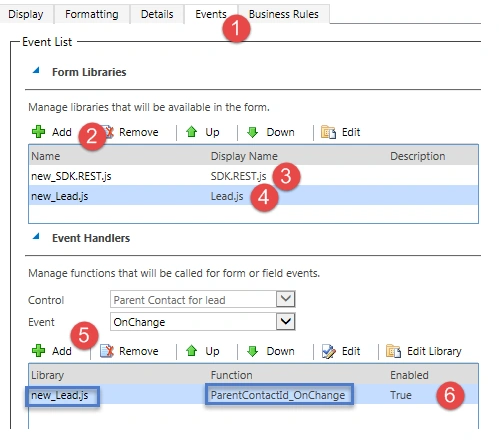
Figure 4: Display
- Click on Display tab and uncheck the following option, to hide our lookup field from lead form.

Figure 5: Lookup
- Save and Close form
- Click on Publish All Customizations to publish all the changes.
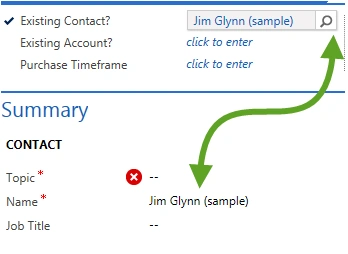
Figure 6: Name
Santhakumar MunuswamyPosted Oct 18, 2015, 2:40 AM
Good one
Nilesh JadavPosted Oct 16, 2015, 1:01 AM
Thank you for sharing !!
RakeshPosted Oct 16, 2015, 12:43 AM
Good work sir
Priyaranjan K SPosted Oct 15, 2015, 2:32 PM
Good One . Thanks for the share