

In this article, we will understand how to setup a Webdriver IO Test Automation Project in our System.
Before going into setup let us understand,
What is Webdriver IO?
WebdriverIO is an Automation framework which is built to automate web and mobile applications.
It is robust and scalable.
Advantages of using webdriver IO
- We can automate modern web applications written in frameworks like vue, react, angular, etc.
- We can also automate native/hybrid mobile applications.
- It has lot of integrations and plugins which is easy to use.
Steps for Set up
Pre-requisite
- Node JS needs to be installed
- Visual studio code IDE
1. Create a folder.
2. Open the folder in the visual studio code IDE.
3. Open the terminal.
4. Create a package.json file using the command npm init -y
5. We need to install webdriver IO. So run the command
npm i @wdio/cli
6. Webdriver IO will get installed. Next we need to generate the config file. This file is important in this framework. We call this as a runner file. To generate this file run the below command in terminal and hit enter
npx wdio config
Now in the terminal, the configuration helper will ask a few questions on how you want to set up your config file. we need to provide the appropriate options for it. At the end, it will gather all the config options given by you and install it inside your project.
- Where is your automation backend located? On my local machine/Saucelabs/browserstack/chromedriver service
- Toggle through the options and select the option you need.
- Which framework do you want to use? mocha/jasmine
- Do you want to use a compiler? No!/babel
- Where are your test specs located? ./test/specs/**/*.js
- Default - it will take this folder for writing the test cases if you hit enter.
- Do you want WebdriverIO to autogenerate some test files? Yes/No
- Do you want to use page objects (https://martinfowler.com/bliki/PageObject.html)? Yes/No
- Where are your page objects located? ./test/pageobjects/**/*.js
- Default - it will take this folder for writing the test cases if you hit enter.
- Which reporter do you want to use? spec
- There will be eight reporter options choose any from those
- Do you want to add a plugin to your test setup?
- Do you want to add a service to your test setup? chromedriver
- What is the base URL? http://localhost
- We can provide the application URL which we are going to test. Just provide the URL of the application till .com. Later while testing the specific page then in the browser.url command we just add the path to page.
- If www.example.com is the base URL
- Inside example.com if i need to test about us page we can just add the path in browser.url command
- Eg: await browser.url('/aboutus')
- When the browser instance is open,webdriver io appends the base URL with the path that is provided in the URL command.
- Do you want me to run `npm install` Yes
- Now at the last question provide yes, option
All the configurations will get installed automatically by webdriver io cli.
Screenshot
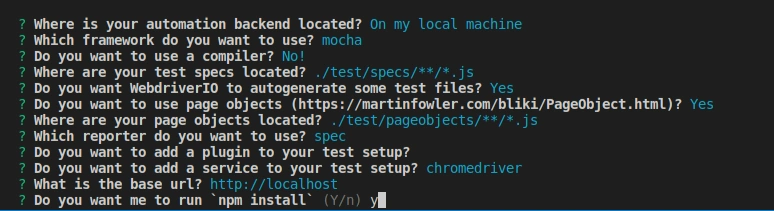
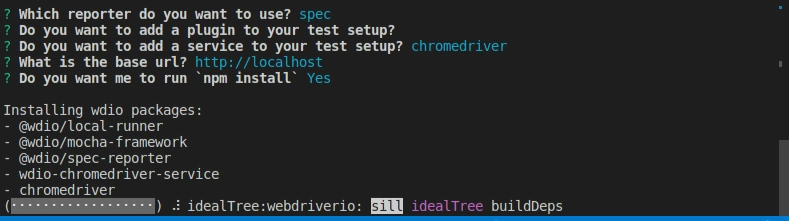
Now the Webdriver IO configuration file will be created. Test folder with sample tests and page objects folder with all the object repositories will be created.
Folder structure
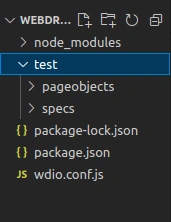
We can also generate the Webdriver IO configuration file with default options by running the command
npx wdio config -y
There is no need to answer the questions which was asked while running the command npx wdio config. If you want to customize your configurations then go for this command.
How to run the webdriver IO Test
npx wdio run ./wdio.conf.js
We can run the webdriver IO Test using the command. It will run all the tests that are written in the tests folder. by default the configuration will be set in the wdio.conf.js file. We can mention the test/spec file specifically to be run in the spec object in the config file
specs: [
        './test/specs/**/*.js'
    ],
To run a specific spec file then run the below command
npx wdio run ./wdio.conf.js --spec specfilname.js
Hope this article helps you in setting up webdriver IO in your system.
Thanks Happy learning...
Join the conversation! Your thoughts help the community grow.