

This article will be focused on the Service applications in SharePoint 2013 which we can’t create by going to Central Admin > Application Management > Manage Service Application > Click New.
We will be covering the service applications that are created using PowerShell or using a different method.
Given below is the list of Service applications that we can easily create from GUI (Central Admin > Application Management > Manage Service Application > Click New.)
- App Management Service (new in 2013)
- Business Data Connectivity Service
- Excel Service Application
- Managed Metadata Service
- PerformancePoint Service Application
- Search Service Application
- Secure Store Service
- Machine Translation Services (new in 2013)
- User Profile Service Application
- Visio Graphics Service
- Word Automation Services
- Access Services App databases (new) (2010 and 2013)
- Work Management Service Application
We won’t be talking about the above-mentioned applications. The service application we are going to create/install are listed below,
- PowerPoint Automation Services
- State Service
- Subscription settings
- Usage and health Data Collection
There are two ways of creating/ installing these apps.
- Using Farm Configuration Wizards
- PowerShell
Let’s start with the first option.
- On the Central Administration, click "Configuration Wizards".
- Click on “Launch the Farm Configuration Wizard”.
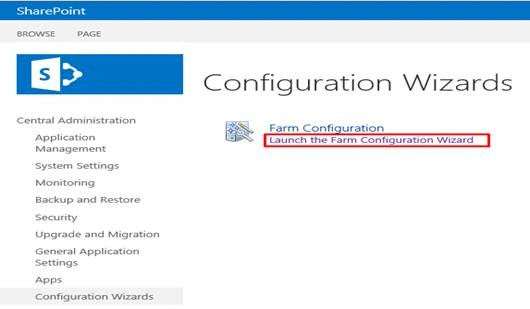
- On Farm Configuration wizard, click on "Start the wizard".
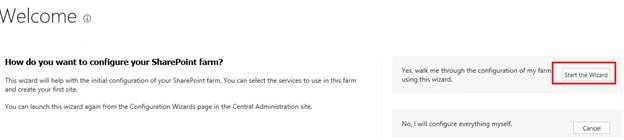
- On the Services configuration page, in the Services section, select the Service mentioned above.
- Click Next.
- Complete any other configuration steps for the Server Farm.
- On the final page of the Farm Configuration Wizard, click Finish.
Let’s talk about the second option which is PowerShell.
Make sure you run SharePoint Management Shell as an Administrator. Now, use the following commands to execute the Service applications.
- PowerPoint Automation ServicesPowerPoint Automation Service Proxy
- New-SPPowerPointConversionServiceApplication -Name "PowerPoint Automation Service Application" -ApplicationPool "App Pool name"
- New-SPPowerPointConversionServiceApplicationProxy -Name "PowerPoint Automation Service Application Proxy" -ServiceApplication "PowerPoint Automation Service Application" AddtoDefaultGroup
- State Service
- $serviceApp = New-SPStateServiceApplication -Name “State Service Application”
- New-SPStateServiceDatabase -Name “SharePoint_Service_State” -ServiceApplication $serviceApp
- #State Service Proxy
- New-SPStateServiceApplicationProxy -Name “State Service Application Proxy” -ServiceApplication $serviceApp -DefaultProxyGroup
- Subscription settings
- New-SPSubscriptionSettingsServiceApplication -ApplicationPool “SharePoint Web Services Default” -Name “Subscription Settings Service Application” -DatabaseName “SubscriptionSettingsDB” | New-SPSubscriptionSettingsServiceApplicationProxy
- Usage and health Data Collection
- New-SPUsageApplication -Name "Usage and Health Data Collection"
- $proxy = Get-SPServiceApplicationProxy | where {$_.TypeName -eq "Usage and Health Data Collection Proxy"}
- $proxy.Provision()
Hope it helps.
Let me know in the comments if I missed out any of the Service applications. Happy SharePointing!!!
Join the conversation! Your thoughts help the community grow.