

In this article, we are going to see how to serialize and deserialize an object as binary data using the binary formatter.
Step 1: Used Namespace
- using System;
- using System.Collections;
- using System.IO;
- using System.Runtime.Serialization.Formatters.Binary;
- protected void Page_Load(object sender, EventArgs e)
- {
- Employees emps = new Employees();
- emps.Add(new Employee("1", "Lajapathy"));
- emps.Add(new Employee("2", "Anand"));
- emps.Add(new Employee("3", "Sathiya"));
- emps.Add(new Employee("4", "Lakshmi"));
- emps.Add(new Employee("5", "Parthiban"));
- string pth = @"D:\Test.bin";
- //Serializing the collection
- Serialize(emps, pth);
- //Deserializing the collection
- Deserialize(pth);
- }
Step 3: Serializing the Object using Binary Formatter
- //Serializing the List
- public void Serialize(Employees emps, String filename)
- {
- //Create the stream to add object into it.
- System.IO.Stream ms = File.OpenWrite(filename);
- //Format the object as Binary
- BinaryFormatter formatter = new BinaryFormatter();
- //It serialize the employee object
- formatter.Serialize(ms, emps);
- ms.Flush();
- ms.Close();
- ms.Dispose();
- }
Step 4: Deserializing the Object using Binary Formatter
- //Deserializing the List
- public void Deserialize(String filename)
- {
- //Format the object as Binary
- BinaryFormatter formatter = new BinaryFormatter();
- //Reading the file from the server
- FileStream fs = File.Open(filename, FileMode.Open);
- object obj = formatter.Deserialize(fs);
- Employees emps = (Employees)obj;
- fs.Flush();
- fs.Close();
- fs.Dispose();
- foreach (Employee employee in emps)
- {
- Response.Write(employee.Name + "<br/>");
- }
- }
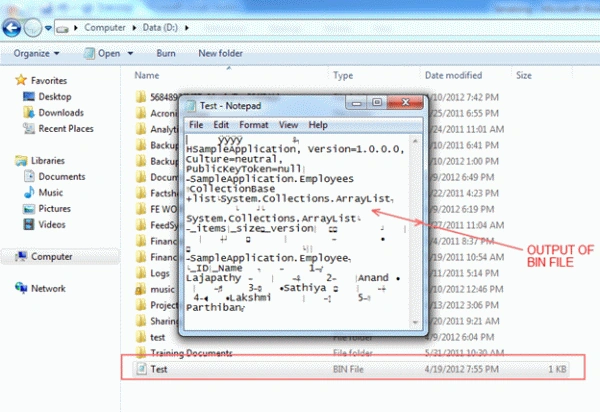
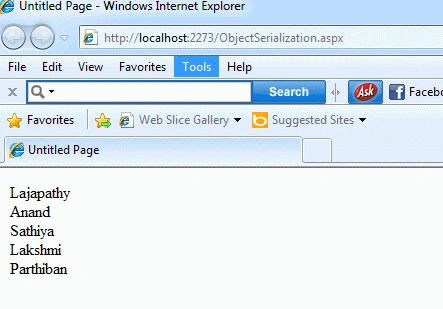
Step 6: Output of Deserialization:
- //Deserializing the List
- public void Deserialize(String filename)
- {
- //Format the object as Binary
- BinaryFormatter formatter = new BinaryFormatter();
- //Reading the file from the server
- FileStream fs = File.Open(filename, FileMode.Open);
- object obj = formatter.Deserialize(fs);
- Employees emps = (Employees)obj;
- fs.Flush();
- fs.Close();
- fs.Dispose();
- foreach (Employee employee in emps)
- {
- Response.Write(employee.Name + "<br/>");
- }
- }
Copy & Paste Code Snippet
- using System;
- using System.Collections;
- using System.IO;
- using System.Runtime.Serialization.Formatters.Binary;
- namespace SampleApplication
- {
- public partial class ObjectSerialization : System.Web.UI.Page
- {
- protected void Page_Load(object sender, EventArgs e)
- {
- Employees emps = new Employees();
- emps.Add(new Employee("1", "Lajapathy"));
- emps.Add(new Employee("2", "Anand"));
- emps.Add(new Employee("3", "Sathiya"));
- emps.Add(new Employee("4", "Lakshmi"));
- emps.Add(new Employee("5", "Parthiban"));
- string pth = @"D:\Test.bin";
- //Serializing the collection
- Serialize(emps, pth);
- //Deserializing the collection
- Deserialize(pth);
- }
- //Serializing the List
- public void Serialize(Employees emps, String filename)
- {
- //Create the stream to add object into it.
- System.IO.Stream ms = File.OpenWrite(filename);
- //Format the object as Binary
- BinaryFormatter formatter = new BinaryFormatter();
- //It serialize the employee object
- formatter.Serialize(ms, emps);
- ms.Flush();
- ms.Close();
- ms.Dispose();
- }
- //Deserializing the List
- public void Deserialize(String filename)
- {
- //Format the object as Binary
- BinaryFormatter formatter = new BinaryFormatter();
- //Reading the file from the server
- FileStream fs = File.Open(filename, FileMode.Open);
- object obj = formatter.Deserialize(fs);
- Employees emps = (Employees)obj;
- fs.Flush();
- fs.Close();
- fs.Dispose();
- foreach (Employee employee in emps)
- {
- Response.Write(employee.Name + "<br/>");
- }
- }
- }
- //Classes
- [Serializable]
- public class Employee
- {
- public Employee(String id, String name)
- {
- _ID = id;
- _Name = name;
- }
- private String _ID = String.Empty;
- private String _Name = String.Empty;
- public String ID
- {
- get
- {
- return _ID;
- set
- {
- _ID = value;
- }
- }
- public String Name
- {
- get
- {
- return _Name;
- }
- set
- {
- _Name = value;
- }
- }
- }
- [Serializable]
- public class Employees : CollectionBase
- {
- //Constructor
- public Employees()
- {
- }
- //Add function
- public void Add(Employee objT)
- {
- this.List.Add(objT);
- }
- //Indexer
- public Employee this[int i]
- {
- get
- {
- return (Employee)this.List[i];
- }
- set
- {
- this.List.Add(value);
- }
- }
- }
- }
Thanks for reading this article. Have a nice day.
Rodrigo Alarcón SantiniPosted Oct 26, 2021, 4:22 AM
Do NOT use BinaryFormatter!!!, as Microsoft said, it's insecure (Info: https://aka.ms/binaryFormatter), pick some other alternative!