

In this article we are going to see how to serialize and deserialize an object as XML data.
Serialization - Converts Object to XML
Deserialization - Converts XML to Object
Step 1: Namespaces used:
using System;
using System.IO;
using System.Collections.Generic;
using System.Xml;
using System.Xml.Serialization;
Step 2: List used for demo:
public List<Product> GetProductList()
{
List<Product> list = new List<Product>();
Product product = new Product(new Section[3]);
product.Sections[0] = new Section("1", new Header[3]);
product.Sections[0].Headers[0] = new Header("P1", "C1", "T1");
product.Sections[0].Headers[1] = new Header("P2", "C2", "T2");
product.Sections[1] = new Section("2", new Header[3]);
product.Sections[1].Headers[0] = new Header("P1", "C1", "T1");
product.Sections[1].Headers[1] = new Header("P2", "C2", "T2");
list.Add(product);
return list;
}
Step 3: Serializing the List<T> to XML:
//serialize
private void Serialize()
{
//Creating Custom List
List<Product> list = GetProductList();
//Creating XmlSerializer.
XmlSerializer serializer = new XmlSerializer(typeof(List<Product>));
//Creating text writer for xml data
TextWriter tw = new StreamWriter(Server.MapPath("book1.xml"));
//Convert the XML to List
serializer.Serialize(tw, list);
tw.Close();
}
Step 4: Output of serializing:
<?xml version="1.0" encoding="utf-8"?>
<ArrayOfProduct xmlns:xsi="http://www.w3.org/2001/XMLSchema-instance" xmlns:xsd="http://www.w3.org/2001/XMLSchema">
<Product>
<Sections>
<Section Name="1">
<Headers>
<Header PropertyName="P1" ClassName="C1">T1</Header>
<Header PropertyName="P2" ClassName="C2">T2</Header>
<Header xsi:nil="true" />
</Headers>
</Section>
<Section Name="2">
<Headers>
<Header PropertyName="P1" ClassName="C1">T1</Header>
<Header PropertyName="P2" ClassName="C2">T2</Header>
<Header xsi:nil="true" />
</Headers>
</Section>
<Section xsi:nil="true" />
</Sections>
</Product>
</ArrayOfProduct>
Step 5: Deserializing the XML to List<T>:
public void DeSerialize()
{
XmlSerializer serializer = new XmlSerializer(typeof(List<Product>));
TextReader tr = new StreamReader(Server.MapPath("book1.xml"));
List<Product> b = (List<Product>)serializer.Deserialize(tr);
tr.Close();
Foreach (Product product in b)
{
Response.Write(product.Sections[0].Name + ",");
Response.Write(product.Sections[1].Name);
}
}
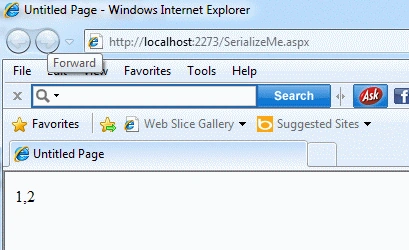
Step 6: The List has no collection:
<?xml version="1.0" encoding="utf-8"?>
<ArrayOfProduct xmlns:xsi="http://www.w3.org/2001/XMLSchema-instance"
xmlns:xsd="http://www.w3.org/2001/XMLSchema">
<Product />
</ArrayOfProduct>
Step 7: Copy and Paste code snippet:
using System.Xml;
using System.Xml.Serialization;
namespace SampleApplication
{
public partial class SerializeMe : System.Web.UI.Page
{
protected void Page_Load(object sender, EventArgs e)
{
Serialize();
DeSerialize();
}
//serialize
private void Serialize()
{
//Creating Custom List
List<Product> list = GetProductList();
//Creating XmlSerializer.
XmlSerializer serializer = new XmlSerializer(typeof(List<Product>));
//Creating text writer for xml data
TextWriter tw = new StreamWriter(Server.MapPath("book1.xml"));
//Convert the XML to List
serializer.Serialize(tw, list);
tw.Close();
}
//Deserialize
public void DeSerialize()
{
XmlSerializer serializer = new XmlSerializer(typeof(List<Product>));
TextReader tr = new StreamReader(Server.MapPath("book1.xml"));
List<Product> b = (List<Product>)serializer.Deserialize(tr);
tr.Close();
foreach (Product product in b)
{
Response.Write(product.Sections[0].Name + ",");
Response.Write(product.Sections[1].Name);
}
}
public List<Product> GetProductList()
{
List<Product> list = new List<Product>();
Product product = new Product(new Section[3]);
product.Sections[0] = new Section("1", new Header[3]);
product.Sections[0].Headers[0] = new Header("P1", "C1", "T1");
product.Sections[0].Headers[1] = new Header("P2", "C2", "T2");
product.Sections[1] = new Section("2", new Header[3]);
product.Sections[1].Headers[0] = new Header("P1", "C1", "T1");
product.Sections[1].Headers[1] = new Header("P2", "C2", "T2");
list.Add(product);
return list;
}
}
public class Product
{
public Product()
{
}
public Product(Section[] sections)
{
this.Sections = sections;
}
public Section[] Sections;
}
public class Section
{
public Section()
{
}
public Section(string name, Header[] headers)
{
this.Name = name;
this.Headers = headers;
}
[XmlAttribute]
public string Name;
public Header[] Headers;
}
public class Header
{
public Header()
{
}
public Header(string propertyName, string className, string text)
{
this.PropertyName = propertyName;
this.ClassName = className;
this.Text = text;
}
[XmlAttribute]
public string PropertyName;
[XmlAttribute]
public string ClassName;
[XmlText]
public string Text;
}
}
Thanks for reading this article. Have a nice day.
Lajapathy ArunPosted Apr 22, 2012, 10:27 AM
Always serialization is the easy way to do it. Just converts the object to XML. If the database collection, dataset has some option to readxml and writexml. http://msdn.microsoft.com/en-us/library/fx29c3yd(v=vs.80).aspx But i am not sure i have answer, if not please let me know the scenario to understand.
Arjun PanwarPosted Apr 22, 2012, 5:16 AM
Is there an easy way to generate my xml in the same order every time, without writing the ReadXml and WriteXml methods myself?