

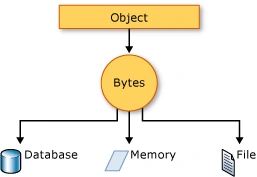
Serialization is the process of converting an object into a stream of bytes to store the object or transmit it to memory, a database, or a file. Its main purpose is to save the state of an object in order to be able to recreate it when needed. The reverse process is called deserialization.
- Serialization (1): in General --- this article
- Serialization (2): JSON Serialization
A - Introduction
This article will discuss serialization in general. This is the structure of this article,
- A - Introduction
- B - How Serialization Works
- C - Uses for Serialization
- D - .NET Serialization Features
- E - Sample of the Serialization
- Binary and Soap Formatter
- JSON Serialization
B - How Serialization Works
The object is serialized to a stream that carries the data. The stream may also have information about the object's type, such as its version, culture, and assembly name. From that stream, the object can be stored in a database, a file, or memory.
C - Uses for Serialization
Serialization allows the developer to save the state of an object and re-create it as needed, providing storage of objects as well as data exchange. Through serialization, a developer can perform actions such as:
- Sending the object to a remote application by using a web service
- Passing an object from one domain to another
- Passing an object through a firewall as a JSON or XML string
- Maintaining security or user-specific information across applications
D - .NET Serialization Features
.NET features the following serialization technologies:
-
Binary serialization preserves type fidelity, which is useful for preserving the state of an object between different invocations of an application. For example, you can share an object between different applications by serializing it to the Clipboard. You can serialize an object to a stream, to a disk, to memory, over the network, and so forth. Remoting uses serialization to pass objects "by value" from one computer or application domain to another.
-
XML and SOAP serialization serializes only public properties and fields and does not preserve type fidelity. This is useful when you want to provide or consume data without restricting the application that uses the data. Because XML is an open standard, it is an attractive choice for sharing data across the Web. SOAP is likewise an open standard, which makes it an attractive choice.
-
JSON serialization serializes only public properties and does not preserve type fidelity. JSON is an open standard that is an attractive choice for sharing data across the web.
Note
For binary or XML serialization, you need:
- The object to be serialized
- Binary serialization can be dangerous. The
BinaryFormatter.Deserializemethod is never safe when used with untrusted input. [ref]
E - Samples of the Serialization
Binary and Soap Formatter
The following example demonstrates serialization of an object that is marked with the SerializableAttribute attribute. To use the BinaryFormatter instead of the SoapFormatter, uncomment the appropriate lines.
using System;
using System.IO;
using System.Runtime.Serialization;
using System.Runtime.Serialization.Formatters.Soap;
//using System.Runtime.Serialization.Formatters.Binary;

public class Test {
   public static void Main()  {

      // Creates a new TestSimpleObject object.
      TestSimpleObject obj = new TestSimpleObject();

      Console.WriteLine("Before serialization the object contains: ");
      obj.Print();

      // Opens a file and serializes the object into it in binary format.
      Stream stream = File.Open("data.xml", FileMode.Create);
      SoapFormatter formatter = new SoapFormatter();

      //BinaryFormatter formatter = new BinaryFormatter();

      formatter.Serialize(stream, obj);
      stream.Close();

      // Empties obj.
      obj = null;

      // Opens file "data.xml" and deserializes the object from it.
      stream = File.Open("data.xml", FileMode.Open);
      formatter = new SoapFormatter();

      //formatter = new BinaryFormatter();

      obj = (TestSimpleObject)formatter.Deserialize(stream);
      stream.Close();

      Console.WriteLine("");
      Console.WriteLine("After deserialization the object contains: ");
      obj.Print();
   }
}

// A test object that needs to be serialized.
[Serializable()]
public class TestSimpleObject  {

    public int member1;
    public string member2;
    public string member3;
    public double member4;

    // A field that is not serialized.
    [NonSerialized()] public string member5;

    public TestSimpleObject() {

        member1 = 11;
        member2 = "hello";
        member3 = "hello";
        member4 = 3.14159265;
        member5 = "hello world!";
    }

    public void Print() {

        Console.WriteLine("member1 = '{0}'", member1);
        Console.WriteLine("member2 = '{0}'", member2);
        Console.WriteLine("member3 = '{0}'", member3);
        Console.WriteLine("member4 = '{0}'", member4);
        Console.WriteLine("member5 = '{0}'", member5);
    }
}
The code is from
- Microsoft at SerializableAttribute Class (System).
- My local: FiservTest Solution
where the serializers:
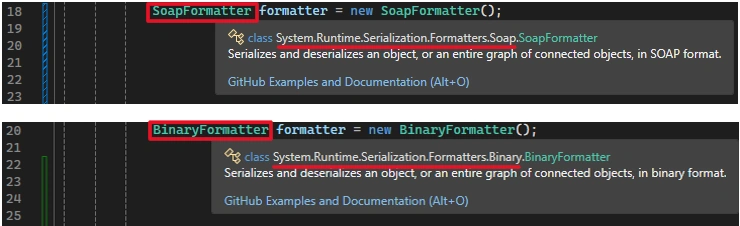
- SoapFormatter class is from Namespace:System.Runtime.Serialization.Formatters.Soap
- BinaryFormatter class is from Namespace: System.Runtime.Serialization.Formatters.Binary
Run the code
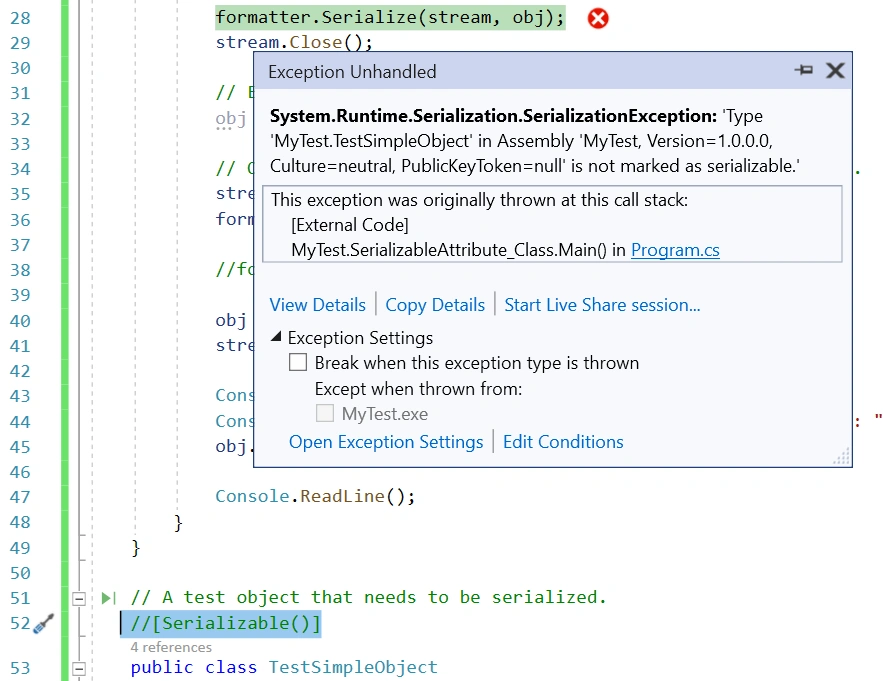
1, If we comment out Line 44, the Serializable Attribute, then we will get a SerializationException,
2, If you use SoapFormatter, you will get XML output,

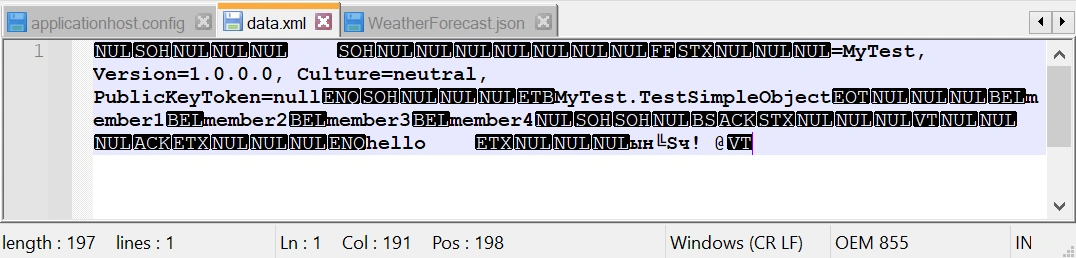
3, If you use BinaryFormatter, you will get the binary output like this,
JSON Serialization:
// How to serialize and deserialize (marshal and unmarshal) JSON in .NET
// https://docs.microsoft.com/en-us/dotnet/standard/serialization/system-text-json-how-to?pivots=dotnet-6-0

using System;
using System.IO;
using System.Text.Json;

namespace SerializeToFile
{
    // A test object that needs to be serialized.
    [Serializable()]
    public class WeatherForecast
    {
        public DateTimeOffset Date { get; set; }
        public int TemperatureCelsius { get; set; }
        //public string? Summary { get; set; }
        public string Summary { get; set; }
    }

    public class Program
    {
        public static void Main()
        {
            var weatherForecast = new WeatherForecast
            {
                Date = DateTime.Parse("2019-08-01"),
                TemperatureCelsius = 25,
                Summary = "Hot"
            };

            string fileName = "WeatherForecast.json";
            string jsonString = JsonSerializer.Serialize(weatherForecast);
            File.WriteAllText(fileName, jsonString);

            Console.WriteLine(File.ReadAllText(fileName));
            Console.ReadLine();
        }
    }
}
// output:
//{"Date":"2019-08-01T00:00:00-07:00","TemperatureCelsius":25,"Summary":"Hot"}
The code is from
- Microsoft at How to serialize and deserialize JSON using C# - .NET.
- My local: FiservTest Solution
where the serializer:
- Serialize is a method of JsonSerializer class
- JsonSerializer is a static class, from System.TextJson name space [JsonSerializer Class (System.Text.Json)]:

Run the code, You will get the JSON output like this,

Note
In JSON serialization, you do not need the Serializable Attribute.
Reference
- Serialization (C#) | Microsoft Docs
- Serialization - .NET | Microsoft Docs
- SerializableAttribute Class (System) | Microsoft Docs
- Serialization guidelines | Microsoft Docs
- BinaryFormatter security guide | Microsoft Docs
- Serialization and Deserialization in C# with Example (guru99.com)
- Serialize and deserialize JSON using C# - .NET | Microsoft Docs
- How to serialize and deserialize JSON using C# - .NET | Microsoft Docs
- Serialization Attributes (newtonsoft.com)
- JsonSerializer Class (System.Text.Json) | Microsoft Learn
Join the conversation! Your thoughts help the community grow.