

In this article we will see an example of sending sms through the way2sms account. There are two pages in the demo
1. login.aspx
2. Sms.aspx
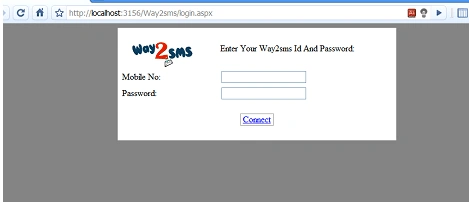
This is the login.aspx where you have to provide your way2sms username and password
NOTE: If you don't have account in way2sms, before using this demo you have to create account in way2sms.com
protected void btnconnect_Click(object sender, EventArgs e)
{
Session["id"] = txtmobileno.Text;
Session["pw"] = txtpw.Text;
Response.Redirect("send.aspx");
}
Send.aspx
In this page two functions are created
1. Connect() this function will connect and authenticate your id and password
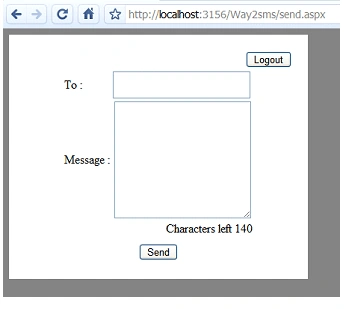
2. Sendsms(): If you are successfully connected they you will get the following page and you can send sms now
Send.aspx.cs
using System;
using System.Data;
using System.Configuration;
using System.Collections;
using System.Web;
using System.Web.Security;
using System.Web.UI;
using System.Web.UI.WebControls;
using System.Web.UI.WebControls.WebParts;
using System.Web.UI.HtmlControls;
using System.IO;
using System.Net;
using System.Text;
using System.Text.RegularExpressions;
public partial class send : System.Web.UI.Page
{
string mbno, mseg, ckuser, ckpass;
private HttpWebRequest req;
private CookieContainer cookieCntr;
private string strNewValue;
public static string responseee;
private HttpWebResponse response;
protected void Page_Load(object sender, EventArgs e)
{
if (Session["id"] == null && Session["pw"] == null)
{
Server.Transfer("login.aspx");
}
connect();
try
{
lblError.Text = "";
lblError.Visible = false;
if (!(IsPostBack))
{
btnSend.Attributes.Add("onclick", "return Validate('" + txtTo.ClientID + "','" + txtMessage.ClientID + "');");
txtMessage.Attributes.Add("onchange", "TextChange('" + txtMessage.ClientID + "','" + lblLeft.ClientID + "');");
txtMessage.Attributes.Add("onkeyup", "TextChange('" + txtMessage.ClientID + "','" + lblLeft.ClientID + "');");
}
}
catch (Exception ex)
{
lblError.Text = ex.Message;
lblError.Visible = true;
}
}
protected void btnSend_Click(object sender, EventArgs e)
{
try
{
mbno = txtTo.Text;
mseg = txtMessage.Text;
sendSms(mbno, mseg);
txtTo.Text = "";
txtMessage.Text = "";
}
catch (Exception ex)
{
lblError.Text = ex.Message;
lblError.Visible = true;
}
}
public void connect()
{
ckuser = Session["id"].ToString();
ckpass = Session["pw"].ToString();
try
{
this.req = (HttpWebRequest)WebRequest.Create("http://wwwd.way2sms.com/auth.cl");
this.req.CookieContainer = new CookieContainer();
this.req.AllowAutoRedirect = false;
this.req.Method = "POST";
this.req.ContentType = "application/x-www-form-urlencoded";
this.strNewValue = "username=" + ckuser + "&password=" + ckpass;
this.req.ContentLength = this.strNewValue.Length;
StreamWriter writer = new StreamWriter(this.req.GetRequestStream(), Encoding.ASCII);
writer.Write(this.strNewValue);
writer.Close();
this.response = (HttpWebResponse)this.req.GetResponse();
this.cookieCntr = this.req.CookieContainer;
this.response.Close();
this.req = (HttpWebRequest)WebRequest.Create("http://wwwd.way2sms.com//jsp/InstantSMS.jsp?val=0");
this.req.CookieContainer = this.cookieCntr;
this.req.Method = "GET";
this.response = (HttpWebResponse)this.req.GetResponse();
responseee = new StreamReader(this.response.GetResponseStream()).ReadToEnd();
int index = Regex.Match(responseee, "custf").Index;
responseee = responseee.Substring(index, 0x12);
responseee = responseee.Replace("\"", "").Replace(">", "").Trim();
this.response.Close();
pnlsend.Visible = true;
lblErrormsg.Text = "connected";
}
catch (Exception)
{
lblErrormsg.Text = "Error connecting to the server...";
Session["error"] = "Error connecting to the server...";
Server.Transfer("login.aspx");
}
}
public void sendSms(string mbno, string mseg)
{
if ((mbno != "") && (mseg != ""))
{
try
{
this.req = (HttpWebRequest)WebRequest.Create("http://wwwd.way2sms.com//FirstServletsms?custid=");
this.req.AllowAutoRedirect = false;
this.req.CookieContainer = this.cookieCntr;
this.req.Method = "POST";
this.req.ContentType = "application/x-www-form-urlencoded";
this.strNewValue = "custid=undefined&HiddenAction=instantsms&Action=" + responseee + "&login=&pass=&MobNo=" + this.mbno + "&textArea=" + this.mseg;
string msg = this.mseg;
string mbeno = this.mbno;
this.req.ContentLength = this.strNewValue.Length;
StreamWriter writer = new StreamWriter(this.req.GetRequestStream(), Encoding.ASCII);
writer.Write(this.strNewValue);
writer.Close();
this.response = (HttpWebResponse)this.req.GetResponse();
this.response.Close();
lblErrormsg.Text = "Message Sent..... " + mbeno + ": " + msg;
}
catch (Exception)
{
lblErrormsg.Text = "Error Sending msg....check your connection...";
}
}
else
{
lblErrormsg.Text = "Mob no or msg missing";
}
}
protected void logout_Click(object sender, EventArgs e)
{
//logout
Session["id"] = null;
Session["pw"] = null;
Session["error"] = null;
Server.Transfer("login.aspx");
}
}
Vijay GuptaPosted Sep 21, 2017, 8:06 AM
This code is not working what to do tell any one
Former memberPosted Mar 31, 2014, 5:11 AM
Hi Dipa! For sending text messages from a website you have to download an sms gateway and a php api. You can find an exmaple and detailed information in the following website: http://ozekisms.com/index.php?owpn=204&info=php_sms_example
Dhwani PatelPosted Mar 15, 2013, 6:14 AM
Not Working...
Srikanth RPosted Oct 28, 2012, 9:08 PM
Hi Diya, I downloaded the entire appn of urs and when running that code this.response = (HttpWebResponse)this.req.GetResponse(); the above line is getting an exception. can u plz tell me wat is d problem?
anil babuPosted Sep 17, 2012, 2:31 AM
Its not working
anil babuPosted Sep 14, 2012, 2:45 AM
It's not working, I am giving mobile number and password its not working,
chandru patilPosted Jul 25, 2012, 3:56 AM
its working fine but i m not getting the sms to my mobile no
Muralitharan APosted Apr 27, 2012, 1:03 AM
hi dipa... The above code for sending SMS was not working it showing the error remote server 404 not found...help me dipa what can i do for it
vara reddyeditedPosted Apr 8, 2012, 8:02 AMEdited Apr 8, 2012, 8:04 AM
here is the simple solution using way2sms / 160by2 accounts tested and working.... http://www.reddyinfosoft.blogspot.in/2012/04/sending-sms-via-c-using-way2sms-160by2.html
Manish AhujaPosted Mar 28, 2012, 7:59 AM
I download and tried your application but its noe working feel free to contact me at my mail id:[email protected]. Or send me another link. thanx.
Manikandan RPosted Mar 16, 2012, 7:11 AM
Hi this code is not working please you check and send it
sourabh ghoshPosted Mar 13, 2012, 5:54 AM
it gives remote server not found 404 error at this.response = (HttpWebResponse)this.req.GetResponse(); every thing is as it is and my way2sms account is also valid then how this error take place??? plz help.....
srinivasa raju jbcPosted Feb 23, 2012, 2:03 PM
the above code is not sending sms and not working please clarify thnaking you srinivasa raju
sudha sankariPosted Oct 17, 2011, 5:25 AM
Hi, Dim mymobilenow As String = "" 'Add ur mobileno Dim mypassword As String = "" 'add ur password Dim reciever As String = "" 'add reciever mobileno Dim status As String = "" Dim cookie As CookieContainer = SMSClientLib.Login.Connect(mymobilenow, mypassword, status) Dim siteParameters() As String = SMSClientLib.Login.GetSiteParameters(cookie) Dim messgeSentResult As String = sendSms.Send_Processing(reciever, "Helo way2sms testing!", cookie, siteParameters) the above code is not working in my system getting status as "Invalid Password or User Name" but by using given username and password i can login in to the way2sms.com. please help me. Thanks & Regards sudha
wes chettyeditedPosted Sep 26, 2011, 5:47 AMEdited Mar 3, 2012, 6:38 AM
Thanks alot ...it works
Rajesh SharmaPosted Sep 21, 2011, 4:16 AM
I sent messages but but does not delivered
Simson NadarPosted Sep 6, 2011, 10:32 AM
I try to this example i could not send sms. anybody can you help to me?
Gowtham manjuPosted Jun 13, 2011, 8:27 AM
the downloads executes but msg is not received can u provide me some tips
Mukesh RajaramPosted Apr 29, 2011, 8:48 AM
plz send the new web site temple sir . its very necessary sir plz sending the article mukesh
piyush sardharaPosted Apr 6, 2011, 6:02 AM
nice that 's really work thanks diya
Bishu VishueditedPosted Feb 3, 2011, 12:44 AMEdited Feb 3, 2011, 12:46 AM
But when i send sms i ddnt get delivered.. plz help me i m very needy to send sms from asp.net. my mail is [email protected]
Amruta PatilPosted Feb 3, 2011, 12:13 AM
Hello, I m Name is Amruta I tried your Code of Sending SmS But it is Not working Help me .. i m Beginner to C# And ASP.Net My Mail_Id [email protected] Thank You
vimal prakashPosted Jan 12, 2011, 12:08 PM
it running,, but not get any sms, plz help me
prakash pandianPosted Jan 11, 2011, 11:30 PM
this project is very useful. but not receive to phone any phone. kindly rectify the error. there is no error occur in this project. plz send a reply with new project in send and receive the project source code.
MAHA MAHAPosted Dec 2, 2010, 1:12 AM
HI Divyaa... its running without error,..but i didnt get any SMS.. can you help me... i need your help...my email ID is [email protected]
MAHA MAHAPosted Nov 29, 2010, 4:46 AM
running..but not getting SMS
ravi shankarPosted Nov 8, 2010, 3:32 AM
its nothing doing anything
Sajjad AhmedPosted Oct 31, 2010, 10:51 AM
very helpfull for me. Thx
Rashid ChakiPosted Sep 21, 2010, 11:40 AM
Hi diya, i m searching for how to send sms from sim card, one sim modem is there,which is used for bulk sms sending . So i want in asp.net code for that Please help [email protected]
juju mcePosted Sep 7, 2010, 8:02 AM
above code is a dummy code don trust check with login it will send even for phone number 1 with password 0 very worst code built
juju mcePosted Sep 4, 2010, 7:15 AM
pl reply soon
juju mcePosted Sep 4, 2010, 7:14 AM
hi i download and used it but sms not delivered
vinay kumarPosted Aug 20, 2010, 5:43 PM
Thanks a lot in advance
Tanmay SarkarPosted Jul 11, 2010, 10:34 AM
How can i send multy sms from it??
Tanmay SarkarPosted Jul 11, 2010, 8:39 AM
Thanks for this nice code.
dani amPosted May 5, 2010, 3:59 PM
Diya, realy thanks alot, I was looking for articale talking about this.
Ram ShuklaPosted Apr 29, 2010, 9:33 AM
Very nice