

Sending mail in .NET Core is not easy as .NET Core does not support SMTPClient class. In .NET Core, there is System.NET.Mail assembly where the SMTPClient is missing, that we use while sending mails in a full framework .NET Application.
So, this article explains how we can send mail in .NET Core, using SendGrid.
So, this article explains how we can send mail in .NET Core, using SendGrid.
What is SendGrid?
SendGrid actually does more than sending emails. According to SendGrid, it is a "Marketing & Transactional Email" Service. SendGrid API integrates via email API to ensure the delivery of most important emails.
Site Link - https://sendgrid.com
Requirements
SendGrid actually does more than sending emails. According to SendGrid, it is a "Marketing & Transactional Email" Service. SendGrid API integrates via email API to ensure the delivery of most important emails.
Site Link - https://sendgrid.com
Requirements
- Visual Studio 2015
- .NET Core
- Azure subscription to create SendGrid (I am using Azure to integrate SendGrid else you can create a trial account on SendGrid Site)
Video Walkthrough: Click here to view complete Video Walkthrough
Advantages
- Easy to use with integrated API for .NET Core.
- Cloud based.
- Azure Integration
Before starting to code, we need to send up the SendGrid account.
Log into your Azure Account and add a new SendGrid Email Delivery Resource.
Log into your Azure Account and add a new SendGrid Email Delivery Resource.
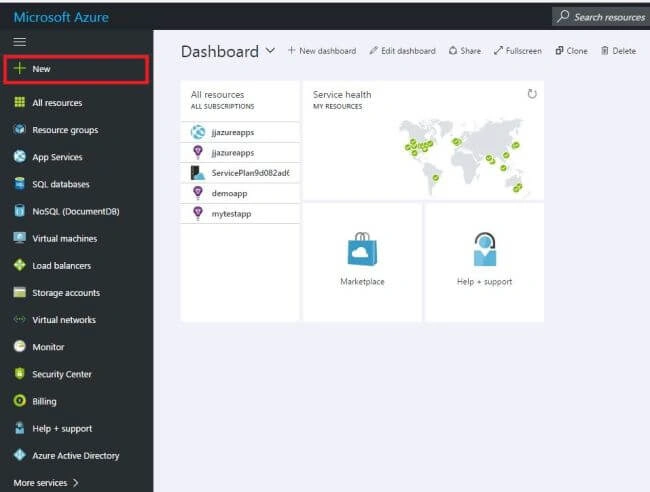
- Click "New" to add a new resource.
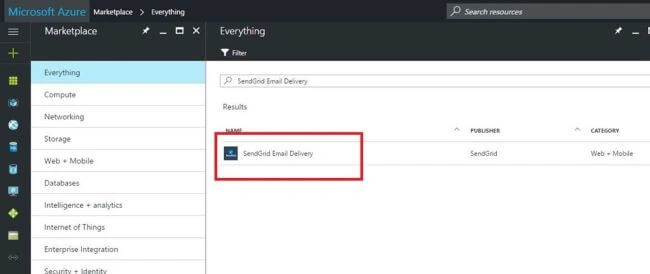
- Type "SendGrid Email Delivery" to find SendGrid.
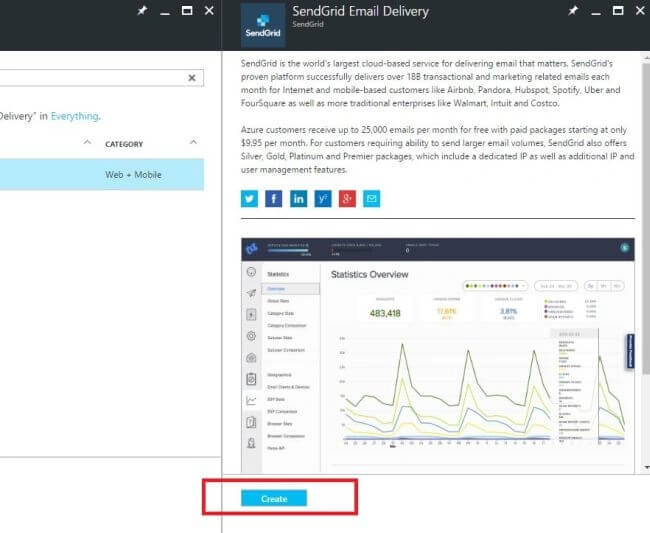
- Click "Create".
- Fill in the required settings in SendGrid as per your subscription.
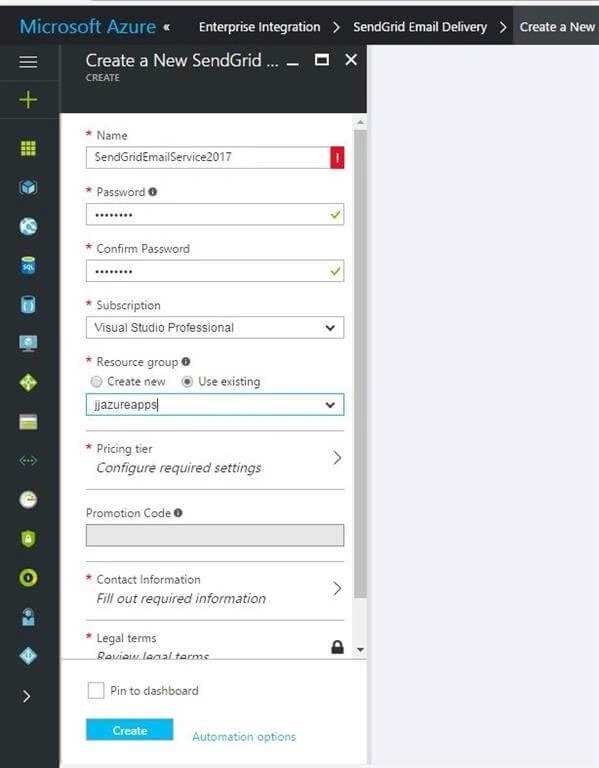
- Select the "Free Plan" from the SendGrid Pricing Tier or as per your requirement.
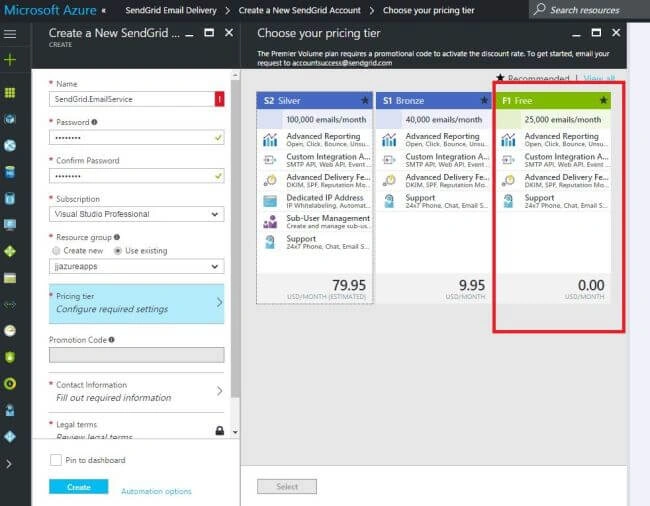
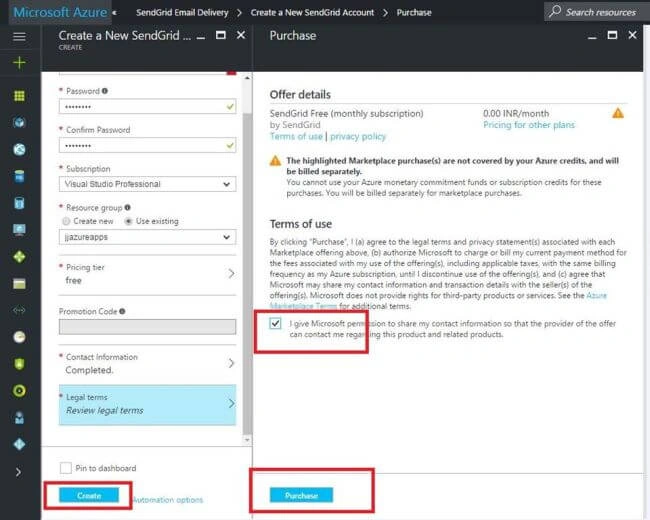
- Click "Create" and "Purchase" after all the information has been provided.
- After the resource is created, a username, password, and SMTP Server details will be provided. Note that down.
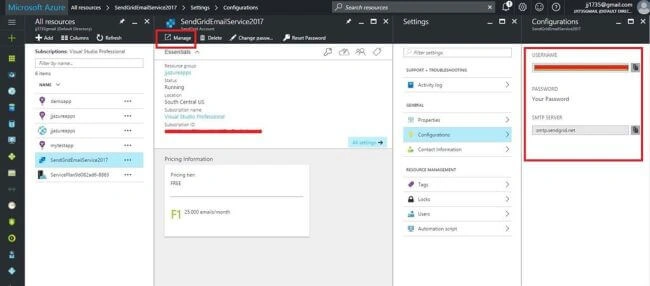
- We can send emails using username and password but the best way is to create an API key. So, click on "Manage" to go to SendGrid website and create an API key which we will use while sending an email.
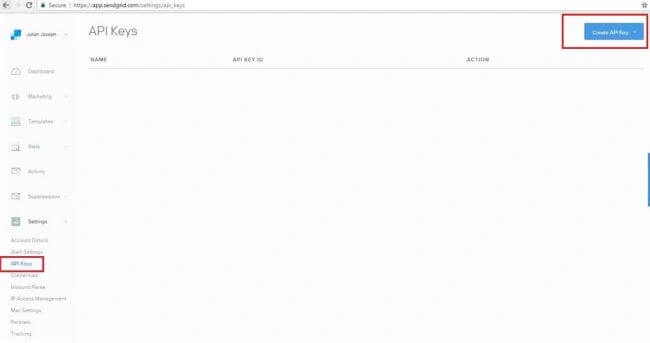
- After you save, the API Key will be generated. Please note it down.
- Now, let's come to the coding part. Create a .NET Core Console application and add the below code.
The project.json- using SendGrid;
- using System;
- using System.Collections.Generic;
- using System.Linq;
- using System.Net.Mail;
- using System.Threading.Tasks;
- namespace SendMail {
- public class Program {
- public static void Main(string[] args) {
- var message = new SendGrid.SendGridMessage();
- message.From = new MailAddress("[email protected]", "Julian");
- message.Subject = "Sending Email using SendGrid";
- message.AddTo("[email protected]");
- message.Html = "<p>Hello from Julian</p>";
- var client = new Web("YOUR API KEY");
- client.DeliverAsync(message).Wait();
- }
- }
- }
- {
- "version": "1.0.0-*",
- "buildOptions": {
- "emitEntryPoint": true
- },
- "dependencies": {
- "Microsoft.NETCore.App": {
- "type": "platform",
- "version": "1.0.1"
- },
- "SendGrid.NetCore": "1.0.0-rc2-00004"
- },
- "frameworks": {
- "netcoreapp1.0": {
- "imports": ["dnxcore50", "portable-net45+win8"]
- }
- }
- }
Now, run the application and check for the sent mail.
Thanks a lot for giving your valuable time reading this article !!
JulianPosted Feb 10, 2017, 11:07 AM
Yes mailkit is a free package but.... mailkit only provides api for sending mail..mailkit needs a SMTP mail server too to send mail ..but SendGrid itself provides a Email Server.. In the article in Point 7 you will find I used SendGrid SMTP server "smtp.sendgrid.net"
Former memberPosted Feb 10, 2017, 4:21 AM
You said another mail lib called mailkit. is that one is free ? with help of mailkit can we track emails ?
JulianPosted Feb 9, 2017, 5:59 AM
No.No..Its not completely free. Sendgrid offers a free usage of fix limit of sending emails which you read in their site.
Former memberPosted Feb 9, 2017, 3:51 AM
Thanks for nice reply. i like to ask one question because you used this lib. SendGrid mail sending lib is free and they freely track email and we can send bulk email at free of cost ?
JulianPosted Feb 8, 2017, 5:31 AM
Hi. Yes System.Net.Mail library is there but SMTPClient class in not inside this library anymore in .NET Core. You are right we can use any free mail library but however in .NET Core these library are very less. There is one other free library to send Email in .NET Core called MailKit. I used SendGrid because as I told in my article, it can be integrated with Azure Cloud, Email Tracking, Bulk Emails, Email Marketting etc and also you can find many other features which you can see in SendGrid site.
Former memberPosted Feb 7, 2017, 3:40 AM
So you mean SMTPClient is not there in .net core. we can use any other free mail library then tell me why sendgrid ? sendgrid has any special feature for which people love to use it? please clarify when possible. thanks
Former memberPosted Feb 3, 2017, 4:18 AM
What is the difference between .net mail api and sendgrid mail api ?