

Let me brief you about Semantic Zoom control.
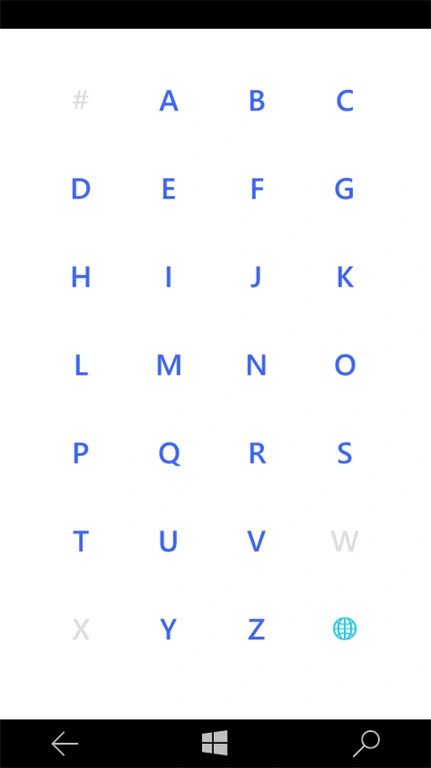
- The semantic zoom control enables the user to zoom between the two different views of the same content.
- It has zoomed in and zoomed out components.
- The zoomed in view is the main ListView, which the user will be first presented with.
- The zoomed out view is the higher level view of the same content.
Here in this article, to make it simple, I haven't used MVVM Pattern.
Add the classes, given below, "JumpListHelper" and "JumpListGroup", which helps to group the data properly. It groups the items into the alphabetical groups and sorts the items.
- public class JumpListGroup<T> : List<object>
- {
- public object Key { get; set; }
- public new IEnumerator<object> GetEnumerator()
- {
- return (System.Collections.Generic.IEnumerator<object>)base.GetEnumerator();
- }
- }
- public static class JumpListHelper
- {
- public static List<JumpListGroup<TSource>> ToAlphaGroups<TSource>(
- this IEnumerable<TSource> source, Func<TSource, string> selector)
- {
- var characterGroupings = new CharacterGroupings();
- var keys = characterGroupings.Where(x => x.Label.Any())
- .Select(x => x.Label)
- .ToDictionary(x => x);
- keys["..."] = "\uD83C\uDF10";
- var groupDictionary = keys.Select(x => new JumpListGroup<TSource>() { Key = x.Value })
- .ToDictionary(x => (string)x.Key);
- var query = from item in source
- orderby selector(item)
- select item;
- foreach (var item in query)
- {
- var sortValue = selector(item);
- groupDictionary[keys[characterGroupings.Lookup(sortValue)]].Add(item);
- }
- return groupDictionary.Select(x => x.Value).ToList();
- }
- }
- public class CountryJumplist
- {
- private ObservableCollection<Country> loadedCountry = new ObservableCollection<Country>();
- public CountryJumplist(object country)
- {
- this.loadedCountry = country as ObservableCollection<Country>;
- }
- private IList data;
- public IList Data
- {
- get
- {
- if (this.data == null)
- {
- var items = this.loadedCountry;
- this.data = items.ToAlphaGroups(x => x.CountryName);
- }
- return this.data;
- }
- }
- private CollectionViewSource collection;
- public CollectionViewSource Collection
- {
- get
- {
- if (this.collection == null)
- {
- this.collection = new CollectionViewSource();
- this.collection.Source = this.Data;
- this.collection.IsSourceGrouped = true;
- }
- return this.collection;
- }
- }
- }
- public class Country
- {
- public string CountryName { get; set; }
- }
Add the code, given below, in your XAML page.
- <Page.Resources>
- <JumpListItemBackgroundConverter x:Key="JumpListItemBackgroundConverter" />
- <JumpListItemForegroundConverter x:Key="JumpListItemForegroundConverter" />
- <!--DATA TEMPLATES-->
- <DataTemplate x:Key="AlphaGroupHeaderTemplate">
- <TextBlock Text="{Binding Key}"
- Foreground="{ThemeResource SystemControlBackgroundAccentBrush}"
- FontSize="32"
- FontFamily="{StaticResource PhoneFontFamilySemiLight}"
- FontWeight="Medium"
- HorizontalAlignment="Left"
- VerticalAlignment="Bottom"
- Margin="5.5,0,0,9.5" />
- </DataTemplate>
- <DataTemplate x:Key="AlphaJumpListPickerItemTemplate">
- <Border Background ="Transparent"
- BorderThickness="0"
- Height="60"
- Width="60"
- HorizontalAlignment="Center"
- Margin="0,0,1.5,1.5">
- <TextBlock Text="{Binding Group.Key}"
- Foreground="{Binding Converter={StaticResource JumpListItemBackgroundConverter}}"
- FontSize="22"
- FontWeight="SemiBold"
- HorizontalAlignment="Center"
- VerticalAlignment="Center"
- Margin="1.5,0,0,1.5" />
- </Border>
- </DataTemplate>
- <!--Remove header seperator line in listView groupStyle -->
- <Style TargetType="ListViewHeaderItem">
- <Setter Property="FontFamily" Value="{ThemeResource ContentControlThemeFontFamily}" />
- <Setter Property="FontSize" Value="{ThemeResource ListViewHeaderItemThemeFontSize}" />
- <Setter Property="Background" Value="Transparent" />
- <Setter Property="Margin" Value="0,0,0,0"/>
- <Setter Property="Padding" Value="6,8,12,0"/>
- <Setter Property="HorizontalContentAlignment" Value="Left" />
- <Setter Property="VerticalContentAlignment" Value="Bottom" />
- <Setter Property="MinHeight" Value="{ThemeResource ListViewHeaderItemMinHeight}"/>
- <Setter Property="UseSystemFocusVisuals" Value="True" />
- <Setter Property="Template">
- <Setter.Value>
- <ControlTemplate TargetType="ListViewHeaderItem">
- <StackPanel Background="{TemplateBinding Background}"
- BorderBrush="{TemplateBinding BorderBrush}"
- BorderThickness="{TemplateBinding BorderThickness}">
- <ContentPresenter x:Name="ContentPresenter"
- Margin="{TemplateBinding Padding}"
- Content="{TemplateBinding Content}"
- ContentTemplate="{TemplateBinding ContentTemplate}"
- ContentTransitions="{TemplateBinding ContentTransitions}"
- HorizontalContentAlignment="{TemplateBinding HorizontalContentAlignment}"
- VerticalContentAlignment="{TemplateBinding VerticalContentAlignment}"/>
- </StackPanel>
- </ControlTemplate>
- </Setter.Value>
- </Setter>
- </Style>
- </Page.Resources>
- <Grid Background="{ThemeResource ApplicationPageBackgroundThemeBrush}">
- <SemanticZoom HorizontalContentAlignment="Stretch"
- HorizontalAlignment="Stretch">
- <SemanticZoom.ZoomedInView>
- <ListView x:Name="lstAlphaGroupHeader"
- ItemsSource="{Binding CountryCollectionView}"
- SelectionMode="Single"
- HorizontalContentAlignment="Stretch">
- <ListView.GroupStyle>
- <GroupStyle HeaderTemplate="{StaticResource AlphaGroupHeaderTemplate}"
- HidesIfEmpty="True" />
- </ListView.GroupStyle>
- <ListView.ItemTemplate>
- <DataTemplate>
- <TextBlock Text="{Binding CountryName}"/>
- </DataTemplate>
- </ListView.ItemTemplate>
- </ListView>
- </SemanticZoom.ZoomedInView>
- <SemanticZoom.ZoomedOutView>
- <GridView x:Name="grdAlphaJumpListPicker"
- ItemsSource="{Binding CountryCollectionViewCollectionGroups}"
- HorizontalAlignment="Center"
- HorizontalContentAlignment="Stretch"
- VerticalAlignment="Center"
- ItemTemplate="{StaticResource AlphaJumpListPickerItemTemplate}">
- </GridView>
- </SemanticZoom.ZoomedOutView>
- </SemanticZoom>
- </Grid>
Cs Page
Add the code, given below, in cs page.
- protected override void OnNavigatedTo(NavigationEventArgs e)
- {
- base.OnNavigatedTo(e);
- LoadJumpList();
- }
- public void LoadJumpList()
- {
- ObservableCollection<Country> CountryList = new ObservableCollection<Country>();
- CountryList.Add(new Country() { CountryName = "Afghanistan" });
- CountryList.Add(new Country() { CountryName = "Australia" });
- CountryList.Add(new Country() { CountryName = "Austria" });
- CountryList.Add(new Country() { CountryName = "Bahrain" });
- CountryList.Add(new Country() { CountryName = "Bangladesh" });
- CountryList.Add(new Country() { CountryName = "Belgium" });
- CountryList.Add(new Country() { CountryName = "Brazil" });
- CountryList.Add(new Country() { CountryName = "Canada" });
- CountryList.Add(new Country() { CountryName = "Costa Rica" });
- CountryList.Add(new Country() { CountryName = "Denmark" });
- CountryList.Add(new Country() { CountryName = "Egypt" });
- CountryList.Add(new Country() { CountryName = "Ethiopia" });
- CountryList.Add(new Country() { CountryName = "Finland" });
- CountryList.Add(new Country() { CountryName = "France" });
- CountryList.Add(new Country() { CountryName = "Germany" });
- CountryList.Add(new Country() { CountryName = "Greece" });
- CountryList.Add(new Country() { CountryName = "Hungary" });
- CountryList.Add(new Country() { CountryName = "Iceland" });
- CountryList.Add(new Country() { CountryName = "India" });
- CountryList.Add(new Country() { CountryName = "Ireland" });
- CountryList.Add(new Country() { CountryName = "Italy" });
- CountryList.Add(new Country() { CountryName = "Japan" });
- CountryList.Add(new Country() { CountryName = "Kenya" });
- CountryList.Add(new Country() { CountryName = "Luxembourg" });
- CountryList.Add(new Country() { CountryName = "Malaysia" });
- CountryList.Add(new Country() { CountryName = "Netherlands" });
- CountryList.Add(new Country() { CountryName = "New Zealand" });
- CountryList.Add(new Country() { CountryName = "Oman" });
- CountryList.Add(new Country() { CountryName = "Pakistan" });
- CountryList.Add(new Country() { CountryName = "Qatar" });
- CountryList.Add(new Country() { CountryName = "Russia" });
- CountryList.Add(new Country() { CountryName = "Singapore" });
- CountryList.Add(new Country() { CountryName = "South Africa" });
- CountryList.Add(new Country() { CountryName = "Thailand" });
- CountryList.Add(new Country() { CountryName = "United Kingdom (UK)" });
- CountryList.Add(new Country() { CountryName = "United States of America (USA)" });
- CountryList.Add(new Country() { CountryName = "Vietnam" });
- CountryList.Add(new Country() { CountryName = "Yemen" });
- CountryList.Add(new Country() { CountryName = "Zimbabwe" });
- CountryJumplist countryJumpList = new CountryJumplist(CountryList);
- lstAlphaGroupHeader.ItemsSource = countryJumpList.Collection.View;
- grdAlphaJumpListPicker.ItemsSource = countryJumpList.Collection.View.CollectionGroups;
- }
Your MainPage.cs page looks like:
- using System;
- using System.Collections;
- using System.Collections.Generic;
- using System.Collections.ObjectModel;
- using System.IO;
- using System.Linq;
- using System.Runtime.InteropServices.WindowsRuntime;
- using Windows.Foundation;
- using Windows.Foundation.Collections;
- using Windows.Globalization.Collation;
- using Windows.UI.Xaml;
- using Windows.UI.Xaml.Controls;
- using Windows.UI.Xaml.Controls.Primitives;
- using Windows.UI.Xaml.Data;
- using Windows.UI.Xaml.Input;
- using Windows.UI.Xaml.Media;
- using Windows.UI.Xaml.Navigation;
- namespace SemanticZoomSample
- {
- public sealed partial class MainPage : Page
- {
- public MainPage()
- {
- this.InitializeComponent();
- }
- protected override void OnNavigatedTo(NavigationEventArgs e)
- {
- base.OnNavigatedTo(e);
- LoadJumpList();
- }
- public void LoadJumpList()
- {
- ObservableCollection<Country> CountryList = new ObservableCollection<Country>();
- CountryList.Add(new Country() { CountryName = "Afghanistan" });
- CountryList.Add(new Country() { CountryName = "Australia" });
- CountryList.Add(new Country() { CountryName = "Austria" });
- CountryList.Add(new Country() { CountryName = "Bahrain" });
- CountryList.Add(new Country() { CountryName = "Bangladesh" });
- CountryList.Add(new Country() { CountryName = "Belgium" });
- CountryList.Add(new Country() { CountryName = "Brazil" });
- CountryList.Add(new Country() { CountryName = "Canada" });
- CountryList.Add(new Country() { CountryName = "Costa Rica" });
- CountryList.Add(new Country() { CountryName = "Denmark" });
- CountryList.Add(new Country() { CountryName = "Egypt" });
- CountryList.Add(new Country() { CountryName = "Ethiopia" });
- CountryList.Add(new Country() { CountryName = "Finland" });
- CountryList.Add(new Country() { CountryName = "France" });
- CountryList.Add(new Country() { CountryName = "Germany" });
- CountryList.Add(new Country() { CountryName = "Greece" });
- CountryList.Add(new Country() { CountryName = "Hungary" });
- CountryList.Add(new Country() { CountryName = "Iceland" });
- CountryList.Add(new Country() { CountryName = "India" });
- CountryList.Add(new Country() { CountryName = "Ireland" });
- CountryList.Add(new Country() { CountryName = "Italy" });
- CountryList.Add(new Country() { CountryName = "Japan" });
- CountryList.Add(new Country() { CountryName = "Kenya" });
- CountryList.Add(new Country() { CountryName = "Luxembourg" });
- CountryList.Add(new Country() { CountryName = "Malaysia" });
- CountryList.Add(new Country() { CountryName = "Netherlands" });
- CountryList.Add(new Country() { CountryName = "New Zealand" });
- CountryList.Add(new Country() { CountryName = "Oman" });
- CountryList.Add(new Country() { CountryName = "Pakistan" });
- CountryList.Add(new Country() { CountryName = "Qatar" });
- CountryList.Add(new Country() { CountryName = "Russia" });
- CountryList.Add(new Country() { CountryName = "Singapore" });
- CountryList.Add(new Country() { CountryName = "South Africa" });
- CountryList.Add(new Country() { CountryName = "Thailand" });
- CountryList.Add(new Country() { CountryName = "United Kingdom (UK)" });
- CountryList.Add(new Country() { CountryName = "United States of America (USA)" });
- CountryList.Add(new Country() { CountryName = "Vietnam" });
- CountryList.Add(new Country() { CountryName = "Yemen" });
- CountryList.Add(new Country() { CountryName = "Zimbabwe" });
- CountryJumplist countryJumpList = new CountryJumplist(CountryList);
- lstAlphaGroupHeader.ItemsSource = countryJumpList.Collection.View;
- grdAlphaJumpListPicker.ItemsSource = countryJumpList.Collection.View.CollectionGroups;
- }
- }
- public class CountryJumplist
- {
- private ObservableCollection<Country> loadedCountry = new ObservableCollection<Country>();
- public CountryJumplist(object country)
- {
- this.loadedCountry = country as ObservableCollection<Country>;
- }
- private IList data;
- public IList Data
- {
- get
- {
- if (this.data == null)
- {
- var items = this.loadedCountry;
- this.data = items.ToAlphaGroups(x => x.CountryName);
- }
- return this.data;
- }
- }
- private CollectionViewSource collection;
- public CollectionViewSource Collection
- {
- get
- {
- if (this.collection == null)
- {
- this.collection = new CollectionViewSource();
- this.collection.Source = this.Data;
- this.collection.IsSourceGrouped = true;
- }
- return this.collection;
- }
- }
- }
- public class Country
- {
- public string CountryName { get; set; }
- }
- #region JumpList
- public class JumpListGroup<T> : List<object>
- {
- public object Key { get; set; }
- public new IEnumerator<object> GetEnumerator()
- {
- return (System.Collections.Generic.IEnumerator<object>)base.GetEnumerator();
- }
- }
- public static class JumpListHelper
- {
- public static List<JumpListGroup<TSource>> ToAlphaGroups<TSource>(
- this IEnumerable<TSource> source, Func<TSource, string> selector)
- {
- var characterGroupings = new CharacterGroupings();
- var keys = characterGroupings.Where(x => x.Label.Any())
- .Select(x => x.Label)
- .ToDictionary(x => x);
- keys["..."] = "\uD83C\uDF10";
- var groupDictionary = keys.Select(x => new JumpListGroup<TSource>() { Key = x.Value })
- .ToDictionary(x => (string)x.Key);
- var query = from item in source
- orderby selector(item)
- select item;
- foreach (var item in query)
- {
- var sortValue = selector(item);
- groupDictionary[keys[characterGroupings.Lookup(sortValue)]].Add(item);
- }
- return groupDictionary.Select(x => x.Value).ToList();
- }
- }
- #endregion JumpList
- }
- <Page
- x:Class="SemanticZoomSample.MainPage"
- xmlns="http://schemas.microsoft.com/winfx/2006/xaml/presentation"
- xmlns:x="http://schemas.microsoft.com/winfx/2006/xaml"
- xmlns:local="using:SemanticZoomSample"
- xmlns:d="http://schemas.microsoft.com/expression/blend/2008"
- xmlns:mc="http://schemas.openxmlformats.org/markup-compatibility/2006"
- mc:Ignorable="d">
- <Page.Resources>
- <JumpListItemBackgroundConverter x:Key="JumpListItemBackgroundConverter" />
- <JumpListItemForegroundConverter x:Key="JumpListItemForegroundConverter" />
- <!--DATA TEMPLATES-->
- <DataTemplate x:Key="AlphaGroupHeaderTemplate">
- <TextBlock Text="{Binding Key}"
- Foreground="{ThemeResource SystemControlBackgroundAccentBrush}"
- FontSize="32"
- FontFamily="{StaticResource PhoneFontFamilySemiLight}"
- FontWeight="Medium"
- HorizontalAlignment="Left"
- VerticalAlignment="Bottom"
- Margin="5.5,0,0,9.5" />
- </DataTemplate>
- <DataTemplate x:Key="AlphaJumpListPickerItemTemplate">
- <Border Background ="Transparent"
- BorderThickness="0"
- Height="60"
- Width="60"
- HorizontalAlignment="Center"
- Margin="0,0,1.5,1.5">
- <TextBlock Text="{Binding Group.Key}"
- Foreground="{Binding Converter={StaticResource JumpListItemBackgroundConverter}}"
- FontSize="22"
- FontWeight="SemiBold"
- HorizontalAlignment="Center"
- VerticalAlignment="Center"
- Margin="1.5,0,0,1.5" />
- </Border>
- </DataTemplate>
- <!--Remove header seperator line in listView groupStyle -->
- <Style TargetType="ListViewHeaderItem">
- <Setter Property="FontFamily" Value="{ThemeResource ContentControlThemeFontFamily}" />
- <Setter Property="FontSize" Value="{ThemeResource ListViewHeaderItemThemeFontSize}" />
- <Setter Property="Background" Value="Transparent" />
- <Setter Property="Margin" Value="0,0,0,0"/>
- <Setter Property="Padding" Value="6,8,12,0"/>
- <Setter Property="HorizontalContentAlignment" Value="Left" />
- <Setter Property="VerticalContentAlignment" Value="Bottom" />
- <Setter Property="MinHeight" Value="{ThemeResource ListViewHeaderItemMinHeight}"/>
- <Setter Property="UseSystemFocusVisuals" Value="True" />
- <Setter Property="Template">
- <Setter.Value>
- <ControlTemplate TargetType="ListViewHeaderItem">
- <StackPanel Background="{TemplateBinding Background}"
- BorderBrush="{TemplateBinding BorderBrush}"
- BorderThickness="{TemplateBinding BorderThickness}">
- <ContentPresenter x:Name="ContentPresenter"
- Margin="{TemplateBinding Padding}"
- Content="{TemplateBinding Content}"
- ContentTemplate="{TemplateBinding ContentTemplate}"
- ContentTransitions="{TemplateBinding ContentTransitions}"
- HorizontalContentAlignment="{TemplateBinding HorizontalContentAlignment}"
- VerticalContentAlignment="{TemplateBinding VerticalContentAlignment}"/>
- </StackPanel>
- </ControlTemplate>
- </Setter.Value>
- </Setter>
- </Style>
- </Page.Resources>
- <Grid Background="{ThemeResource ApplicationPageBackgroundThemeBrush}">
- <SemanticZoom HorizontalContentAlignment="Stretch"
- HorizontalAlignment="Stretch">
- <SemanticZoom.ZoomedInView>
- <ListView x:Name="lstAlphaGroupHeader"
- ItemsSource="{Binding CountryCollectionView}"
- SelectionMode="Single"
- HorizontalContentAlignment="Stretch">
- <ListView.GroupStyle>
- <GroupStyle HeaderTemplate="{StaticResource AlphaGroupHeaderTemplate}"
- HidesIfEmpty="True" />
- </ListView.GroupStyle>
- <ListView.ItemTemplate>
- <DataTemplate>
- <TextBlock Text="{Binding CountryName}"/>
- </DataTemplate>
- </ListView.ItemTemplate>
- </ListView>
- </SemanticZoom.ZoomedInView>
- <SemanticZoom.ZoomedOutView>
- <GridView x:Name="grdAlphaJumpListPicker"
- ItemsSource="{Binding CountryCollectionViewCollectionGroups}"
- HorizontalAlignment="Center"
- HorizontalContentAlignment="Stretch"
- VerticalAlignment="Center"
- ItemTemplate="{StaticResource AlphaJumpListPickerItemTemplate}">
- </GridView>
- </SemanticZoom.ZoomedOutView>
- </SemanticZoom>
- </Grid>
- </Page>
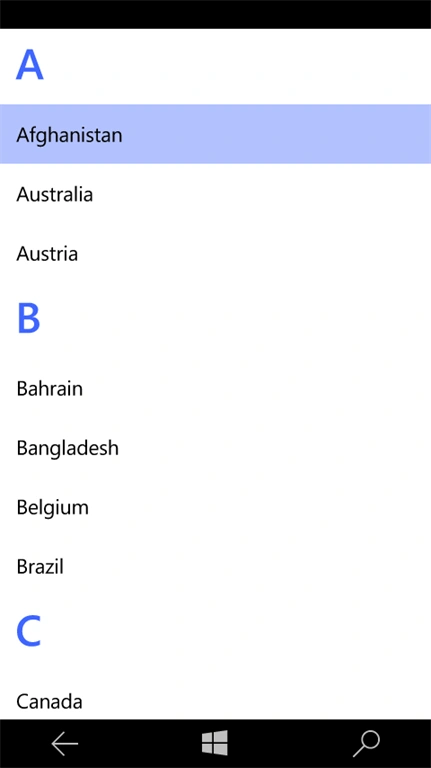
Click group header to see zoom out view.
If you have any queries, feel free to ask.
Glenn WebsterPosted Mar 17, 2017, 6:10 AM
Hi, would you be happy to release the source code?
Prasanna MuraliPosted Aug 4, 2016, 10:55 AM
Nice share..
Vignesh ManiPosted Aug 4, 2016, 7:26 AM
Good work