

Introduction
Hi guys. In this article we are going to understand the database select
statement using PHP. The SELECT statement is used to select data from a
database.
Select Data From a Database Table
In this section we going to work with the select statement to fetch data
from the database.
Syntax
SELECT column_name(s) FROM table_name
PHP script for Fetching up data from table
<html>
<body
bgcolor="pink">
<center>
<h3>
Select data from database table PBL !
<h3>
<hr>
<?php
$con
= mysql_connect("localhost","root","");
if
(!$con)
{
die('Could
not connect: '
.
mysql_error());
}
mysql_select_db("dwij",
$con);
$result = mysql_query("SELECT
* FROM PBL");
while($row
= mysql_fetch_array($result))
{
echo
$row['FirstName']
. "
" .
$row['LastName'];
echo
"<br />";
}
mysql_close($con);
?>
</center>
</body>
</html>
Save it as select.php.
Output
To run the code, Open the XAMPP server and start the services like Apache and
MySQL. Open the browser type:
http://localhost/yourfoldername/select.php
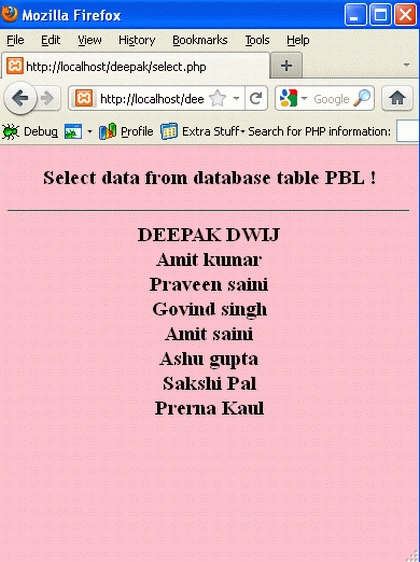
Elaboration of the preceding script:
- The mysql_query() function stores the data returned in the $result variable.
- The mysql_fetch_array() function to return the first row from the recordset as an array.
- Each call to mysql_fetch_array() returns the next row in the recordset.
- To print the value of each row, we use the PHP $row variable ($row['FirstName'] and $row['LastName']).
Select data from database table PBL In HTML Table
PHP Script
<html>
<body
bgcolor="pink">
<center>
<h3>
Select data from database table PBL In HTML Table!
<h3>
<hr>
<?php
$con
= mysql_connect("localhost","root","");
if
(!$con)
{
die('Could
not connect: '
.
mysql_error());
}
mysql_select_db("dwij",
$con);
$result = mysql_query("SELECT
* FROM PBL");
echo
"<table
border='1'>
<tr>
<th>Firstname</th>
<th>Lastname</th>
</tr>";
while($row
= mysql_fetch_array($result))
{
echo
"<tr>";
echo
"<td>"
.
$row['FirstName']
.
"</td>";
echo
"<td>"
.
$row['LastName']
.
"</td>";
echo
"</tr>";
}
echo
"</table>";
mysql_close($con);
?>
</center>
</body>
</html>
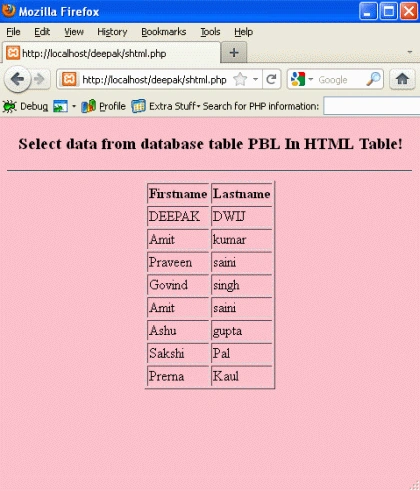
Save it as
shtml.php.
Output
To run the code, Open the XAMPP server and start the services like Apache and
MySQL. Open the browser type:
http://localhost/yourfoldername/shtml.php
Thanks !
Rohatash KumarPosted Jun 22, 2012, 5:25 AM
Why we use php script deepak? We cando it without script.